

Beschreibung
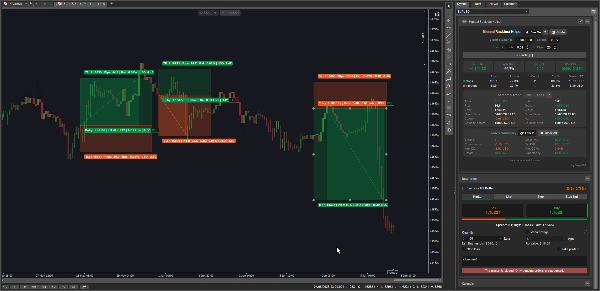
Manual Backtest Helper ist ein cTrader-Plugin , mit dem Sie Ihre Strategien direkt im Chart aufzeichnen, bewerten und analysieren können – keine Tabellenkalkulationen, keine externen Tools, keine Datenexporte.
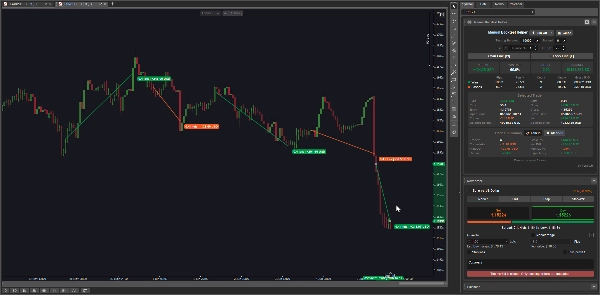
Sie zeichnen Ihre Trades visuell, und das Plugin berechnet sofort Ihre Gewinnrate, Profitfaktor, Netto-Gewinn/Verlust, maximalen Drawdown, Erwartungswert und mehr. Alles wird in Echtzeit aktualisiert, während Sie Trades hinzufügen oder bearbeiten.
Es ist entwickelt für:
- Diskretionäre Trader , die eine Strategie manuell an historischen Preisdaten testen möchten
- Entwickelnde Trader , die eine Erfolgsbilanz ihrer Setups aufbauen, bevor sie live gehen
- Strategieprüfer , die vergangene Trades wiederholen und den Vorteil objektiv messen möchten
- Jeder, der die Frage beantworten möchte: „Hat meine Strategie tatsächlich einen Vorteil?“
--------------- ACHTUNG: Dieses Plugin funktioniert derzeit nicht gut auf macOS ---------------
Hauptfunktionen
📊 Zwei Aufnahmemodi
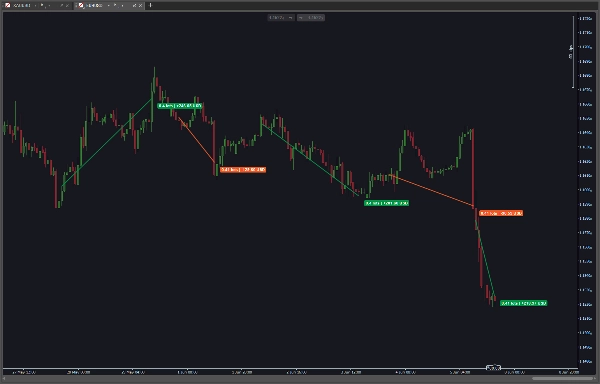
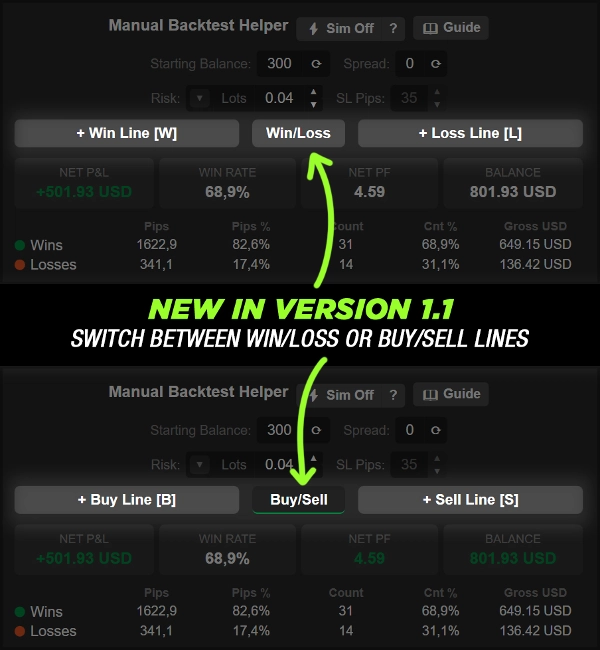
- Manueller Modus — Zeichnen Sie einen Gewinn oder Verlust als einfache Trendlinie zwischen zwei Preis-Punkten. Die Richtung (KAUF/VERKAUF) wird automatisch aus dem Linienwinkel abgeleitet
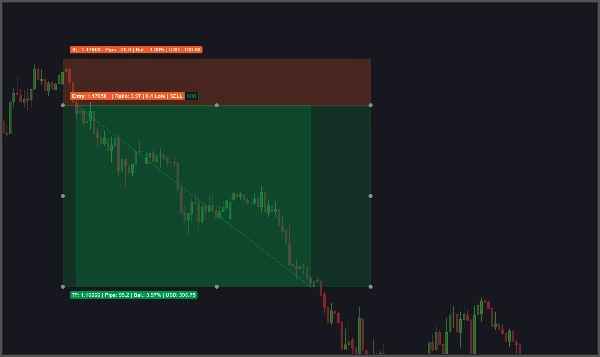
- Sim-Modus (⚡) — Klicken Sie, um ein vollständiges Trade-Setup mit Einstieg, Take-Profit-Ziel und Stop-Loss zu platzieren. Das Plugin scannt Kerze für Kerze vorwärts und löst das Ergebnis automatisch als Gewinn oder Verlust auf
🎯 Automatische Trade-Auflösung (Sim-Modus)
- Scannt Kerze für Kerze, um zu bestimmen, ob das Ziel oder der Stop-Loss zuerst erreicht wurde
- Kennzeichnet Trades als Mehrdeutig , wenn beide Levels in derselben Kerze berührt werden
- Mehrdeutige Trades können manuell überschrieben werden zu Gewinn oder Verlust direkt im Inspektor
💰 Drei Risikomodi
- Feste Lots — geben Sie direkt eine bestimmte Lotgröße ein
- Balance % — geben Sie einen Prozentsatz des Startguthabens zum Risiko ein; die Lotgröße wird automatisch aus den SL-Pips berechnet
- Monetärer Betrag — geben Sie einen festen Währungsbetrag zum Risiko ein; die Lotgröße wird automatisch aus den SL-Pips berechnet
📐 Lotgrößen-Berechnungs-Engine
- Berechnet automatisch die korrekte Lotgröße aus dem Risikobetrag und den SL-Pips rückwärts
- Rastet auf den minimalen Volumenschritt des Symbols ein
- Begrenzt auf das minimal und maximal erlaubte Volumen des Symbols
🔢 Konfigurierbare Eingaben
- Startguthaben — manuell eingegeben oder mit einem Klick vom Live-Konto synchronisiert
- Spread — manuell eingegeben oder mit einem Klick vom Live-Chart-Symbol kopiert
- SL-Pips — die für die Lotgrößenberechnung und das Zeichnen von Sim-Trades verwendete Stop-Loss-Distanz
- Einfache ▲ / ▼ Spinner-Schaltflächen für schnelle inkrementelle Anpassungen
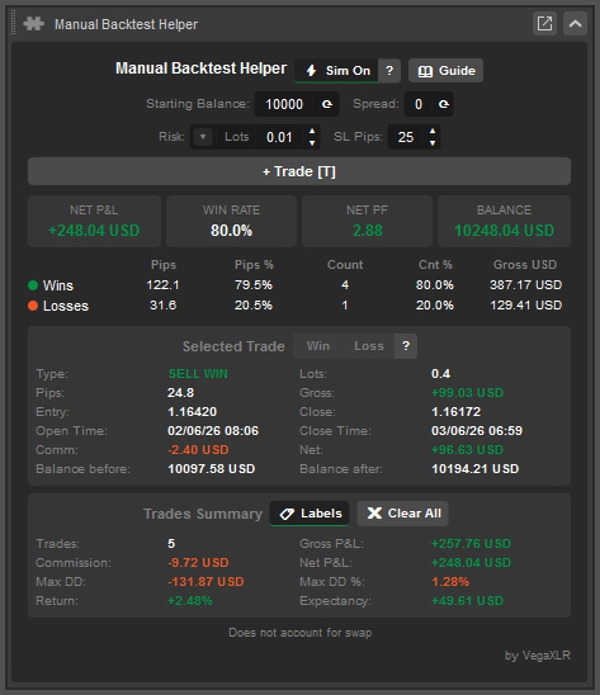
📈 Live-KPI-Kacheln
Drei stets sichtbare Hauptkennzahlen, die in Echtzeit aktualisiert werden, wenn Trades hinzugefügt oder bearbeitet werden:
- NETTO-GEWINN/VERLUST — Gesamtgewinn/-verlust aller Trades nach Kommission
- GEWINNRATE — Prozentsatz der gewonnenen Trades
- NETTO-PF — Netto-Profitfaktor
- Balance — Kontostand nach dem Backtesting
📋 Gewinn-/Verlust-Statistik-Tabelle
Seitenweise Aufschlüsselung von Gewinnen und Verlusten über fünf Spalten:
- Gesamt Pips
- Pips % des gesamten Pips-Bewegung
- Trade Anzahl
- Anteil % der Gesamtanzahl der Trades
- Bruttowert in Geld
🔍 Trade-Inspektor
Klicken Sie auf einen beliebigen Trade im Chart, um dessen vollständige Details zu sehen:
- Typ (z.B. KAUF GEWINN, VERKAUF VERLUST, KAUF MEHRDEUTIG)
- Lotgröße
- Gewonnene oder verlorene Pips
- Brutto-Gewinn/Verlust
- Eintritts- und Schlusskurs
- Öffnungs- und Schließzeitstempel
- Kommission
- Netto-Gewinn/Verlust (nach Kommission)
- Kontostand vor dem ausgewählten Trade
- Kontostand nach dem ausgewählten Trade
📑 Trades-Zusammenfassungsabschnitt
Chart-Ebene Statistiken über alle aufgezeichneten Trades:
- Gesamtanzahl der Trades
- Brutto-Gewinn/Verlust
- Gesamte Kommission
- Netto-Gewinn/Verlust
- Maximaler Drawdown (Währung)
- Maximaler Drawdown-Prozentsatz
- Rendite % auf Startguthaben
- Erwartungswert (durchschnittliche netto-monetäre Rendite pro Trade)
🏷️ Beschriftungen im Chart
- Schalten Sie die Trade-Beschriftungen direkt über die Überschrift der Trades-Zusammenfassung ein oder aus
🗑️ Alles löschen mit Bestätigung
- ✖ Alles löschen Schaltfläche entfernt alle aufgezeichneten Trades
- Erfordert einen ✓ Bestätigung Schritt vor der Ausführung, um versehentliches Löschen zu verhindern
- ✗ Abbrechen bricht die Aktion ab
⌨️ Tastenkürzel
- Konfigurierbare Shortcut-Tasten für Gewinnlinie, Verlustlinie und Trade-Zeichenaktionen
- Shortcut-Beschriftungen werden direkt auf den Aktionsschaltflächen angezeigt
💾 Persistenter Zustand
- Alle Trades, Einstellungen und UI-Werte werden automatisch gespeichert
- Vollständig wiederhergestellt beim nächsten Öffnen des Charts oder der Plattform
🎨 Themenbewusste Benutzeroberfläche
- Panelfarben, Schaltflächenzustände und Status-Text passen sich dem aktiven Thema an
- Umschaltbare Schaltflächen heben den aktiven Zeichenmodus hervor
Zusammenfassung
The plugin supports two recording modes: Manual Mode, where trades are drawn as trendlines with automatic direction detection, and Sim Mode, which allows placing full trade setups (entry, take profit, stop loss) that automatically resolve outcomes by scanning candle data. Ambiguous trades, where both target and stop loss are hit in the same candle, can be manually classified.
Risk sizing is flexible with three modes: fixed lot size, percentage of starting balance, or fixed monetary amount, with an automatic lot size calculator that respects symbol volume constraints. Configurable inputs include starting balance, spread, and stop loss pips, adjustable via spinner controls.
Users benefit from live KPI tiles showing net P&L, win rate, profit factor, and balance, a detailed win/loss stats table, and a per-trade inspector providing comprehensive trade details. Additional features include on-chart trade labels, keyboard shortcuts, persistent state saving, and a theme-aware user interface. This tool is suited for discretionary traders, strategy developers, and reviewers seeking objective edge analysis.





![„Custom Timeframes [Iridio Capital]“-Logo](https://cdn.ctrader.com/image/webp/4d75a920-23c7-4fea-a7b5-594a9d067f2e_63286)

