Beschreibung
Hält Ihre Strategie tatsächlich außerhalb der Stichprobe stand – oder hatten Sie nur Glück beim Curve-Fitting eines Backtests?
cTrader verfügt nicht über eine native rollierende Walk-Forward-Optimierung – nur eine einzelne In-Sample/Out-of-Sample-Aufteilung. WFO Studio fügt eine echte Walk-Forward-Validierung direkt in die Plattform ein: keine CSV-Exporte, keine externen Tools, keine Tabellenkalkulationen.
WIE ES FUNKTIONIERT
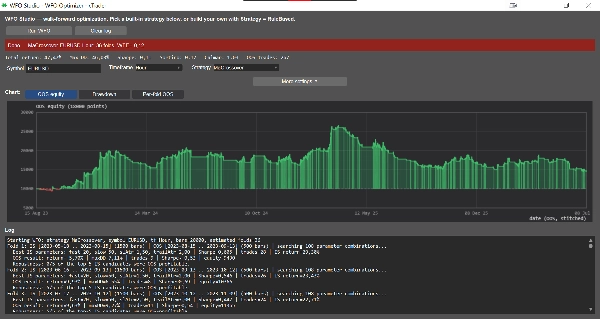
Wählen Sie ein Symbol und einen Zeitrahmen, wählen Sie eine Strategie, legen Sie Ihre In-Sample/Out-of-Sample-Fenster fest und klicken Sie auf Run WFO. Sie erhalten einen vollständigen Bericht:
• Rollierende oder verankerte Folds über Ihre Historie
• Walk-Forward-Effizienz (wie viel Ihres In-Sample-Vorteils außerhalb der Stichprobe erhalten bleibt)
• Parameterstabilität über die Folds hinweg – kennzeichnet Strategien, die nur wegen eines glücklichen Parametersatzes funktionierten
• Top-N-Robustheitsprüfung – validiert die Top-N In-Sample-Parametersätze auf Out-of-Sample-Daten, nicht nur den einzelnen besten
• Eine zusammengesetzte Out-of-Sample-Equity-Kurve mit Ansichten zu Equity / Drawdown / Rendite pro Fold und einer Zusammenfassung der Statistiken (Gesamtrendite, Max DD, Sharpe, Sortino, Calmar, Handelsanzahl)
ERSTELLEN SIE IHRE EIGENEN REGELN – KEIN CODE ERFORDERLICH
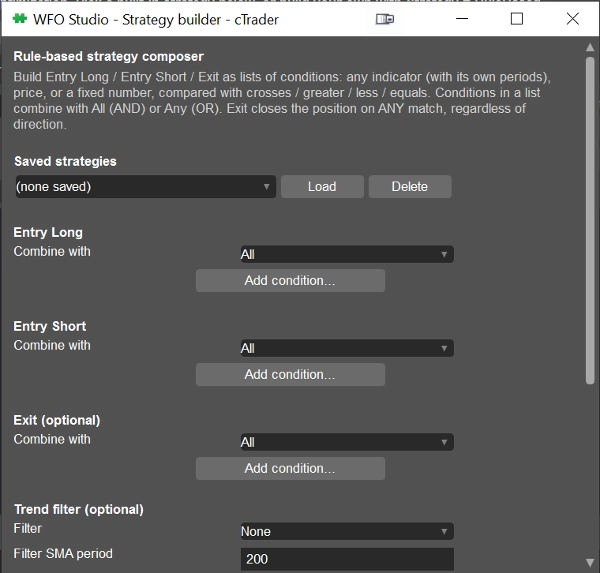
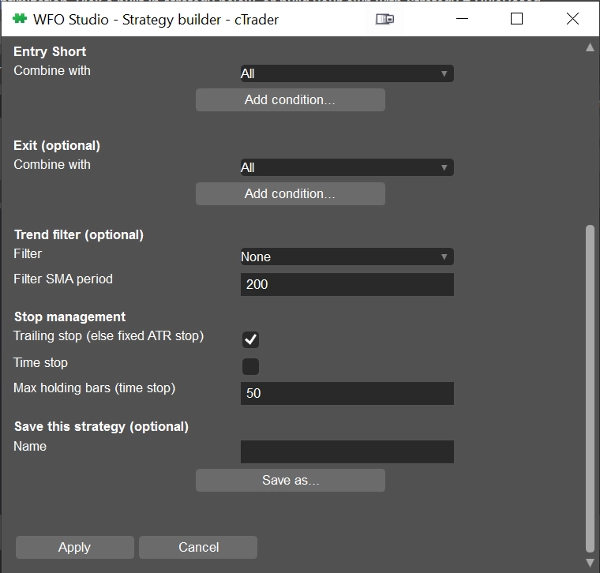
Bevorzugen Sie Ihre eigene Logik gegenüber einer festen Strategie? Der integrierte Strategy Builder ermöglicht es Ihnen, Entry Long-, Entry Short- und Exit-Bedingungen aus 15 Indikatoren zu komponieren – RSI, MACD, Bollinger Bands, Stochastic, ADX/DMI, Aroon, Parabolic SAR, Supertrend, Keltner Channels, SMA/EMA, ATR, Donchian Channels, CCI, Williams %R. Vergleichen Sie jede Indikatorlinie mit einem anderen Indikator, dem Preis oder einer festen Zahl mittels Kreuzungen / größer / kleiner / gleich, kombinieren Sie mit UND/ODER und speichern Sie mehrere Strategien, um jederzeit zwischen ihnen zu wechseln.
Alle Indikatormathematik läuft über die eigene Indicators API von cTrader, sodass die Zahlen genau mit denen auf Ihren Charts übereinstimmen – keine separate Neuimplementierung.
FÜR WEN ES GEEIGNET IST
Trader, die eine Idee vor dem Risiko mit echtem Kapital einem Stresstest unterziehen möchten, und Entwickler, die ein fertiges Walk-Forward-Framework wollen, anstatt eines von Grund auf neu zu schreiben.
WFO Studio ist ein Forschungs- und Validierungstool – es führt keine Live-Trades aus. Bestätigen Sie immer die endgültigen Parameter mit einem vollständigen Backtest im nativen Backtester von cTrader, bevor Sie live gehen.
Zusammenfassung
Users select a symbol, timeframe, strategy, and define in-sample and out-of-sample windows to generate detailed reports including Walk-Forward Efficiency, parameter stability across folds, top-N robustness checks, and stitched out-of-sample equity curves with performance metrics such as total return, maximum drawdown, Sharpe ratio, and trade count.
Additionally, WFO Studio features a no-code Strategy Builder that allows users to create custom entry and exit rules using 15 technical indicators (e.g., RSI, MACD, Bollinger Bands, Stochastic, ADX/DMI) combined with logical operators. Indicator calculations use cTrader’s native Indicators API to ensure consistency with chart data.
This tool is designed for traders seeking to validate strategies before live deployment and for developers needing a ready-made walk-forward testing framework. It functions solely as a research and validation tool and does not execute live trades.
Diskussion
Kundenbewertungen
5 | 100 % | |
4 | 0 % | |
3 | 0 % | |
2 | 0 % | |
1 | 0 % |