present
Sign up and get $50 off your first purchase
Trading product for wt.Custom Timeframes Desktop plugin Forex Chart UI Tools, image 1
wt.Custom Timeframes
Desktop plugin
36 purchases
Version 3.3, Oct 2026
Windows, Mac
5.0
Reviews: 2
Trading product for wt.Custom Timeframes Desktop plugin Forex Chart UI Tools, image 2
Trading product for wt.Custom Timeframes Desktop plugin Forex Chart UI Tools, image 3
Trading product for wt.Custom Timeframes Desktop plugin Forex Chart UI Tools, image 4
Trading product for wt.Custom Timeframes Desktop plugin Forex Chart UI Tools, image 5
Trading product for wt.Custom Timeframes Desktop plugin Forex Chart UI Tools, image 6
Trading product for wt.Custom Timeframes Desktop plugin Forex Chart UI Tools, image 7
Trading product for wt.Custom Timeframes Desktop plugin Forex Chart UI Tools, image 8
Trading product for wt.Custom Timeframes Desktop plugin Forex Chart UI Tools, image 9
Trading product for wt.Custom Timeframes Desktop plugin Forex Chart UI Tools, image 10
Trading product for wt.Custom Timeframes Desktop plugin Forex Chart UI Tools, image 11
99.81M
Traded volume
150.07K
Pips won
95
Sales
524
Free installs

Description

Custom Timeframes for cTrader: the original plugin

👨‍🔧Created, tested and maintained directly by its developer.

I created cTrader's original Custom Timeframe Plugin to give traders exact control over chart granularity without breaking their usual cTrader workflow. I trade and develop on cTrader every day, and I test and update this plugin with each major cTrader Desktop release to keep it stable.


Chart Types

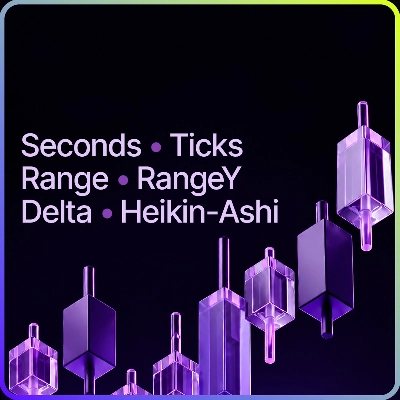
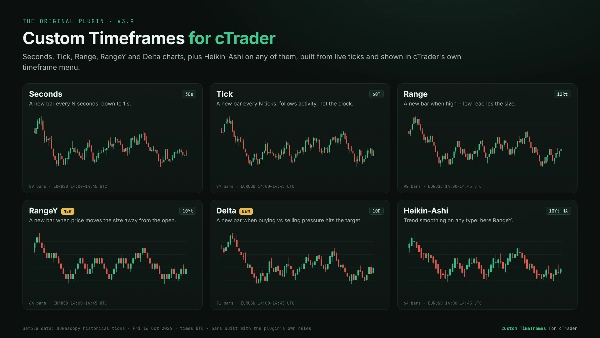
Seconds: custom intervals down to 1 second. See how a move unfolds inside the minute, which a single 1-minute candle hides.

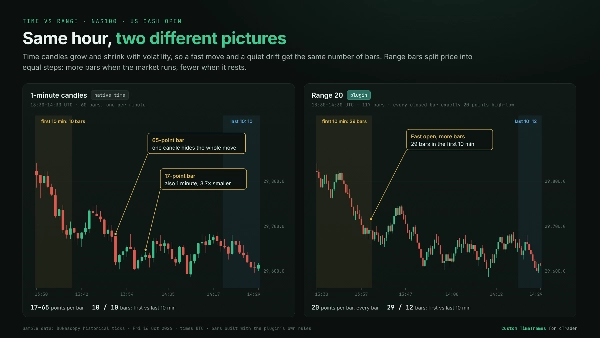
Tick: a new bar every N ticks. Bars follow market activity instead of the clock, so busy sessions get more detail and quiet periods compress.

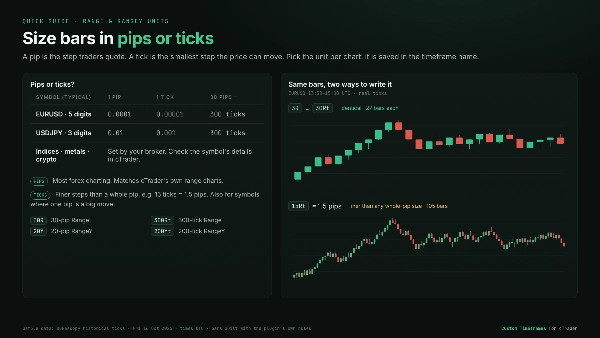
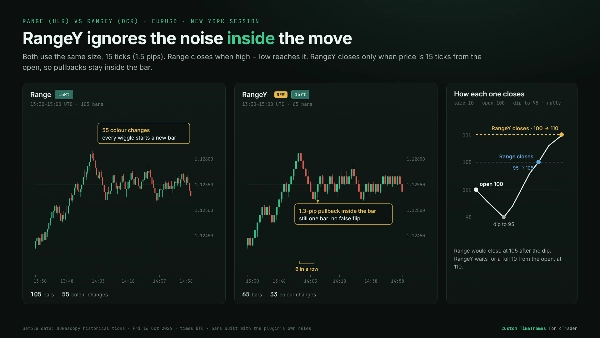
Range: a new bar each time high minus low reaches your size. Every bar covers the same price range. Chop clusters into small bars and breakouts stand out. Size it in pips or ticks.

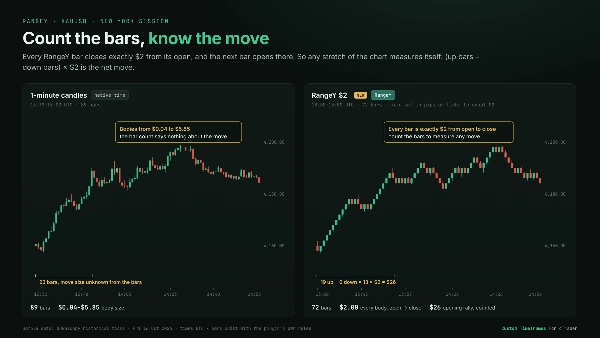
⭐RangeY: a new bar each time price moves your size away from the bar's open, in either direction. Pullbacks stay inside the bar, so each bar marks a real move. Every bar closes exactly one size from its open, so counting bars measures the move. Size it in pips or ticks.

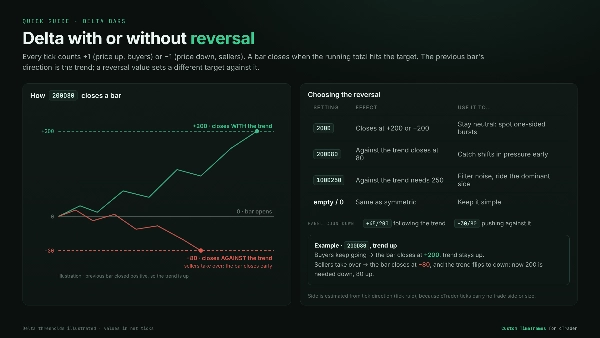
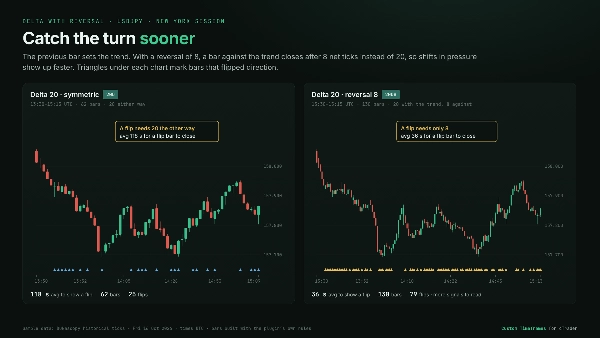
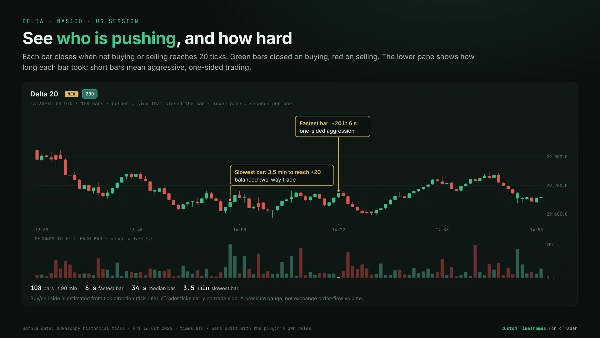
⭐Delta: a new bar when buying vs. selling pressure reaches your target. Each tick is counted as a buy or a sell from the direction price moved, because cTrader provides no buyer/seller data. One-sided aggression closes bars fast, and balanced trading keeps them open. You can optionally set a separate reversal target, so a shift in pressure against the previous bar shows up sooner.

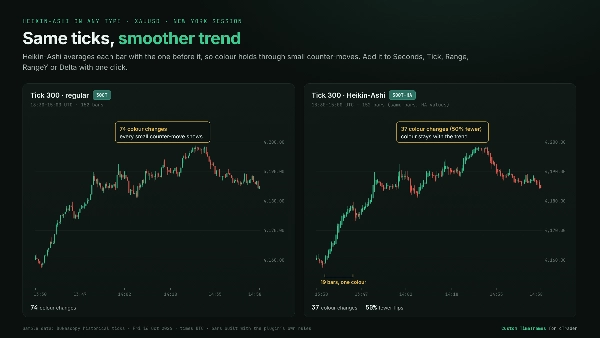
Heikin-Ashi: trend smoothing available on every chart type above.


Built for Daily Trading

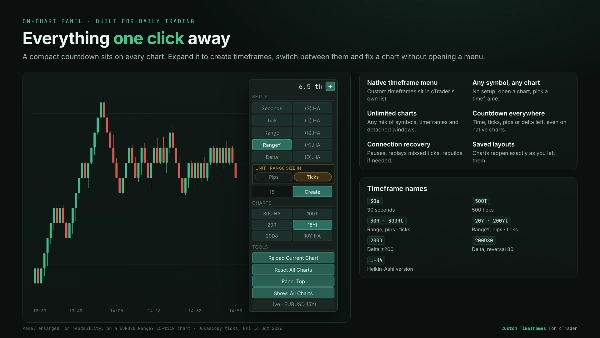
  • Native timeframe menu: custom timeframes appear in cTrader's standard timeframe list, just like the native charts.
  • Any symbol, any chart: no symbol setup. Open any chart and pick a custom timeframe.
  • Unlimited charts: run any mix of symbols and timeframes across main and detached windows at the same time.
  • Switches like a normal chart: changing symbol or timeframe works the same way it does on built-in timeframes.
  • On-chart control panel: a compact countdown to the next bar, which expands to create timeframes, a one-click list of all your custom timeframes, and Reload / Reset tools. Settings take effect immediately, with no plugin restart.
  • Countdown on every chart: time, ticks, pips or delta left in the current bar, including on standard cTrader charts.
  • Restored from layouts: saved layouts reopen with the exact same custom charts.


Reliable data handling

  • Automatic history and live updates: history loads by itself, and scrolling back loads older bars.
  • Connection recovery: after a dropped connection or a stalled data feed, charts pause, replay the missed data and continue without gaps. If that data is gone, the chart rebuilds itself.
  • Light on resources: symbols you're no longer viewing stop loading data, and very busy charts load in chunks so the platform stays responsive.


👉 See the gallery for Real-market Examples, Comparisons with standard time charts, and Quick Guides to pips vs. ticks and Delta settings.


Active development. Direct support from the creator. Built for the long haul.

Summary

AI summary
wt.Custom Timeframes is a trading platform plugin that enables users to create custom second and tick charts with adjustable bar sampling intervals. It supports three bar types: seconds bars (new bar every N seconds), tick bars (new bar every N ticks, reflecting market activity), and range bars (new bar every N pips of price movement). Each bar type can be displayed as regular candlesticks or Heikin-Ashi bars for smoother trend visualization.

The plugin integrates seamlessly into the trading interface with an on-chart panel for quick bar type and size selection, eliminating the need for separate settings menus or restarts. Custom timeframes appear directly in the platform’s standard Period dropdown menu. It loads historical data and updates live in real time, maintaining smooth performance even on high-activity instruments.

This tool is applicable across multiple markets including Forex, indices, cryptocurrencies, and stocks, supporting market, limit, stop, and stop-limit order types. It is designed to facilitate fast execution and detailed price action analysis by providing flexible charting options tailored to user preferences.
Plugin profile
Plugin category
Utilities
Data access
Market data
Positions
Orders
Chart
Supported order types
Market
Limit
Stop
Stop-limit

Customer reviews

5.0
Reviews: 2
5
100 %
4
0 %
3
0 %
2
0 %
1
0 %
Customer reviews
September 11, 2026
It is perfect.! It allows me to quit the expensive. Tradingview Premium Plans. Because now I have all seconds Charts IN my platfor, where execute my trades.
April 22, 2026
A flexible tool for building second and tick charts in cTrader. Great for advanced traders exploring market microstructure. Not essential for everyone, but powerful in the right hands.

Discussion

FAQ

Forex
Chart UI Tools
Indices
Crypto
Stocks
Products available through cTrader Store, including trading bots, indicators and plugins, are provided by third-party developers and made available for informational and technical access purposes only. cTrader Store is not a broker and does not provide investment advice, personal recommendations or any guarantee of future performance.

More from this author

Indicator
Prop
Forex
+12
Lightweight Risk-Reward Visualization Tool.
cBot
Fixed Risk %
No Overtrading
+5
Turn Your Keyboard into a Trading Console — Instant Entries, Exits, and Precision Risk Control.
Desktop plugin
Stocks
Indices
+1
Build custom charts based on specific trading sessions.
Indicator
Forex
Crypto
+5
Experience a new approach with amplitude-based momentum analysis. Smart Trend Detection That Adapts to Market Volatility
Indicator
Key Levels
Supertrend
+1
A trend-regime system for cTrader — spot the trend, the pullback zone and your stop in one glance.
Indicator
Forex
Crypto
+5
This indicator combines two independent analytical engines into a single overlay on your chart.
Desktop plugin
Chart UI Tools
Trend Reversal (TRev) charts plot candlesticks according to the distance price moves, not the passage of time.
Indicator
Imbalance
Order Block
+5
Spot the moments when price and order flow disagree - across every timeframe, at a glance.
Indicator
ATR
Supertrend
+5
Read price differently. Measure what the market actually does.
Desktop plugin
Fixed Risk %
Risk/Reward
+5
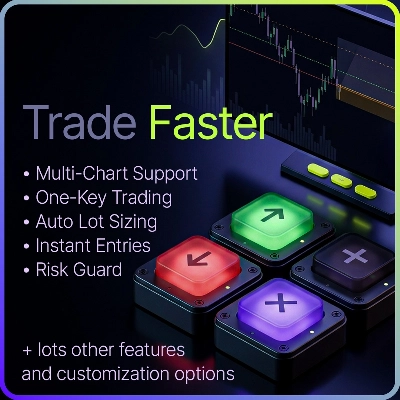
⚡Trade faster. Manage easier. Stay within your risk.

You may also like

Desktop plugin
Trade Journal
AI Integration
+1
Turn your closed-trade history into an at-a-glance monthly calendar and a deep performance dashboard.
Desktop plugin
AI
Forex
+5
AI Trading Agent, predict market moves, detect trends, and execute profitable trades.
Desktop plugin
Prop
Forex
+3
Visual calendar with daily PnL, trades, win rate, profit factor, and performance insights.
Desktop plugin
AI
ATR
+27
Trade Analytics delivers advanced trading insights and heatmaps directly inside TradeWatch.
Desktop plugin
Forex
Crypto
+4
Apply Stop Loss and Take Profit to all positions and pending orders in one click.
Desktop plugin
Risk Reward management tools (风险回报管理工具)
Desktop plugin
Prop
Forex
+5
Place professional OCO & OSO orders in cTrader — visually, instantly, and without execution mistakes.
Desktop plugin
AI
ATR
+27
Turn your cTrader trade history into a visual performance dashboard to see trading patterns and strategy strength
Desktop plugin
Chart UI Tools
Replay your broker’s charts candle by candle. Rewind any time, switch timeframes and practise trades with full stats.
Desktop plugin
Forex
Signal
+2
Adaptive Renko chart builder for precise, flexible trading - ideal for both scalping and trend analysis.
Desktop plugin
Chart UI Tools
Keep lines, zones and channels synced across selected same-symbol charts from one desktop plugin.
Desktop plugin
SMC
Grid
+5
The all-in-one trade management plugin that automates your risk, execution, and position management.
Desktop plugin
Market Scanner
An 8-currency strength ranking, multi-TF heatmap and impulse tracker. Read the real driver at a glance. Read-only.
Desktop plugin
Trade Journal
AI Integration
+1
#1 Trade Journal, PnL analytics, bot monitoring and strategy statistics.
Desktop plugin
Trade Journal
Trade Statistics
Track. Analyze. Improve. A journal and statistics for your real cTrader trades, with a prop challenge guard.
Desktop plugin
Position Sizer
Risk Calculator
Size manual trades from your risk settings and review Market, Limit or Stop orders before execution.
Desktop plugin
Prop Firm Fit
Trade Journal
+1
Paper trade your broker’s live prices in cTrader: demo accounts, prop challenges, a stats dashboard and trading journal
Desktop plugin
Prop
Forex
+4
Professional risk management plugin with automatic lot calculation, chart panels, and R:R automation. Version 1.4.2.

Price

99.81M
Traded volume
150.07K
Pips won
95
Sales
524
Free installs