
الوصف
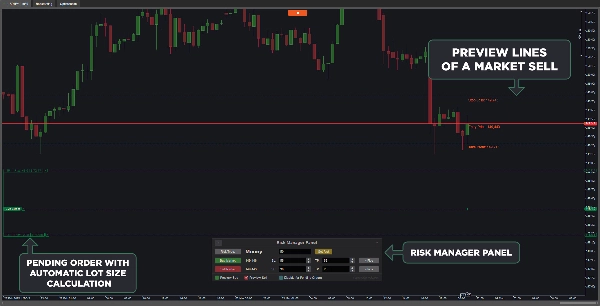
التداول بالمبلغ الصحيح من المخاطرة أمر ضروري للنجاح. يقوم cTrader Risk Manager cBot تلقائيًا بحساب حجم اللوت للأوامر المعلقة وأوامر السوق بناءً على مبلغ المخاطرة الذي تختاره (النقود أو نسبة الرصيد). يوفر تكاملًا سلسًا مع الرسم البياني، مما يتيح لك تعديل الأوامر المعلقة مباشرة، بينما يمكن تعديل أوامر السوق من خلال لوحة مدير المخاطر مع معاينة قبل التنفيذ. مصمم للاستخدام البديهي، ولا يتطلب تدريبًا إضافيًا.
الميزات:
- حساب حجم اللوت تلقائيًا: يضبط أحجام اللوت لكل من الأوامر المعلقة وأوامر السوق بناءً على إعدادات المخاطرة.
- تعديل الأوامر في الوقت الحقيقي: تعديل الأوامر المعلقة على الرسم البياني مع تحديث حجم اللوت تلقائيًا.
- معاينة أوامر السوق: معاينة أوامر السوق على الرسم البياني قبل التنفيذ.
- تخصيص نوع المخاطرة: اختر بين النقود أو نسبة الرصيد لإدارة المخاطر.
- تكامل سلس: تحديث الإعدادات ديناميكيًا دون إعادة تشغيل cBot.
- إعدادات مخاطرة قابلة للتخصيص: تعيين وقف الخسارة الافتراضي، وجني الأرباح، ومبالغ المخاطرة.
- تحديد موضع اللوحة: ضبط مكان اللوحة على الرسم البياني.
- تعطيل إدارة المخاطر للأوامر المعلقة: تطبيق إعدادات المخاطرة فقط على أوامر السوق، إذا رغبت.
- زر دليل المستخدم الجديد: الوصول إلى دليل المستخدم مباشرة من خلال زر صغير على لوحة مدير المخاطر.
تحديثات الإصدار 1.4:
مع قدرة cTrader على تعديل الأطر الزمنية والمعلمات أثناء التشغيل، أصبح cBot الآن يتذكر إعدادات لوحة مدير المخاطر عند:
- تغيير الأطر الزمنية
- إيقاف واستئناف cBot
- تعديل معلمات cBot
التحديث 2.0:
- تم تضمين دليل المستخدم داخل cBot نفسه. يمكنك فتحه بالنقر على زر صغير في الزاوية العلوية اليسرى من لوحة مدير المخاطر.
- تمت إضافة أزرار سهلة للزيادة والنقصان في مربعات وقف الخسارة وجني الأرباح.
- لمنع وضع الصفقات بدون وقف خسارة عند استخدام أزرار الشراء والبيع في السوق من لوحة مدير المخاطر وأسعار وقف الخسارة الصغيرة جدًا، سيضيف cBot الآن الفارق السعري إلى وقف الخسارة لتلك الأوامر. لاحظ أنه بسبب التقلبات العالية، من المستحيل ضمان أن جميع الصفقات سيكون لها وقف خسارة.
- تمت إضافة تنبيه يظهر على الشاشة إذا تم فتح صفقة باستخدام لوحة مدير المخاطر بدون وقف خسارة. يمكنك تعطيل ذلك في معلمات cBot إذا لم ترغب في ذلك.
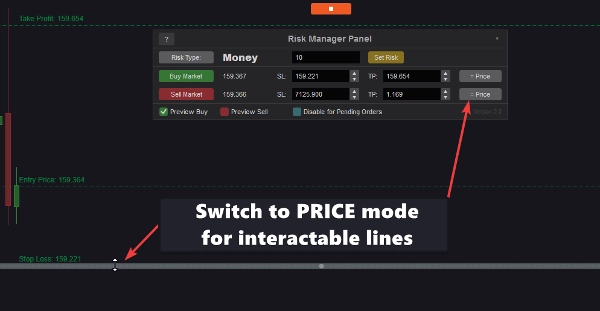
- التبديل إلى وضع السعر سيجعل الخطوط على الرسم البياني تفاعلية. ستتمكن من تحريك الخطوط مباشرة بالفأرة. ستتحدث أهداف السعر في لوحة مدير المخاطر تلقائيًا وتُعاد موضعتها
مع هذه الميزات، يضمن cTrader Risk Manager cBot إدارة مخاطرة دقيقة وفعالة للمتداولين من جميع المستويات.
ملاحظة مهمة:
قد لا تعمل لوحة مدير المخاطر بشكل صحيح على cTrader لنظام Mac بسبب خلل في المنصة. ومع ذلك، يظل cBot يعمل بكامل وظائفه للأوامر المعلقة عبر إعدادات المعلمات.
كيفية الاستخدام:
- شغّل cBot.
- اختر نوع المخاطرة باستخدام زر نوع المخاطرة.
- أدخل مبلغ المخاطرة وانقر على تعيين المخاطرة.
- ضع الأوامر المعلقة على الرسم البياني أو استخدم أزرار شراء/بيع السوق.
- اضبط مواقع وقف الخسارة—يتم تحديث حجم اللوت تلقائيًا.
- التبديل بين النقاط والسعر لأوامر السوق باستخدام زر = نقاط.
- فعّل معاينة الشراء/البيع لرؤية مواقع وقف الخسارة، وجني الأرباح، والدخول.
- خصص موقع اللوحة باستخدام الزر في الزاوية العلوية اليمنى.
الملخص
Key features include customizable risk settings such as default stop loss and take profit levels, dynamic panel positioning on the chart, and the option to disable risk management for pending orders if desired. The cBot supports toggling between pip and price modes, enabling interactive chart lines for direct adjustment of price targets. It also includes a user guide accessible from the panel and alerts for positions opened without stop loss.
Version updates enhance usability by preserving panel settings across timeframe changes, cBot restarts, and parameter modifications. The tool supports multiple markets including Forex, indices, cryptocurrencies, and stocks. It is compatible with Pepperstone broker and is suitable for traders seeking automated, efficient risk control integrated within the cTrader platform.
تقييمات العملاء
5 | 67 % | |
4 | 33 % | |
3 | 0 % | |
2 | 0 % | |
1 | 0 % |

![شعار "[Fx4U]Risk & Reward Trading Tool Pro"](https://cdn.ctrader.com/image/webp/e26324ec-9547-4365-a38e-ccd0e7c4d86f_31374)