Descrição
OLÁ A TODOS OS TRADERS, EM BREVE VOU INTRODUZIR NOVAS FUNCIONALIDADES COM BLOQUEIO DIÁRIO QUE AJUDARÁ NO EXCESSO DE NEGOCIAÇÕES E NA GESTÃO DE RISCO.
ImmortalManualScaler — Guia do Usuário em Linguagem Simples
Um guia simples sobre o que este cBot faz, o que cada configuração significa e como usá-lo sem surpresas.
1. O que este bot é (em poucas palavras)
Este bot não encontra negociações para você. Ele é um gerenciador de negociações.
Você decide quando e em qual direção negociar. O bot então assume e lida automaticamente com as partes chatas, rápidas e propensas a erros:
- Abre a primeira posição.
- Coloca um stop loss nela.
- Adiciona mais posições conforme o preço se move a seu favor (isso é chamado de "piramidagem" ou "escalonamento").
- Move seu stop para break-even para que uma negociação vencedora não se transforme em perdedora.
- Realiza lucros em etapas, ou acompanha o stop, ou sai em um valor fixo em dólares — sua escolha.
Pense nele como um piloto automático para a gestão de uma negociação, não para a decisão de negociar.
2. A grande ideia, passo a passo
Aqui está toda a vida de uma negociação, em ordem:
VOCÊ INICIA O BOT
│
▼
[1] Abre a primeira posição + define stop loss
│
▼
[2] Coloca uma escada de ordens pendentes acima (para compra)
│ ── preço sobe ──► cada degrau é preenchido, adicionando à posição
▼
[3] O preço se moveu o suficiente → stop pula para break-even
│ (agora a negociação está "segura")
▼
[4] A SAÍDA ocorre de três maneiras (você escolhe o modo):
• realiza lucro em partes nos TP1 / TP2 / TP3, ou
• acompanha o stop e aproveita o movimento, ou
• fecha tudo em um valor fixo positivo/negativo em dólares
│
▼
NEGOCIAÇÃO FECHADA → bot fica inativo
É isso. Tudo abaixo é apenas explicação dos controles.
3. Início rápido (a maneira mais rápida de usar)
- Coloque o bot no gráfico do símbolo que deseja (ex: US100, XAUUSD).
- Defina Preset do Símbolo para corresponder a:
Gold,NDX, ouCustomse quiser digitar seus próprios números. - Defina Lotes Base (tamanho da sua primeira posição) e Adicionar Lotes (tamanho de cada adição).
- Escolha Direção (Comprar ou Vender) e Modo de Saída (comece com
FixedTP). - Pressione iniciar. O bot abre a negociação e a gerencia. Observe o painel no canto superior direito.
Para parar uma negociação cedo, basta parar o bot — ele deixa a posição aberta para você gerenciar manualmente (ele não a fecha para você quando você o para).
4. Os TRÊS grandes interruptores (eles controlam tudo)
Quase todo o comportamento do bot vem de três escolhas. Acertar essas e o resto é detalhe.
Interruptor 1 — Modo de Entrada: como a negociação começa
OpçãoO que faz
OpenOnStart
No momento em que você inicia o bot, ele abre a negociação sozinho, na Direção que você escolheu. "Iniciar o bot" é seu gatilho de entrada.
AttachToManual
Você abre a negociação manualmente (a qualquer momento). O bot percebe e assume a gestão. Use isso quando quiser clicar em Comprar/Vender você mesmo e deixar o bot cuidar do resto.
Interruptor 2 — Tipo de Ordem de Escalonamento: como adiciona mais posições
OpçãoO que faz
Stop
Adiciona conforme o preço se move a seu favor (uma pirâmide). Para uma compra, empilha mais compras acima da sua entrada. Esta é a escolha normal.
Limit
Adiciona em retrações (média móvel). Para uma compra, empilha mais compras abaixo da sua entrada. Estilo de risco diferente — use apenas se realmente quiser.
None
Sem adições. Apenas uma posição.
Interruptor 3 — Modo de Saída: como a negociação termina (o mais importante)
OpçãoO que faz
Trailing
Sem take-profits. O stop vai para break-even, depois acompanha o preço passo a passo. A posição inteira acompanha e sai quando o trailing é atingido. Melhor para dias de tendência.
FixedTP
Escalona saídas em três alvos fixos: TP1, TP2, TP3. Realiza lucros em partes. Melhor para condições instáveis/incertas onde você quer garantir ganhos.
FixedTP_ThenTrail
Uma mistura: realiza lucro em TP1 e TP2, depois acompanha o "restante corredor" em vez de usar TP3. Realiza parte, deixa parte correr.
Há também uma Saída Rápida $ sobrescrição (Seção 8). Quando ativada, ignora os três modos de saída e sai apenas em um valor em dólares.
5. Como funciona o escalonamento (piramidagem) — com uma imagem
Suponha que você compre US100 com estas configurações: Lotes Base 4, Adicionar Lotes 2, Máx Adições 5, Passo de Adição 15 pips.
O bot abre 4 lotes, depois coloca 5 ordens pendentes de "adição" separadas por 15 pips, subindo:
Preço ▲
+75 ── Adição #5 (2 lotes)
+60 ── Adição #4 (2 lotes)
+45 ── Adição #3 (2 lotes)
+30 ── Adição #2 (2 lotes)
+15 ── Adição #1 (2 lotes)
0 ── ENTRADA (4 lotes) ← stop loss fica abaixo daqui
À medida que o preço sobe, cada degrau é preenchido. Se todos forem preenchidos, você estará segurando 4 + (5 × 2) = 14 lotes. A negociação está agora "totalmente carregada."
Isso é poderoso, mas tem dois lados. Uma reversão afeta todos os lotes, não apenas o primeiro. Por isso break-even (seção seguinte) é tão importante — é o que impede um vencedor carregado de virar uma perda dolorosa.
Incremento de Lote Adicional permite que cada adição seja maior que a anterior (ex: +0,5 a cada degrau). Deixe em 0 para adições de tamanho igual.
6. Break-Even — a função "nunca devolver um vencedor"
Quando o preço se move a seu favor por uma quantidade definida, o bot move o stop para que a negociação não possa perder. Duas configurações controlam isso:
Âncora BE — onde o break-even fica
OpçãoSignificado
AverageEntry(recomendado)
O break-even é colocado no custo médio de toda a cesta. Se o stop for atingido aqui, a cesta inteira fecha no lucro. Isso é o que você quer para uma pirâmide.
FirstEntry
O break-even é colocado apenas na entrada original. Proteção mais fraca depois de adicionar lotes acima.
Bloqueio BE (pips) — quanto lucro bloquear
0= o stop fica exatamente no break-even (lucro zero, mas sem perda). Após custos (comissão/spread) isso é ligeiramente negativo.5,10, etc. = o stop fica tantos pips no lucro, então um stop-out garante um ganho garantido.
Dica: Se seu objetivo é "pegar um lucro pequeno e certo em vez de arriscar um vencedor," use AverageEntry + um pequeno Bloqueio BE (como 5–10). Essa é a combinação que faz isso.
Quando o break-even é acionado?
- Nos modos Trailing e ThenTrail quando o preço se move BE Trigger pips a seu favor.
- No modo FixedTP quando TP1 é atingido (somente se "Mover SL para BE após TP1 = Sim").
7. Os três modos de saída, com exemplos simples
Suponha uma cesta carregada com 14 lotes e estes alvos: TP1, TP2, TP3 em distâncias definidas, fechando 50% / 25% / 25%.
Importante: as porcentagens de fechamento são fatias do tamanho total da cesta (medido no momento em que o TP1 é atingido pela primeira vez). Então 50 + 25 + 25 = 100 fecha tudo. Se somarem menos que 100, sobra um "corredor".
Trailing
Sem alvos. O stop vai para break-even, depois sobe atrás do preço em passos (Passo de Trailing), sempre ficando Distância de Trailingatrás. Os 14 lotes completos acompanham juntos e saem quando o trailing é atingido. Ganha muito em dias de tendência, devolve mais em reversões.
FixedTP
- TP1 atingido → fecha 50% (7 lotes), stop move para break-even, adições restantes canceladas.
- TP2 atingido → fecha 25% (3,5 lotes).
- TP3 atingido → fecha 25% (3,5 lotes) → fechado, pronto.
Realiza lucros de forma constante. Se o preço reverter após TP1/TP2 mas antes do TP3, o restante fecha no break-even — um pequeno ganho, não uma perda.
FixedTP_ThenTrail
- TP1 atingido → fecha 50%.
- TP2 atingido → fecha 25%.
- Os últimos 25% tornam-se um corredor que acompanha (TP3 não é usado).
Realiza dois terços, deixa o restante correr com um stop trailing.
8. A Saída Rápida $ — um interruptor simples de dólar
Isto é uma sobrescrição. Quando ativada, ela ignora completamente TP / break-even / trailing e gerencia a saída apenas pelo lucro/prejuízo flutuante em dólares.
ConfiguraçãoSignificado
Usar Saída Rápida $
Sim = este modo assume tudo. Não = modos normais funcionam.
Meta de Lucro $
Quando o lucro flutuante da cesta atingir este valor em dólares → fecha tudo (lucro). 0 = desligado.
Limite de Perda $
Quando a perda flutuante da cesta atingir este valor em dólares → fecha tudo (prejuízo). 0 = desligado.
O que ainda funciona enquanto está ligado: a entrada, o escalonamento (adições continuam sendo preenchidas) e o stop loss original como um backup de gap. O que é desligado: TP1/2/3, movimentos de break-even e trailing.
Observe a escala. Os níveis em dólares reagem à sua cesta inteira. No US100, uma cesta totalmente carregada pode valer cerca de $18 por ponto. Então um limite de perda de $100 é apenas cerca de 6 pontos de movimento quando carregada — muito apertado, acionará com pequenas oscilações. Ajuste esses números para sua cesta, não para uma única posição.
9. Referência completa das configurações (linguagem simples)
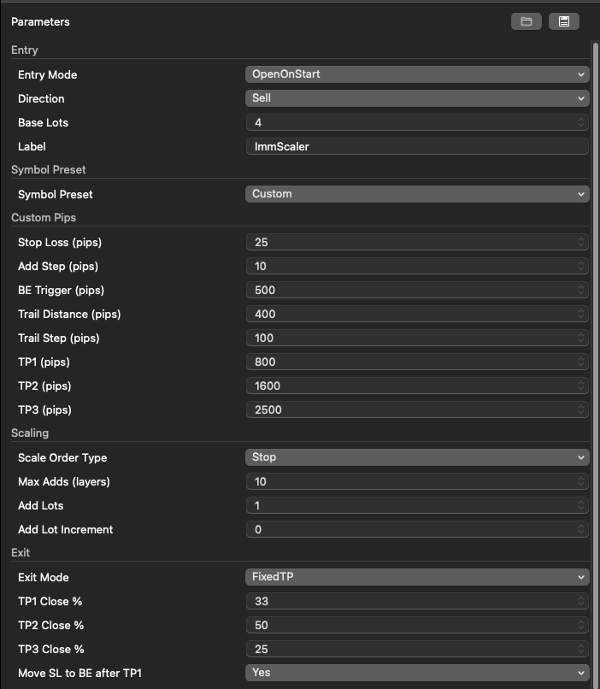
Entrada
ConfiguraçãoSignificado
Modo de Entrada
OpenOnStart (bot abre a negociação) ou AttachToManual (você abre, bot gerencia).
Direção
Comprar ou Vender. Usado apenas em OpenOnStart.
Lotes Base
Tamanho da primeira posição.
Etiqueta
Uma tag de nome para a negociação. Cosmético.
Preset do Símbolo
ConfiguraçãoSignificado
Preset do Símbolo
Gold / NDX carrega distâncias de pips prontas. Custom = use os números que você digitar abaixo. Os tamanhos dos lotes nunca são alterados pelo preset — defina-os você mesmo.
Pips Personalizados (usado apenas quando Preset = Custom)
ConfiguraçãoSignificado
Stop Loss (pips)
Distância do stop de proteção da entrada. Também o backup em cada adição.
Passo de Adição (pips)
Intervalo entre cada degrau do escalonamento.
Gatilho BE (pips)
Movimento favorável necessário antes do stop pular para break-even (modos trailing).
Distância de Trailing (pips)
Quão longe o stop trailing fica atrás do preço.
Passo de Trailing (pips)
Movimento mínimo antes do trailing avançar um degrau.
TP1 / TP2 / TP3 (pips)
As três distâncias de take-profit a partir da primeira entrada.
Escalonamento
ConfiguraçãoSignificado
Tipo de Ordem de Escalonamento
Stop (adiciona no lucro) / Limit (adiciona na retração) / None.
Máx Adições (camadas)
Quantas posições extras empilhar (até 20).
Adicionar Lotes
Tamanho de cada posição adicionada.
Incremento de Lote Adicional
Faça cada adição maior que a anterior (0 = todas iguais).
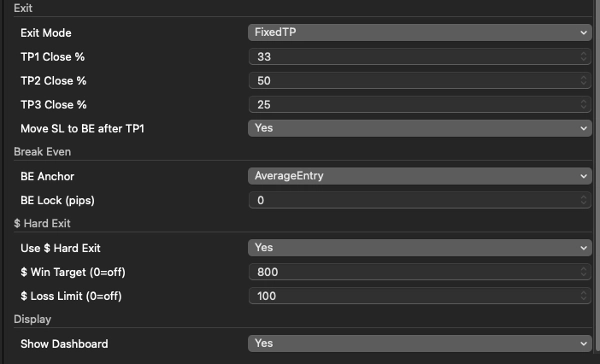
Saída
ConfiguraçãoSignificado
Modo de Saída
Trailing / FixedTP / FixedTP_ThenTrail.
TP1 / TP2 / TP3 Fechar %
Porcentagem da cesta inteira a fechar em cada alvo. Some 100 para sair completamente.
Mover SL para BE após TP1
Nos modos FixedTP, move o stop para break-even quando TP1 é atingido.
Break Even
ConfiguraçãoSignificado
Âncora BE
AverageEntry (break-even da cesta inteira, recomendado) ou FirstEntry.
Bloqueio BE (pips)
Pips de lucro para garantir no break-even (0 = break-even exato).
Saída Rápida $
ConfiguraçãoSignificado
Usar Saída Rápida $
Ativa/desativa a sobrescrição em dólares.
Meta de Lucro $
Fecha na margem de lucro flutuante. 0 = desligado.
Limite de Perda $
Fecha na margem de perda flutuante. 0 = desligado.
Exibição
ConfiguraçãoSignificado
Mostrar Painel
Mostra o painel de informações no gráfico. Desligue para execuções rápidas de otimização.
10. Lendo o painel no gráfico
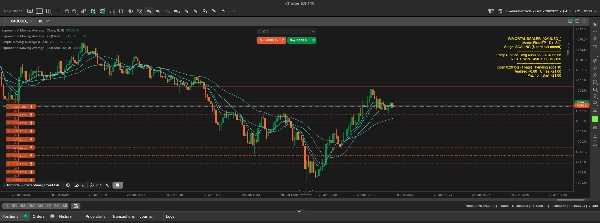
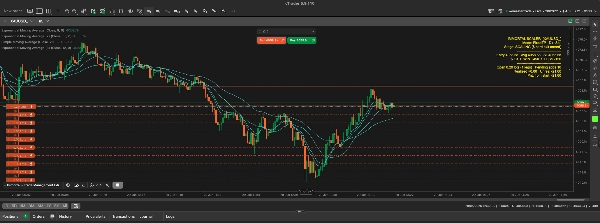
O painel (canto superior direito, amarelo brilhante) mostra o estado ao vivo:
IMMORTAL SCALER [US100.cash]
Modo: FixedTP Dir: Comprar
Estágio: TP1 feito (pré-TP2) ← onde você está na negociação
--------------------------------------
Entrada 30041.18 Média 30108.96 SL 30109.96
TP1 30141.18 [ATINGIDO] TP2 30191.18 [ - ] TP3 30241.18 [ - ]
--------------------------------------
Aberto 8.00 lotes (4 pernas) Adições pendentes 0
Realizado +392.96 Não realizado +641.40 ← realizado vs flutuante
PnL desde o início: +1034.36 ← total desde que o bot iniciou
As linhas desenhadas na escala de preço:
- pontilhado cinza = sua primeira entrada
- pontilhado ciano = entrada média (onde o break-even se ancora)
- linha sólida vermelha = o stop loss da cesta ao vivo
- pontilhado verde = um take-profit ainda não atingido → fica laranja quando atingido
11. Exemplos prontos para uso
A) Lucro constante (US100, FixedTP) Entrada OpenOnStart, Direção sua escolha, Preset Custom, Modo de Saída FixedTP, Fechar % 50/25/25, Mover SL para BE após TP1 = Sim, Âncora BE AverageEntry, Bloqueio BE 5. → Escalona, trava break-even no TP1, sai plano no TP3.
B) Seguir a tendência (US100, Trailing) Modo de Saída Trailing, Gatilho BE sensível para o símbolo, Distância/Passo de Trailing ajustados para o símbolo, Âncora BE AverageEntry. → Toda a cesta acompanha e sai na retração.
C) Interruptor de dólar (qualquer símbolo) Use Saída Rápida $ = Sim, Meta de Lucro $ e Limite de Perda $ ajustados ao valor da sua cesta. → Ignora TP/trailing, fecha em + / – dólares.
12. Notas importantes de segurança (por favor leia)
- O bot não tem sinal de entrada. No OpenOnStart ele faz uma negociação quando você o inicia, depois fica inativo. Ele é um gerenciador, não uma estratégia. Para negociações automáticas repetidas, você precisaria acoplá-lo a um sinal de entrada.
- Execute uma instância por símbolo por conta. O bot gerencia todas as posições no símbolo do gráfico. Uma segunda instância, ou uma negociação manual no mesmo símbolo, será incluída.
- Verifique o tamanho do pip para cada símbolo. "Pips" significam valores diferentes em símbolos diferentes. A primeira linha do log imprime
pip=...— confirme antes de confiar nos seus números de distância. Números de ouro serão muito largos em um índice, e vice-versa. - Combine tamanhos de lote entre símbolos por dólares por ponto, não por número de lotes. (Exemplo: 1 futuro MNQ ≈ 2,0 lotes de US100 aqui, porque US100 é ~$1/ponto e MNQ é $2/ponto.)
- A piramidagem amplifica reversões. Uma vez que a cesta está totalmente carregada, uma reversão atinge todos os lotes. Break-even (AverageEntry + um pequeno bloqueio) é seu amigo.
- Faça backtest no modo TICK. O escalonamento, fechamentos parciais, trailing e o controle $ reagem tick a tick. Backtests em modo barra irão representar mal esses comportamentos.
- Parar o bot não fecha a negociação. Ele deixa as posições abertas de propósito. Feche-as manualmente se quiser que desapareçam.
Este bot automatiza apenas a gestão de negociações. Ele não decide quando negociar e não pode garantir lucro. Sempre teste primeiro em demo e ajuste o risco para sua conta e regras da sua prop-firma.
Resumo
Key features include:
- Entry modes: Open trade on bot start or attach to manually opened trades.
- Scaling options: Add positions on price advances (Stop), on pullbacks (Limit), or no scaling.
- Exit modes: Fixed take-profit targets with staged partial closes, trailing stops that follow price movements, or a hybrid mode combining both.
- Break-even management with configurable anchoring and profit locking to prevent turning winning trades into losses.
- A dollar-based hard exit override that closes trades when floating profit or loss reaches set thresholds.
- Customizable parameters for lot sizes, scaling steps, stop loss distances, and take-profit levels.
- On-chart dashboard displaying trade status, entry points, stops, and profit/loss in real time.
The bot supports symbols like indices and gold, with presets for pip distances and allows custom settings. It is compatible with prop firm trading requirements and emphasizes risk management through position sizing and stop loss control. It operates on a single symbol per account and requires tick data for accurate backtesting. Stopping the bot leaves positions open for manual handling.
Avaliações de clientes
5 | 100 % | |
4 | 0 % | |
3 | 0 % | |
2 | 0 % | |
1 | 0 % |