

Deskripsi
Bot Perdagangan Grid dengan Indikator Supertrend - Panduan Pengguna
Selamat datang di Bot Perdagangan Grid dengan Indikator Supertrend! Bot ini dirancang untuk mengotomatisasi strategi perdagangan grid sambil menggabungkan indikator Supertrend untuk memfilter perdagangan berdasarkan tren pasar. Berikut adalah panduan rinci tentang cara mengatur dan menggunakan bot secara efektif.
Fitur Utama:
- Perdagangan Grid: Bot menempatkan order beli dan jual pada interval yang telah ditentukan (langkah) untuk memanfaatkan fluktuasi pasar.
- Filter Supertrend: Indikator Supertrend digunakan untuk memastikan perdagangan hanya dilakukan sesuai arah tren, mengurangi risiko perdagangan melawan tren.
- Penyesuaian Langkah Dinamis: Ukuran langkah grid dapat disesuaikan secara dinamis berdasarkan jumlah posisi terbuka.
- Manajemen Risiko: Termasuk fitur seperti perlindungan drawdown maksimum dan trailing drawdown untuk melindungi akun Anda.
- Parameter yang Dapat Disesuaikan: Semua pengaturan, termasuk langkah grid, volume, dan parameter Supertrend, dapat disesuaikan sesuai gaya perdagangan Anda.
Cara Menggunakan Bot
- Instalasi:
-
- Unduh Bot: Pastikan Anda memiliki file .cAlgo untuk bot tersebut.
- Buka cTrader: Jalankan platform cTrader dan navigasikan ke tab Automate.
- Tambahkan Bot: Klik pada Import cBot dan pilih file .cAlgo yang telah diunduh.
- Pasang ke Grafik: Seret dan jatuhkan bot ke grafik pasangan perdagangan yang ingin Anda perdagangkan.
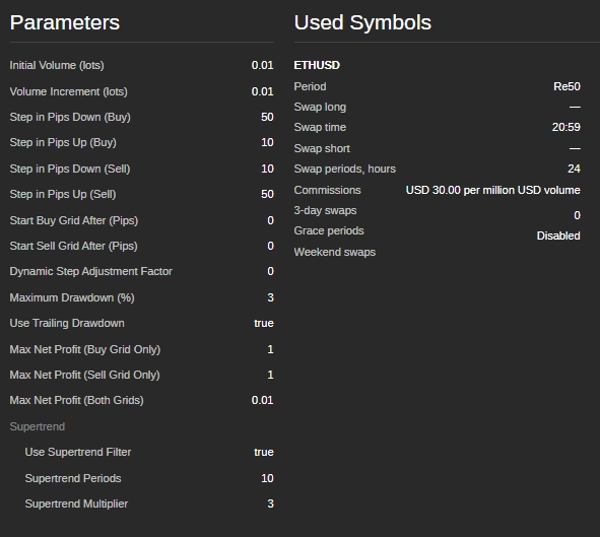
- Pengaturan Parameter: Setelah bot dipasang pada grafik, konfigurasikan parameter berikut di tab Parameters.
Parameter Volume:
Parameter Langkah Grid:
Kondisi Mulai Grid:
Parameter Supertrend:
Manajemen Risiko:
Kondisi Laba Bersih Maksimum: -
- Volume Awal (lot): Ukuran lot awal untuk perdagangan pertama.
- Peningkatan Volume (lot): Jumlah peningkatan ukuran lot untuk setiap perdagangan berikutnya.
-
- Langkah dalam Pips Turun (Beli): Jarak dalam pips untuk menempatkan order beli berikutnya di bawah order sebelumnya.
- Langkah dalam Pips Naik (Beli): Jarak dalam pips untuk menempatkan order beli berikutnya di atas order sebelumnya.
- Langkah dalam Pips Turun (Jual): Jarak dalam pips untuk menempatkan order jual berikutnya di bawah order sebelumnya.
- Langkah dalam Pips Naik (Jual): Jarak dalam pips untuk menempatkan order jual berikutnya di atas order sebelumnya.
-
- Mulai Grid Beli Setelah (Pips): Jumlah pips harga harus naik dari harga awal untuk memulai grid beli.
- Mulai Grid Jual Setelah (Pips): Jumlah pips harga harus turun dari harga awal untuk memulai grid jual.
-
- Periode Supertrend: Jumlah periode yang digunakan untuk menghitung indikator Supertrend.
- Pengali Supertrend: Pengali yang digunakan untuk menghitung indikator Supertrend.
-
- Drawdown Maksimum (%): Drawdown maksimum yang diizinkan sebagai persentase dari saldo akun.
- Gunakan Trailing Drawdown: Mengaktifkan trailing drawdown untuk menyesuaikan level drawdown maksimum saat ekuitas akun meningkat.
-
- Laba Bersih Maksimum (Hanya Grid Beli): Laba bersih maksimum yang diizinkan untuk grid beli sebelum bot menutup semua posisi beli dan memulai ulang.
- Laba Bersih Maksimum (Hanya Grid Jual): Laba bersih maksimum yang diizinkan untuk grid jual sebelum bot menutup semua posisi jual dan memulai ulang.
- Laba Bersih Maksimum (Kedua Grid): Laba bersih maksimum gabungan yang diizinkan untuk kedua grid sebelum bot menutup semua posisi dan memulai ulang.
- Memulai Bot:
-
- Atur Parameter: Sesuaikan parameter sesuai strategi perdagangan dan toleransi risiko Anda.
- Mulai Bot: Klik tombol Start untuk mengaktifkan bot.
- Pantau Kinerja: Awasi kinerja bot dan lakukan penyesuaian parameter sesuai kebutuhan.
- Menghentikan Bot:
-
- Untuk menghentikan bot, klik tombol Stop di platform cTrader.
- Bot akan menutup semua posisi terbuka dan berhenti berdagang.
Tips untuk Kinerja Optimal:
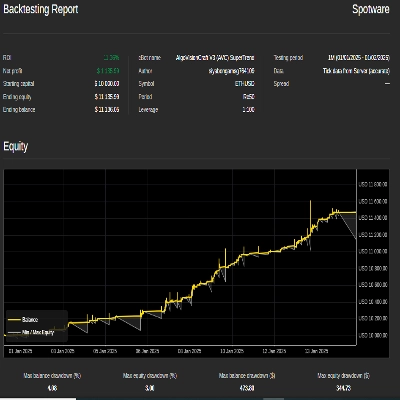
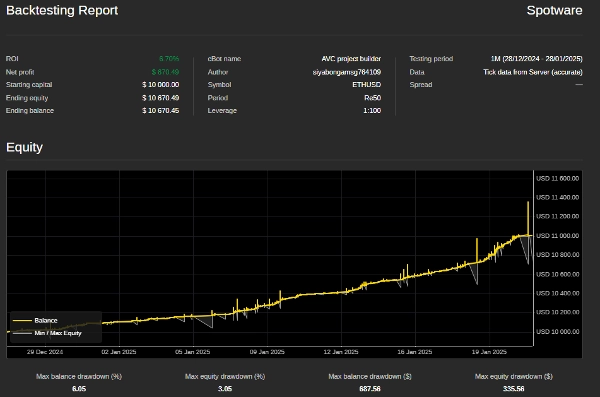
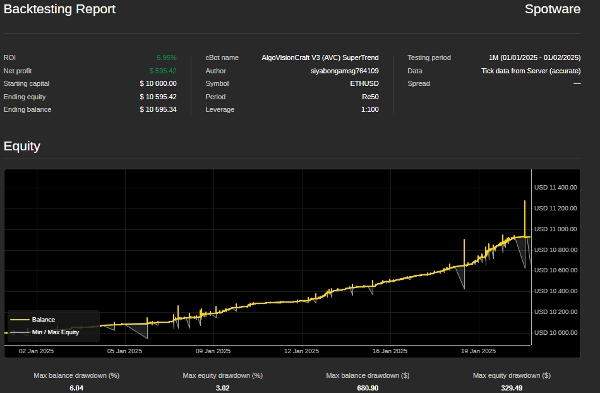
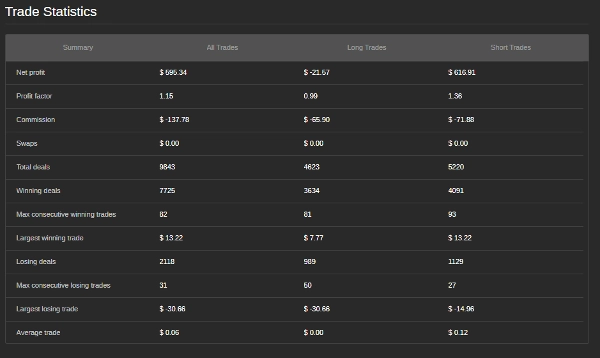
- Uji Coba Terlebih Dahulu: Sebelum menjalankan bot di akun nyata, uji coba pada data historis untuk memastikan kinerjanya baik dalam berbagai kondisi pasar.
- Sesuaikan Parameter: Sesuaikan langkah grid, parameter Supertrend, dan pengaturan manajemen risiko agar sesuai dengan gaya perdagangan dan kondisi pasar Anda.
- Pantau Drawdown: Awasi drawdown maksimum untuk memastikan tetap dalam toleransi risiko Anda.
- Gunakan pada Pasangan Stabil: Bot bekerja paling baik pada pasangan mata uang dengan tren stabil dan volatilitas rendah.
Informasi Kontak: Jika Anda memiliki pertanyaan, membutuhkan bantuan, atau ingin menyesuaikan bot lebih lanjut, jangan ragu untuk menghubungi:
- Email: siyabongamsg764109@gmail.com
- WhatsApp: +27 73 714 0490
Penafian: Bot ini disediakan apa adanya, dan pengembang tidak bertanggung jawab atas kerugian finansial yang terjadi saat menggunakannya. Perdagangan di pasar keuangan melibatkan risiko, dan Anda harus hanya berdagang dengan uang yang Anda mampu untuk kehilangan. Selalu uji bot di akun demo sebelum menggunakannya di akun nyata.
Menghindari perdagangan selama peristiwa berita besar sangat penting karena periode ini sering ditandai dengan volatilitas tinggi dan pergerakan harga yang tidak dapat diprediksi. Perdagangan berita dapat menyebabkan perilaku pasar yang tidak stabil yang menyimpang dari tren biasa, meningkatkan risiko kerugian. Demikian pula, berdagang di pasar yang bergerak menyamping—di mana harga bergerak tanpa arah yang jelas—dapat menghasilkan breakout palsu dan peluang keuntungan terbatas, sehingga sulit untuk menerapkan strategi yang koheren. Selain itu, hari dengan volume rendah biasanya memiliki likuiditas yang berkurang, yang dapat menyebabkan spread yang lebih lebar dan slippage, yang semakin mempersulit eksekusi perdagangan. Dengan menghindari perdagangan berita, pasar yang bergerak menyamping, dan periode volume rendah, trader dapat fokus pada kondisi pasar yang lebih stabil yang menawarkan tren yang lebih jelas dan eksekusi yang lebih baik, yang pada akhirnya meningkatkan kinerja perdagangan secara keseluruhan.
Ringkasan
Users can customize all parameters, including initial trade volume, volume increments, grid step distances, Supertrend calculation periods and multipliers, as well as profit targets for buy and sell grids. The bot is designed for use on the cTrader platform, where it is imported as a .cAlgo file and attached to the desired trading pair’s chart. It is recommended to backtest the bot on historical data and to avoid trading during major news events, ranging markets, or low volume periods to optimize performance.
The bot automatically closes positions and stops trading when stopped via the platform. It is suitable for currency pairs exhibiting stable trends and low volatility. Contact details are provided for support and customization inquiries.
Ulasan pelanggan
5 | 67 % | |
4 | 0 % | |
3 | 33 % | |
2 | 0 % | |
1 | 0 % |
Diskusi
Pertanyaan umum
Produk lain dari penulis ini













Harga