الوصف
Hotkey Trader + Auto TP/SL
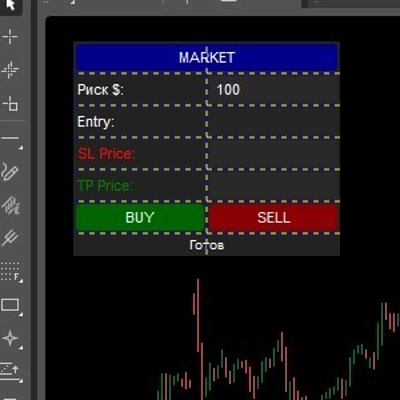
Hotkey Trader + Auto TP/SL هو cBot تداول يدوي سريع مصمم للمتداولين الذين يرغبون في تنفيذ عمليات شراء، بيع، إغلاق، خالية من المخاطر والتحوط مباشرة من الرسم البياني.
كما يتضمن مدير TP/SL تلقائي مع حجم مرن حسب النقاط، المال، أو نسبة من رصيد الحساب، بالإضافة إلى ميزة تغطية SL الاختيارية لحماية الأرباح مع تحرك الصفقة لصالحك.
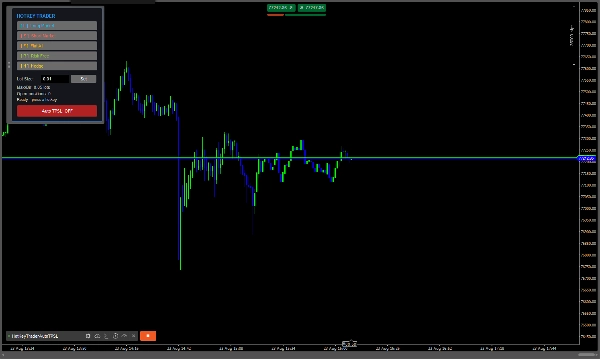
لوحة التداول قابلة للتحريك بالكامل، ويمكن تنفيذ جميع إجراءات التداول الرئيسية باستخدام مفاتيح اختصار لوحة المفاتيح القابلة للتخصيص.
الميزات الرئيسية
- ⚡ شراء / بيع — فتح صفقات السوق فوراً.
- 🛑 إغلاق الكل — إغلاق جميع المراكز المفتوحة على الرمز الحالي.
- 🔒 خالي من المخاطر — يحرك وقف الخسارة إلى سعر الدخول للمراكز المربحة.
- 🔄 تحوط — يفتح تلقائياً مركزاً معاكسا لمعادلة التعرض الصافي الحالي.
- 🎯 TP/SL تلقائي — يطبق تلقائياً TP و SL على المراكز.
- 🛡️ تغطية SL — يحرك وقف الخسارة تلقائياً إلى الربح بعد حركة سعر محددة.
- 📊 وضع المركز أو المعاملة — يستخدم TP/SL مشترك بناءً على متوسط سعر الدخول للمجموعة أو TP/SL فردي لكل مركز.
- 🎹 مفاتيح اختصار مخصصة — اختر مفاتيحك الخاصة لجميع إجراءات التداول.
- 🖱️ لوحة تداول قابلة للتحريك — اسحب اللوحة إلى أي مكان على الرسم البياني.
إعدادات الإدخال
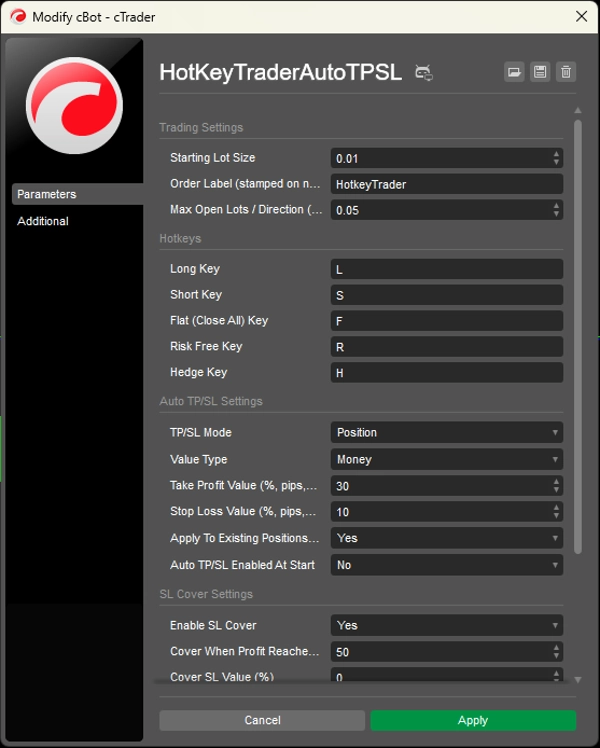
إعدادات التداول
حجم اللوت الابتدائي
حجم اللوت الافتراضي المستخدم عند الضغط على شراء أو بيع.
تسمية الأمر
التسمية المعينة للمراكز المفتوحة من خلال لوحة مفاتيح الاختصار. هذا مفيد أيضاً لتحديد المراكز التي يجب أن يديرها نظام Auto TP/SL.
الحد الأقصى للوتات المفتوحة / الاتجاه
أقصى تعرض صافي مسموح به في اتجاه واحد.
مفاتيح الاختصار
مفتاح الشراء
مفتاح لوحة المفاتيح المستخدم لفتح مركز شراء.
الافتراضي: L
مفتاح البيع
مفتاح لوحة المفاتيح المستخدم لفتح مركز بيع.
الافتراضي: S
مفتاح الإغلاق الكلي (إغلاق الكل)
يغلق جميع المراكز المفتوحة للرمز الحالي.
الافتراضي: F
مفتاح خالي من المخاطر
يحرك وقف الخسارة للمراكز المربحة إلى سعر الدخول.
الافتراضي: R
مفتاح التحوط
يفتح صفقة معاكسة مساوية للتعرض الصافي الحالي لمعادلة المركز.
الافتراضي: H
إعدادات Auto TP/SL
وضع TP/SL
- المركز — يجمع المراكز حسب الرمز والاتجاه ويستخدم متوسط سعر الدخول المرجح لحساب TP/SL مشترك.
- المعاملة — يحسب TP/SL بشكل منفصل لكل مركز فردي.
نوع القيمة
اختر كيفية حساب مسافات TP و SL:
- النسبة المئوية — بناءً على نسبة من رصيد الحساب.
- النقاط — مسافة نقاط ثابتة.
- المال — مبلغ مالي ثابت بعملة الحساب.
قيمة جني الأرباح
يضبط هدف TP وفقاً لـ نوع القيمة المختار.
أمثلة:
30مع النقاط = 30 نقطة30مع المال = 30 وحدة عملة الحساب30مع النسبة المئوية = 30% من رصيد الحساب
قيمة وقف الخسارة
يضبط مسافة SL وفقاً لـ نوع القيمة المختار.
تطبيق على المراكز القائمة عند البدء
إذا تم التفعيل، يطبق الروبوت إعدادات Auto TP/SL على المراكز القائمة عند بدء تشغيل cBot.
تمكين Auto TP/SL عند البدء
يحدد ما إذا كان محرك Auto TP/SL يبدأ مفعلاً أو معطلاً عند إطلاق cBot.
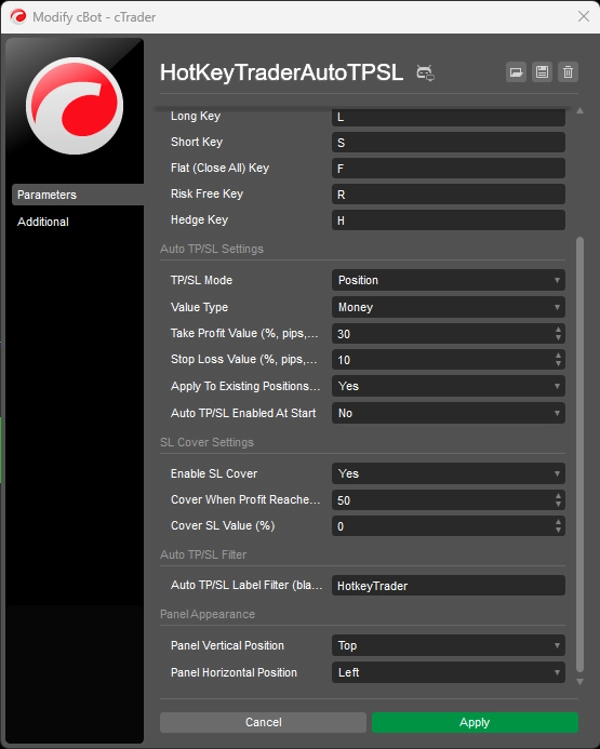
إعدادات تغطية SL
تمكين تغطية SL
يمكن الحركة التلقائية لوقف الخسارة عندما تصل الصفقة إلى مستوى الربح المطلوب.
التغطية عند وصول الربح (%)
نسبة حركة السعر من سعر الدخول المطلوبة قبل تفعيل تغطية SL.
قيمة تغطية SL (%)
تحدد مكان وضع وقف الخسارة الجديد بالنسبة لسعر الدخول.
0= يتحرك وقف الخسارة إلى سعر الدخول (نقطة التعادل)- القيمة الإيجابية = يتحرك وقف الخسارة إلى منطقة الربح
مرشح Auto TP/SL
مرشح تسمية Auto TP/SL
يتحكم في المراكز التي يديرها محرك Auto TP/SL.
- أدخل تسمية مثل
HotkeyTrader→ يتم إدارة المراكز التي تحمل هذه التسمية فقط. - اتركها فارغة → يمكن إدارة جميع المراكز المفتوحة، على أي رمز.
مظهر اللوحة
الموضع الرأسي للوحة
يضبط الموضع الرأسي الابتدائي للوحة التداول.
الموضع الأفقي للوحة
يضبط الموضع الأفقي الابتدائي للوحة التداول.
يمكن بعد ذلك سحب اللوحة إلى أي مكان على الرسم البياني.
ملاحظة مهمة
بالنسبة لـ المال و النسبة المئوية في حسابات TP/SL، يحول الروبوت الهدف المالي إلى مسافة سعر باستخدام قيمة النقطة وحجم النقطة للرمز. يوصي الكود نفسه باختبار هذا الحساب على حساب تجريبي أولاً، لأن تطبيع قيمة النقطة قد يختلف بين الوسطاء. حساب TP/SL بناءً على النقاط لا يعتمد على هذا
الملخص
Key features include an automatic TP/SL manager with flexible sizing options based on pips, monetary value, or percentage of account balance. The bot offers two TP/SL modes: Position mode, which groups positions by symbol and direction for shared TP/SL based on weighted-average entry price, and Transaction mode, which applies TP/SL individually per position. An optional SL Cover feature automatically moves the stop loss into profit after a specified price movement.
Input settings allow configuration of starting lot size, order labels for position management, maximum net exposure per direction, and hotkey assignments. The panel’s initial position on the chart can be set and then adjusted by dragging. For monetary and percentage TP/SL calculations, the bot converts targets into price distances using symbol tick values, with pip-based calculations independent of broker variations.
مناقشة
تقييمات العملاء
5 | 50 % | |
4 | 50 % | |
3 | 0 % | |
2 | 0 % | |
1 | 0 % |