
Mô tả
Ema Up&Down 2025: Đồng minh chiến lược của bạn trên thị trường
Bạn đã sẵn sàng nâng tầm giao dịch thuật toán của mình lên một cấp độ mới chưa? Ema Up&Down 2025 cho cTrader không chỉ là một cBot; nó là một cỗ máy chiến lược thực thụ được thiết kế để mang lại cho bạn sự linh hoạt, kiểm soát và quản lý rủi ro tinh vi. Quên đi những giờ đồng hồ theo dõi biểu đồ: hãy để Ema Up&Down 2025 làm việc cho bạn với độ chính xác như phẫu thuật.
Tại sao Ema Up&Down 2025 nổi bật:
- Nhiều chiến lược, kiểm soát duy nhất: Đừng bó buộc bản thân vào một phương pháp duy nhất! Ema Up&Down 2025 đặt bạn vào vị trí chỉ huy với ba chiến lược vào lệnh có thể tùy chỉnh và kết hợp:
-
- MA Crossover: Khai thác sức mạnh của các đường trung bình động giao cắt (EMA, SMA, v.v.), một cổ điển vượt thời gian để nhận diện xu hướng.
- Breakout: Nắm bắt những biến động thị trường bùng nổ bằng cách vào lệnh chính xác kịp thời khi phá vỡ các mức quan trọng.
- Price Deviation: Tận dụng sự lệch giá so với đường trung bình động, lý tưởng cho các chiến lược quay về trung bình hoặc tiếp tục sau khi điều chỉnh. Chọn chế độ thực thi ưa thích của bạn –
OnBarCloseđể xác nhận chắc chắn hoặcOnEveryTickđể phản ứng ngay lập tức.
- Quản lý rủi ro chuyên nghiệp:
-
- Stop Loss và Take Profit động: Điều chỉnh bảo vệ và mục tiêu của bạn với SL/TP cố định theo pips hoặc dựa trên biến động thị trường thực tế nhờ ATR, với các hệ số nhân riêng biệt cho giao dịch Long và Short.
- Trailing Stop thông minh: Khi một giao dịch có lợi nhuận (theo
TrailingStartPips), bot sẽ kích hoạt Trailing Stop theo dõi giá động ở khoảng cách bạn định nghĩa (TrailingDistancePips), bảo vệ lợi nhuận và tối đa hóa tiềm năng của mỗi giao dịch. - Break-Even tự động: Khi đạt lợi nhuận nhất định (
BreakEvenTriggerPips), bot tự động di chuyển Stop Loss về điểm hòa vốn (cộng thêm một chútBreakEvenExtraPips), giúp giao dịch của bạn không còn rủi ro.
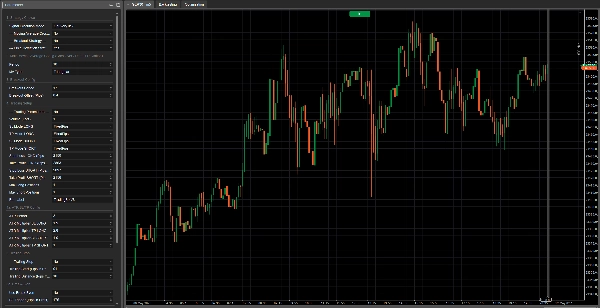
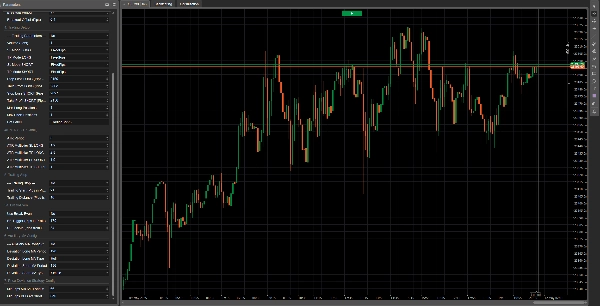
- Cấu hình sâu và trực quan: Mọi khía cạnh của bot đều nằm trong tầm kiểm soát của bạn nhờ bảng tham số toàn diện và được tổ chức tốt. Định nghĩa khối lượng, chu kỳ chỉ báo, loại đường trung bình động (bao gồm các MA phụ trợ cho chiến lược lệch giá), và mọi chi tiết trong quản lý giao dịch của bạn.
- Thiết kế cho hiệu quả:
-
- Logic khởi tạo tối ưu: Các chỉ báo chỉ được tải khi thực sự cần thiết, đảm bảo hiệu suất tối ưu.
- Mã nguồn sạch và có chú thích: Dành cho những ai muốn hiểu rõ "bên trong", mã được cấu trúc rõ ràng và logic.
- Phản hồi chi tiết: Mọi hành động của bot, từ mở lệnh đến quản lý SL/TP và Trailing Stop, đều được ghi lại với các thông báo rõ ràng, giúp bạn theo dõi từng bước đi của nó.
Lưu ý quan trọng về tối ưu hóa:
Xin lưu ý rằng phiên bản này của Ema Up&Down 2025 là một công cụ mạnh mẽ, linh hoạt được cung cấp mà không có tối ưu hóa trước cho bất kỳ tài sản hoặc điều kiện thị trường cụ thể nào. Điều này mang lại cho bạn sự tự do hoàn toàn để thử nghiệm và tùy chỉnh theo công cụ ưa thích của bạn. Tin vui! Các phiên bản tối ưu hóa cho nhiều tài sản sẽ sớm được cung cấp. Nếu bạn đang tìm kiếm tối ưu hóa tùy chỉnh, theo yêu cầu phù hợp với chiến lược giao dịch độc đáo hoặc tài sản cụ thể của bạn, đừng ngần ngại liên hệ với chúng tôi!
Ema Up&Down 2025 lý tưởng cho:
- Các nhà giao dịch tìm kiếm một bot đa năng có khả năng thích ứng với các điều kiện thị trường khác nhau và sẵn sàng tự thực hiện tối ưu hóa.
- Các nhà phát triển mong muốn một nền tảng vững chắc và có cấu trúc tốt để xây dựng thêm các tùy chỉnh.
- Bất kỳ ai muốn tự động hóa chiến lược của mình với mức độ kiểm soát cao đối với quản lý rủi ro và quá trình tối ưu hóa.
Với Ema Up&Down 2025, bạn không chỉ tự động hóa giao dịch; bạn đang triển khai một tầm nhìn chiến lược hoàn chỉnh. Hãy sẵn sàng khám phá một cách tiếp cận mới để chinh phục thị trường, với một trợ lý không bao giờ ngủ và làm việc không mệt mỏi vì mục tiêu của bạn. arkets, with an assistant that never sleeps and works tirelessly towards your goals.
Dưới đây là giải thích về từng tham số:
Nhóm 1: Lựa chọn chiến lược
Chế độ thực thi tín hiệu-
- Tên hiển thị: Chế độ thực thi tín hiệu
- Giá trị mặc định:
OnBarClose - Giải thích: Xác định khi nào bot nên đánh giá tín hiệu giao dịch và có thể mở vị thế.
-
OnBarClose: Tín hiệu chỉ được kiểm tra khi thanh nến đóng. Cách tiếp cận này chờ xác nhận thanh nến trước khi hành động.OnEveryTick: Tín hiệu được kiểm tra trên mỗi tick (thay đổi giá). Cách tiếp cận này phản ứng nhanh hơn nhưng có thể dẫn đến tín hiệu dựa trên biến động giá chưa được xác nhận bởi đóng thanh nến.
--- Chiến lược giao cắt trung bình động ---(Tham số thực tế:UseMACrossoverStrategy)-
- Tên hiển thị: --- Chiến lược giao cắt trung bình động ---
- Giá trị mặc định:
true(Bật) - Giải thích: Một công tắc đơn giản (true/false). Nếu đặt thành
true, bot sẽ sử dụng chiến lược giao cắt trung bình động để tạo tín hiệu mua hoặc bán.
--- Chiến lược Breakout ---(Tham số thực tế:UseBreakoutStrategy)-
- Tên hiển thị: --- Chiến lược Breakout ---
- Giá trị mặc định:
false(Tắt) - Giải thích: Một công tắc (true/false). Nếu đặt thành
true, bot sẽ kích hoạt chiến lược breakout, cố gắng vào thị trường khi giá phá vỡ trên mức cao gần đây hoặc dưới mức thấp gần đây.
--- Chiến lược lệch giá ---(Tham số thực tế:UsePriceDeviationStrategy)-
- Tên hiển thị: --- Chiến lược lệch giá ---
- Giá trị mặc định:
false(Tắt) - Giải thích: Một công tắc (true/false). Nếu đặt thành
true, bot sẽ sử dụng chiến lược dựa trên sự lệch giá so với đường trung bình động.
Nhóm 2: Cấu hình trung bình động chính (Crossover / Lệch giá mặc định)
Các tham số này áp dụng cho đường trung bình động được sử dụng bởi chiến lược "Giao cắt trung bình động" và, trừ khi được chỉ định khác, bởi chiến lược "Lệch giá".
Chu kỳ-
- Tên hiển thị: Chu kỳ
- Giá trị mặc định: 20
- Giá trị tối thiểu: 1
- Giải thích: Xác định số thanh nến trước đó được sử dụng để tính toán đường trung bình động chính. Chu kỳ dài hơn sẽ tạo ra đường trung bình động mượt mà, phản ứng chậm hơn; chu kỳ ngắn hơn sẽ làm nó phản ứng nhanh hơn.
Loại MA-
- Tên hiển thị: Loại MA
- Giá trị mặc định:
Simple(Trung bình động đơn giản - SMA) - Giải thích: Chỉ định loại trung bình động được sử dụng. Các lựa chọn phổ biến bao gồm:
-
Simple (SMA): Tính trung bình cộng số học đơn giản của giá đóng cửa.Exponential (EMA): Ưu tiên trọng số cho giá gần đây hơn, làm cho nó phản ứng nhanh hơn SMA.Weighted (WMA): Tương tự EMA, gán trọng số giảm dần theo đường thẳng cho các giá trong quá khứ.- Các loại khác có thể có tùy thuộc vào nền tảng (ví dụ: Smoothed, Hull).
Nhóm 3: Cấu hình Breakout
Các tham số này dành riêng cho "Chiến lược Breakout."
Chu kỳ Breakout-
- Tên hiển thị: Chu kỳ Breakout
- Giá trị mặc định: 20
- Giá trị tối thiểu: 2
- Giải thích: Xác định số thanh nến trước đó (không tính hai thanh cuối cùng) để tìm mức cao nhất và thấp nhất. Bot sẽ cố gắng vào lệnh khi giá phá vỡ các mức này.
Độ lệch Breakout (Pips)-
- Tên hiển thị: Độ lệch Breakout (Pips)
- Giá trị mặc định: 1.0
- Giá trị tối thiểu: 0.0
- Bước: 0.1
- Giải thích: Một giá trị tính bằng pips được cộng vào mức cao (cho tín hiệu mua) hoặc trừ đi mức thấp (cho tín hiệu bán) của "Chu kỳ Breakout." Đây là một bộ đệm hoặc bộ lọc để tránh các breakout giả quá gần các mức cực đoan. Độ lệch 0 nghĩa là tín hiệu kích hoạt chính xác tại điểm phá vỡ.
Nhóm 4: Cài đặt giao dịch
PlaceholderTrading-
- Tên hiển thị: --- Tham số giao dịch --- (tên tham số thực tế trong mã là
PlaceholderTrading, nhưng nhóm được đặt tên "--- Tham số giao dịch ---") - Giải thích: Tham số boolean này (
true/false) có trong mã nhưng dường như không có tác dụng trực tiếp trong logic giao dịch. Có thể đây là phần còn lại của phiên bản trước hoặc là chỗ dành cho chức năng tương lai. Trong bối cảnh hiện tại, thay đổi nó sẽ không ảnh hưởng đến hành vi của bot.
- Tên hiển thị: --- Tham số giao dịch --- (tên tham số thực tế trong mã là
Khối lượng (Lots)Chế độ SL LONG/Chế độ TP LONG/Chế độ SL SHORT/Chế độ TP SHORT-
- Tên hiển thị: Chế độ SL LONG, Chế độ TP LONG, Chế độ SL SHORT, Chế độ TP SHORT
- Giá trị mặc định:
FixedPipscho tất cả - Giải thích: Xác định cách tính Stop Loss (SL) và Take Profit (TP) cho các vị thế Long (mua) và Short (bán).
-
FixedPips: SL/TP sẽ được đặt ở một số pips cố định so với giá vào lệnh (được định nghĩa trong các tham số tiếp theo).ATR: SL/TP sẽ được tính toán động dựa trên Average True Range (ATR), nhân với một hệ số nhất định (được định nghĩa trong các tham số nhóm "Cấu hình ATR SL/TP").
Stop Loss LONG (Pips - Nếu cố định)/Take Profit LONG (Pips - Nếu cố định)/Stop Loss SHORT (Pips - Nếu cố định)/Take Profit SHORT (Pips - Nếu cố định)-
- Tên hiển thị: Stop Loss LONG (Pips - Nếu cố định), Take Profit LONG (Pips - Nếu cố định), v.v.
- Giá trị mặc định: SL 20 pips, TP 40 pips cho cả Long và Short.
- Giá trị tối thiểu: 0
- Giải thích: Nếu chế độ SL/TP tương ứng được đặt là
FixedPips, các tham số này xác định khoảng cách tính bằng pips cho Stop Loss hoặc Take Profit. Giá trị 0 nghĩa là SL hoặc TP đó sẽ không được đặt (nếu chế độ là FixedPips).
Số vị thế Long tối đa/Số vị thế Short tối đa-
- Tên hiển thị: Số vị thế Long tối đa, Số vị thế Short tối đa
- Giá trị mặc định: 1 cho cả hai
- Giá trị tối thiểu: 1
- Giải thích: Số lượng vị thế Long (mua) hoặc Short (bán) tối đa mà bot có thể mở cùng lúc cho công cụ và khung thời gian cụ thể này.
Nhãn bot-
- Tên hiển thị: Nhãn bot
- Giá trị mặc định: "TradingBotV8" (bạn có thể muốn đổi thành "Ema Up&Down 2025")
- Giải thích: Một nhãn văn bản dùng để nhận diện các vị thế được mở bởi phiên bản bot cụ thể này. Nó hữu ích để phân biệt các giao dịch của bot này với các bot khác hoặc giao dịch thủ công, đặc biệt trong nhật ký và quản lý vị thế (ví dụ: cho Trailing Stop và Break-Even).
Nhóm 4a: Cấu hình ATR SL/TP
Các tham số này chỉ liên quan nếu một trong các chế độ SL/TP (cho Long hoặc Short) được đặt là ATR.
Chu kỳ ATR-
- Tên hiển thị: Chu kỳ ATR
- Giá trị mặc định: 14
- Giá trị tối thiểu: 1
- Giải thích: Số thanh nến được sử dụng để tính chỉ báo Average True Range (ATR), đo biến động thị trường.
Hệ số nhân ATR SL LONG/Hệ số nhân ATR TP LONG/Hệ số nhân ATR SL SHORT/Hệ số nhân ATR TP SHORT-
- Tên hiển thị: Hệ số nhân ATR SL LONG, Hệ số nhân ATR TP LONG, v.v.
- Giá trị mặc định: SL 1.5, TP 3.0 cho cả Long và Short.
- Giá trị tối thiểu: 0.1
- Bước: 0.1
- Giải thích: Hệ số nhân mà giá trị ATR sẽ được nhân để xác định khoảng cách Stop Loss hoặc Take Profit tính bằng pips. Ví dụ, nếu ATR là 10 pips và
Hệ số nhân ATR SL LONGlà 1.5, Stop Loss cho vị thế Long sẽ được đặt ở 15 pips (10 * 1.5) so với giá vào lệnh.
Nhóm 5: Trailing Stop
--- Trailing Stop ---(Tham số thực tế:UseTrailingStop)-
- Tên hiển thị: --- Trailing Stop ---
- Giá trị mặc định:
false(Tắt) - Giải thích: Một công tắc (true/false). Nếu đặt thành
true, bot sẽ kích hoạt chức năng Trailing Stop cho các vị thế mở.
Bắt đầu Trailing (Pips có lợi nhuận)-
- Tên hiển thị: Bắt đầu Trailing (Pips có lợi nhuận)
- Giá trị mặc định: 10
- Giá trị tối thiểu: 1
- Giải thích: Số pips lợi nhuận mà một vị thế phải đạt được trước khi Trailing Stop bắt đầu hoạt động.
Khoảng cách Trailing (Pips so với giá)-
- Tên hiển thị: Khoảng cách Trailing (Pips so với giá)
- Giá trị mặc định: 10
- Giá trị tối thiểu: 1
- Giải thích: Khi được kích hoạt, Stop Loss sẽ được duy trì ở khoảng cách này tính bằng pips so với mức giá thị trường thuận lợi nhất đã đạt được (từ Bid cho vị thế Long, từ Ask cho vị thế Short).
Nhóm 5a: Break-Even
Sử dụng Break-Even-
- Tên hiển thị: Sử dụng Break-Even
- Giá trị mặc định:
false(Tắt) - Giải thích: Một công tắc (true/false). Nếu đặt thành
true, bot sẽ kích hoạt chức năng Break-Even.
Kích hoạt BE (Pips có lợi nhuận)-
- Tên hiển thị: Kích hoạt BE (Pips có lợi nhuận)
- Giá trị mặc định: 15
- Giá trị tối thiểu: 1
- Giải thích: Số pips lợi nhuận mà một vị thế phải đạt được trước khi Stop Loss được di chuyển về điểm hòa vốn (hoặc hơi có lợi nhuận).
Khóa BE (Pips so với giá vào lệnh)-
- Tên hiển thị: Khóa BE (Pips so với giá vào lệnh)
- Giá trị mặc định: 1
- Giá trị tối thiểu: 0
- Giải thích: Số pips vượt quá giá vào lệnh mà Stop Loss sẽ được đặt khi Break-Even được kích hoạt. Ví dụ, với giá trị 1, SL sẽ được di chuyển đến "giá vào lệnh + 1 pip" cho vị thế Long, hoặc "giá vào lệnh - 1 pip" cho vị thế Short. Giá trị 0 sẽ di chuyển SL chính xác đến giá vào lệnh.
Nhóm 6: Cấu hình MA phụ trợ (cho chiến lược lệch giá)
Các tham số này chỉ liên quan nếu "Chiến lược lệch giá" đang hoạt động (UsePriceDeviationStrategy = true) VÀ bạn chọn sử dụng các đường trung bình động riêng biệt cho chiến lược này (UseSeparateMAForDeviation = true).
UseSeparateMAForDeviation-
- Tên hiển thị: UseSeparateMAForDeviation
- Giá trị mặc định:
false - Giải thích: Một công tắc (true/false). Nếu
false(mặc định), chiến lược lệch giá sẽ sử dụng đường trung bình động chính (được cấu hình trong Nhóm 2). Nếutrue, nó sẽ sử dụng các đường trung bình động riêng biệt cho tín hiệu Long và Short, được cấu hình với các tham số tiếp theo trong nhóm này.
Chu kỳ MA Long lệch/Loại MA Long lệch-
- Tên hiển thị: Chu kỳ MA Long lệch, Loại MA Long lệch
- Giá trị mặc định: Chu kỳ 20, Loại
Simple - Giải thích: Chu kỳ và loại đường trung bình động được sử dụng để đánh giá tín hiệu mua (Long) trong chiến lược lệch giá, chỉ khi
UseSeparateMAForDeviationlàtrue.
Chu kỳ MA Short lệch/Loại MA Short lệch-
- Tên hiển thị: Chu kỳ MA Short lệch, Loại MA Short lệch
- Giá trị mặc định: Chu kỳ 20, Loại
Simple - Giải thích: Chu kỳ và loại đường trung bình động được sử dụng để đánh giá tín hiệu bán (Short) trong chiến lược lệch giá, chỉ khi
UseSeparateMAForDeviationlàtrue.
Nhóm 7: Cấu hình chiến lược lệch giá
Các tham số này chỉ liên quan nếu "Chiến lược lệch giá" đang hoạt động (UsePriceDeviationStrategy = true).
Số pips tối thiểu trên MA Long để MUA-
- Tên hiển thị: Số pips tối thiểu trên MA Long để MUA
- Giá trị mặc định: 10.0
- Giá trị tối thiểu: 0.0
- Bước: 0.1
- Giải thích: Đối với chiến lược lệch giá, số pips tối thiểu mà giá hiện tại (Ask) phải cao hơn đường trung bình động liên quan (chính hoặc
DeviationLongMA) để tạo tín hiệu mua.
Số pips tối thiểu dưới MA Short để BÁN-
- Tên hiển thị: Số pips tối thiểu dưới MA Short để BÁN
- Giá trị mặc định: 10.0
- Giá trị tối thiểu: 0.0
- Bước: 0.1
- Giải thích: Đối với chiến lược lệch giá, số pips tối thiểu mà giá hiện tại (Bid) phải thấp hơn đường trung bình động liên quan (chính hoặc
DeviationShortMA) để tạo tín hiệu bán.
Tóm tắt
The bot features professional-grade risk management tools, including dynamic Stop Loss (SL) and Take Profit (TP) settings configurable as fixed pip distances or based on market volatility using the Average True Range (ATR) indicator with adjustable multipliers for long and short positions. It supports intelligent trailing stops that activate after a defined profit threshold and automatic break-even functionality to secure trades once a specified profit level is reached.
EMA Up&Down 2025 provides deep configurability through a comprehensive parameter panel, allowing users to define trade volumes, indicator periods, moving average types (Simple, Exponential, Weighted, etc.), and detailed trade management settings. The bot is optimized for efficiency, loading indicators only as needed, with clean, commented code and detailed logging of all trading actions.
This version is unoptimized for specific assets or market conditions, enabling users to tailor and optimize it for their preferred instruments. It is suitable for traders seeking adaptable automation, developers wanting a solid foundation for customization, and anyone requiring precise control over risk and strategy optimization.
Đánh giá của khách hàng
5 | 50 % | |
4 | 50 % | |
3 | 0 % | |
2 | 0 % | |
1 | 0 % |