![Trading product for [CB] RR Management cBot Forex Indices, image 1](https://cdn.ctrader.com/image/webp/0390d544-4996-4346-974b-d41dd9e73c64_32505)
![Trading product for [CB] RR Management cBot Forex Indices, image 2](https://cdn.ctrader.com/image/webp/62a2f277-6531-4405-9387-d4eec2142b06_32506)
![Trading product for [CB] RR Management cBot Forex Indices, image 3](https://cdn.ctrader.com/image/webp/b9dad7e0-8fa2-4f29-8bf7-8b47116e97fa_32507)
![Trading product for [CB] RR Management cBot Forex Indices, image 4](https://cdn.ctrader.com/image/webp/772e2aa1-7349-43fa-ae70-fdc71ff9cf24_32508)
![Trading product for [CB] RR Management cBot Forex Indices, image 5](https://cdn.ctrader.com/image/webp/f2cdb27c-4b85-472a-a3c8-a2d607c06558_32509)
![Trading product for [CB] RR Management cBot Forex Indices, image 6](https://cdn.ctrader.com/image/webp/2d928340-8ae7-49f7-8942-4263af502b02_32510)
Descrizione
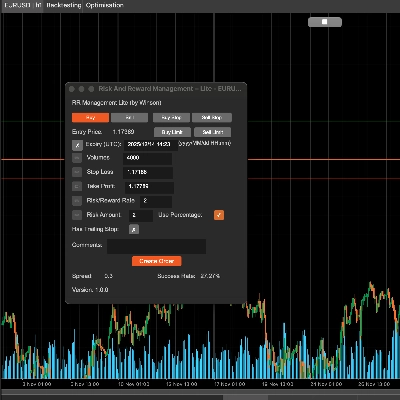
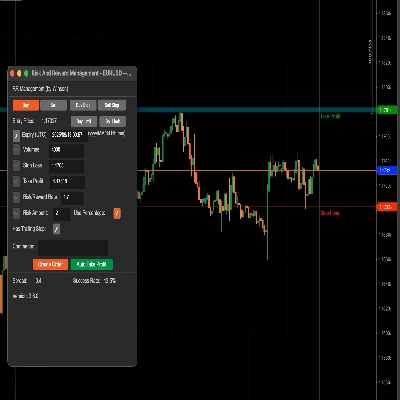
Lo strumento di gestione Rischio & Ricompensa di cTrader può aiutarti facilmente a impostare i valori di rischio rispetto alla ricompensa, puoi semplicemente trascinare le linee di take profit & stop loss per calcolare automaticamente l'importo del rischio o i volumi necessari da utilizzare. Inoltre, è inclusa una funzione automatica di take profit che ti permetterà di impostare quattro (4) scenari diversi per bloccare quei profitti.
Pianificare le tue operazioni è una delle parti più importanti della vita di un trader giornaliero, se non lo fai fallirai, questo strumento ti permetterà di impostare facilmente i tuoi obiettivi di take profit e stop-loss a seconda della tua propensione al rischio.
Caratteristiche principali
- Trascina la linea TP/SL per calcolare automaticamente i valori di rischio/ricompensa
- Take profit automatico per ordini pendenti.
- Basato sul valore sottostante per impostare le informazioni di rischio/ricompensa
- Volumi: impostare i volumi calcolerà automaticamente l'importo del rischio
- Stop Loss: imposta lo SL per calcolare il tasso e l'importo TP/RR
- Take Profit: impostare il TP calcolerà automaticamente il tasso e l'importo SL/RR
- Tasso Rischio/Ricompensa: impostare il tasso RR calcolerà automaticamente il TP
- Importo del rischio (con/senza percentuale): puoi impostare il valore effettivo o con la percentuale
- Puoi usare lo stop trailing
- Aggiungi commenti all'ordine
- Supporta ordini Buy, Sell, Buy Stop, Sell Stop
- Imposta il take profit automatico (ma poiché questo è un cBot, se usi questa funzione non puoi fermare lo strumento)
- Supporta Windows e MacOS
Trascina la linea dello stop loss (il colore predefinito è verde) e calcolerà automaticamente il tasso di rischio & ricompensa e l'importo del volume per la dimensione della posizione. Puoi anche aggiornare il volume tramite input manuale, quando cambi il valore sottostante, l'icona di modifica a sinistra sarà abilitata così potrai aggiornare i valori.
Supporto per ordini Buy & Sell Limit
Lo strumento ora supporta sia ordini buy che sell limit con una data/ora di scadenza.
Usa Percentuale
Se vuoi usare la percentuale basata sul tuo saldo, basta cliccare sulla casella Usa Percentuale o verrà usato il valore effettivo. Nota: se il saldo del tuo conto è basso, il volume calcolato non scenderà sotto la dimensione minima della posizione consentita per il simbolo.
Tasso Rischio & Ricompensa
Puoi impostare il rischio rispetto alla ricompensa per il tuo stop loss e take profit, quindi un tasso Rischio/Ricompensa di 2 sarà dove il tuo take profit è il doppio del tuo rischio, quando clicchi sul pulsante di vendita lo stop loss e il take profit saranno calcolati automaticamente usando questo rapporto.
Tasso di Successo
Il tasso di successo si basa su tutti i tuoi ordini storici, calcolerà gli ordini di successo per il tasso, e il "Trailing Stop" è solo un'opzione nativa di cTrader per creare un ordine da eseguire, io passo semplicemente questo quando crei l'ordine.
Pulsante Auto Take Profit
Ci sono 3 livelli per impostare il take profit automatico, il che significa che puoi usare 4 condizioni per prendere profitto, per esempio:
- Prendi il 50% di take profit parziale dopo aver superato il 60% dell'obiettivo di profitto.
- Prendi il 50% di take profit parziale quando il prezzo del simbolo raggiunge 60 o per Forex qualcosa come 1.72245
Puoi modificare i valori sopra in tempo reale, avranno effetto immediatamente se hai avviato il pulsante take profit. Resetterà anche tutti i valori dopo aver fermato il cBot. Se profit 1 allora non sarà preso di nuovo, ciò significa che funziona solo una volta per ogni condizione di profitto a meno che non si fermi il profitto automatico e si riavvii, resettando tutti gli stati delle condizioni.
Aggiornamento: Ora è supportato che gli ordini pendenti abbiano il take profit automatico applicato quando diventano ordini di mercato.
Aggiornamento: Puoi anche impostare una condizione di take profit in pips, quindi puoi scegliere una % del totale, il prezzo e anche il numero di pips.
Uso del Volume per il Take Profit
Invece di usare il 50% o un'altra percentuale nella casella Take Profit, puoi usare un valore come 1000 (1K) che è il volume della posizione.
Ma non dimenticare di selezionare la casella verde per abilitare questa condizione di take profit.
Imposta l'etichetta dell'ordine per prendere profitto, questo perché potrebbero esserci più ordini contemporaneamente, quindi devi definire quale ordine vuoi usare per il take profit automatico, e se usi questo strumento per creare l'ordine, imposterà automaticamente l'etichetta dell'ordine qui.
Come gestire le operazioni da un altro cBot?
Puoi anche usare questo strumento per gestire le operazioni aperte da un altro cBot semplicemente impostando un nome etichetta quando l'ordine viene inviato e usando lo stesso nome etichetta nel campo sopra per il label dell'ordine per prendere profitto.
Imposta un Break-Even
Questo strumento permetterà anche di applicare un break-even alle tue operazioni, ancora una volta, puoi usare sia una percentuale del saldo totale del conto o un prezzo fisso.
Per applicare le impostazioni e tornare alla schermata principale devi cliccare sul Start Take Profit pulsante.
Impostazioni dei Parametri
Quando alleghi il cBot a un grafico ti verrà mostrata prima la finestra delle impostazioni principali.
Impostazioni di Stile
Imposta qui il colore e lo spessore delle linee SL/TP e del prezzo corrente.
Allineamento del pannello
Imposta qui la posizione del pannello, ma puoi anche usare Ctrl+Mouse per spostare il pannello.
Gestione RR
- Imposta i valori predefiniti per le informazioni di rischio/ricompensa.
- Auto Take Profit 1,2,3 - imposta i valori predefiniti per la funzione di take profit automatico, ci sono 3 livelli di take profit.
- Auto Set Break-Even - imposta il valore predefinito per il break-even automatico quando viene raggiunto.
![Logo di "[CB] Pivot Points Pro"](https://cdn.ctrader.com/image/webp/43463c82-67b0-4f10-a4ba-901bba091d81_32594)