Penerangan
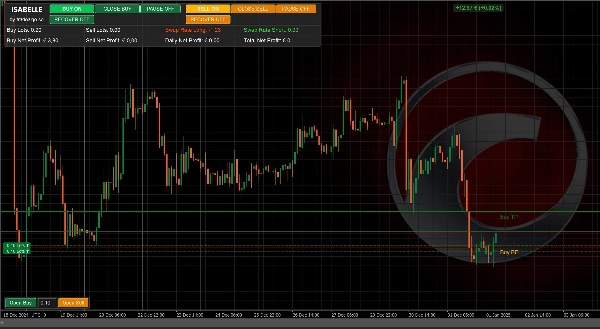
Isabelle adalah pembantu dagangan automatik penuh dan separa yang canggih untuk pedagang yang mahukan yang terbaik dari kedua-dua dunia: automasi yang berkuasa dan kawalan pada carta. Jalankan ia secara automatik sepenuhnya dengan penjadualan pintar, logik grid adaptif volatiliti, mod pemulihan, dan pengurusan keuntungan jejak maya — atau ambil kawalan dengan panel intuitif yang membolehkan anda berhenti seketika, pulih, dan buka/tutup posisi secara manual.
Apa yang baru dalam v5.0.0
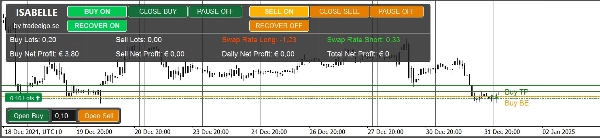
- Panel Utama Baru dengan analitik tambahan:
-
- Jumlah Lot Sisi (Beli/Jual)
- Kadar Swap Langsung (panjang/pendek) dengan pewarnaan positif/negatif
- Paparan keuntungan yang diperluaskan (Beli, Jual, Harian, Jumlah)
- Penapis Dagangan Baru
-
- Penapis Arah Pusat Graviti (CoG) (pilihan)
- RSI penapis dengan kawalan jangka masa dan ambang (pilihan)
- Penambahbaikan UX umum, kemas kini visual pada carta yang lebih lancar, dan dalaman yang berorientasikan prestasi.
Mengapa pedagang memilih Isabelle
- Fleksibel mengikut reka bentuk: Input Isabelle merangkumi penjadualan, jarak grid, jeda dinamik, penapis, jejak, pemulihan, dan UI — jadi anda boleh mengkonfigurasikannya untuk menyesuaikan kebanyakan gaya dagangan: grid tanpa sentuhan, pembalikan purata yang berdisiplin, scalping separa manual dengan bantuan automasi, atau pengurusan sesi berfokuskan pemulihan.
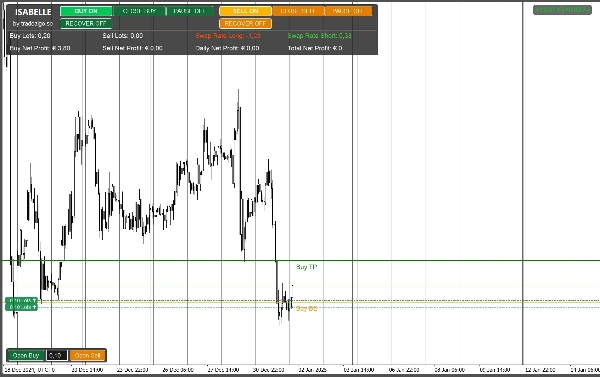
- Visual yang tepat: Garis BE/TP/SL/jejak pada carta serta panel keuntungan yang jelas memastikan anda sedar risiko dan kemajuan dengan sekilas pandang.
- Sedar pemulihan: Togol pemulihan atau aktifkan automatik selepas ambang. Kurangkan sasaran keuntungan dengan bijak semasa fasa mencabar.
- Adaptif volatiliti: Enjin Sisihan Piawai yang dilicinkan secara dinamik meregangkan atau memampatkan jeda antara kemasukan untuk menyesuaikan dengan keadaan pasaran semasa.
Keupayaan teras
- Dagangan grid dengan langkah boleh dikonfigurasikan, pertumbuhan volum, maksimum pesanan setiap sisi, dan SL tetap pilihan.
- Jeda Dinamik berdasarkan volatiliti yang dilicinkan (tempoh StdDev + jangka masa) dengan had min/maks.
- Mod Pemulihan dengan empat tingkah laku sasaran: Tiada perubahan, Separuh, Dibahagi mengikut Posisi, atau Pulangan Modal.
- Ambil Untung Maya / Untung Jejak:
-
- TP Tetap (mata dari titik pulang modal bersih termasuk komisen & swap), atau
- Jejak maya yang diaktifkan selepas sasaran dicapai.
- Penapis & Keselamatan:
-
- Penapis spread, tingkap dagangan, pilihan CoG dan RSI.
- Panel kawalan pada carta:
-
- Ringkasan keuntungan (Beli/Jual/Harian/Jumlah), Lot mengikut sisi, Swap panjang/pendek
- Butang BELI/JUAL manual, togol jeda sisi, dan togol pemulihan.
- Lapisan visual:
-
- Lukisan automatik BE, pengaktifan TP, SL, dan (apabila aktif) Jejak garis.
Nota demo: Demo Kedai berfungsi dalam ujian semula sahaja untuk menilai logik dan UI. Untuk ujian langsung/maju anda memerlukan binaan berlesen.
Aliran kerja yang dicadangkan
Grid tanpa sentuhan:
Tetapkan waktu dagangan, jarak langkah, pesanan maksimum, lot asas & pengganda; aktifkan jeda dinamik; biarkan penapis dimatikan atau sedikit berat sebelah.
Kawalan separa manual:
Nyahaktifkan pesanan benih, gunakan butang manual panel untuk membuka arah awal, kekalkan pemulihan tersedia, dan biarkan jejak/TP mengurus keluar.
Sesi berfokuskan pemulihan:
Aktifkan Pemulihan Automatik selepas N posisi, pilih tingkah laku sasaran yang dikurangkan, dan bergantung pada visual (garis BE/TP + panel) untuk pengawasan.
Peringatan risiko
Isabelle adalah alat yang berkuasa. Jika salah konfigurasi atau digunakan dengan leverage tinggi, dagangan grid boleh menghasilkan kerugian besar atau kerugian bencana. Sentiasa uji hadapan dalam demo, saiz dengan berhati-hati, dan gunakan penapis/kawalan penjadualan serta ciri pemulihan dengan bijak.
Rujukan parameter penuh (v5.0.0)
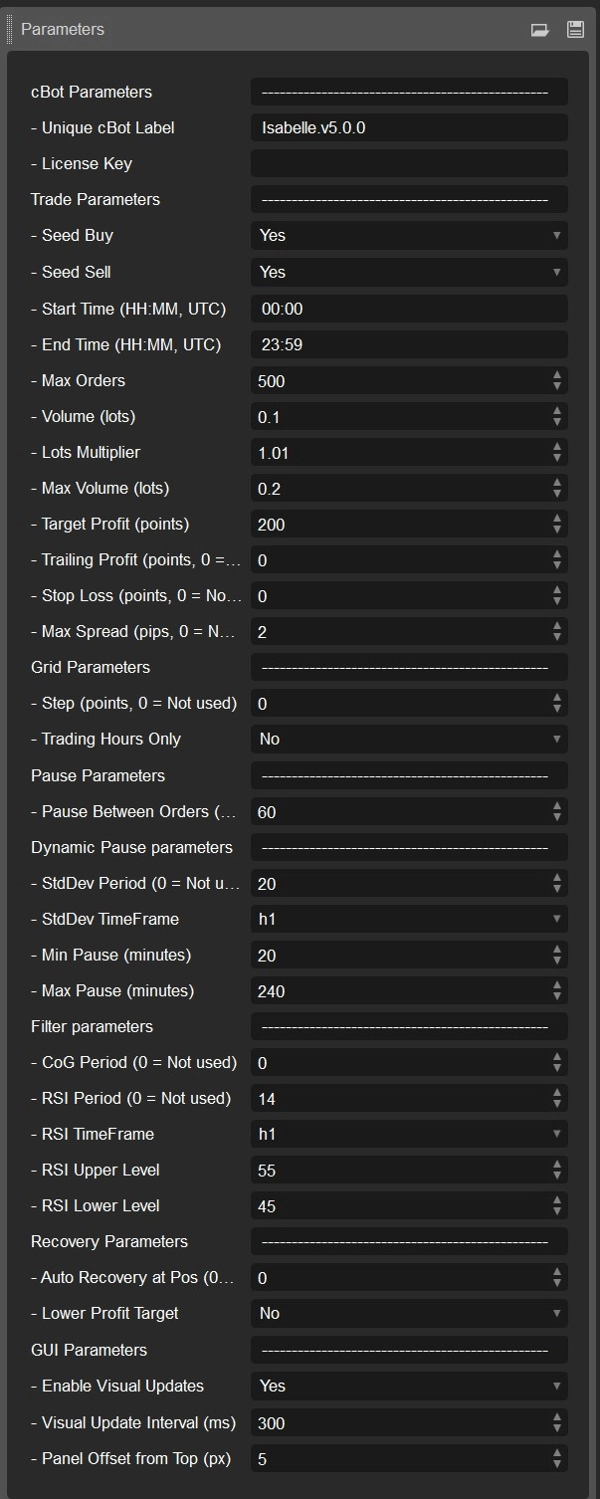
Semua parameter di bawah mencerminkan sumber dan lalai semasa.
Identiti / Pelesenan
- Label CBot (lalai:
Isabelle.v5.0.0) — Mengelompokkan posisi/sejarah untuk contoh ini. Tukar apabila menjalankan beberapa salinan. - Kunci Lesen — Diperlukan untuk binaan berlesen (tidak digunakan dalam demo/binaan ujian penuh).
Parameter Dagangan
- Beli Benih (lalai: HIDUP) — Buka BELI pertama secara automatik apabila dibenarkan.
- Jual Benih (lalai: HIDUP) — Buka JUAL pertama secara automatik apabila dibenarkan.
- Masa Mula (UTC) (lalai:
00:00) — Masa paling awal untuk membuka posisi baru. - Masa Tamat (UTC) (lalai:
23:59) — Masa paling lewat untuk membuka posisi baru. - Pesanan Maksimum (lalai: 500) — Had posisi terbuka setiap sisi (BELI/JUAL).
- Isipadu (lot) (lalai: 0.01) — Saiz lot awal untuk posisi pertama setiap sisi.
- Pengganda Lot (lalai: 1.01) — Faktor pertumbuhan untuk setiap pesanan grid tambahan (1.0 = saiz tetap).
- Isipadu Maksimum (lot) (lalai: 0.02) — Had keras setiap pesanan tunggal (selepas pengganda).
- Sasaran Untung (mata) (lalai: 50) — Jarak dari titik pulang modal bersih ke pengaktifan TP (10 mata ≈ 1 pip pada banyak simbol).
- Untung Jejak (mata) (lalai: 0) — Jika 0: tutup pada TP tetap; jika >0: gunakan jejak maya saiz ini selepas pengaktifan TP.
- Henti Rugi (mata) (lalai: 0) — SL tetap pilihan dari kemasukan berwajaran (0 = dimatikan).
- Spread Maksimum (pip) (lalai: 1.0) — Sekat pesanan baru jika spread semasa ≥ nombor ini (0 = dimatikan).
Parameter Grid
- Langkah (mata) (lalai: 0) — Jarak minimum dari kemasukan terakhir untuk menambah pesanan grid lain (0 = tiada penapis jarak).
- Hanya Waktu Dagangan (lalai: MATI) — Jika HIDUP, kemasukan grid/benih hanya berlaku dalam tempoh Mula–Tamat.
Parameter Jeda
- Jeda Antara Pesanan (minit) (lalai: 60) — Penyejukan asas setiap sisi; boleh ditimpa oleh Jeda Dinamik.
Jeda Dinamik (Adaptif Volatiliti)
- Tempoh StdDev (lalai: 20) — Panjang pensampelan StdDev (0 = dimatikan).
- Jangka Masa StdDev (lalai: Jam) — Jangka masa bar untuk pensampelan volatiliti.
- Jeda Min (minit) (lalai: 20) — Had bawah pada jeda adaptif.
- Jeda Maks (minit) (lalai: 240) — Had atas pada jeda adaptif.
Parameter Penapis (semua pilihan)
- Tempoh CoG (lalai: 50, 0 = mati) — Memerlukan CoG condong ke arah dagangan (Beli perlu condong naik; Jual perlu condong turun).
- Tempoh RSI (lalai: 14, 0 = mati) — Penapisan RSI berdasarkan jangka masa di bawah.
- Jangka Masa RSI (lalai: Jam) — Jangka masa pensampelan RSI.
- Tahap Atas RSI (lalai: 55) — Jual dibenarkan hanya jika RSI ≥ Atas (apabila penapis RSI dihidupkan).
- Tahap Bawah RSI (lalai: 45) — Beli dibenarkan hanya jika RSI ≤ Bawah (apabila penapis RSI dihidupkan).
Parameter Pemulihan
- Pemulihan Automatik pada Posisi (lalai: 0 = mati) — Aktifkan pemulihan automatik selepas N posisi terbuka pada satu sisi.
- Sasaran Untung Lebih Rendah (lalai:
Tiada) — Tingkah laku semasa pemulihan: -
- Tiada — Kekalkan sasaran tidak berubah
- Separuh — SasaranUntung / 2
- DibahagiMengikutPosisi — SasaranUntung / posisi terbuka (min 1 mata)
- PulanganModal — Aktif tepat pada BE (sasaran menjadi 0)
GUI / Visual
- Aktifkan Kemas Kini Visual (lalai: HIDUP) — Lukis garis BE/TP/SL/jejak dan label keuntungan. Matikan untuk ujian semula lebih pantas.
- Selang Kemas Kini Visual (ms) (lalai: 300) — Menggabungkan kemas kini (0 = kemas kini setiap tick).
- Offset Panel dari Atas (px) (lalai: 5) — Peralihan menegak untuk panel atas supaya tidak menutupi penunjuk.
Visual & panel
- Panel Utama (atas-kiri)
Untung Bersih Beli/Jual, Harian dan Jumlah Untung Bersih, Lot Beli/Jual, Kadar Swap Panjang/Pendek dengan pewarnaan intuitif. - Panel Dagangan (bawah-kiri)
Butang BELI/JUAL manual, togol jeda sisi, togol pemulihan, dan maklum balas status langsung. - Lapisan carta
-
- Garis BE (bersih dari komisen & swap)
- Garis Pengaktifan TP (dari BE oleh SasaranUntung)
- Garis SL Pilihan (dari kemasukan berwajaran)
- Garis Jejak Maya apabila jejak aktif
Demo vs Berlesen
- Binaan demo: Hanya ujian semula. Gunakannya untuk menilai logik, UI, dan prestasi di bawah pelbagai konfigurasi.
- Binaan berlesen: Diperlukan untuk ujian langsung atau maju. Hubungi pengarang untuk terma lesen.
Memulakan (resipi cepat)
- Uji semula simbol anda dengan Beli/Jual Benih HIDUP, pilih Isipadu dan Pesanan Maksimum yang konservatif.
- Tetapkan Langkah dan aktifkan Jeda Dinamik dengan min/maks yang munasabah.
- Tambah RSI dan/atau CoG penapis jika anda mahu pemilihan arah.
- Putuskan pada TP Tetap vs Jejak Maya (tetapkan Untung Jejak > 0).
- Pertimbangkan tingkah laku dan ambang Pemulihan; uji urutan kes terburuk.
- Bergerak ke ujian maju demo dengan binaan berlesen sebelum pergi langsung.
Ringkasan
New in version 5.0.0 are enhanced analytics on the main panel, including side lots totals, live swap rates with color coding, expanded profit readouts, and new trade filters based on Center of Gravity and RSI indicators. The interface provides precise visual overlays such as breakeven, take profit activation, stop loss, and trailing lines, along with comprehensive profit and status panels.
Isabelle supports multiple markets including Forex, Indices, Commodities, and Cryptocurrencies, with symbols like EURUSD, GBPUSD, BTCUSD, XAUUSD, and NAS100. The demo version operates in backtesting mode only, enabling evaluation of logic and UI, while licensed builds are required for live or forward testing. The bot offers flexible configuration to suit various trading styles, including hands-off grid trading, semi-manual scalping, and recovery-focused sessions.
Ulasan pelanggan
5 | 0 % | |
4 | 0 % | |
3 | 100 % | |
2 | 0 % | |
1 | 0 % |