
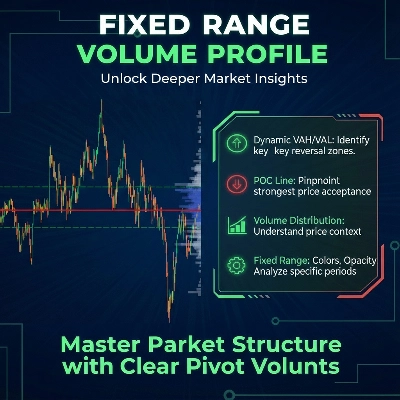
Fixed Range Volume Profile
Indicatore
5 acquisti
Versione 1.0, Jan 2026
Windows, Mac
4.0
Recensioni: 2
Da 26/09/2025
18
Vendite
Descrizione
Come utilizzare il Fixed Range Volume Profile (FRVP)
- Attiva l'indicatore: Trascina e rilascia il Indicatore FRVP sul grafico desiderato dal menu cTrader Automate o Indicatori.
- Seleziona lo strumento di analisi: Trova lo Strumento di disegno rettangolo standard nella barra degli strumenti di cTrader (tipicamente sul lato destro o sinistro della piattaforma).
- Definisci il tuo intervallo: Clicca e trascina il rettangolo sull'azione del prezzo e sul periodo di tempo specifico che desideri analizzare.
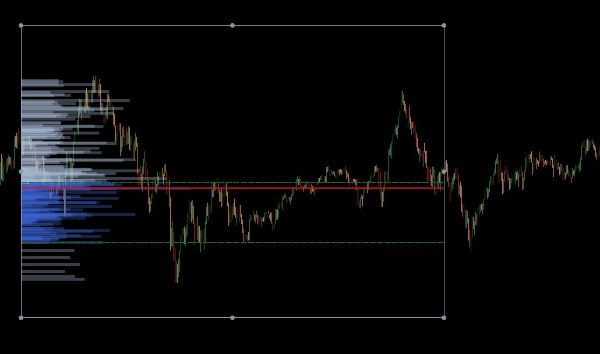
- Inizializza il profilo: Dopo aver disegnato, clicca e sposta leggermente il rettangolo. Questo "scambio di saluto" tra il disegno e l'indicatore attiva il calcolo del volume, generando istantaneamente l'istogramma, il POC e le linee dell'area di valore.
- Regola dinamicamente: Puoi trascinare i bordi del rettangolo per espandere l'intervallo di tempo o spostarlo su una diversa gamba di prezzo; il profilo di volume si ricalcolerà automaticamente per riflettere la nuova area.
Il Fixed Range Volume Profile (FRVP) per cTrader è uno strumento di analisi sofisticato progettato per identificare livelli di prezzo significativi calcolando la distribuzione del volume su un intervallo specifico di tempo e prezzo. A differenza degli indicatori di volume standard che corrispondono al tempo, questo indicatore si concentra sulla densità del prezzo per rivelare il sentimento del mercato.
Caratteristiche principali
- Selezione dinamica dell'intervallo: L'indicatore calcola e aggiorna automaticamente ogni volta che disegni o sposti un rettangolo standard sul tuo grafico cTrader.
- Identificazione dei livelli chiave:
-
- Point of Control (POC): Evidenzia il livello di prezzo con il volume più alto scambiato, agendo come una "calamita" per l'azione del prezzo.
- Value Area High/Low (VAH/VAL): Definisce i confini entro cui è stato scambiato un determinato percentuale di volume (predefinito 40%).
- Layout personalizzabili:
-
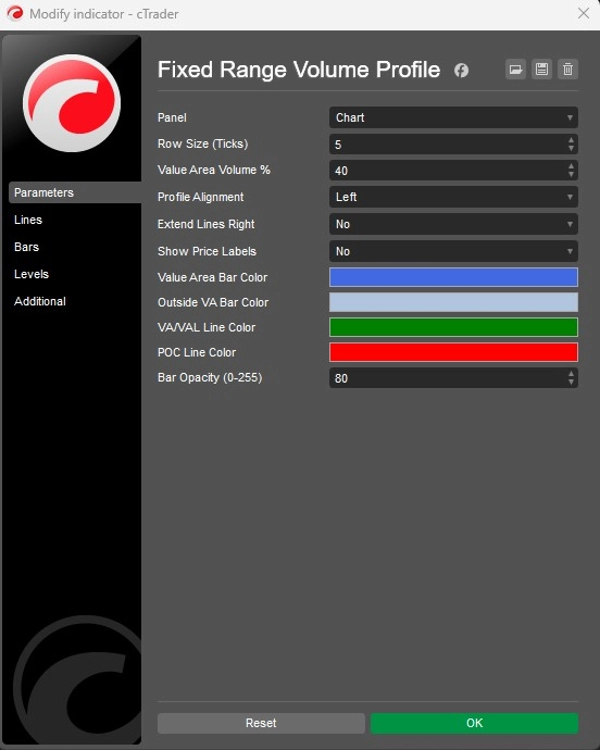
- Allineamento: Scegli di visualizzare l'istogramma del volume dal Lato sinistro o dal Lato destro della casella.
- Granularità: Regola la Dimensione della riga (predefinita 5 tick) per controllare il dettaglio delle barre di volume.
- Aspetto visivo: Controllo completo sui colori delle barre (Area di valore vs. Esterno), opacità e visibilità delle etichette di prezzo.
Applicazione strategica
- Supporto e resistenza: I nodi ad alto volume (HVN) spesso agiscono come forti supporti o resistenze, mentre i nodi a basso volume (LVN) rappresentano aree "sottili" dove il prezzo può muoversi rapidamente.
- Conferma del trend: Usa la funzione Estendi a destra per vedere come i livelli di volume storici interagiscono con l'azione del prezzo corrente mentre si sviluppa.
Riepilogo
AI summary
The Fixed Range Volume Profile (FRVP) indicator for cTrader analyzes volume distribution within a user-defined price and time range using a standard rectangle drawing tool. By selecting and adjusting this rectangle on the chart, the indicator dynamically calculates and displays a volume histogram along with key levels: Point of Control (POC), which marks the price with the highest traded volume, and Value Area High/Low (VAH/VAL), defining the volume concentration boundaries. Users can customize the histogram’s alignment, granularity (row size), colors, opacity, and price label visibility. The indicator supports dynamic range adjustments by dragging the rectangle edges, automatically recalculating volume data. Strategically, it helps identify support and resistance zones through high and low volume nodes and offers trend confirmation by extending volume levels into current price action. The FRVP is applicable across various markets including Forex, cryptocurrencies, commodities, indices, and stocks, and supports symbols such as BTCUSD, EURUSD, GBPUSD, XAUUSD, and NAS100. It integrates with cTrader’s drawing tools and provides a detailed volume-based perspective on price action beyond standard time-based volume indicators.
Profilo indicatore
Categoria indicatore
Volume
Tipo di output
Visualizzazione
Requisiti per i dati
Solo barre
Volume
Recensioni dei clienti
4.0
Recensioni: 2
5 | 0 % | |
4 | 100 % | |
3 | 0 % | |
2 | 0 % | |
1 | 0 % |
Discussioni
Domande frequenti
Forex
Signal
Scalping
Indices
Commodities
Crypto
Stocks
I prodotti disponibili tramite cTrader Store, inclusi bot di trading, indicatori e plugin, sono forniti da sviluppatori terzi e resi disponibili esclusivamente a scopo informativo e di accesso tecnico. cTrader Store non è un broker e non fornisce consulenze in materia di investimento, raccomandazioni individualizzate o garanzie di risultati futuri.





![Logo di "[Stellar Strategies] MARSI Signal Plotter"](https://cdn.ctrader.com/image/webp/7b2b8da6-8f8e-4646-8d4a-4710c516c01e_25567)





Prezzo
Da 26/09/2025
18
Vendite