

Descrizione
Precision FVG Analysis - Indicatore Professionale di Fair Value Gap
Panoramica
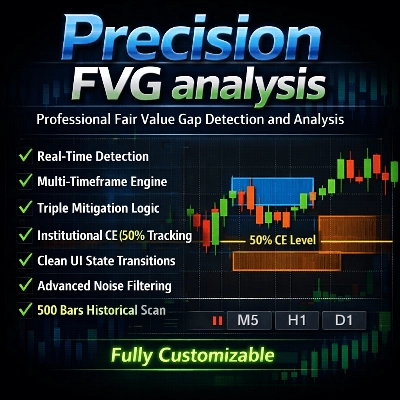
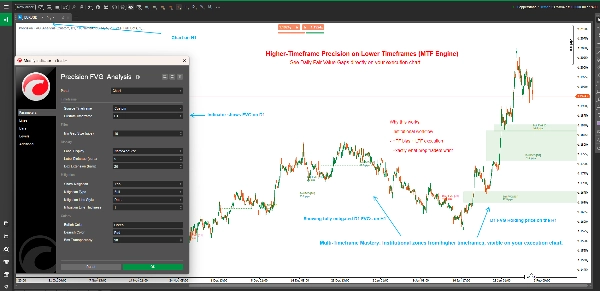
Precision FVG Analysis è un indicatore potente e flessibile per il rilevamento dei Fair Value Gap (FVG) progettato per trader seri che utilizzano Smart Money Concepts (SMC) e metodologie ICT. Questo indicatore avanzato identifica, traccia e visualizza automaticamente i Fair Value Gap su più timeframe con sofisticate capacità di tracciamento della mitigazione.
I Fair Value Gap rappresentano squilibri nel mercato dove il prezzo si è mosso troppo rapidamente, lasciando inefficienze che spesso vengono rivisitate. Comprendere e operare su questi gap è cruciale per i trader moderni basati sull'azione del prezzo.
Caratteristiche Principali
🎯 Analisi Multi-Timeframe
- Rilevamento Timeframe Adattivo: Scegli di visualizzare gli FVG dal timeframe del grafico corrente o da qualsiasi timeframe personalizzato
- Trading Cross-Timeframe: Visualizza gli FVG di timeframe superiori su grafici di timeframe inferiori per un contesto di trading migliore
- Etichette Timeframe Intelligenti: Identificazione automatica del timeframe nelle etichette quando si usano timeframe personalizzati
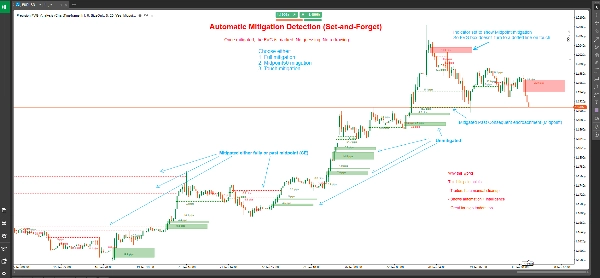
📊 Tracciamento Avanzato della Mitigazione
- Tre Tipi di Mitigazione:
-
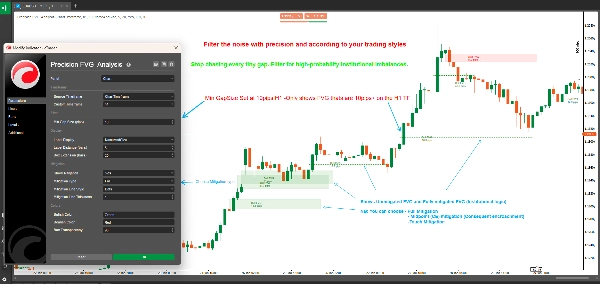
- Mitigazione Completa: Il prezzo riempie completamente l'intero gap (approccio più conservativo)
- 50% Punto Medio (CE): Il prezzo raggiunge il livello di Consequent Encroachment (approccio bilanciato)
- Mitigazione al Contatto: Il prezzo tocca il confine del gap (più sensibile)
- Cambiamenti Visivi di Stato: Gli FVG non mitigati appaiono come box pieni; gli FVG mitigati si trasformano in linee tratteggiate
- Marcatura Precisa della Mitigazione: Mostra la candela esatta in cui si è verificata la mitigazione
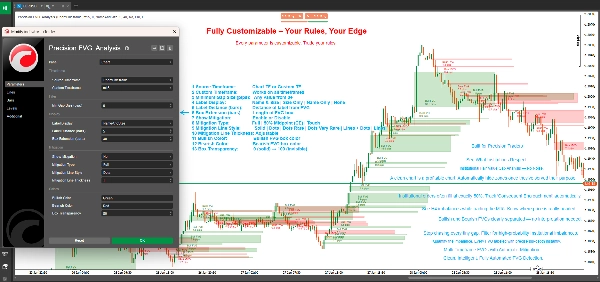
🎨 Display Completamente Personalizzabile
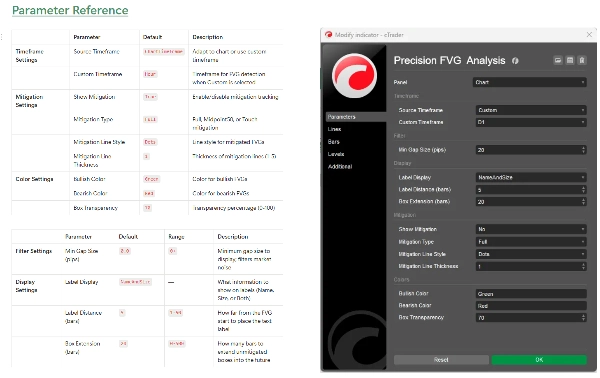
- Estensione Flessibile del Box: Controlla quanto i box FVG si estendono nel futuro (0-500 barre)
- Sistema di Etichettatura Intelligente: Scegli tra quattro modalità di etichetta:
-
- Nome e Dimensione: Dettagli completi con tipo di FVG e dimensione in pip
- Solo Dimensione: Solo la dimensione del gap in pips
- Solo Nome: Identificazione del tipo di FVG
- Nessuna: Grafico pulito senza etichette
- Colori Personalizzati: Schemi di colore separati per rialzista e ribassista
- Trasparenza Regolabile: Trasparenza del box da 0-100%
- Personalizzazione Linea di Mitigazione: Scegli stile e spessore della linea per gli FVG mitigati
⚙️ Filtraggio Professionale
- Filtro Dimensione Minima del Gap: Imposta il requisito minimo in pip per filtrare gap insignificanti
- Rilevamento Automatico: Identificazione FVG in tempo reale ad ogni chiusura di candela
- Scansione Storica: Scansiona automaticamente fino a 500 barre storiche all'avvio
Cosa sono i Fair Value Gap?
I Fair Value Gap (FVG) si verificano quando c'è un'inefficienza di prezzo tra tre candele consecutive:
FVG Rialzista: Si forma quando il minimo della candela corrente è più alto del massimo della candela di due barre fa, con la candela centrale che chiude sopra quel massimo. Questo crea un gap verso l'alto che spesso agisce da supporto.
FVG Ribassista: Si forma quando il massimo della candela corrente è più basso del minimo della candela di due barre fa, con la candela centrale che chiude sotto quel minimo. Questo crea un gap verso il basso che spesso agisce da resistenza.
Questi gap rappresentano aree dove si sono verificate forti pressioni di acquisto o vendita, lasciando squilibri di prezzo che il mercato rivisita frequentemente per "fair value" prima di continuare nella direzione originale.
Comprendere i Tipi di Mitigazione
Mitigazione Completa (Conservativa)
- FVG Rialzista: Mitigato quando il prezzo scambia sotto il fondo del gap
- FVG Ribassista: Mitigato quando il prezzo scambia sopra la cima del gap
- Caso d'Uso: Conferma che il gap è stato completamente riempito, adatto per trader swing e strategie che cercano conferme
50% Punto Medio / CE (Bilanciata)
- FVG Rialzista: Mitigato quando il prezzo raggiunge o scende sotto il punto medio
- FVG Ribassista: Mitigato quando il prezzo raggiunge o supera il punto medio
- Caso d'Uso: Il livello di Consequent Encroachment (CE) è spesso dove le istituzioni piazzano ordini, rendendo questo ideale per ingressi con buon rapporto rischio-rendimento
Mitigazione al Contatto (Aggressiva)
- FVG Rialzista: Mitigato quando il prezzo tocca o supera il confine superiore
- FVG Ribassista: Mitigato quando il prezzo tocca o supera il confine inferiore
- Caso d'Uso: Sistema di allerta precoce per trader che vogliono cogliere reazioni ai confini degli FVG, ideale per scalping e ingressi rapidi
Come Usare
Configurazione Base
- Aggiungi Precision FVG Analysis al tuo grafico
- Imposta il tuo Timeframe di Origine:
-
- Scegli "ChartTimeframe" per rilevare gli FVG sul grafico corrente
- Scegli "Custom" e seleziona un timeframe specifico (es. H4, D1) per vedere gli FVG di timeframe superiori
- Configura Dimensione Minima del Gap per filtrare gap piccoli e insignificanti (consigliato: 2-5 pips per forex)
Configurazione della Mitigazione
- Abilita Mostra Mitigazione per attivare il tracciamento della mitigazione
- Seleziona il tuo Tipo di Mitigazione in base al tuo stile di trading:
-
- Trader giornalieri e scalper: considera "Touch" o "Midpoint50"
- Trader swing: usa "Full" per conferma
- Personalizza l'aspetto della linea di mitigazione con Stile Linea e Spessore
Personalizzazione Visiva
- Imposta Estensione del Box per controllare quanto i box si proiettano (default 20 barre)
- Scegli la tua preferenza di Visualizzazione Etichetta
- Regola il Colore Rialzista e il Colore Ribassista per adattarli al tema del tuo grafico
- Affina la Trasparenza del Box per una visibilità ottimale
Strategie di Trading
Strategia 1: FVG di Timeframe Superiore con Ingresso in Timeframe Inferiore
- Imposta l'indicatore su timeframe H4 o D1 su un grafico M15 o M5
- Identifica gli FVG di timeframe superiore non mitigati
- Aspetta che il prezzo si avvicini all'FVG nel timeframe inferiore
- Cerca conferme nel timeframe inferiore (pattern di candele, blocchi di ordini, ecc.)
- Entra quando il prezzo raggiunge il livello di mitigazione scelto
Strategia 2: Zone di Confluenza FVG
- Usa più istanze dell'indicatore con timeframe diversi
- Identifica aree dove si sovrappongono più FVG di timeframe differenti
- Queste zone di confluenza offrono posizioni di trading ad alta probabilità
- Usa il tracciamento della mitigazione per temporizzare con precisione i tuoi ingressi
Strategia 3: Conferma di Breakout
- Identifica livelli chiave di supporto/resistenza
- Osserva la formazione di FVG durante i breakout
- Gli FVG non mitigati nella direzione del breakout suggeriscono continuazione
- Gli FVG mitigati suggeriscono potenziale breakout fallito o inversione
Strategia 4: Scalping Basato sulla Mitigazione
- Usa la Mitigazione al Contatto su timeframe inferiori (M1, M5)
- Entra immediatamente quando l'FVG viene toccato
- Punta al massimo/minimo swing precedente
- Usa stop stretti sotto/sopra l'FVG
Specifiche Tecniche
- Piattaforma: cTrader
- Tipo: Indicatore Overlay
- Calcolo: In tempo reale alla chiusura della barra
- Barre Storiche: Scansiona fino a 500 barre all'avvio
- Massimo Numero di FVG Attivi: 500 gap contemporanei
- Uso delle Risorse: Leggero e ottimizzato per le prestazioni
Best Practices
Linee Guida Generali per il Trading
- Combina con Altri Concetti: Gli FVG funzionano meglio se combinati con blocchi di ordini, pool di liquidità e struttura di mercato
- Rispetta il Contesto di Mercato: Gli FVG di timeframe superiori hanno più peso rispetto a quelli di timeframe inferiori
- Usa Più Timeframe: Sovrapponi FVG di timeframe diversi per confluenza
- Gestione del Rischio: Usa sempre stop loss adeguati; non tutti gli FVG reggeranno
Consigli per l'Ottimizzazione
- Regola la Dimensione Minima del Gap: Imposta in base alla volatilità media del tuo strumento
- Estensione del Box: Più lunga per swing trading (50-100 barre), più corta per day trading (10-20 barre)
- Tipo di Mitigazione: Adatta al tuo timeframe e stile di trading
- Distanza Etichetta: Regola in base all'ingombro del grafico e al livello di zoom
Errori Comuni da Evitare
- Over-trading: Non ogni FVG è un'opportunità di trading
- Ignorare il Contesto: Gli FVG contro forti trend sono meno affidabili
- Tipo di Mitigazione Errato: Gli scalper che usano la mitigazione completa perdono ingressi; i trader swing che usano il contatto vengono stoppati
- Nessuna Conferma: Aspetta sempre la conferma dell'azione del prezzo ai livelli FVG
Domande Frequenti
D: Perché alcuni FVG scompaiono immediatamente? R: Quando "Mostra Mitigazione" è abilitato con mitigazione "Touch", gli FVG che vengono subito retracciati si trasformano rapidamente in linee tratteggiate. Questo è un comportamento normale.
D: Posso vedere più FVG di timeframe contemporaneamente? R: Sì! Aggiungi l'indicatore più volte al tuo grafico con diversi timeframe personalizzati per un'analisi multi-timeframe.
D: Qual è la differenza tra questo e altri indicatori FVG? R: Precision FVG Analysis offre capacità multi-timeframe, tre tipi di mitigazione e una chiarezza visiva superiore con rendering basato sullo stato (box vs linee).
D: Quale tipo di mitigazione dovrei usare? R: Inizia con Midpoint50 (CE) poiché bilancia segnali precoci con affidabilità. Regola in base ai tuoi risultati e stile di trading.
D: Funziona su tutti gli strumenti? R: Sì, l'indicatore funziona su Forex, Indici, Commodities e Criptovalute. Regola il parametro "Dimensione Minima del Gap" in base alla volatilità dello strumento.
D: Quanto indietro arriva la scansione storica? R: L'indicatore scansiona fino a 500 barre all'avvio, fornendo un contesto storico completo.
Supporto e Aggiornamenti
Questo indicatore è attivamente mantenuto e aggiornato. Gli utenti ricevono:
- Aggiornamenti regolari con nuove funzionalità
- Ottimizzazioni delle prestazioni
- Correzioni di bug e miglioramenti
- Aggiornamenti della documentazione
Per domande, suggerimenti o supporto, contattare tramite il sistema di messaggistica del negozio cTrader.
Disclaimer
Il trading comporta un rischio sostanziale di perdita e non è adatto a tutti gli investitori. Le performance passate non indicano risultati futuri. Questo indicatore è uno strumento di analisi e non costituisce consulenza finanziaria. Pratica sempre una corretta gestione del rischio e non rischiare mai più di quanto puoi permetterti di perdere.
Cronologia delle Versioni
Versione 1.0 (Corrente)
- Rilevamento FVG multi-timeframe
- Tre tipi di mitigazione (Completa, Midpoint50, Touch)
- Cambiamenti visivi di stato (box a linee tratteggiate)
- Colori e trasparenza personalizzabili
- Sistema di etichettatura flessibile
- Scansione storica (500 barre)
- Rilevamento e tracciamento in tempo reale
Precision FVG Analysis - Eleva il tuo trading sui Fair Value Gap al livello professionale.
Riepilogo
Key features include adaptive multi-timeframe detection, allowing users to view FVGs from the current or custom timeframes, and advanced mitigation tracking with three types: Full Mitigation (complete gap fill), 50% Midpoint (Consequent Encroachment), and Touch Mitigation (gap boundary touch). Visual states change accordingly, with unmitigated gaps shown as filled boxes and mitigated ones as dotted lines, including precise candle marking of mitigation events.
The indicator offers extensive customization options such as box extension length, label display modes (name, size, both, or none), separate bullish/bearish color schemes, transparency control, and mitigation line styling. It filters gaps by minimum size and scans up to 500 historical bars on initialization for comprehensive context.
Applicable to Forex, Indices, Commodities, Cryptocurrencies, and Stocks, it supports various trading strategies including multi-timeframe analysis, confluence zones, breakout confirmation, and mitigation-based scalping. The tool operates in real-time on bar close and is optimized for performance with up to 500 active gaps tracked concurrently.
Discussioni
Recensioni dei clienti
5 | 50 % | |
4 | 50 % | |
3 | 0 % | |
2 | 0 % | |
1 | 0 % |
Domande frequenti








Prezzo