


説明
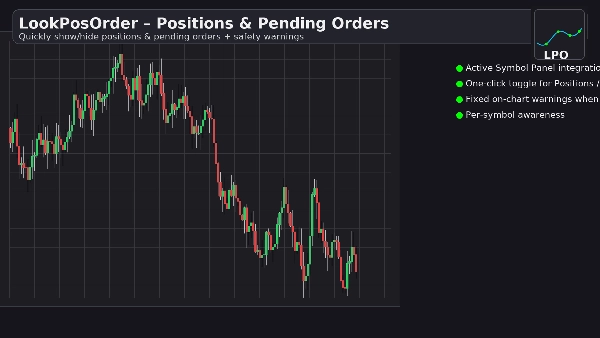
LookPosOrderは、ポジションと保留中の注文の表示・非表示を簡単に行えることで高額な驚きを回避し、現在のシンボルで何かが非表示になっている場合に明確に警告します。
機能内容
- アクティブシンボルパネル(ASP)に、2つのチェックボックスを備えたクリーンなコントロールブロックを追加します:Active Symbol Panel (ASP)
-
- ポジション: 表示 / 非表示
- 保留中: 表示 / 非表示
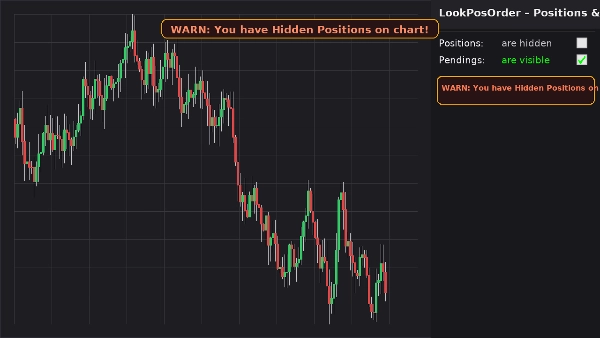
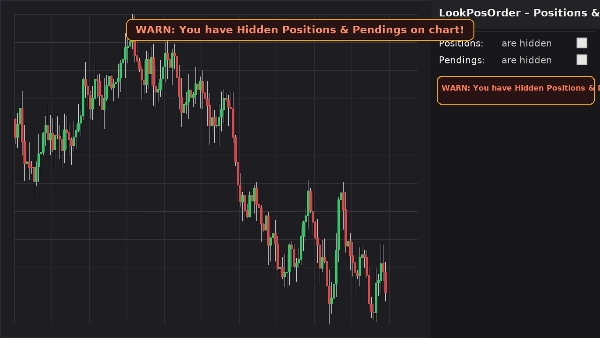
- 現在のシンボルに非表示の項目がある場合、固定されたチャート上の警告バナー(パン/ズームしても動かない)を表示します。
- 同じ警告をASPブロック内にインラインで表示します。
- シンボルごとの設定を記憶します。
トレーダーに愛される理由
- ミス防止: チャート上で何かが非表示になっていることを決して忘れません。
- 高速切り替え: チャートメニューを探し回る必要なし。
- シンボルごとの認識: 現在のシンボルに非表示の項目がある場合のみ警告します。
- 軽量&クリーン: 最小限のUIで即座に反応します。
主な特徴
- アクティブシンボルパネルとの統合
- ポジションと保留中の注文のワンクリック切り替え
- 固定されたチャート上の警告バナー(非表示項目がある場合)
- ASPブロック内のインライン警告
- シンボルごとの認識(現在のシンボルにポジション/注文をフィルタリング)
- 設定の永続化(シンボルごと)
- ネイティブの表示設定と連携(チャートメニューから変更された場合は自動同期)
必要条件
- cTrader 5.4.9以降推奨
- デスクトッププラットフォーム
インストール方法
- プラグインファイルをダウンロードします。
- cTraderを開き → Automate → Plugins → Importを選択します。
- LookPosOrder Pluginを有効にします。
- チャートを開き、シンボルを選択し、LookPosOrderブロックを右側のASPで使用します。
使い方
- チェックボックスでポジションと保留中を切り替えます。
- 何かが非表示でかつ現在のシンボルに存在する場合、警告が表示されます:
-
- 「警告:チャートに非表示のポジションがあります!」
- 「警告:チャートに非表示の保留中注文があります!」
- 「警告:チャートに非表示のポジションと保留中注文があります!」
よくある質問
Q: プラグインは私の注文やポジションを変更しますか?
A: いいえ。ネイティブの表示設定を使用してチャートの表示/非表示を切り替えるだけです。
Q: 他のシンボルについても警告しますか?
A: いいえ。警告は現在のシンボルに非表示の項目がある場合のみ表示されます。
Q: チャートのメニューから表示設定を変更した場合は?
A: プラグインはチェックボックスと警告を自動同期します。
Q: パフォーマンスへの影響は?
A: ほとんどありません。軽量なUIオーバーレイとASPブロックです。
返金
- 返金:プラグインが説明通りに動作しない場合、14日間の返金保証があります。
プライバシー
プラグインは個人データを収集または送信しません。cTraderのローカルチャートとUIとだけ連携します。
概要
AIによる概要
LookPosOrder is a plugin for the cTrader desktop platform (version 5.4.9 or later) that provides a one-click toggle to show or hide Positions and Pending Orders directly on trading charts. It integrates into the Active Symbol Panel (ASP) with two checkboxes allowing users to control visibility of Positions and Pending Orders for the current symbol. When any items are hidden, the plugin displays a fixed on-chart warning banner that remains visible during chart navigation, along with an inline warning in the ASP block. The plugin remembers visibility preferences on a per-symbol basis and automatically syncs with native cTrader Display Settings if changed outside the plugin. It does not modify orders or positions, only their chart visibility. The interface is lightweight and minimal, designed for fast toggling without navigating through menus. This tool helps traders avoid missing hidden positions or orders by providing clear, symbol-specific warnings. Installation involves importing the plugin into cTrader’s Automate Plugins section and enabling it. Users interact with the plugin via the ASP block on the right side of the chart. The plugin supports all markets available in cTrader and is compatible with various trading symbols. It does not collect or transmit personal data.
プラグインのプロフィール
ディスカッション
カスタマーレビュー
5.0
レビュー: 1
5 | 100 % | |
4 | 0 % | |
3 | 0 % | |
2 | 0 % | |
1 | 0 % |
カスタマーレビュー
November 4, 2025
Never miss a hidden trade again 🕵️♂️ - LookPosOrder gives you two quick toggles: show/hide Positions & Pendings, plus a bold on-chart alert when something’s hidden. Fast, clean, symbol-aware and super handy for serious traders who hate surprises. A tiny UI add-on that keeps your vision sharp and your risk under control.
よくあるご質問
Signal
Indices
Commodities
GBPUSD
RSI
Bollinger
Fibonacci
Scalping
XAUUSD
NAS100
MACD
BTCUSD
Forex
Breakout
EURUSD
NZDUSD
Martingale
ZigZag
Supertrend
Fair Value Gap
Crypto
Grid
Stocks
ATR
USDJPY
VWAP
cTrader Storeで入手可能な取引ボット、インジケーター、プラグインなどの商品は、第三者の開発者が提供するものであり、情報と技術の取得のみを目的としてご利用いただけます。cTrader Storeはブローカーではなく、投資助言や個人的な推奨を行うことも、将来のパフォーマンスを保証することもありません。
この作成者の他の商品

これも好きかも





価格
1
販売