

설명
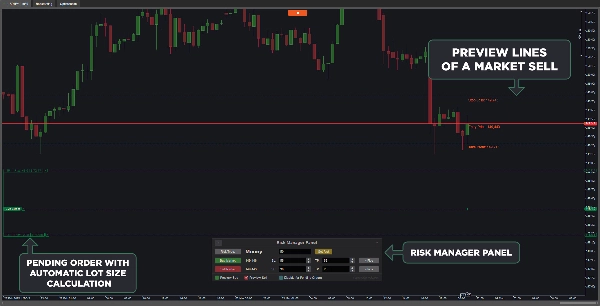
올바른 위험 금액으로 거래하는 것은 성공을 위해 필수적입니다. cTrader Risk Manager cBot은 선택한 위험 금액(금액 또는 잔액 비율)을 기반으로 대기 주문과 시장 주문의 로트 크기를 자동으로 계산합니다. 차트와 원활하게 통합되어 대기 주문을 직접 편집할 수 있으며, 시장 주문은 실행 전에 미리보기를 통해 Risk Manager 패널에서 조정할 수 있습니다. 직관적인 사용을 위해 설계되어 추가 교육이 필요 없습니다.
특징:
- 자동 로트 크기 계산: 위험 설정에 따라 대기 주문과 시장 주문 모두의 로트 크기를 조정합니다.
- 실시간 주문 편집: 차트에서 대기 주문을 수정하면 로트 크기가 자동으로 업데이트됩니다.
- 시장 주문 미리보기: 실행 전에 차트에서 시장 주문을 미리 볼 수 있습니다.
- 위험 유형 사용자 지정: 위험 관리에 대해 금액 또는 잔액 비율 중 선택할 수 있습니다.
- 원활한 통합: cBot를 재시작하지 않고도 설정을 동적으로 업데이트할 수 있습니다.
- 사용자 지정 가능한 위험 설정: 기본 손절매, 이익 실현 및 위험 금액을 설정할 수 있습니다.
- 패널 위치 조정: 차트에서 패널 위치를 조정할 수 있습니다.
- 대기 주문에 대한 위험 관리 비활성화: 원하는 경우 위험 설정을 시장 주문에만 적용할 수 있습니다.
- 새 사용자 가이드 버튼: Risk Manager 패널의 작은 버튼을 통해 사용자 가이드에 직접 접근할 수 있습니다.
버전 1.4 업데이트:
cTrader가 실행 중에도 시간대와 매개변수를 조정할 수 있는 기능 덕분에, cBot은 다음 상황에서 Risk Manager 패널 설정을 기억합니다:
- 시간대 변경 시
- cBot 일시 중지 및 재시작 시
- cBot 매개변수 수정 시
업데이트 2.0:
- 사용자 가이드를 cBot 자체에 포함시켰습니다. Risk Manager 패널 왼쪽 상단의 작은 버튼을 클릭하여 열 수 있습니다.
- 손절매 및 이익 실현 박스에 쉽게 값을 증가 및 감소시키는 버튼을 추가했습니다.
- Risk Manager 패널의 시장 매수 및 시장 매도 버튼을 사용할 때 손절매 없이 포지션이 설정되는 것을 방지하기 위해, 매우 작은 손절매 가격에 대해 cBot이 해당 주문의 손절매에 스프레드를 추가합니다. 높은 변동성 때문에 모든 포지션에 손절매가 확실히 설정된다고 보장할 수는 없습니다.
- Risk Manager 패널로 열린 포지션에 손절매가 없을 경우 화면에 팝업 경고가 표시됩니다. 원하지 않으면 cBot 매개변수에서 이 기능을 비활성화할 수 있습니다.
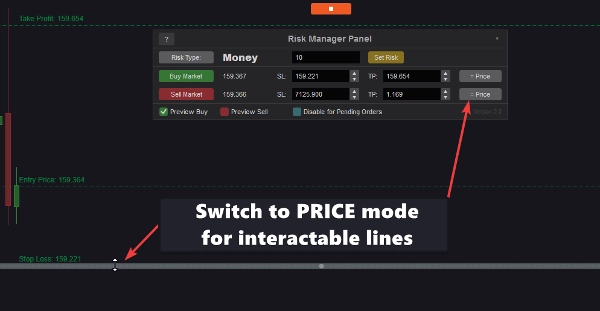
- 가격 모드로 전환하면 차트의 선들이 인터랙티브해집니다. 마우스로 선을 직접 이동할 수 있으며, Risk Manager 패널의 가격 목표가 자동으로 업데이트되고 재배치됩니다.
이러한 기능들로 cTrader Risk Manager cBot은 모든 수준의 트레이더에게 정확하고 효율적인 위험 관리를 보장합니다.
중요 참고 사항:
플랫폼 버그로 인해 cTrader for Mac에서는 Risk Manager 패널이 제대로 작동하지 않을 수 있습니다. 그러나 cBot은 매개변수 설정을 통해 대기 주문에 대해 완전히 기능합니다.
사용 방법:
- cBot을 실행합니다.
- 위험 유형을 Risk Type 버튼을 사용해 선택합니다.
- 위험 금액을 입력하고 Set Risk를 클릭합니다.
- 차트에 대기 주문을 배치하거나 Buy/Sell Market 버튼을 사용합니다.
- 손절매 위치를 조정하면 로트 크기가 자동으로 업데이트됩니다.
- 시장 주문에 대해 = Pips 버튼을 사용해 핍과 가격 간 전환이 가능합니다.
- 손절매, 이익 실현 및 진입 위치를 시각화하려면 Preview Buy/Sell 기능을 활성화하세요.
- 오른쪽 상단의 버튼을 사용해 패널 위치를 사용자 지정합니다.
요약
AI 요약
VegaXLR - Risk Manager is a cTrader cBot designed to automate precise risk management by calculating lot sizes for both pending and market orders based on user-defined risk amounts, either as a fixed money value or a percentage of the account balance. It integrates directly with the trading chart, allowing real-time editing of pending orders with automatic lot size adjustments. Market orders can be previewed and modified via the Risk Manager Panel before execution.
Key features include customizable risk settings such as default stop loss and take profit levels, dynamic panel positioning on the chart, and the option to disable risk management for pending orders if desired. The cBot supports toggling between pip and price modes, enabling interactive chart lines for direct adjustment of price targets. It also includes a user guide accessible from the panel and alerts for positions opened without stop loss.
Version updates enhance usability by preserving panel settings across timeframe changes, cBot restarts, and parameter modifications. The tool supports multiple markets including Forex, indices, cryptocurrencies, and stocks. It is compatible with Pepperstone broker and is suitable for traders seeking automated, efficient risk control integrated within the cTrader platform.
Key features include customizable risk settings such as default stop loss and take profit levels, dynamic panel positioning on the chart, and the option to disable risk management for pending orders if desired. The cBot supports toggling between pip and price modes, enabling interactive chart lines for direct adjustment of price targets. It also includes a user guide accessible from the panel and alerts for positions opened without stop loss.
Version updates enhance usability by preserving panel settings across timeframe changes, cBot restarts, and parameter modifications. The tool supports multiple markets including Forex, indices, cryptocurrencies, and stocks. It is compatible with Pepperstone broker and is suitable for traders seeking automated, efficient risk control integrated within the cTrader platform.
트레이딩 프로필
고객 리뷰
4.6
리뷰: 3
5 | 67 % | |
4 | 33 % | |
3 | 0 % | |
2 | 0 % | |
1 | 0 % |
고객 리뷰
February 16, 2026
VegaXLR Risk Manager is a precise lot-sizing and execution tool, not a strategy. It accurately calculates volume based on money or percentage risk, supports live order editing and preview, and improves discipline at entry level. It does not provide session protection or trading edge, but works reliably for trade-level risk control.
March 7, 2025
March 5, 2025
상담
자주 묻는 질문(FAQ)
Forex
Scalping
Indices
Crypto
Stocks
Limit Order Tool
트레이딩 봇, 지표, 플러그인 등 cTrader Store에서 제공되는 상품은 제3자 개발자에 의해 제공되며, 이는 단순히 정보 및 기술적 접근을 목적으로 제공된 것입니다. cTrader Store는 중개인이 아니며, 투자 조언, 개인별 추천 또는 향후 성과에 대한 어떠한 보장도 제공하지 않습니다.
이 작성자의 상품 더 보기















가격
255
판매
1.41K
무료 설치