![Trading product for [Fx4U]Risk & Reward Trading Tool Pro cBot Forex Signal, image 1](https://cdn.ctrader.com/image/webp/e26324ec-9547-4365-a38e-ccd0e7c4d86f_31374)
![Trading product for [Fx4U]Risk & Reward Trading Tool Pro cBot Forex Signal, image 2](https://cdn.ctrader.com/image/webp/b39abd48-eefe-40d1-b5fc-2e6386f54a71_31375)
![Trading product for [Fx4U]Risk & Reward Trading Tool Pro cBot Forex Signal, image 3](https://cdn.ctrader.com/image/webp/67aa0c0c-8c57-48a7-9162-ad929ad7a475_31376)
![Trading product for [Fx4U]Risk & Reward Trading Tool Pro cBot Forex Signal, image 4](https://cdn.ctrader.com/image/webp/e3992ca9-7ae3-4710-9ddd-d3b38a430fc6_31377)
![Trading product for [Fx4U]Risk & Reward Trading Tool Pro cBot Forex Signal, image 5](https://cdn.ctrader.com/image/webp/3708b80a-d8a6-4ed1-aa3e-621594a534d9_31378)
![Trading product for [Fx4U]Risk & Reward Trading Tool Pro cBot Forex Signal, image 6](https://cdn.ctrader.com/image/webp/02d28981-4163-48c7-8fdb-f47c6e94e0d6_31379)
설명
최신 버전은 아래 링크에서 업데이트됩니다:
https://ctrader.com/products/2100 (cbot)
https://ctrader.com/products/2101 (indicator)
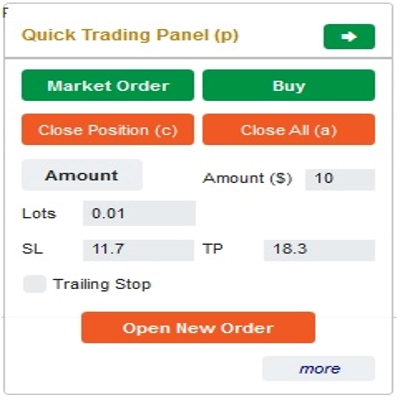
이 도구는 트레이더가 한 번의 클릭으로 주문을 열고 닫거나 수정할 수 있도록 돕는 도구입니다. 이 도구는 각 주문의 위험 금액과 선택한 StopLoss를 기반으로 로트 수를 이미 계산했습니다. 실시간 모드에서 라이브 거래뿐만 아니라 백테스팅 모드에서 전략을 테스트하는 데도 사용할 수 있습니다.
중요 참고 사항:
- "파란 버튼"은 상태 변경 버튼입니다 (시장 주문 => 지정가 주문 => 스탑 주문 => 시장 주문; 매수 => 매도 => 매수)
- "빨간 버튼"은 "실행" 버튼입니다. => 주문을 열려면 "새 주문 열기" 버튼을 사용하고, 포지션을 닫으려면 "포지션 닫기" 버튼 또는 "모두 닫기" 버튼을 사용하며, 대기 주문을 취소하려면 "주문 취소" 버튼 또는 "모두 닫기" 버튼을 사용하세요.
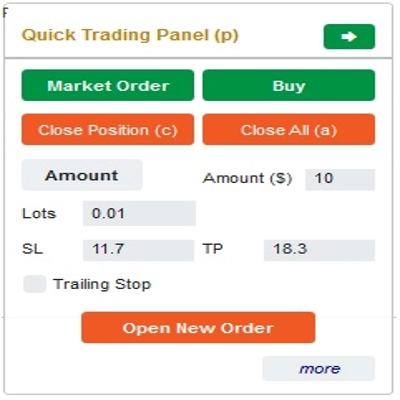
“빠른 거래 패널”에서:
매수와 매도 주문 간 전환은 차트 위의 StopLoss 라인을 진입선 위나 아래로 드래그하여 할 수 있습니다.
– 시장 주문과 지정가 주문 또는 스탑 주문 모두 열고 닫을 수 있습니다.
– 각 주문에 대해 %잔액 또는 고정 주문 금액으로 주문 금액을 조정할 수 있습니다. 이 금액과 선택한 StopLoss를 기반으로 봇이 자동으로 주문을 열 로트 수를 계산합니다.
– “빠른 거래 패널”에서 SL, TP 또는 범위 숫자를 변경하거나 차트의 수평선을 드래그하여 StopLoss, TakeProfit 또는 진입 가격(대기 주문의 경우)을 편집할 수 있습니다.
– SL, TP 및 범위(대기 주문의 경우)는 핍 단위로 계산되며, 만료(분)는 분 단위로 계산됩니다 (만료를 사용하지 않는 경우 0 또는 공백으로 두세요)
“빠른 수정 패널”에서:
– 이 패널에서는 주문을 닫거나 StopLoss(가격 단위), TakeProfit(가격 단위), TrailingStop 또는 범위(핍 단위), 만료(분 단위)와 같은 주문 매개변수를 편집할 수 있습니다.
(이 패널에서 StopLoss와 TakeProfit은 이동하려는 가격임을 참고하세요)
– 이 패널에서는 숫자로 StopLoss, TakeProfit 또는 범위(핍 단위)를 변경하거나 차트의 수평선을 원하는 위치로 드래그할 수 있습니다.
– 패널에서 주문 간 전환하여 해당 주문의 매개변수를 표시할 수 있습니다.
참고: 노란색 사각형 안의 숫자는 편집을 위해 선택된 주문의 ID 번호입니다
성공적인 거래를 기원합니다!
요약
The interface includes a Quick Trading Panel where users can toggle between buy and sell orders by adjusting the stop loss line on the chart. Users can specify order amounts as a percentage of their balance or as fixed values. StopLoss, TakeProfit, and entry prices for pending orders can be edited either numerically or by dragging lines on the chart. Parameters such as SL, TP, and range are measured in pips, while expiry times are set in minutes.
A Quick Modifying Panel allows users to close orders or adjust order parameters including StopLoss, TakeProfit, TrailingStop, range, and expiry. Changes can be made by entering values or dragging chart lines. The panel also enables switching between orders to view and edit their details.
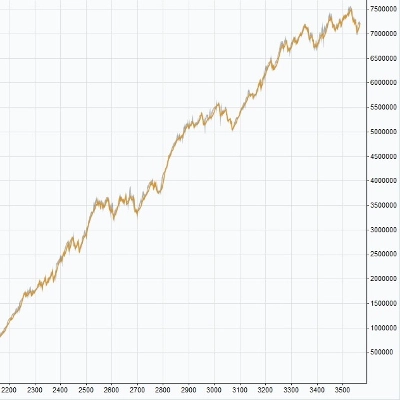
This tool operates in both real-time trading and backtesting modes, supporting multiple forex symbols including EURUSD, GBPUSD, USDJPY, and XAUUSD (gold). It is intended to streamline risk and reward management in forex trading environments.
상담
고객 리뷰
5 | 33 % | |
4 | 33 % | |
3 | 33 % | |
2 | 0 % | |
1 | 0 % |
!["[Fx4U] GBPUSD - Price Action" 로고](https://cdn.ctrader.com/image/webp/d80b34fc-da3c-4f01-a321-456450665649_26190)
!["[Fx4U] CADJPY - Price Action" 로고](https://cdn.ctrader.com/image/webp/1ba81247-b6b7-4f3c-a297-fa3eb1d57fe1_26195)

!["[Fx4U] AUDCHF - Price Action" 로고](https://cdn.ctrader.com/image/webp/0a22e9aa-c83b-42cd-b0b8-c1a2da593207_26148)

!["[Fx4U] EURAUD - Price Action" 로고](https://cdn.ctrader.com/image/webp/baf8dde4-1ef3-4beb-8ae2-0fed8320f65d_26177)