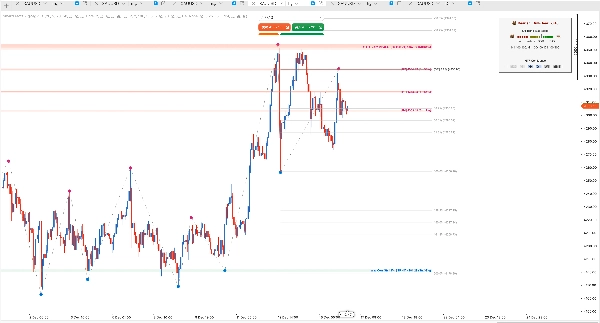
설명
SmartFractalZigZag Plus — 스마트 프랙탈, 지그재그, 자동 피보나치 및 동적 지지/저항 구역
════════════════════════════════════════════════════════════════════════════════
제품 개요
SmartFractalZigZag Plus는 KDE, HTF 합류 및 SR 트렌드 바이어스 패널과 함께 정량적 지지/저항 구역을 제공하며, 지지/저항 구역 내 자동 피보나치 보강 기능을 포함합니다.
SmartFractalZigZag Plus는 cTrader용 SmartFractalZigZag 제품군의 기관급 에디션입니다.
역사적으로 안정적인 프랙탈 엔진, 깔끔한 지그재그 스윙, Pro 버전의 완전 자동 피보나치 되돌림/확장 기능과 동적 지지 및 저항 구역 엔진, 다중 타임프레임 합류 감지 및 강세/약세 트렌드 바이어스 패널을 결합합니다.
내부적으로 Plus는 단순한 "터치 횟수 세기" 지표가 아닌 정량적 지지/저항 모델로 구축되었습니다. 구조적으로 유효한 프랙탈 피벗, ATR 정규화 거리, 로짓 공간 증거 집계 및 지수 시간 감쇠를 사용하여 원시 가격 움직임을 각 구역에 대한 안정적인 확률 유사 강도 점수로 변환합니다.
Plus는 가격이 어디에서 반전되었는지뿐만 아니라 각 구역이 얼마나 강한지, 테스트에 어떻게 반응하는지, 그리고 상위 타임프레임 구조가 현재 차트를 어떻게 조용히 보강하는지를 보고자 하는 트레이더를 위해 설계되었습니다. 이 설계는 SMC/ICT, Wyckoff, Dow 이론, Chan 이론 및 고전 피보나치 트레이딩의 아이디어를 바탕으로 단일하고 일관된 엔진으로 정제되었습니다.
════════════════════════════════════════════════════════════════════════════════
기능 비교 (Pro vs Plus)
Pro와 Plus 모두 포함:
• 스마트 프랙탈 감지 및 동일 방향 필터링
• 지그재그 스윙 연결
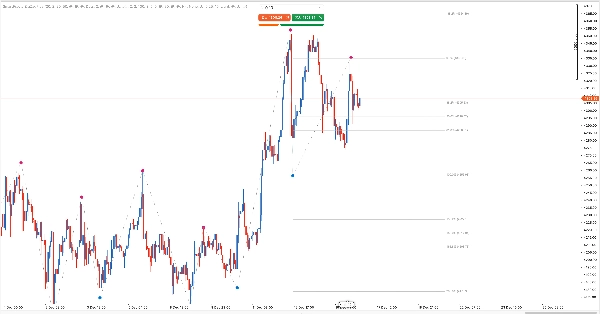
• 실시간 자동 피보나치
Plus 전용 기능:
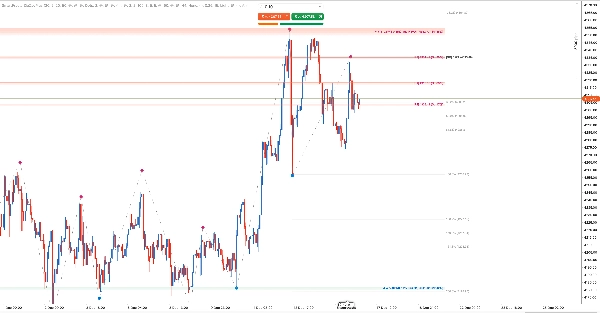
• 동적 지지/저항 구역 (KDE 밀도 히트맵)
• HTF 지지/저항 합류
• SR 트렌드 바이어스 (강세/약세 지수 + 패널)
════════════════════════════════════════════════════════════════════════════════
핵심 구조 기능 (에디션 간 공통)
────────────────────────────────────────────────────────────────────────────────
1. 스마트 프랙탈 감지
프랙탈은 시장 구조 분석의 기초로, 지역 가격 극값(스윙 고점 및 저점)을 식별합니다.
SmartFractalZigZag는 조정 가능한 민감도의 역사적으로 안정적인 프랙탈 엔진을 사용하여 스캘핑, 일중, 스윙 또는 포지션 트레이딩에 맞게 감지를 조정할 수 있습니다. Left Bars 및 Right Bars 매개변수는 전체 전략 논리를 변경하지 않고도 엔진의 선택성을 조절할 수 있습니다.
거래 스타일별 권장 설정:
• 스캘핑: Left 3 / Right 2
• 일중: Left 5 / Right 3
• 스윙: Left 10 / Right 5
• 포지션: Left 20 / Right 10
────────────────────────────────────────────────────────────────────────────────
2. 스마트 동일 방향 필터링
여러 연속된 프랙탈이 동일 방향으로 나타날 때, 지표는 진정한 극값(상향 프랙탈의 최고 고점, 하향 프랙탈의 최저 저점)만 유지합니다.
이는 깔끔한 고점-저점-고점-저점 순서를 강제하며 구조를 쉽게 읽을 수 있게 합니다. 가장 최근의 오른쪽 프랙탈만이 새 바가 닫힐 때 조정될 수 있으며, 과거 구조는 다시 그려지지 않습니다.
────────────────────────────────────────────────────────────────────────────────
3. 지그재그 스윙
필터링된 프랙탈 포인트들은 지그재그 스윙으로 연결되어, 한눈에 트렌드 방향과 스윙 경계를 명확히 보여줍니다.
────────────────────────────────────────────────────────────────────────────────
4. 실시간 자동 피보나치
가장 최근 스윙을 기반으로 피보나치 되돌림 및 확장 레벨을 자동으로 그립니다:
• 자동 앵커 – 항상 확인된 구조적 고점/저점에 연결됨
• 동적 업데이트 – 새로운 구조가 형성됨에 따라 레벨이 실시간으로 조정됨
• 일반적으로 사용되는 되돌림 및 확장 레벨 전체 세트 (추세 지속을 위한 음수 확장 포함), 모두 개별 설정 가능
• 깔끔한 시각적 규칙: Fib 레벨 가격이 Plus 지지/저항 구역 내에 있을 때, Fib 라벨은 추가 도형을 그리는 대신 [SR] 접두사와 함께 굵게 표시됩니다. 이는 차트를 복잡하게 하지 않고 "강한 지지/저항 구역 내 피보나치"를 쉽게 식별할 수 있게 하며, Pro 에디션 대비 주요 업그레이드 중 하나입니다.
────────────────────────────────────────────────────────────────────────────────
5. 테마 지원
차트 배경에 자동으로 맞춰지는 내장 라이트/다크 테마 지원. 모든 선, 구역 및 라벨은 두 테마 모두에서 가독성을 위해 조정되었습니다.
════════════════════════════════════════════════════════════════════════════════
Plus 전용 지지/저항 및 합류 엔진
────────────────────────────────────────────────────────────────────────────────
6. 동적 지지/저항 구역 (KDE 밀도 히트맵)
Plus는 프랙탈 구조 위에 완전한 동적 지지/저항 구역 엔진을 도입합니다:
• 프랙탈 기반 지지/저항 피벗 – 구역은 전용 지지/저항 프랙탈에서 구축되며, 메인 표시 프랙탈과 독립적이지만 동일한 역사 안정 규칙을 따릅니다
• 프랙탈 수에 따른 고정 창 – 단일 프랙탈 창 크기 매개변수(예: 100)를 설정합니다. 엔진은 항상 최근 N개의 지지/저항 프랙탈을 사용하며, 이들이 차지하는 바 수와 무관합니다
• 시간 가중 및 스윙 가중 밀도 – 각 지지/저항 프랙탈은 최신성, 스윙 크기 및 가격 위치를 기반으로 커널 밀도 추정에 기여합니다
• 자동 대역폭 (추가 입력 없음) – 구역 너비는 프랙탈 간격과 ATR에서 도출되며, 견고한 범위로 제한됩니다
• 히트맵 시각화 – 구역은 밀도 기반 불투명도를 가진 다층 직사각형으로 그려져 강한 구역이 시각적으로 더 두껍고 밝게 나타납니다
• 측면별 최대 구역 – 최대 저항 구역 및 최대 지지 구역은 강도 순위를 자연스러운 필터로 사용하여 표시되는 구역 수를 제한합니다
이 지지/저항 엔진이 전통적인 레벨과 다른 점
대부분의 지지/저항 도구는 눈대중으로 고점/저점을 기반으로 몇 개의 수평선을 그리거나, 가격이 단순 가격 레벨을 터치한 횟수를 셉니다.
Plus는 매우 다른 정량적 접근 방식을 취합니다:
• 프랙탈 고정, 임의가 아님 – 모든 구역은 단일 바의 꼬리가 아닌 구조적으로 유효한 프랙탈 피벗에서 파생됩니다
• 구역, 얇은 선이 아님 – KDE는 거래가 실제로 집중된 가격 밴드를 완전하게 구축하며, 단일 정확한 틱이 아닙니다
• 강도는 확률 유사, 단순 터치 횟수가 아님 – 각 반응은 밴드 높이와 ATR로 정규화되고, 시간이 지남에 따라 EffectiveStrength로 결합됩니다
• 수명 주기 인식 – 빠른 스윕, 깔끔한 돌파 및 반복적이고 간격을 둔 재테스트는 매우 다르게 처리됩니다; "깨지고 무시된" 레벨은 자연스럽게 강도가 감소합니다
• 역사에서 안정적 – 구역이 형성되고 확인되면 위치가 안정적이며, 앞으로는 새로운 반응과 HTF 증거만이 강도를 업데이트할 수 있습니다 (과거 반응의 역사적 재도색 없음)
결과적으로 이 S/R 맵은 고전적인 "선을 그리고 터치를 세는" 지표보다 기관에서 사용하는 공급/수요 구역의 행동에 훨씬 가깝습니다.
────────────────────────────────────────────────────────────────────────────────
7. 반응 인식 구역 수명 주기
모든 레벨의 터치가 동일하지 않습니다. Plus는 각 지지/저항 구역의 수명 주기를 모델링합니다:
• 상태 – 활성, 테스트 중, 깨짐
• 테스트 유형 – 엔진은 밴드를 넘어선 여러 종가를 가진 깔끔한 돌파와 강한 반전과 함께 빠르게 다시 진입하는 엄격한 스윕, 그리고 비파괴 재테스트(터치/내부 및 터치 없이 접근 거부)를 구분합니다
• 반응 점수 – 각 테스트 창에서 가격 움직임은 밴드 높이와 ATR에 상대적으로 정규화되어 측정되며, 창 내에서 끝 가중치가 적용된 반응 점수 ∈ [-1, 1]로 변환됩니다
• 테스트 점수 – 반복적이고 간격을 둔 성공적인 테스트는 별도의 테스트 점수 차원을 증가시킵니다
• 유효 강도 – 반응 점수와 테스트 점수는 기본 구조 강도와 로짓 공간에서 결합되어 각 구역에 대해 안정적인 유효 강도를 얻습니다
결과적으로 이 구역 엔진은 "과거에 이 레벨이 얼마나 잘 유지되었는가?"에 답할 수 있으며, 단순히 "가격이 몇 번 터치했는가?"만을 묻는 것이 아닙니다.
────────────────────────────────────────────────────────────────────────────────
8. 다중 타임프레임 지지/저항 합류
Plus는 상위 타임프레임(HTF)에서 지지/저항 구역을 자동으로 계산하고 현재 차트에 그 영향을 투영합니다:
• 최대 3개의 HTF 선택 – 인터랙티브 패널 버튼을 통해 M30, H1, H4, D1, W1, MN1 조합 선택 가능
• HTF 선택 지속성 – 동일 차트 창에서 타임프레임 전환 시 선택이 유지됨
• 구성 가능한 1차/2차/3차 HTF (또는 현재 타임프레임 기반 자동 매핑)
• 표준 및 비표준 TF(M2, H2 등)와 작동하는 견고한 타임프레임 순위
• 현재 및 HTF 대역폭을 기반으로 한 적응형 중첩 허용 오차
• 구역별 HTF 합류 메타데이터 저장: HtfTag (예: H4, H4+D1) 및 ConfluenceTFCount
• 삼각형 접두사 – HTF 합류가 있는 구역의 라벨 텍스트는 1~3개의 삼각형(▲/▼)으로 시작하며, 합류된 HTF 수와 수정된 강도 라벨을 표시
예: ▲▲ Corr Str 82% [S5 H4+D1] (Str:76%)
여기서 Corr Str 82%는 HTF 보정 강도이며, Str:76%는 현재 타임프레임의 원시 EffectiveStrength입니다.
────────────────────────────────────────────────────────────────────────────────
9. SR 트렌드 바이어스 (강세/약세 지수) 패널
컴팩트한 SR 트렌드 바이어스 패널은 현재 가격 주변의 순 지지 대 저항 강도를 요약합니다:
• 최소화/확장 토글 – 필요하지 않을 때 패널을 축소; 상태는 세션 간 유지
• HTF 리셋 버튼 – 현재 타임프레임 기반 자동 매핑 기본값으로 HTF 선택 복원
• 인근 구역의 EffectiveStrength를 가중치로 사용
• [-1, 1] 범위의 바이어스 지수를 출력하며, 균형, 약간 강세, 강세, 강한 강세, 강한 약세 등 직관적인 라벨에 매핑
• 곰/황소 아이콘과 색상 코딩된 구간이 포함된 시각적 스케일로 빠른 판독 가능
• 데이터가 부족할 때 명확히 표시 (예: 아직 충분한 지지/저항 프랙탈이 없거나 유효 구역 기여가 없음)
• 지지 또는 저항만 유효하게 존재해도 지수는 계산됨 (자연스럽게 +1 또는 -1에 접근)
────────────────────────────────────────────────────────────────────────────────
10. 자동 이력 백필 및 안정성
지지/저항 구역과 HTF 합류가 의미 있도록, 지표는 자동으로 이력 로딩을 관리합니다:
• 현재/HTF 프랙탈 수가 프랙탈 창 크기 미만일 때 추가 이력 요청
• 과도한 플랫폼 부하를 방지하기 위해 심볼/TF별 로드 상태를 조절 및 백오프하며 추적
• HistoryLoaded/Reloaded 이벤트 처리 및 바 이동 시 내부 상태 완전 재구성
• SR 바이어스 패널을 각 타임프레임의 실제 데이터 가용성과 동기화 유지
────────────────────────────────────────────────────────────────────────────────
11. 내부 구조: 정량적 엔진
Plus의 지지/저항 엔진은 의도적으로 수학적으로 무거워서 시각적 출력이 심볼, 타임프레임 및 확대 수준에 걸쳐 일관되게 유지됩니다:
• ATR 정규화 대역폭을 가진 프랙탈 피벗에 대한 커널 밀도 추정(KDE)으로 임의 가격 레벨이 아닌 실제 공급/수요 클러스터를 찾음
• Str%에 대한 고정 정규화 기준으로, "강한" 구역은 확대/축소 여부와 관계없이 동일한 의미를 가짐
• 로짓 공간 증거 융합 – BaseStrength, ReactionScore, TestScore 및 HTF 증거는 임의 점수가 아닌 로지스틱 변환을 사용해 결합됩니다. 이는 강도 척도를 부드럽고 제한된 상태로 유지합니다
• 지수 시간 감쇠 및 간격 제어 – 오래된 반응과 밀집된 테스트는 반감기 스타일 공식으로 자동으로 가중치가 낮아집니다
• 안정적인 역사 설계 – 스윙 또는 구역이 확인되면 위치와 Str%가 안정적이며, 가장 새로운 증거만이 수정된 강도를 기울일 수 있습니다
════════════════════════════════════════════════════════════════════════════════
누구를 위한 것인가?
• 깔끔하고 역사적으로 일관된 구조와 동적 지지/저항 히트맵을 원하는 일중 및 스윙 트레이더
• OTE 구역과 주변 지지/저항의 강한 또는 약한 반응 이력을 중요시하는 SMC/ICT 트레이더
• 자동 피보나치 및 지지/저항 컨텍스트를 단일 화면에서 원하는 재량적 트레이더
• 상위 타임프레임 레벨에 의존하며 이를 활성 차트에 명확히 표시하고자 하는 다중 타임프레임 트레이더
════════════════════════════════════════════════════════════════════════════════
왜 SmartFractalZigZag Plus인가?
문제: 수평선이 임의적이고 주관적으로 느껴짐
해결책: 엄격한 프랙탈 + KDE 밀도 알고리즘과 명확한 규칙으로 구역 생성
문제: 레벨이 강한지 약한지 알 수 없음
해결책: 반응 인식 수명 주기와 EffectiveStrength가 구조적 중요성과 가격의 레벨 주변 행동을 정량화
문제: HTF 레벨을 기억하기 어려움
해결책: 자동 HTF 지지/저항 합류 및 모든 구역 라벨에 명확한 HtfTag + 삼각형 접두사
문제: 너무 많은 개별 도구가 차트를 복잡하게 만듦
해결책: 하나의 지표가 프랙탈 + 지그재그 + 피보나치 + 동적 지지/저항 + HTF 합류 + 바이어스 패널을 결합
문제: 이력 백필 동작이 예측 불가능
해결책: 데이터가 아직 다운로드 중이거나 소진되었을 때 UI 피드백과 함께 명시적 이력 로드 관리
════════════════════════════════════════════════════════════════════════════════
모든 방법론과 호환
• SMC / ICT – BOS, CHoCH, 스윙 포인트, OTE 구역, 반응 인식 지지/저항 및 유동성 스윕
• 엘리엇 파동 – 스윙 피벗, 피보나치 확장 및 동적 지지/저항 구역과의 합류
• 다우 이론 – 시각적으로 명확한 지그재그 스윙과 함께 고점 상승 / 저점 하락
• 와이코프 – 공급/수요 구역, 스프링, 업스트러스트 및 그 반응 품질
• 찬 이론 – 펜, 세그먼트 및 구조적 피벗 정렬
• 피보나치 – 자동으로 그려진 레벨과 구역 인식 [SR] 합류 태그
════════════════════════════════════════════════════════════════════════════════
매개변수 (Plus 하이라이트)
아래는 가장 중요한 매개변수 그룹의 개요입니다. 전체 기술 세부사항은 첨부 문서를 참조하십시오.
────────────────────────────────────────────────────────────────────────────────
1. 프랙탈 설정
• Left Bars – 비교를 위한 왼쪽 바 수 (기본값: 20)
• Right Bars – 확인을 위한 오른쪽 바 수 (기본값: 2)
프랙탈 표시:
• 상승 프랙탈 색상 – 기본값: DeepPink
• 하락 프랙탈 색상 – 기본값: DodgerBlue
• 프랙탈 크기 – 기본값: 20
• 프랙탈 오프셋 (포인트) – 기본값: 50
• 프랙탈 표시 여부 – 기본값: 켬
필터 설정:
• 연속 필터 – 지그재그 및 피보나치에 필요한 스마트 동일 방향 필터링 (기본값: 켬)
────────────────────────────────────────────────────────────────────────────────
2. 지그재그 설정
• 지그재그 활성화 – 기본값: 켬
• 지그재그 색상 – 기본값: 회색
• 지그재그 스타일 – 기본값: 점
• 지그재그 두께 – 기본값: 2
────────────────────────────────────────────────────────────────────────────────
3. 피보나치 설정
• 피보나치 활성화 – 마스터 스위치 (기본값: 켬)
• 라벨 표시 – 가격 라벨 표시 (기본값: 켬)
• 레벨 스위치 – -100%에서 200%까지 19개의 개별 스위치 (핵심 레벨 기본 켬)
참고: RightOffset은 현재 보이는 차트 너비(뷰포트)의 백분율로 해석되며 안전 범위(1%-500%)로 제한됩니다. 이는 Fib 선/라벨과 지지/저항 구역/라벨의 공유 오른쪽 가장자리를 제어합니다.
────────────────────────────────────────────────────────────────────────────────
4. 지지/저항 구역 설정 (Plus)
• 지지/저항 구역 활성화 – 동적 지지/저항 엔진의 마스터 스위치 (기본값: 켬)
• 구역 피벗 왼쪽 바 – 기본값: 2
• 구역 피벗 오른쪽 바 – 기본값: 2
• 프랙탈 창 크기 – 사용되는 최근 지지/저항 프랙탈 수 (기본값: 100)
• 거리 스케일 (ATR 배수) – 기본값: 5.0
• 최대 저항 구역 – 기본값: 5
• 최대 지지 구역 – 기본값: 5
• 구역 라벨 표시 – 기본값: 켬
• 최대 불투명도 % – 기본값: 90
• 저항 색상 – 기본값: 토마토
• 지지 색상 – 기본값: 미디엄시그린
────────────────────────────────────────────────────────────────────────────────
5. HTF 지지/저항 합류
• HTF 합류 사용 – 다중 TF 지지/저항 합류 활성화 (기본값: 켬)
• 자동 HTF 매핑 – 현재 TF 기반 자동 HTF 선택 (기본값: 켬)
• 1차 HTF – 기본값: H4
• 2차 HTF – 기본값: 없음
• 3차 HTF – 기본값: 없음
────────────────────────────────────────────────────────────────────────────────
6. SR 트렌드 바이어스 (강세/약세 지수)
• SR 트렌드 바이어스 활성화 – 기본값: 켬
• 트렌드 바이어스 임계값 – 균형 대 강세/약세 바이어스 임계값 (기본값: 0.25)
────────────────────────────────────────────────────────────────────────────────
7. 표시 및 테마 설정
• 오른쪽 오프셋 (%) – 보이는 차트 너비의 %로 오른쪽 예약 (기본값: 30)
• 색상 테마 – 라이트 / 다크 (기본값: 라이트)
• 테마 팔레트 사용 – 기본값: 켬
────────────────────────────────────────────────────────────────────────────────
8. 기타 설정
• 모든 인스턴스 강제 정리 – 기본값: 끔
• 이력 로드 디버그 – 기본값: 끔
════════════════════════════════════════════════════════════════════════════════
업그레이드 경로
현재 SmartFractalZigZag Pro를 사용 중이며 다음을 원한다면:
• KDE 밀도 히트맵이 포함된 동적이고 반응 인식 지지/저항 구역
• 자동 다중 타임프레임 지지/저항 합류 및 명확한 시각적 삼각형
• 실제 지지/저항 강도로 구축된 통합 강세/약세 트렌드 바이어스 패널
그렇다면 SmartFractalZigZag Plus가 자연스러운 업그레이드입니다 — 동일한 기본 엔진을 전체 구조 + 수학 + 동적 지지/저항 + HTF 합류 워크플로우로 확장합니다.
════════════════════════════════════════════════════════════════════════════════
중요 참고 사항
설계상 안정적인 역사
이 지표는 확인된 스윙과 지지/저항 구역을 역사에서 안정적으로 유지하면서도 활성 구간/구역이 새로운 가격 움직임에 반응할 수 있도록 구축되었습니다. 구조가 확인되면 앵커 포인트가 고정되며, 시장이 진화함에 따라 아직 형성 중인 구간과 최신 구역만 적응할 수 있습니다.
스위치 의존성
지그재그와 피보나치는 모두 연속 필터 = 켬이 필요합니다. 이를 끄면 원시 프랙탈 포인트만 표시되고 지그재그/피보나치는 비활성화됩니다. 지지/저항 구역은 항상 자체 전용 프랙탈 엔진을 사용하며 동일 방향 필터링이 적용됩니다.
데이터 충분성
지지/저항 구역과 HTF 합류는 현재 및 선택된 HTF 타임프레임에서 최소한 프랙탈 창 크기만큼의 지지/저항 프랙탈을 필요로 합니다. 데이터가 아직 로드 중이거나 부족할 때 바이어스 패널이 이 상태를 명확히 표시합니다.
체험판
cTrader 스토어를 통해 체험판이 제공될 수 있으므로 구매 전에 자신의 심볼과 타임프레임에서 지표를 테스트할 수 있습니다.
════════════════════════════════════════════════════════════════════════════════
지원
질문이나 피드백이 있으시면 cTrader 스토어를 통해 문의해 주십시오.
SmartFractalZigZag Plus를 선택해 주셔서 감사합니다!
요약
Key features include:
- History-stable fractal engine with tunable sensitivity for various trading styles (scalping to position trading).
- Smart filtering of consecutive fractals to maintain clean swing sequences.
- Real-time auto Fibonacci levels anchored to confirmed swings, with clear visual cues when levels coincide with strong S/R zones.
- Dynamic S/R zones visualized as density heatmaps reflecting institutional supply/demand behavior.
- Reaction-aware zone lifecycle modeling states (Active, UnderTest, Broken) and scoring based on price reaction quality.
- Multi-timeframe S/R confluence with up to three HTF selections, projecting higher timeframe zones onto the current chart.
- SR Trend Bias panel providing a Bull/Bear index based on nearby zone strengths.
- Automatic history backfill and stability management to ensure consistent zone and swing formation.
The indicator supports various markets including Forex, indices, commodities, stocks, and cryptocurrencies, and is compatible with multiple trading methodologies such as SMC/ICT, Elliott Wave, Dow Theory, Wyckoff, Chan Theory, and Fibonacci trading.