AI Dynamic Trendline pro cBot v2.4.1
cBot
버전 1.0, May 2026
Windows, Mac, Mobile, Web
4.6
리뷰: 3
1
구매
2
손익비
4%
최대 낙폭
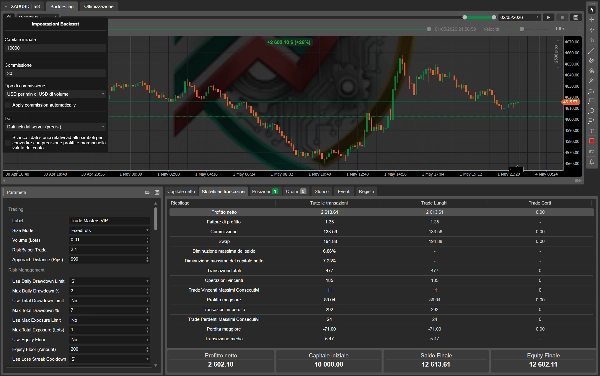
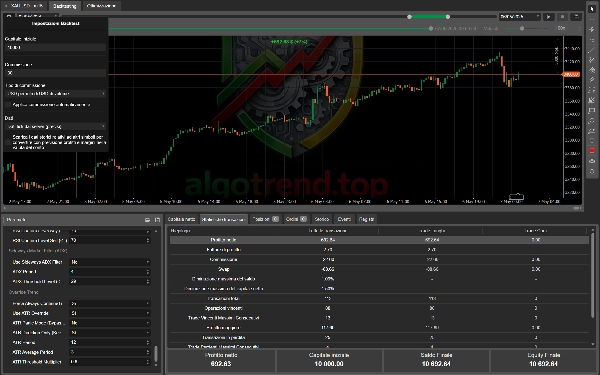
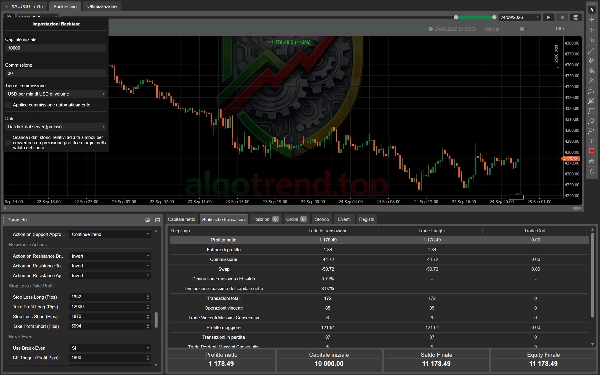
Trading product for AI Dynamic Trendline pro cBot v2.4.1 cBot AI Integration Aggressive, image 2
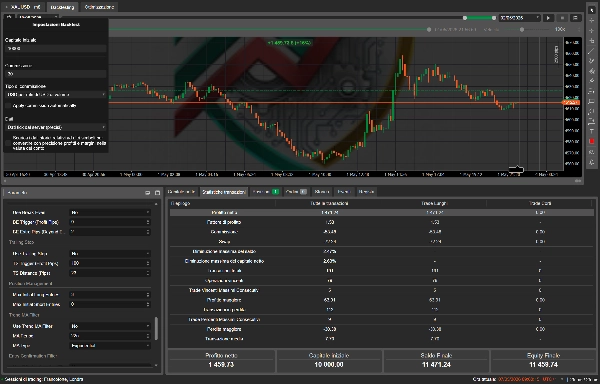
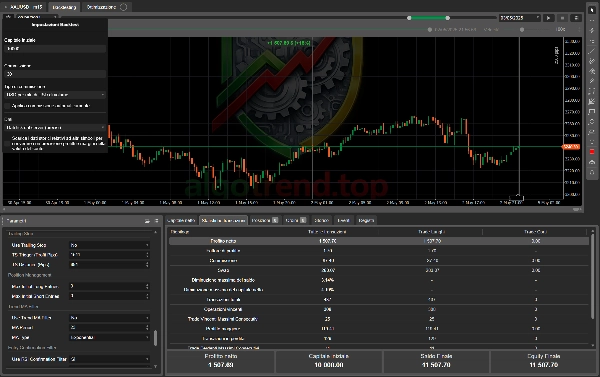
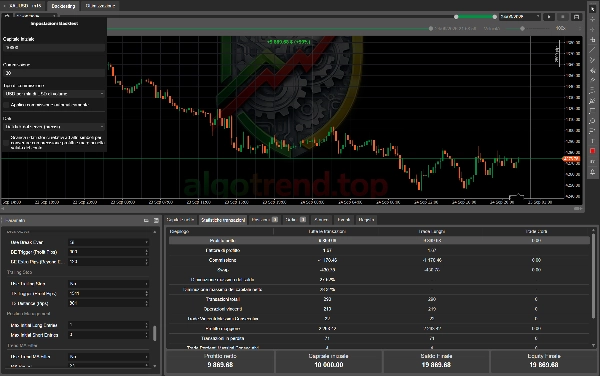
Trading product for AI Dynamic Trendline pro cBot v2.4.1 cBot AI Integration Aggressive, image 3
Trading product for AI Dynamic Trendline pro cBot v2.4.1 cBot AI Integration Aggressive, image 4
Trading product for AI Dynamic Trendline pro cBot v2.4.1 cBot AI Integration Aggressive, image 5
Trading product for AI Dynamic Trendline pro cBot v2.4.1 cBot AI Integration Aggressive, image 6
Trading product for AI Dynamic Trendline pro cBot v2.4.1 cBot AI Integration Aggressive, image 7
Trading product for AI Dynamic Trendline pro cBot v2.4.1 cBot AI Integration Aggressive, image 8
42.11M
거래량
6.13M
핍 수익
211
판매
8.13K
무료 설치

설명

🏷️ TAGLINE

AI-powered dynamic trendline trading bot for cTrader — breakout, touch and approach signals filtered through nine confirmation layers.

━━━━━━━━━━━━━━━━━━━━━━━━━━━━

📈 DynamicTrendlineProBot V24 — AI Sentiment Edition

A professional cTrader cBot that combines advanced dynamic trendline analysis with AI-driven market sentiment scoring.

━━━━━━━━━━━━━━━━━━━━━━━━━━━━

🧠 WHAT IS IT?

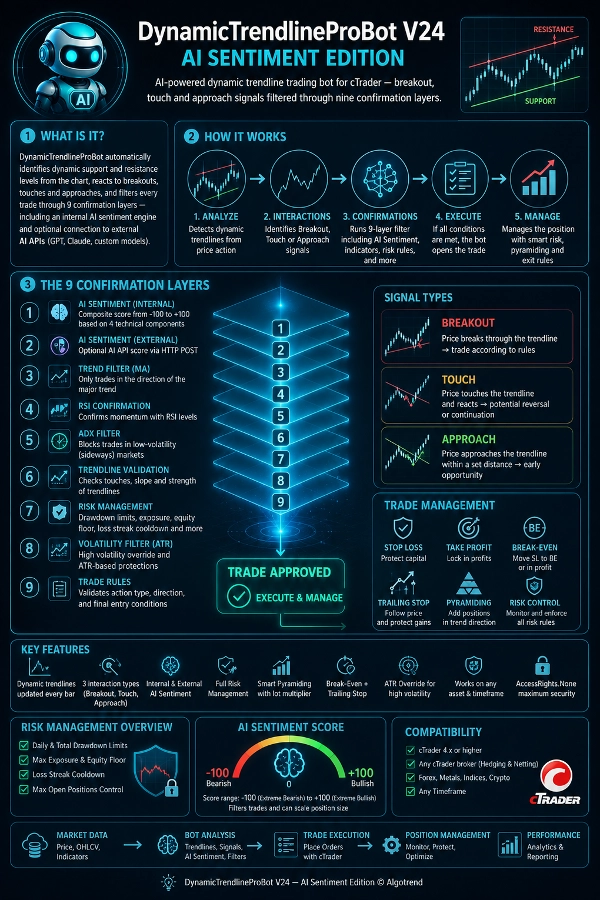
DynamicTrendlineProBot automatically identifies dynamic support and resistance levels from the chart, reacts to breakouts, touches and approaches, and filters every trade through 9 confirmation layers — including an internal AI sentiment engine and optional connection to external AI APIs (GPT, Claude, custom models).

━━━━━━━━━━━━━━━━━━━━━━━━━━━━

KEY FEATURES

🔹 Auto-calculated dynamic trendlines updated every bar 🔹 3 interaction types: Breakout, Touch, Approach — each fully configurable 🔹 Internal AI Sentiment with composite score from -100 to +100 🔹 External AI Sentiment via HTTP POST API 🔹 Full Risk Management with daily/total drawdown, equity floor, loss streak cooldown 🔹 Smart Pyramiding with lot multiplier 🔹 Automatic Break-Even + Trailing Stop 🔹 ATR Override for high-volatility conditions 🔹 MA, RSI, ADX filters plus slope and touch validation 🔹 Works on any asset and timeframe 🔹 AccessRights.None — maximum security for the user

━━━━━━━━━━━━━━━━━━━━━━━━━━━━

🏷️ TRADING — GENERAL

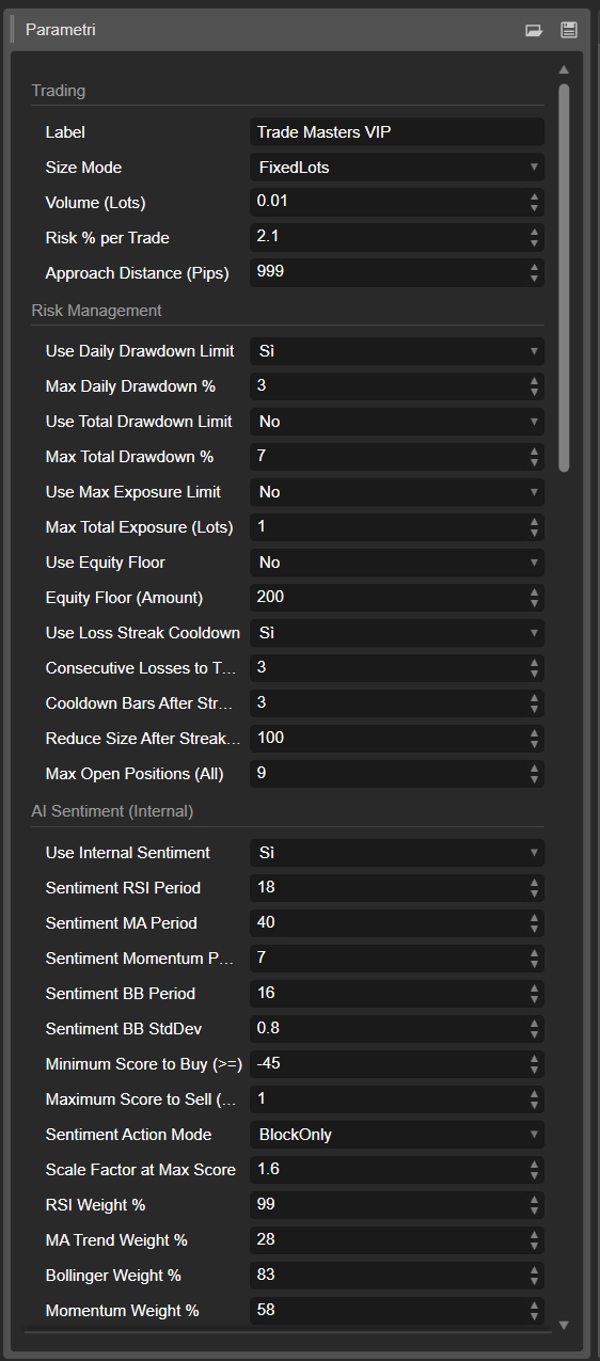
📌 Label — Tag that identifies the bot's trades. Must be unique if you run multiple instances on the same account.

📌 Size Mode — Choose between fixed volume (FixedLots) or automatic calculation based on risk percentage of balance (RiskPercent).

📌 Volume (Lots) — Fixed volume per trade, only used in FixedLots mode. Default: 0.01

📌 Risk % per Trade — Percentage of balance risked per trade. The bot automatically calculates the volume based on the stop loss. Default: 1.9%

📌 Approach Distance (Pips) — Distance in pips from the trendline to trigger an Approach signal. Default: 241

━━━━━━━━━━━━━━━━━━━━━━━━━━━━

🛡️ RISK MANAGEMENT

📌 Use Daily Drawdown Limit — Stops trading if the daily loss exceeds the threshold. Default: on

📌 Max Daily Drawdown % — Maximum daily loss relative to the start-of-day balance. Once hit, the bot pauses until the next day. Default: 5%

📌 Use Total Drawdown Limit — Stops trading if the total drawdown from peak equity exceeds the threshold. Default: on

📌 Max Total Drawdown % — Maximum drawdown from peak equity. Trading resumes automatically when equity recovers. Default: 15%

📌 Use Max Exposure Limit — Caps the total open lot exposure. Default: on

📌 Max Total Exposure (Lots) — Maximum combined lots across all open positions. Default: 1.0

📌 Use Equity Floor — Blocks trading when equity drops below a fixed amount. Default: off

📌 Equity Floor (Amount) — Minimum equity threshold in account currency. Default: 500

📌 Use Loss Streak Cooldown — Pauses trading after a series of consecutive losses. Default: on

📌 Consecutive Losses to Trigger — Number of consecutive losses to activate the cooldown. Default: 3

📌 Cooldown Bars After Streak — Number of bars the bot stays idle after a loss streak. Default: 5

📌 Reduce Size After Streak % — Volume reduction after a loss streak. 50% means the bot halves its lot size. Default: 50%

📌 Max Open Positions (All) — Maximum positions open at the same time, including long, short and pyramid entries. Default: 6

━━━━━━━━━━━━━━━━━━━━━━━━━━━━

🧠 AI SENTIMENT — INTERNAL

The internal sentiment engine calculates a score from -100 (extreme bearish) to +100 (extreme bullish) by combining 4 technical components, each with a configurable weight.

📌 Use Internal Sentiment — Enables the internal sentiment filter. Default: on

📌 Sentiment RSI Period — RSI period for the momentum component. Default: 14

📌 Sentiment MA Period — Exponential moving average period for the trend component. Default: 50

📌 Sentiment Momentum Period — Lookback period for Rate of Change. Default: 10

📌 Sentiment BB Period — Bollinger Bands period. Default: 20

📌 Sentiment BB StdDev — Bollinger Bands standard deviation. Default: 2.0

📌 Minimum Score to Buy — Minimum score to allow a long entry. Default: 15

📌 Maximum Score to Sell — Maximum score (negative) to allow a short entry. Default: -15

📌 Sentiment Action Mode — BlockOnly just blocks non-conforming trades. ConfirmAndScale also scales the volume proportionally to signal strength. Default: ConfirmAndScale

📌 Scale Factor at Max Score — Maximum volume multiplier when the score is at its peak. Default: 1.5x

📌 RSI Weight % — Weight of the RSI component. Default: 30%

📌 MA Trend Weight % — Weight of the MA trend component (distance + slope). Default: 25%

📌 Bollinger Weight % — Weight of the Bollinger Band positioning component. Default: 20%

📌 Momentum Weight % — Weight of the Rate of Change component. Default: 25%

💡 Example: RSI at 70 generates a +40 component, price above MA with positive slope +60, price near the upper BB +80, positive momentum +50 → weighted final score ≈ +52 → Buy allowed (above the 15 threshold). If the score were +8 the Buy would be blocked.

━━━━━━━━━━━━━━━━━━━━━━━━━━━━

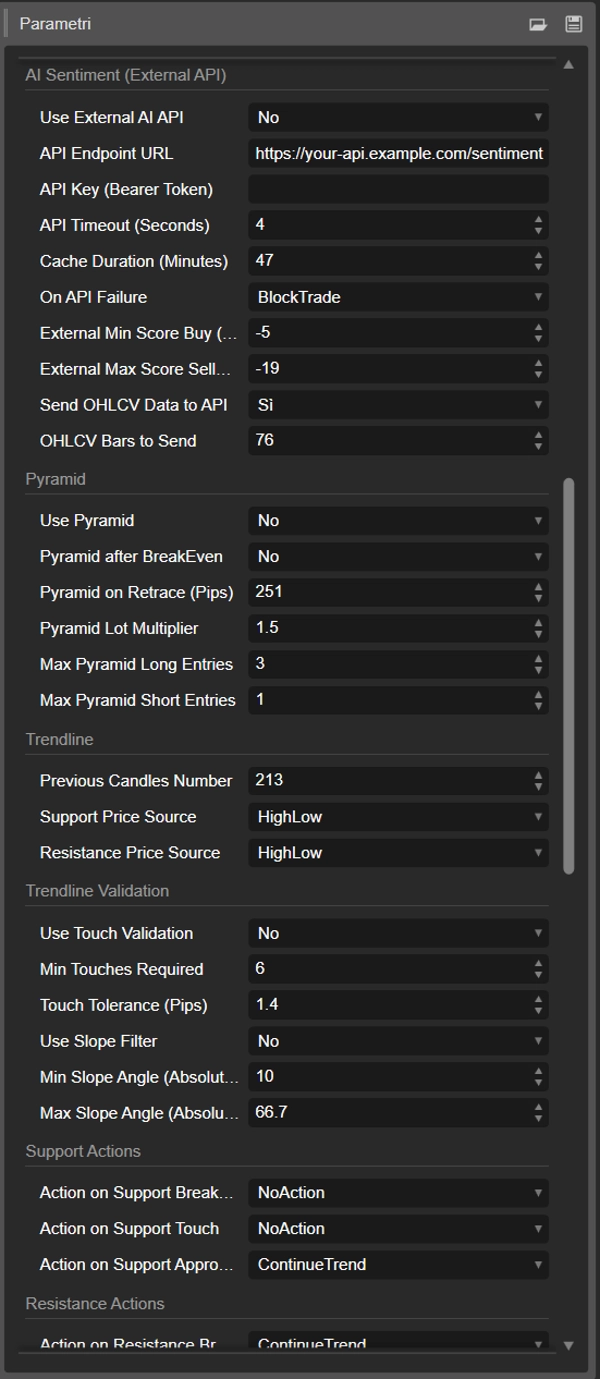
🌐 AI SENTIMENT — EXTERNAL API

Optional connection to any AI API. The bot sends full market context (OHLCV candles, indicators, account data) and receives a sentiment score.

📌 Use External AI API — Enables the connection. Default: off

📌 API Endpoint URL — POST endpoint URL. Supports any service that returns JSON.

📌 API Key (Bearer Token) — Authentication token sent in the Authorization header.

📌 API Timeout (Seconds) — Maximum response timeout. Default: 10s

📌 Cache Duration (Minutes) — The bot won't call the API more than once every N minutes. Default: 5 min

📌 On API Failure — What to do if the API doesn't respond: AllowTrade proceeds anyway, BlockTrade blocks the trade. Default: AllowTrade

📌 External Min Score Buy — Minimum external score to allow a long. Default: 20

📌 External Max Score Sell — Maximum external score to allow a short. Default: -20

📌 Send OHLCV Data to API — Includes candle data in the payload. Default: on

📌 OHLCV Bars to Send — Number of bars included in the payload. Default: 20

📡 Expected response format: { "score": -100..100, "signal": "buy|sell|neutral", "confidence": 0.0-1.0 } The parser is flexible and accepts several variants.

━━━━━━━━━━━━━━━━━━━━━━━━━━━━

📐 TRENDLINE — CALCULATION

📌 Previous Candles Number — Bar window used to calculate support and resistance. More bars = slower, more robust trendlines. Default: 185

📌 Support Price Source — HighLow uses candle lows, Close uses closing prices. Default: HighLow

📌 Resistance Price Source — HighLow uses candle highs, Close uses closing prices. Default: HighLow

━━━━━━━━━━━━━━━━━━━━━━━━━━━━

TRENDLINE — VALIDATION

📌 Use Touch Validation — The trendline must have been touched at least N times to be considered valid. Default: off

📌 Min Touches Required — Minimum touches required (including the 2 defining points). Default: 7

📌 Touch Tolerance (Pips) — Tolerance to count a touch as valid. Default: 1.3 pips

📌 Use Slope Filter — Rejects trendlines with angles that are too flat or too steep. Default: off

📌 Min Slope Angle — Minimum acceptable angle in degrees. Default: 8.2°

📌 Max Slope Angle — Maximum acceptable angle. Default: 18.2°

━━━━━━━━━━━━━━━━━━━━━━━━━━━━

🎯 SUPPORT ACTIONS

What the bot does when price interacts with the support trendline.

📌 Action on Support Breakout — Price breaks support to the downside. Default: Invert (Buy) 📌 Action on Support Touch — Price touches support and bounces. Default: NoAction 📌 Action on Support Approach — Price approaches support within the configured distance. Default: ContinueTrend (Buy)

🎯 RESISTANCE ACTIONS

What the bot does when price interacts with the resistance trendline.

📌 Action on Resistance Breakout — Price breaks resistance to the upside. Default: NoAction 📌 Action on Resistance Touch — Price touches resistance and reverses. Default: ContinueTrend (Sell) 📌 Action on Resistance Approach — Price approaches resistance. Default: NoAction

💡 ContinueTrend = trades in the natural direction. Invert = trades the opposite way. NoAction = ignores the signal.

━━━━━━━━━━━━━━━━━━━━━━━━━━━━

🔴🟢 STOP LOSS / TAKE PROFIT

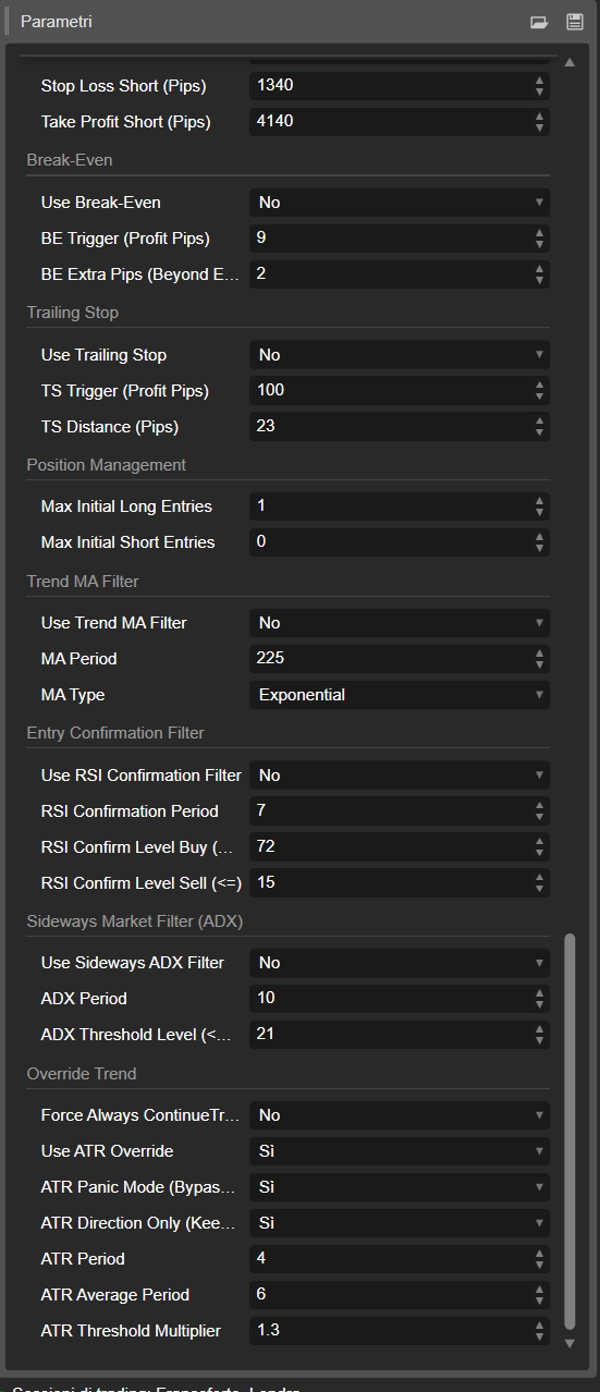
📌 Stop Loss Long — Default: 2500 pips 📌 Take Profit Long — Default: 3000 pips 📌 Stop Loss Short — Default: 2500 pips 📌 Take Profit Short — Default: 3600 pips

Set to 0 to disable.

━━━━━━━━━━━━━━━━━━━━━━━━━━━━

⚖️ BREAK-EVEN

📌 Use Break-Even — Moves SL to breakeven (or into profit) once triggered. Default: off 📌 BE Trigger (Profit Pips) — Profit in pips that triggers the move. Default: 1401 📌 BE Extra Pips — Additional pips beyond entry price (SL is placed in profit, not exactly at breakeven). Default: 530

━━━━━━━━━━━━━━━━━━━━━━━━━━━━

📏 TRAILING STOP

📌 Use Trailing Stop — Protects profit by following the price. Default: on 📌 TS Trigger (Profit Pips) — Minimum profit before the trailing activates. Default: 801 📌 TS Distance (Pips) — Trailing distance from the current price. Default: 1401

━━━━━━━━━━━━━━━━━━━━━━━━━━━━

🔺 PYRAMIDING

📌 Use Pyramid — Adds positions in the same direction. Default: off 📌 Pyramid after BreakEven — Adds a position when break-even is triggered. Default: off 📌 Pyramid on Retrace (Pips) — Adds a position when price retraces N pips from the best price reached. Default: 381 📌 Pyramid Lot Multiplier — Volume multiplier for each pyramid level. Default: 1.5x 📌 Max Pyramid Long Entries — Maximum additional long positions. Default: 3 📌 Max Pyramid Short Entries — Maximum additional short positions. Default: 3

━━━━━━━━━━━━━━━━━━━━━━━━━━━━

📊 POSITION MANAGEMENT

📌 Max Initial Long Entries — Maximum initial long positions (non-pyramid). Default: 1 📌 Max Initial Short Entries — Maximum initial short positions. Default: 1

━━━━━━━━━━━━━━━━━━━━━━━━━━━━

📈 TREND FILTER (MA)

📌 Use Trend MA Filter — Only allows Buy above MA, Sell below MA. Default: off 📌 MA Period — Moving average period. Default: 20 📌 MA Type — Moving average type. Default: Simple

━━━━━━━━━━━━━━━━━━━━━━━━━━━━

🔍 RSI CONFIRMATION FILTER

📌 Use RSI Confirmation Filter — Additional RSI-based entry confirmation. Default: off 📌 RSI Confirmation Period — RSI period. Default: 8 📌 RSI Confirm Level Buy (>=) — Minimum RSI to allow a Buy. Default: 43 📌 RSI Confirm Level Sell (<=) — Maximum RSI to allow a Sell. Default: 68

━━━━━━━━━━━━━━━━━━━━━━━━━━━━

📉 ADX FILTER (SIDEWAYS MARKET)

📌 Use Sideways ADX Filter — Blocks trades when ADX is below threshold. Default: off 📌 ADX Period — ADX period. Default: 14 📌 ADX Threshold Level — Trading is blocked below this value. Default: 2

━━━━━━━━━━━━━━━━━━━━━━━━━━━━

TREND OVERRIDE (ATR / MANUAL)

📌 Force Always ContinueTrend (Manual) — Manually forces breakout direction on all trades, bypassing filters and configured actions. Default: off

📌 Use ATR Override — When volatility (ATR) is above average, the bot enters high-volatility mode. Default: on

📌 ATR Panic Mode — In high volatility, bypasses ALL filters and trades in the breakout direction. ⚠️ Use with caution. Default: off

📌 ATR Direction Only — In high volatility, forces breakout direction but keeps all filters active. Default: off

📌 ATR Period — ATR period for volatility detection. Default: 8

📌 ATR Average Period — ATR moving average baseline period. Default: 4

📌 ATR Threshold Multiplier — If current ATR > average ATR × this value, the override activates. Default: 0.7

━━━━━━━━━━━━━━━━━━━━━━━━━━━━

🔧 TECHNICAL NOTES

🔸 AccessRights.None — no elevated permissions required, HTTP calls use cTrader's native interface 🔸 Single .cs file, no external dependencies 🔸 Compatible with any cTrader broker (hedging and netting) 🔸 Works on forex, metals, indices, crypto — any asset and timeframe

━━━━━━━━━━━━━━━━━━━━━━━━━━━━

📌 REQUIREMENTS

🔸 cTrader 4.x or higher 🔸 Demo or live account on any cTrader broker 🔸 (Optional) AI API endpoint for external sentiment

━━━━━━━━━━━━━━━━━━━━━━━━━━━━

📩 For custom configuration, parameter optimization or AI API integration, contact support.

DynamicTrendlineProBot V24 — AI Sentiment Edition © Algotrend

요약

AI 요약
AI Dynamic Trendline pro cBot v2.4.1 is an automated trading bot designed for the cTrader platform that integrates dynamic trendline analysis with AI-driven market sentiment evaluation. It automatically identifies dynamic support and resistance levels on charts and reacts to price breakouts, touches, and approaches, applying nine layers of trade confirmation including an internal AI sentiment engine and optional external AI API integration.
Key features include:
- Auto-calculated dynamic trendlines updated every bar.
- Three configurable interaction types: Breakout, Touch, and Approach.
- Internal AI sentiment scoring from -100 (bearish) to +100 (bullish), combining RSI, moving averages, Bollinger Bands, and momentum indicators.
- Optional external AI sentiment via HTTP POST API.
- Comprehensive risk management with daily and total drawdown limits, equity floor, loss streak cooldown, and maximum exposure controls.
- Smart pyramiding with configurable lot multipliers.
- Automatic break-even and trailing stop functionalities.
- Multiple technical filters including MA, RSI, ADX, slope, and touch validation.
- Supports all asset types and timeframes on cTrader brokers.
- No elevated permissions required; single-file implementation.
The bot is suitable for day trading with medium trade frequency and supports prop firm compatibility. It requires cTrader 4.x or higher and optionally an AI API endpoint for enhanced sentiment analysis.
트레이딩 프로필
트레이딩 스타일
데이 트레이딩
전략 유형
추세
분석 유형
알고리즘
거래 빈도
중간
최소 권장 잔고
$1000
거래당 위험
2%
차트 기간
15분
백테스트 레버리지
1:500
일일 낙폭 한도
4%
프랍 트레이딩 회사 규정 부합

고객 리뷰

4.6
리뷰: 3
5
67 %
4
33 %
3
0 %
2
0 %
1
0 %
고객 리뷰
May 22, 2026
2 timeframes keeps the first run grounded. The review process gets less scattered.
May 18, 2026
a 1R exit plan makes review easier. The screen feels less crowded.
May 16, 2026

상담

자주 묻는 질문(FAQ)

AI Integration
Aggressive
Supertrend
Balanced
Prop Firm Fit
AI-assisted
AI Trading
트레이딩 봇, 지표, 플러그인 등 cTrader Store에서 제공되는 상품은 제3자 개발자에 의해 제공되며, 이는 단순히 정보 및 기술적 접근을 목적으로 제공된 것입니다. cTrader Store는 중개인이 아니며, 투자 조언, 개인별 추천 또는 향후 성과에 대한 어떠한 보장도 제공하지 않습니다.

이 작성자의 상품 더 보기

지표
AI
ATR
+27
Read aggressive flow in real time. Flexible resets (Day/Week/Month), optional EMA smoothing, and non-repainting cumulati
cBot
AI
ATR
+27
The Prop-Ready Bot The Definitive Automaton for Challenges 🛡️ V2.0
지표
AI
Grid
+17
Editions: Free (core VWAP + bands) · Pro (multi‑VWAP, click‑to‑anchor, alerts).
cBot
AI
ATR
+21
A price-action-first algorithm to trade Breakout, Approach, and Return around prior High/Low levels—with Prop-style risk
지표
AI
ATR
+27
Volume Bubbles is a lightweight yet powerful visual indicator for cTrader
cBot
AI
ATR
+27
✅ Buy 3 prop accounts and manage just 1: cut management effort by 66% with a professional tool.
cBot
AI
ATR
+27
N.B.: Results with an initial invested capital of 100 euros.
cBot
AI
Prop
+5
Premium algorithmic scalping for funded traders. Capture precise breakouts with ironclad risk management across all majo
14%
ROI
4
손익비
지표
AI
ATR
+27
Want a cBot based on this indicator? Contact us!
cBot
ATR
RSI
+23
TrueScalper AI PRO v4.0 turns live market structure into disciplined AI-filtered scalping execution.
20%
ROI
5
손익비
지표
Prop
Forex
+15
ZigZag Free is a clean swing-detection tool that marks significant pivot highs/lows
cBot
AI
ATR
+27
AILevelTrader — Multi-AI Consensus Trading Bot 11 AI providers. One consensus. Prop Firm Ready.
1.9
손익비

좋아하실 만한 다른 항목

cBot
AI
XAUUSD
+1
An AI infused Self Gold Recalibration Robot that uses custom indicator with 4 Take Profit features to maximize profit.
cBot
XAUUSD
Breakout
+1
Easy to use. Fully adjustable. High-performance breakout bot—ready for your rules, even prop firm setups.
cBot
Fixed Lot
AI Trading
+5
724.5%
ROI
20
손익비
cBot
Fixed Lot
Supertrend
+5
Find the settings. Validate the strategy.
2.2
손익비
cBot
AI
ATR
+27
AILevelTrader — Multi-AI Consensus Trading Bot 11 AI providers. One consensus. Prop Firm Ready.
1.9
손익비
cBot
ATR
Fixed Lot
+5
Sentinel Pulse is a DAX cBot using momentum continuation filters, fixed-lot, rule-based exits, and fixed risk controls.
8%
ROI
4.17
손익비
cBot
ATR
RSI
+3
The best strategy you'll find on the market!
2.1
손익비
cBot
EMA
BTCUSD
+5
Precision Scalper Bots QUANT ,XAUUSD ,
13.8%
ROI
3
손익비
cBot
AI
ATR
+17
Turning candlestick logic into performance
cBot
ATR
Forex
+4
Breakout Strategy for ctrader.
cBot
Scalping
Working with M1 timeframe. This is the best scalping bot.
cBot
RSI
Stochastic
+5
TrendStochRsiBot A dynamic trend following and momentum bot that combines RSI and Stochastic Oscillator signals
8.7%
ROI
1.43
손익비
cBot
RSI
Forex
+4
ProTrend Ultimate automatically trades trend movements using EMA and RSI signals while managing risk through USD-based
100.7%
ROI
1.53
손익비
cBot
RSI
Low Drawdown
+3
RSI TITAN PRO is a fully automated RSI-based trading bot for cTrader that finds smart entries, manages risk in USD.
201.8%
ROI
1.88
손익비
cBot
AI
ATR
+13
This is a Sniper bot is for Fast Sniping Trade , suitable for shorter Timeframes
11.8%
ROI
3.7
손익비
"Candle Color Algo" 로고
실시간 통계
$150
/
cBot
EMA
Volume
+4
Candle Color Algo is a smart cTrader robot designed to capture trend reversals using Heikin Ashi candle logic and EMA
1821%
ROI
8.12
손익비
cBot
AI
Grid
+3
AI-Powered Trading Algorithm. Precision Engineered for Disciplined Traders
1.28
손익비
cBot
Grid
Forex
+2
Aggressive scalping grid strategy using martingale with rapid order stacking and dynamic recovery.
4.5
손익비

가격

42.11M
거래량
6.13M
핍 수익
211
판매
8.13K
무료 설치