

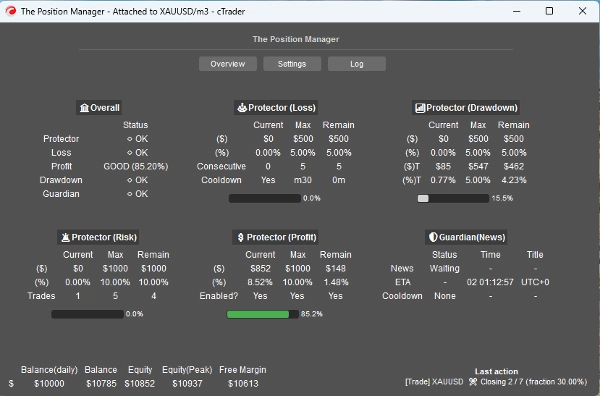
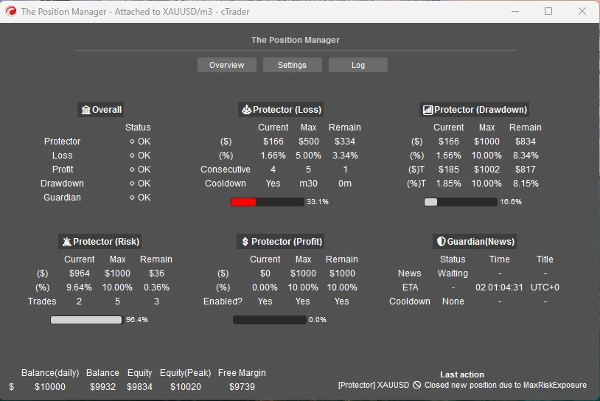
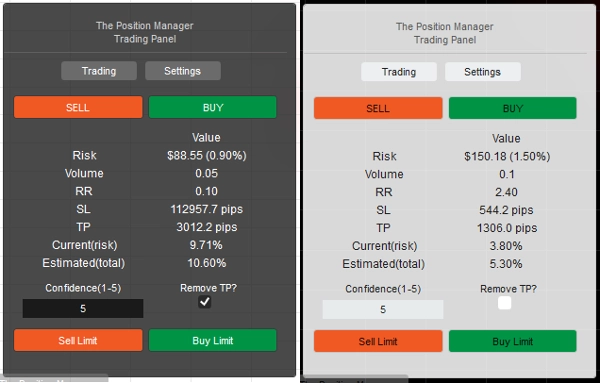
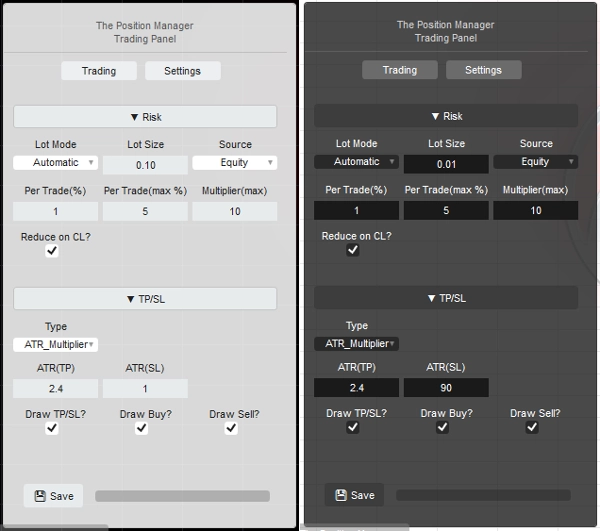

설명
소개합니다 => 포지션 매니저
- 트레이더와 개발자 모두를 위한 올인원 거래 관리
트레이더를 위한 => 이익 보호, 손실 제한 및 설정 가능한 입력으로 규율 강화.
포지션 매니저 는 이름에 걸맞는 4개의 모듈을 가지고 있습니다:
- 포트폴리오 프로텍터
- 가디언 트레이딩
- 리스크 매니저 (수동/반자동 거래용)
- 트레이드 매니저 (트레일링 TP, 부분 TP/SL)
각각은 더 나은 관리를 위한 하위 모듈을 포함하고 있습니다.
사용 사례:
- 트레이더가 포트폴리오 보호 와 지능형 스케일링을 데스크톱, 모바일 및 웹에서 거래할 때 찾는 경우.
-
- 거래를 전적으로 데스크톱에서 한다면, 헤드리스 모드 => OFF를 사용하세요.
- 모바일/웹에서도 거래한다면, 헤드리스 모드 => ON을 사용하세요.
- 프로프 트레이더로서 고정 리스크 한도를 가진 경우.
- 개발자로서 거래 신호를 실제 진입으로 전환하고자 하는 경우.
사용 방법:
- 처음 사용할 때는 다음을 강력히 권장합니다:
- "포지션 매니저" 인스턴스를 하나만 생성하세요:
- 헤드리스 모드 => OFF (UI 모드)
- 인스턴스 모드 => 둘 다 (매니저 + 거래 패널)
- 그 후, 라이브 전에 백테스팅에서 동작을 학습하세요(시각 모드).
명심하세요 => "포지션 매니저"는 스스로 포지션을 열지 않습니다:
- 기존 포지션을 관리합니다!
- 계좌 수준의 관리도 제공합니다.
소액 계좌의 경우, 비율을 높일 수 있습니다.
대형 계좌의 경우, 비율을 낮출 수 있습니다.
어떤 경우든, 항상 계좌 크기에 맞게 입력값을 조정하세요.
파라미터와 동작에 익숙해지면, cTrader 클라우드에서 실행하여 모바일/웹에서 포지션을 관리할 수 있습니다. 단, 두 가지 간단한 규칙만 따르면 됩니다:
- 헤드리스 모드 => ON
- 또한, "포지션 매니저" 인스턴스는 하나만 추가해야 합니다:
-
- 그렇지 않으면, 서로 충돌할 수 있습니다, 대부분의 작업이 심볼 전체에 적용되기 때문입니다.
- 로컬 실행 시에도 동일한 규칙이 적용됩니다.
각 파라미터와 예상 동작을 설명하겠습니다:
직관적인 것도 있지만, 많은 파라미터가 있습니다...
부디 차분히 하나씩 읽어주세요.
==== 포지션 관리 ====
- 헤드리스 모드? => 이 모드에서 가능한 기능은 다음과 같습니다:
-
- 포트폴리오 프로텍터
-
- 모든 기능이 사용 가능합니다.
- 가디언 트레이딩
-
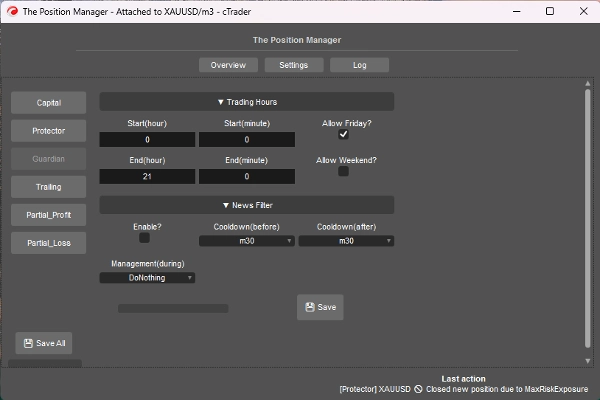
- 헤드리스 모드가 ON일 때 뉴스 필터는 비활성화됩니다.
- 트레일링 이익
-
- 어떤 심볼이든, 포지션에는 테이크 프로핏이 없어야 합니다.
- 부분 청산
-
- 어떤 심볼이든, 포지션에는 테이크 프로핏 또는 스톱 로스가 있어야 합니다.
=> 헤드리스 OFF (UI 모드)
- 인스턴스 모드:
-
- 매니저 => 하나의 인스턴스만 추가해야 합니다.
- 거래 => 순수 거래 패널 (리스크 매니저 모듈), 여러 인스턴스를 추가할 수 있습니다.
- 둘 다 => 하나의 인스턴스만 추가해야 합니다:
-
- 매니저는 창으로 표시됩니다.
- 거래 는 차트에 표시됩니다.
- 패널 유형/위치: 자명함
- 저장 방식:
-
- 재시작 시 동일한 설정을 저장/불러오려면 브로커를 사용하세요.
- 각 심볼 구성을 일종의 “리스크 프로필”로 사용하려면 브로커_심볼을 사용하세요.
=> 헤드리스 OFF/ON - 로컬
- 메시지 모드 허용?
-
- 자명함
- [거래, 둘 다] 인스턴스 모드를 사용할 때, 패널 설정에서 “TP/SL => 유형”을 “핍”으로 변경하여 메시지로 TP/SL을 설정할 수 있도록 하세요.
- 메시지 거래 허용?
-
- 메시지로 포지션 열기 허용.
- 헤드리스 ON일 경우, 리스크 매니저 설정이 불가능합니다.
- 헤드리스 OFF일 경우, [거래, 둘 다] 인스턴스 모드에서 리스크 매니저 모듈을 원하는 대로 설정할 수 있습니다.
=> 헤드리스 ON / 계좌 일반
- 최소 손익분기점(%):
-
- 각 포지션에 대해, 트레일링/부분 이익 모듈에 의해 손익분기점 로직이 실행될 때, SL을 진입 가격으로 바로 이동시키는 대신 (이는 음의 손익으로 이어짐),
- SL은 x% 앞으로 진입 가격으로 이동됩니다.
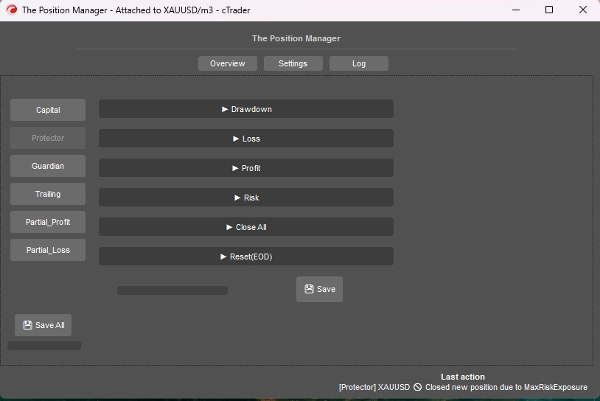
=> 헤드리스 ON / 프로텍터 손실
- 손실 원인: => 현재는 “일일 잔액” 기준입니다.
-
- 에퀴티가 일일 잔액 아래로 내려가면 트리거/카운트됩니다.
- 손실 유형:
-
- 백분율 => 일일 잔액의 %, 동적 성장에 적합.
- 고정 => 고정 금액, 엄격한 규칙에 적합.
- 최대 일일 손실² => % 또는 고정 (자명함)
- 연속 손실(CL):
-
- 연속 손실 발생 시 포지션 닫기 활성화.
- 연속 횟수:
-
- 자명함
- 리셋 쿨다운(CL):
-
- 카운트 리셋 및 새 포지션 열기 허용을 위한 쿨다운.
=> 헤드리스 ON / 프로텍터 이익
- 이익 한도 활성화? => 자명함
-
- 최대 이익에 도달하면 새 포지션은 닫힙니다.
- 이익 원천: => 항상 일일 잔액 기준
- 이익 유형:
-
- 백분율 => 일일 잔액의 %, 동적 성장에 적합.
- 고정 => 고정 금액, 엄격한 규칙에 적합.
- 최대 이익² => % 또는 고정 (자명함)
=> 헤드리스 ON / 프로텍터 리스크
- 총 노출(%):
-
- 손익분기점에 있는 포지션도 고려합니다.
- 총 오픈 거래 수:
-
- 총 개수와 같으면 새 포지션은 닫힙니다.
=> 헤드리스 ON / 프로텍터 전체 닫기
- 일 종료 시 닫기? => EOD에 모든 포지션 닫기
- 주 종료 시 닫기? => EOW(금요일)에 모든 포지션 닫기, EOD 시간을 기준으로 사용.
=> 헤드리스 ON / 프로텍터 리셋(EOD)
- 에퀴티 최고점 추적 리셋 및 적용 시 전체 닫기 로직 실행 시간.
- 리셋 (시간) => 0시 - 23시
- 리셋 (분) => 0분 – 59분
=> 헤드리스 ON / 가디언
- 거래 시간 외 또는 허용된 날 이외에 열린 포지션은 자동으로 닫힙니다.
-
- 시작/종료 (시간) => 0시 – 23시
- 시작/종료 (분) => 0분 – 59분
- 금요일 허용? => 자명함
- 주말 허용? (암호화폐) => 자명함
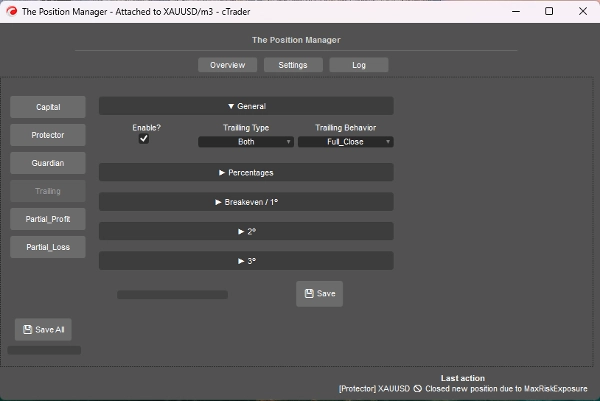
=> 헤드리스 ON / 트레일링 이익
- 에퀴티 기반 테이크 프로핏입니다.
- 활성화?
-
- TP 없는 포지션에 이상적이며, 추세 추종 포지션에 적합합니다.
- => 유형:
-
- 백분율 => 순수 에퀴티 %
- 드로우다운 => 트레일링 DD 개념 기반 (최고 에퀴티), 가격의 되돌림/후퇴 개념으로 생각하세요.
- 둘 다 => 부분 청산 동작이 기본 활성화됨:
-
- 부분 청산은 백분율 유형입니다.
- 전체 종료는 드로우다운 유형입니다.
- 동작:
-
- 전체 종료:
-
- 목표 % 에퀴티에 도달하면 TP 없는 모든 포지션을 닫습니다.
- 또한, 목표 % 에퀴티의 절반에 도달하면, SL을 손익분기점으로 이동합니다.
- 부분 종료:
-
- 부분 청산을 활성화합니다.
- 주의 => 포지션 크기(로트 크기)가 너무 작으면 전체 포지션이 닫힙니다.
- 최소 이익(%):
-
- 트레일링 로직을 활성화하기 위한 최소 이익.
- => 전체 종료 시(%):
-
- “전체 종료” 동작에만 해당.
- => [둘 다] 종료 드로우다운(%):
-
- “둘 다” 유형에만 해당.
- => [% 전용] 스마트 SL?"
-
- “백분율” 유형에만 해당.
- 드로우다운 유형과 유사하지만, 트레일링 SL을 사용해 더 반응적입니다.
- 부분 1(%) / 부분 2(%)
-
- 부분 청산을 실행할 목표 % 에퀴티 (백분율 또는 둘 다)
- 트레일링 유형이 백분율인지 드로우다운인지 항상 확인하세요.
- 부분 1(% 순서) / 부분 2(% 순서)
-
- 자명함
- => 종료 3(%):
-
- TP 없는 포지션을 완전히 종료할 목표 % 에퀴티.
- 백분율 또는 드로우다운 유형에만 해당.
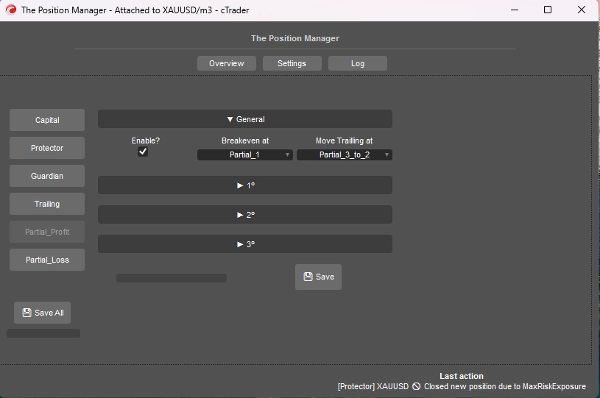
=> 헤드리스 ON / 부분 이익
- 활성화?
-
- TP 있는 포지션에 이상적이며, 일중 거래 또는 스캘핑 포지션에 적합합니다.
- 진입 가격 은 0%가 됩니다.
- 테이크 프로핏은 100%가 됩니다.
- 부분 가격은 이 방식을 기반으로 계산됩니다.
- 손익분기점:
-
- 자명함, 선택한 부분이 트리거되면 SL을 BE로 이동.
- => 트레일링 이동 시점:
-
- 자명함, 선택한 부분이 트리거되면 SL을 이전 부분 가격으로 이동.
- 주의 => 부분 2 또는 3이 활성화되어 있는지 확인하세요.
- 부분 1(%) /
부분 2(%) /
부분 3(%) -
- 진입 가격과 테이크 프로핏 사이의 백분율.
- => 2º 활성화?
=> 3º 활성화? -
- 자명함
- 부분 1(% 순서) /
부분 2(% 순서) /
부분 3(% 순서) -
- 자명함
=> 헤드리스 ON / 부분 손실
- 활성화?
-
- SL 있는 포지션에 이상적이며, 방향성으로 돌아올 수 있는 손실 거래의 손실 제한에 적합합니다.
- 진입 가격 은 0%가 됩니다.
- 스톱 로스 는 100%가 됩니다.
- 부분 가격은 이 방식을 기반으로 계산됩니다.
- 부분 1(%) /
부분 2(%) /
부분 3(%) -
- 진입 가격과 스톱 로스 사이의 백분율.
- => 2º 활성화?
=> 3º 활성화? -
- 자명함
- 부분 1(% 순서) /
부분 2(% 순서) /
부분 3(% 순서) -
- 자명함
====================================================
개발자를 위한 => 플러그 앤 플레이 모든 전략에 대해 cTrader Algo의 메시지/구독를 통해.
- 반자동 또는 완전 자동 시스템용:
- 반자동: 주문은 여전히 직접 열지만,
-
- SL과 TP는 메시지/구독으로 설정됩니다.
- 완전 자동: 주문 신호가 메시지/구독을 통해 “포지션 매니저”로 전송됩니다.
-
- 이 방식에서는 “리스크 매니저” 설정이 불가능할 수 있습니다.
매우 간단하며, 다음 클래스를 사용해 신호를 보내기만 하면 됩니다:
public class TradeSignal
{
public string Symbol { get; set; }
public TradeType Direction { get; set; }
public double StopLossPips { get; set; }
public double? TakeProfitPips { get; set; } // null = without TP
public string StrategyId { get; set; }
public double? EntryPrice { get; set; } // null = market, otherwise limit order.
public DateTime Timestamp { get; set; }
public int Confidence { get; set; } // 1–5
}
그 다음:
Messages.Send("ThePositionManager", signal);
간단한 예:
TradeSignal signal = new()
{
Symbol = Symbol.Name,
Direction = TradeType.Buy,
StopLossPips = 1500,
TakeProfitPips = 3000,
StrategyId = "MyStrategy",
Confidence = 5
};
Messages.Send("ThePositionManager", signal);
요약
Key features include four main modules: Portfolio Protector, Guardian Trading, Risk Manager (for manual or semi-automated trading), and Trade Manager (supporting trailing take profit and partial take profit/stop loss). The tool supports intelligent scaling and portfolio protection across Desktop, Mobile, and Web platforms, with a Headless mode option for managing positions remotely via cTrader Cloud.
For traders, it offers configurable risk controls such as daily and trailing drawdown limits, profit caps, exposure limits, and automated position closing based on trading hours or drawdown thresholds. Trailing profit and partial profit/loss management allow dynamic adjustment of stop loss and take profit levels to optimize trade exits.
Developers can integrate The Position Manager with automated strategies by sending trade signals via messages, enabling semi or fully automated order management with customizable stop loss and take profit settings.
The tool supports saving settings by broker or symbol, and includes detailed parameters for break-even management, risk exposure, and partial close orders, making it adaptable to various account sizes and trading styles.
고객 리뷰
5 | 0 % | |
4 | 67 % | |
3 | 33 % | |
2 | 0 % | |
1 | 0 % |
상담
자주 묻는 질문(FAQ)
















가격