설명
안녕하세요 모든 트레이더 여러분, 곧 과도한 거래와 리스크 관리를 돕는 일일 잠금 기능을 포함한 새로운 기능을 소개할 예정입니다.
ImmortalManualScaler — 쉬운 사용자 가이드
이 cBot이 하는 일, 각 설정의 의미, 그리고 놀라지 않고 사용하는 방법에 대한 간단한 안내서입니다.
1. 이 봇이 무엇인지 (한마디로)
이 봇은 거래를 찾아주지 않습니다. 이것은 거래 관리자입니다.
언제 그리고 어느 방향으로 거래할지 결정합니다. 그 후 봇이 지루하고 빠르며 오류가 발생하기 쉬운 부분을 자동으로 처리합니다:
- 첫 포지션을 엽니다.
- 거기에 손절(stop loss)을 설정합니다.
- 가격이 유리하게 움직일 때 더 많은 포지션을 추가합니다 (이를 "피라미딩" 또는 "스케일링 인"이라고 합니다).
- 손절을 본전(break-even)으로 이동시켜서 이익 중인 거래가 손실로 바뀌지 않도록 합니다.
- 단계별로 이익을 실현하거나 손절을 추적(trail)하거나 고정된 달러 금액에서 종료합니다 — 선택은 당신의 몫입니다.
이것을 거래의 관리를 위한 자동 조종 장치로 생각하세요, 거래를 결정하는 것이 아닙니다.
2. 큰 아이디어, 단계별 설명
거래의 전체 과정을 순서대로 설명합니다:
봇을 시작합니다
│
▼
[1] 첫 포지션을 열고 손절을 설정합니다
│
▼
[2] (매수의 경우) 위쪽에 대기 주문 사다리를 배치합니다
│ ── 가격 상승 ──► 각 단계가 체결되어 포지션이 추가됩니다
▼
[3] 가격이 충분히 움직이면 → 손절이 본전으로 이동합니다
│ (이제 거래가 "안전"해졌습니다)
▼
[4] 종료는 세 가지 방법 중 하나로 이루어집니다 (모드를 선택하세요):
• TP1 / TP2 / TP3에서 단계별 이익 실현, 또는
• 손절을 추적하며 움직임을 타기, 또는
• 설정된 + / – 달러 금액에서 모두 청산
│
▼
거래 종료 → 봇은 대기 상태로 전환
이게 전부입니다. 아래 내용은 설정에 대한 설명일 뿐입니다.
3. 빠른 시작 (가장 빠른 실행 방법)
- 원하는 심볼 차트에 봇을 올리세요 (예: US100, XAUUSD).
- 심볼 프리셋을 다음 중 하나에 맞게 설정하세요:
Gold,NDX, 또는Custom(직접 숫자를 입력하고 싶을 때). - 기본 로트(첫 포지션 크기)와 추가 로트(각 추가 크기)를 설정하세요.
- 방향(매수 또는 매도)와 종료 모드(처음에는
FixedTP로 시작하세요). - 시작 버튼을 누르세요. 봇이 거래를 열고 관리합니다. 오른쪽 상단의 대시보드를 확인하세요.
거래를 조기에 중단하려면 봇을 멈추기만 하면 됩니다 — 포지션은 수동으로 처리할 수 있도록 열려 있습니다 (봇을 멈춰도 자동으로 닫히지 않습니다).
4. 세 가지 주요 스위치 (이것들이 모든 것을 제어합니다)
봇의 동작 대부분은 세 가지 선택에서 나옵니다. 이것들을 제대로 설정하면 나머지는 세부사항입니다.
스위치 1 — 진입 모드: 거래가 시작되는 방식
옵션이 하는 일
OpenOnStart
봇을 시작하는 순간, 선택한 방향으로 거래를 직접 엽니다. "봇 시작"이 진입 트리거입니다.
AttachToManual
사용자가 직접 거래를 엽니다 (언제든지). 봇이 이를 감지하고 관리를 시작합니다. 직접 매수/매도 버튼을 클릭하고 나머지는 봇에 맡기고 싶을 때 사용하세요.
스위치 2 — 스케일 주문 유형: 더 많은 포지션을 추가하는 방식
옵션이 하는 일
Stop
가격이 유리하게 움직일 때 추가합니다 (피라미드). 매수의 경우, 진입가 위에 매수를 더 쌓습니다. 일반적인 선택입니다.
Limit
가격이 되돌릴 때 추가합니다 (평균 진입). 매수의 경우, 진입가 아래에 매수를 더 쌓습니다. 다른 리스크 스타일 — 진심일 때만 사용하세요.
None
추가 없음. 단일 포지션만 유지합니다.
스위치 3 — 종료 모드: 거래가 종료되는 방식 (가장 중요함)
옵션이 하는 일
Trailing
이익 실현 없음. 손절은 본전으로 이동 후 가격 뒤를 단계별로 따라갑니다. 전체 포지션이 함께 움직이며 추적 손절에 걸리면 종료됩니다. 추세가 강한 날에 최적입니다.
FixedTP
세 가지 고정 목표 TP1, TP2, TP3에서 단계별로 청산합니다. 변동성이 크거나 불확실한 상황에서 이익을 확보하기에 좋습니다.
FixedTP_ThenTrail
혼합형: TP1과 TP2에서 이익을 실현하고, 남은 "러너"는 추적 손절로 관리합니다 (TP3는 사용하지 않음). 일부는 확보하고 일부는 추세를 탑니다.
또한 $ 하드 종료 (8절) 오버라이드가 있습니다. 이 기능을 켜면 세 가지 종료 모드를 모두 무시하고 고정된 달러 금액에서 종료합니다.
5. 스케일링(피라미딩) 작동 방식 — 그림과 함께
다음 설정으로 US100을 매수한다고 가정해 봅시다: 기본 로트 4, 추가 로트 2, 최대 추가 5, 추가 간격 15 핍.
봇은 4 로트를 열고, 15 핍 간격으로 5개의 대기 "추가" 주문을 위쪽으로 배치합니다:
가격 ▲
+75 ── 추가 #5 (2 로트)
+60 ── 추가 #4 (2 로트)
+45 ── 추가 #3 (2 로트)
+30 ── 추가 #2 (2 로트)
+15 ── 추가 #1 (2 로트)
0 ── 진입 (4 로트) ← 손절은 이 아래에 위치
가격이 오르면 각 단계가 체결됩니다. 모두 체결되면 총 4 + (5 × 2) = 14 로트를 보유하게 됩니다. 거래가 이제 "완전히 적재"된 상태입니다.
이것은 강력하지만 양날의 검입니다. 바스켓이 완전히 적재되면, 반전은 모든 로트에 영향을 미치며, 단순히 첫 번째 로트만이 아닙니다. 그래서 본전(다음 섹션)이 매우 중요합니다 — 적재된 이익이 고통스러운 손실로 바뀌는 것을 막아줍니다.
추가 로트 증가분은 각 추가가 이전 것보다 더 크게 하도록 합니다 (예: 각 단계마다 +0.5). 0으로 두면 모두 동일한 크기로 추가됩니다.
6. 본전 — "이익을 절대 반납하지 않는" 기능
가격이 설정한 만큼 유리하게 움직이면, 봇이 손절을 이동시켜 거래가 손실을 볼 수 없도록 합니다. 두 가지 설정이 이를 제어합니다:
본전 기준점 — 본전이 위치하는 곳
옵션의 의미
평균 진입가(권장)
본전은 전체 바스켓의 혼합 비용에 위치합니다. 손절이 이곳에 걸리면 전체 바스켓이 이익 상태로 닫힙니다. 피라미딩에 적합한 설정입니다.
첫 진입가
본전은 원래 진입가에만 위치합니다. 추가 로트가 쌓인 후에는 보호가 약해집니다.
본전 잠금 (핍) — 얼마나 이익을 확보할지
0= 손절이 정확히 본전에 위치 (이익은 없지만 손실도 없음). 수수료/스프레드 비용 후에는 약간 손해일 수 있습니다.5,10등 = 손절이 그만큼 핍만큼 이익 구간에 위치하여, 손절 시 소량의 보장된 이익을 기록합니다.
팁: "이익을 위험에 빠뜨리지 않고 작은 확실한 이익을 취하는" 것이 목표라면 평균 진입가와 작은 양의 본전 잠금(예: 5–10)을 함께 사용하세요. 이 조합이 효과적입니다.
본전은 언제 작동하나요?
- Trailing 및 ThenTrail 모드에서: 가격이 본전 트리거 핍만큼 유리하게 움직일 때.
- FixedTP 모드에서: TP1이 도달했을 때 ("TP1 후 SL을 본전으로 이동 = 예"인 경우에만).
7. 세 가지 종료 모드, 간단한 예시와 함께
14 로트가 적재된 바스켓과 다음 목표를 가정합니다: TP1, TP2, TP3 고정 거리에서 각각 50% / 25% / 25%를 청산합니다.
중요: 청산 비율은 전체 바스켓 크기의 일부입니다 (TP1이 처음 도달한 순간 기준). 50 + 25 + 25 = 100이면 모두 청산됩니다. 합이 100 미만이면 "러너"가 남습니다.
Trailing
목표 없음. 손절은 본전으로 이동 후 단계별로 가격 뒤를 따라 올라갑니다 (추적 단계), 항상 추적 거리만큼 뒤에 위치합니다. 전체 14 로트가 함께 움직이며 추적 손절에 걸리면 모두 종료됩니다. 추세가 강한 날에 크게 이기고, 반전 시 더 많이 반납합니다.
FixedTP
- TP1 도달 → 50% (7 로트) 청산, 손절은 본전으로 이동, 나머지 추가 주문 취소.
- TP2 도달 → 25% (3.5 로트) 청산.
- TP3 도달 → 25% (3.5 로트) 청산 → 완전 종료.
이익을 꾸준히 확보합니다. TP1/TP2 후 가격이 반전되어 TP3 전에 종료되면 남은 부분은 본전에서 청산되어 작은 이익을 냅니다.
FixedTP_ThenTrail
- TP1 도달 → 50% 청산.
- TP2 도달 → 25% 청산.
- 마지막 25%는 러너가 되어 추적 손절을 따릅니다 (TP3는 사용하지 않음).
2/3는 확보하고 나머지는 추적 손절로 운용합니다.
8. $ 하드 종료 — 간단한 달러 킬 스위치
이것은 오버라이드입니다. 켜면 TP / 본전 / 추적을 완전히 무시하고 달러 기준의 손익으로만 종료를 관리합니다.
설정의 의미
$ 하드 종료 사용
예 = 이 모드가 모든 것을 제어합니다. 아니오 = 일반 모드가 작동합니다.
$ 이익 목표
바스켓의 현재 이익이 이 달러 금액에 도달하면 → 모두 청산 (이익 실현). 0은 비활성화.
$ 손실 한도
바스켓의 현재 손실이 이 달러 금액에 도달하면 → 모두 청산 (손실 확정). 0은 비활성화.
이 모드가 켜져 있을 때도 작동하는 것: 진입, 스케일링(추가 주문 체결 유지), 원래 손절(갭 백스톱). 꺼지는 것: TP1/2/3, 본전 이동, 추적.
스케일을 주의하세요. 달러 수준은 전체 바스켓에 반응합니다. US100의 완전 적재 바스켓은 포인트당 약 $18 가치가 있습니다. 따라서 $100 손실 한도는 적재 시 약 6포인트 움직임에 해당하며 매우 타이트하여 작은 변동에도 작동할 수 있습니다. 이 숫자들은 단일 포지션이 아닌 바스켓에 맞게 조정하세요.
9. 전체 설정 참조 (쉬운 언어)
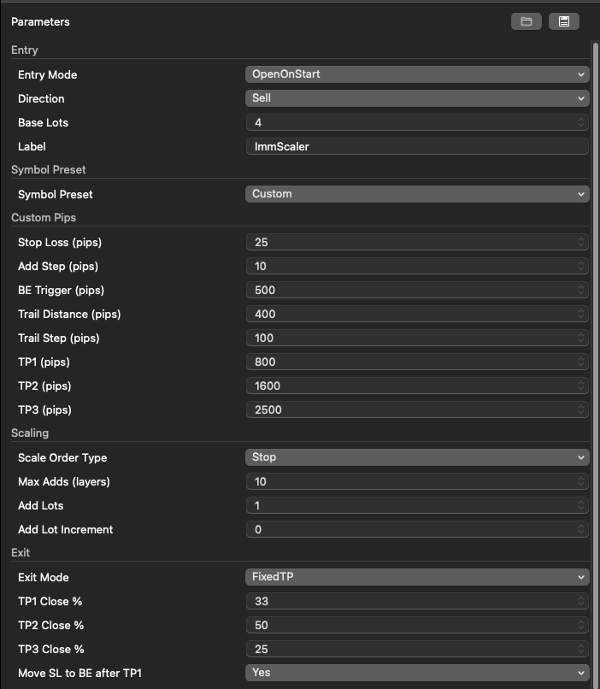
진입
설정의 의미
진입 모드
OpenOnStart (봇이 거래를 엶) 또는 AttachToManual (사용자가 열고 봇이 관리).
방향
매수 또는 매도. OpenOnStart에서만 사용.
기본 로트
첫 포지션 크기.
라벨
거래의 이름 태그. 단순 장식용.
심볼 프리셋
설정의 의미
심볼 프리셋
Gold / NDX 는 미리 만들어진 핍 간격을 불러옵니다. Custom 은 아래에 직접 입력한 숫자를 사용합니다. 로트 크기는 프리셋에 의해 변경되지 않습니다 — 직접 설정하세요.
사용자 지정 핍 (프리셋이 Custom일 때만 사용)
설정의 의미
손절 (핍)
진입가로부터 보호용 손절 거리. 각 추가 주문의 백스톱 역할도 합니다.
추가 간격 (핍)
각 스케일 인 단계 간의 간격.
본전 트리거 (핍)
손절이 본전으로 이동하기 전에 필요한 유리한 가격 움직임.
추적 거리 (핍)
추적 손절이 가격 뒤에 위치하는 거리.
추적 단계 (핍)
추적 손절이 한 단계 앞으로 이동하기 위한 최소 가격 움직임.
TP1 / TP2 / TP3 (핍)
첫 진입가로부터의 세 가지 이익 실현 거리.
스케일링
설정의 의미
스케일 주문 유형
Stop (이익 구간에서 추가) / Limit (되돌림 시 추가) / None.
최대 추가 수 (계층)
추가할 최대 포지션 수 (최대 20).
추가 로트
각 추가 포지션의 크기.
추가 로트 증가분
각 추가가 이전 것보다 더 크게 만듭니다 (0 = 모두 동일).
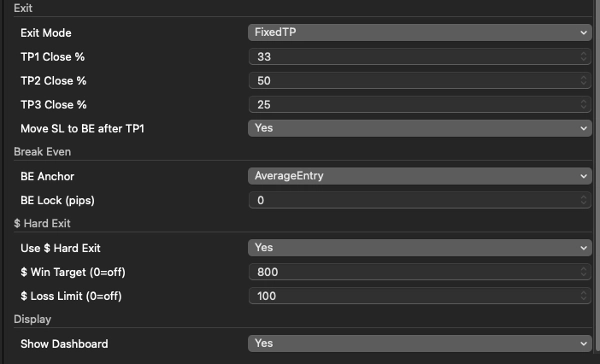
종료
설정의 의미
종료 모드
Trailing / FixedTP / FixedTP_ThenTrail.
TP1 / TP2 / TP3 청산 비율 %
각 목표에서 청산할 전체 바스켓의 비율. 합이 100이면 완전 종료.
TP1 후 SL을 본전으로 이동
FixedTP 모드에서 TP1 도달 시 손절을 본전으로 이동.
본전
설정의 의미
본전 기준점
평균 진입가 (전체 바스켓 본전, 권장) 또는 첫 진입가.
본전 잠금 (핍)
본전에서 확보할 이익 핍 수 (0 = 정확한 본전).
$ 하드 종료
설정의 의미
$ 하드 종료 사용
달러 오버라이드를 켜거나 끕니다.
$ 이익 목표
이익이 이 금액에 도달하면 청산. 0은 비활성화.
$ 손실 한도
손실이 이 금액에 도달하면 청산. 0은 비활성화.
디스플레이
설정의 의미
대시보드 표시
차트 위 정보 패널을 표시합니다. 빠른 최적화 실행 시에는 끄세요.
10. 차트 위 대시보드 읽기
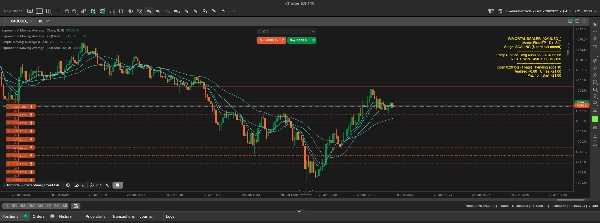
패널(오른쪽 상단, 밝은 노란색)은 현재 상태를 보여줍니다:
IMMORTAL SCALER [US100.cash]
모드: FixedTP 방향: 매수
단계: TP1 완료 (TP2 전) ← 현재 거래 위치
--------------------------------------
진입 30041.18 평균 30108.96 손절 30109.96
TP1 30141.18 [도달] TP2 30191.18 [ - ] TP3 30241.18 [ - ]
--------------------------------------
오픈 8.00 로트 (4 단계) 대기 추가 0
실현 +392.96 미실현 +641.40 ← 실현 이익 대 미실현 이익
시작 이후 손익: +1034.36 ← 봇 시작 이후 총합
가격 축에 그려진 선들:
- 회색 점선 = 첫 진입가
- 청록색 점선 = 평균 진입가 (본전 기준점)
- 빨간 실선 = 현재 바스켓 손절가
- 녹색 점선 = 아직 도달하지 않은 이익 실현선 → 도달 시 주황색으로 변함
11. 바로 사용할 수 있는 예제 설정
A) 안정적 이익 확보 (US100, FixedTP) 진입 OpenOnStart, 방향은 자유, 프리셋 Custom, 종료 모드 FixedTP, 청산 비율 50/25/25, TP1 후 SL 본전 이동 = 예, 본전 기준점 평균 진입가, 본전 잠금 5. → 스케일 인, TP1에서 본전 잠금, TP3에서 완전 종료.
B) 추세 타기 (US100, Trailing) 종료 모드 Trailing, 심볼에 맞는 본전 트리거, 심볼에 맞는 추적 거리/단계, 본전 기준점 평균 진입가. → 전체 바스켓이 추적하며 되돌림 시 종료.
C) 달러 킬 스위치 (모든 심볼) $ 하드 종료 = 예, $ 이익 목표 및 $ 손실 한도를 바스켓 가치에 맞게 설정. → TP/추적 무시, + / – 달러에서 모두 청산.
12. 중요한 안전 주의사항 (꼭 읽어주세요)
- 봇에는 진입 신호가 없습니다. OpenOnStart 모드에서는 시작 시 한 번 거래를 열고 대기합니다. 전략이 아니라 관리 도구입니다. 반복 자동 거래를 원하면 진입 신호에 연결해야 합니다.
- 심볼별, 계좌별로 한 인스턴스만 실행하세요. 봇은 차트 심볼의 모든 포지션을 관리합니다. 두 번째 인스턴스나 수동 거래가 같은 심볼에 있으면 함께 관리됩니다.
- 심볼별 핍 크기를 확인하세요. "핍"은 심볼마다 다른 가격 단위를 의미합니다. 첫 로그 라인에
pip=...가 출력됩니다 — 거리 숫자를 신뢰하기 전에 확인하세요. 금 가격 설정은 지수에 너무 넓고, 반대도 마찬가지입니다. - 로트 크기는 로트 수가 아니라 달러/포인트 기준으로 맞추세요. (예: 1 MNQ 선물 ≈ 여기서 US100 2.0 로트, US100은 포인트당 약 $1, MNQ는 $2.)
- 피라미딩은 반전을 증폭시킵니다. 바스켓이 완전히 적재되면 반전이 모든 로트에 영향을 미칩니다. 본전(평균 진입 + 작은 잠금)이 친구입니다.
- 틱 모드에서 백테스트하세요. 스케일링, 부분 청산, 추적, 달러 체크는 틱 단위로 반응합니다. 바 모드 백테스트는 이를 잘못 표현합니다.
- 봇을 멈춰도 거래는 닫히지 않습니다. 의도적으로 포지션을 열어둡니다. 원하면 수동으로 닫으세요.
이 봇은 거래 관리만 자동화합니다. 언제 거래할지 결정하지 않으며, 이익을 보장하지 않습니다. 항상 데모에서 먼저 테스트하고 계좌 및 프로프 펌 규칙에 맞게 리스크를 조절하세요.
요약
Key features include:
- Entry modes: Open trade on bot start or attach to manually opened trades.
- Scaling options: Add positions on price advances (Stop), on pullbacks (Limit), or no scaling.
- Exit modes: Fixed take-profit targets with staged partial closes, trailing stops that follow price movements, or a hybrid mode combining both.
- Break-even management with configurable anchoring and profit locking to prevent turning winning trades into losses.
- A dollar-based hard exit override that closes trades when floating profit or loss reaches set thresholds.
- Customizable parameters for lot sizes, scaling steps, stop loss distances, and take-profit levels.
- On-chart dashboard displaying trade status, entry points, stops, and profit/loss in real time.
The bot supports symbols like indices and gold, with presets for pip distances and allows custom settings. It is compatible with prop firm trading requirements and emphasizes risk management through position sizing and stop loss control. It operates on a single symbol per account and requires tick data for accurate backtesting. Stopping the bot leaves positions open for manual handling.
고객 리뷰
5 | 100 % | |
4 | 0 % | |
3 | 0 % | |
2 | 0 % | |
1 | 0 % |