คำอธิบาย
ผู้ช่วยการซื้อขายและให้คำปรึกษา AI Trading and Advisory Assistant เป็น cTrader cBot ที่ใช้การเรียนรู้ของเครื่องและโมเดลภาษาใหญ่ (LLMs) ปัจจุบันเพื่อวิเคราะห์ข้อมูลตลาดสด ให้คำแนะนำการซื้อขาย หรือดำเนินการซื้อขายโดยอัตโนมัติ
การเปิดตัวล่าสุดเชื่อมต่อผ่าน OpenRouter, NVIDIA และ Router9 ผู้ให้บริการเหล่านี้ให้คุณเข้าถึงครอบครัวโมเดลหลายรุ่นผ่าน API ที่เข้ากันได้กับ OpenAI หนึ่งเดียว รวมถึงโมเดลจาก OpenAI/ChatGPT, Anthropic Claude, Google Gemini, DeepSeek, Meta, Mistral, Qwen, Kimi และผู้ให้บริการอื่น ๆ เมื่อพร้อมใช้งาน ซึ่งรวมถึงโมเดลรุ่นใหม่ เช่น Anthropic Claude Fable 5, ChatGPT 5.6 Sol, Qwen 3.8 และ Kimi K3 เมื่อผู้ให้บริการที่เลือกแสดงรายการและเปิดเผย ID โมเดลที่เข้ากันได้กับ chat-completions
ความพร้อมใช้งานของโมเดล ชื่อ ราคา ขีดจำกัดบริบท และการเข้าถึงระดับฟรีอาจเปลี่ยนแปลงได้ โปรดคัดลอก ID โมเดลที่ถูกต้องจากแคตตาล็อกโมเดลปัจจุบันของผู้ให้บริการที่เลือกเสมอ
วิธีการทำงานของ TraderAI
TraderAI ส่งข้อมูลตลาดที่เลือกไปยังโมเดล AI ที่คุณเลือกแบบเรียลไทม์ โมเดลจะปฏิบัติตามคำสั่งที่กำหนดเองของคุณและส่งกลับคำแนะนำหรือการดำเนินการซื้อขายที่มีโครงสร้าง ซึ่งช่วยลดความจำเป็นในการคัดลอกข้อมูลตลาดด้วยตนเองหรือดำเนินการตัดสินใจทุกอย่างด้วยตัวเอง
AI สามารถใช้การเคลื่อนไหวของราคา แท่งเทียน ข้อมูล tick ความลึกของตลาด ตัวชี้วัดกราฟ ตำแหน่งเปิด และประวัติการตัดสินใจล่าสุดเพื่อระบุแนวโน้มและประเมินการซื้อขายที่เป็นไปได้ ผลลัพธ์จาก AI อาจไม่ถูกต้อง; ทดสอบกลยุทธ์ทุกอย่างในบัญชีสาธิตก่อนใช้เงินจริง
สองโหมดการทำงาน
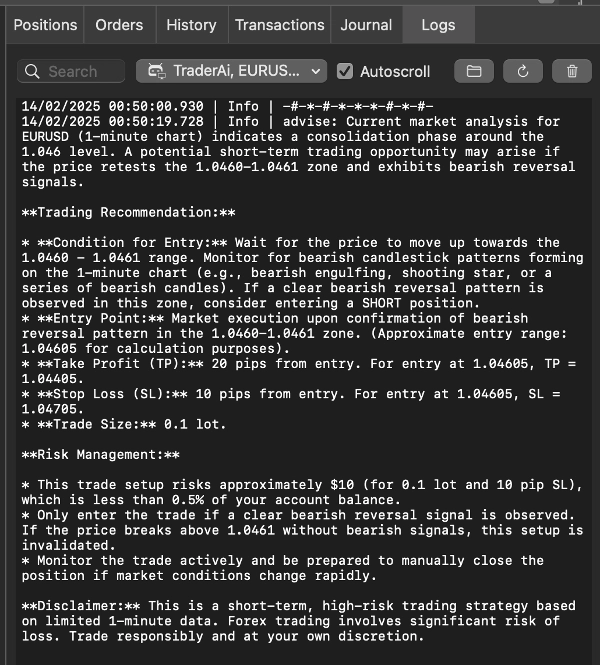
โหมดที่ปรึกษาวิเคราะห์สถานะตลาดที่ให้มาและแสดงคำแนะนำ คุณยังคงรับผิดชอบในการตัดสินใจว่าจะซื้อขายหรือไม่
โหมดผู้ซื้อขายอนุญาตให้โมเดลเปิด ปิด หรือแก้ไขตำแหน่งในบัญชีซื้อขายที่เลือก ขีดจำกัดการดำเนินการในตัวจะตรวจสอบการกระทำของโมเดลก่อนที่จะถึงบัญชี
ผู้ให้บริการ AI ที่รองรับ
OpenRouter
OpenRouter ให้การเข้าถึงโมเดลเชิงพาณิชย์และโมเดลเปิดจำนวนมากผ่านคีย์ API และรูปแบบการตั้งชื่อโมเดลเดียว
แคตตาล็อกโมเดล: openrouter.ai/models
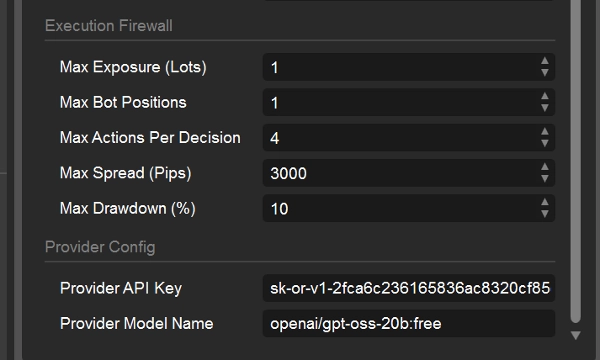
ค่าเริ่มต้นของ ID โมเดล: openai/gpt-oss-20b:free
ป้อน ID แคตตาล็อกที่ถูกต้อง โดยปกติในรูปแบบ publisher/model-name
NVIDIA
NVIDIA ให้บริการปลายทาง NVIDIA NIM ที่โฮสต์สำหรับโมเดลการสร้างข้อความและการให้เหตุผลที่รองรับ
แคตตาล็อกโมเดล: build.nvidia.com/models
เลือกโมเดลที่มี Free Endpoint หรือปลายทาง API ที่โฮสต์อื่น ๆ
เปิดหน้าของโมเดลและคัดลอก ID โมเดล API ที่ถูกต้อง ไม่ใช่ทุกรายการในแคตตาล็อกเป็นโมเดลแชท; โมเดลภาพ เสียง การฝัง และโมเดลที่ดาวน์โหลดได้เท่านั้นไม่เหมาะสำหรับ cBot นี้
Router9
Router9 ส่งต่อโมเดลที่รองรับจากผู้ให้บริการต้นทางหลายรายผ่านปลายทางเดียว
แคตตาล็อกโมเดล: router9.com/models
ป้อนค่าที่แสดงในคอลัมน์ Model ID ของแคตตาล็อกอย่างถูกต้อง
แคตตาล็อกระบุโมเดลปัจจุบัน ผู้ให้บริการต้นทาง ขีดจำกัดบริบท ราคา และการเข้าถึงระดับฟรี
พารามิเตอร์ cBot
การตั้งค่า AI
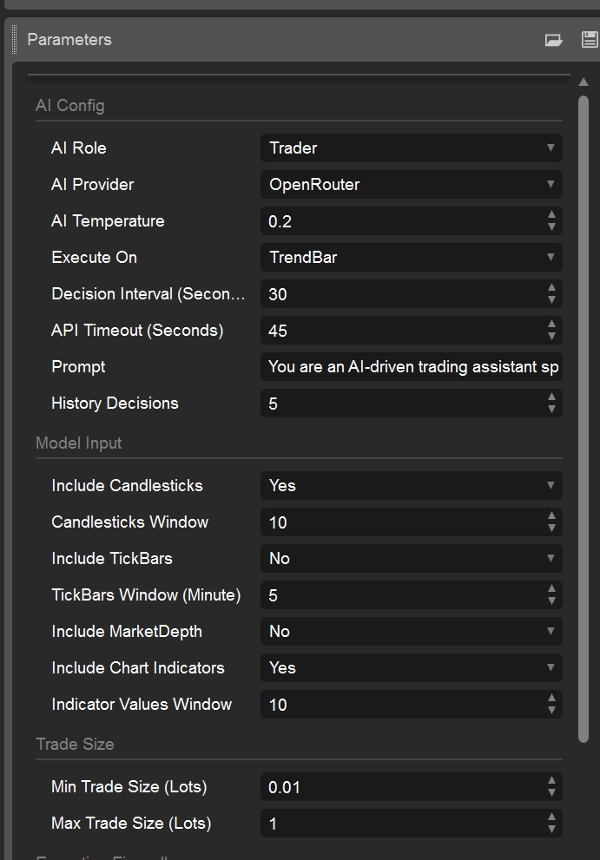
บทบาท AI — เลือก Advisor หรือ Trader
ผู้ให้บริการ AI — เลือก OpenRouter, Nvidia หรือ Router9
อุณหภูมิ AI — ควบคุมความหลากหลายของการตอบสนอง ค่าเริ่มต้นคือ 0.2
- 0.1–0.3: สม่ำเสมอและระมัดระวังมากขึ้น
- 0.4–0.7: สมดุล
- 0.8–1.0: หลากหลายและสร้างสรรค์มากขึ้น
ค่าที่ต่ำกว่ามักเหมาะสำหรับการตัดสินใจซื้อขายที่ทำซ้ำได้ ผู้ให้บริการบางรายหรือโมเดลการให้เหตุผลอาจไม่สนใจหรือจำกัดอุณหภูมิ
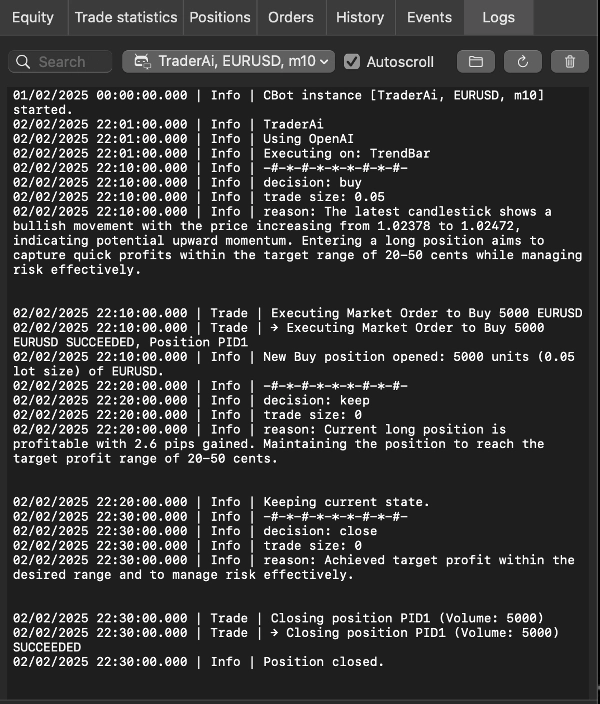
Execute On - เลือกเมื่อ cBot ขอการตัดสินใจใหม่:
TrendBar: เมื่อมีแท่งกรอบเวลากราฟใหม่
TickBar: จากกิจกรรม tick ที่เข้ามา โดยขึ้นอยู่กับช่วงเวลาการตัดสินใจ
ช่วงเวลาการตัดสินใจ (วินาที) - เวลาขั้นต่ำระหว่างคำขอ AI ค่าเริ่มต้นคือ 30 ค่าที่มากขึ้นช่วยลดการใช้ API และช่วยหลีกเลี่ยงข้อจำกัดอัตราของผู้ให้บริการ
หมดเวลาของ API (วินาที) - เวลาสูงสุดในการรอการตอบกลับจากผู้ให้บริการ ค่าเริ่มต้นคือ 45 วินาที
ประวัติการตัดสินใจ - จำนวนการตัดสินใจล่าสุดที่ส่งให้โมเดล ตั้งแต่ 0 ถึง 20 ค่าเริ่มต้นคือ 5
คำสั่ง - กำหนดกลยุทธ์ ข้อจำกัด และพฤติกรรมที่คาดหวังจากโมเดล สร้างและตรวจสอบคำสั่งในสภาพแวดล้อมสาธิต คำสั่งนี้ไม่แทนที่ไฟร์วอลล์การดำเนินการของ cBot
การตั้งค่าผู้ให้บริการ
คีย์ API ของผู้ให้บริการ - ป้อนคีย์ API ที่ออกโดยผู้ให้บริการที่เลือกภายใต้ AI Provider
ชื่อโมเดลของผู้ให้บริการ - ป้อน ID โมเดลที่ถูกต้องของผู้ให้บริการ ID โมเดลมีความไวต่ออักษรตัวพิมพ์เล็ก-ใหญ่และเฉพาะผู้ให้บริการ อย่าป้อนชื่อผลิตภัณฑ์หรือชื่อสมัครสมาชิก ChatGPT เว้นแต่จะปรากฏเป็น ID โมเดล API ในแคตตาล็อกของผู้ให้บริการที่เลือก
ตัวอย่างการตั้งค่า OpenRouter
ผู้ให้บริการ AI: OpenRouter
ชื่อโมเดลของผู้ให้บริการ: moonshotai/kimi-k3 หรือ anthropic/claude-fable-5 หรือ nvidia/nemotron-3-ultra-550b-a55b:free
คีย์ API ของผู้ให้บริการ: คีย์ API OpenRouter ของคุณ
เมื่อเปลี่ยนผู้ให้บริการ ให้แทนที่ทั้งคีย์ API และ ID โมเดล คีย์ OpenAI, Gemini, Anthropic หรือ DeepSeek โดยตรงจากการเปิดตัว TraderAI รุ่นเก่าไม่ถูกต้อง เว้นแต่ผู้ให้บริการเส้นทางที่เลือกจะรองรับการใช้คีย์นั้นอย่างชัดเจน
อินพุตโมเดล:
รวมแท่งเทียน - รวมข้อมูลแท่งเทียนกราฟในอินพุตโมเดล
หน้าต่างแท่งเทียน - จำนวนแท่งเทียนล่าสุดที่จะรวม
รวม TickBars - รวมข้อมูล tick bid/ask ล่าสุด
หน้าต่าง TickBars (นาที) - จำนวนประวัติ tick เป็นนาทีที่จะรวม
รวม MarketDepth - รวมภาพรวมความลึกของตลาดปัจจุบัน ความลึกของตลาดอาจไม่พร้อมใช้งานในระหว่างการทดสอบย้อนหลัง
รวมตัวชี้วัดกราฟ - รวมตัวชี้วัดที่รองรับที่แนบกับกราฟ
หน้าต่างค่าตัวชี้วัด - จำนวนค่าล่าสุดที่จะรวมสำหรับตัวชี้วัดกราฟแต่ละตัว ตั้งแต่ 1 ถึง 100
หน้าต่างอินพุตที่ใหญ่กว่าจะใช้โทเค็นมากขึ้นและอาจเพิ่มความล่าช้าและค่าใช้จ่าย บางการผสมผสานของกรอบเวลาและแหล่งข้อมูลการทดสอบย้อนหลังอาจไม่ให้ข้อมูล tick หรือความลึก
ขนาดการซื้อขาย
ขนาดการซื้อขายขั้นต่ำ (ล็อต) - ขนาดการซื้อขายเล็กที่สุดที่ AI สามารถขอได้
ขนาดการซื้อขายสูงสุด (ล็อต) - ขนาดการซื้อขายใหญ่ที่สุดที่ AI สามารถขอได้
ไฟร์วอลล์การดำเนินการ
ขีดจำกัดเหล่านี้ใช้ในโหมด Trader และช่วยจำกัดการกระทำที่สร้างโดย AI:
การเปิดเผยสูงสุด (ล็อต) - การเปิดเผยรวมสูงสุดที่ cBot อาจสร้างได้
ตำแหน่งบอทสูงสุด - จำนวนตำแหน่งสูงสุดที่จัดการโดย cBot
จำนวนการกระทำสูงสุดต่อการตัดสินใจ - จำนวนการเปิด ปิด หรือแก้ไขสูงสุดที่ยอมรับจากการตอบสนอง AI หนึ่งครั้ง
สเปรดสูงสุด (พิปส์) - ป้องกันการเข้าใหม่เมื่อสเปรดปัจจุบันเกินค่าที่ตั้งไว้
การลดลงสูงสุด (%) - ป้องกันความเสี่ยงเพิ่มเติมเมื่อถึงขีดจำกัดการลดลงที่ตั้งไว้
การควบคุมเหล่านี้ช่วยลดความเสี่ยงแต่ไม่สามารถกำจัดการขาดทุน ความผิดพลาดของผู้ให้บริการ ความล่าช้า การลื่นไถล หรือผลลัพธ์โมเดลที่ไม่ถูกต้องได้
นำคีย์ของคุณเอง (BYOK)
TraderAI ไม่รวมการเข้าถึงผู้ให้บริการ สร้างบัญชีกับผู้ให้บริการที่คุณชื่นชอบ รับคีย์ API และเติมเงินหรือกำหนดค่าบัญชีนั้นตามที่ต้องการ:
- OpenRouter: https://openrouter.ai/
- NVIDIA Build: https://build.nvidia.com/
- Router9: https://www.router9.com/
อย่าแชร์คีย์ API หรือวางในภาพหน้าจอ โค้ดสาธารณะ หรือข้อความสนับสนุน ค่าบริการและข้อจำกัดการใช้งานของผู้ให้บริการควบคุมโดยผู้ให้บริการ ไม่ใช่โดย TraderAI
การเลือกโมเดล
สำหรับการใช้งานซื้อขายหรือให้คำปรึกษา ให้เลือกโมเดลที่รองรับการแชทข้อความที่สมบูรณ์แบบ ปฏิบัติตามคำสั่งที่มีโครงสร้างอย่างน่าเชื่อถือ และมีบริบทเพียงพอสำหรับหน้าต่างข้อมูลตลาดที่คุณเลือก เปรียบเทียบความล่าช้าและค่าใช้จ่ายในบัญชีสาธิต โมเดลที่ใหญ่ขึ้นหรือเน้นการให้เหตุผลไม่ได้หมายความว่าเป็นโมเดลซื้อขายที่ดีกว่าโดยอัตโนมัติ
ตัวอย่างครอบครัวโมเดลที่อาจพร้อมใช้งานผ่านผู้ให้บริการที่รองรับ ได้แก่:
- Anthropic: Claude Fable 5
- OpenAI/ChatGPT: ChatGPT 5.6 Sol
- Alibaba Qwen: Qwen 3.8
- Moonshot AI: Kimi K3
นี่คือชื่อแสดง ไม่ใช่ตัวระบุ API ที่รับประกัน โปรดคัดลอก ID โมเดลที่ถูกต้องจากแคตตาล็อกของผู้ให้บริการ—for ตัวอย่าง ผู้ให้บริการอาจเพิ่มคำนำหน้าขององค์กร ใช้อักษรตัวพิมพ์เล็ก หรือเผยแพร่คำต่อท้ายเวอร์ชัน หากโมเดลไม่อยู่ในแคตตาล็อกของผู้ให้บริการที่เลือก จะไม่สามารถใช้ผ่านผู้ให้บริการนั้นได้ในขณะนี้
ใช้แคตตาล็อกสดเหล่านี้สำหรับรายการปัจจุบัน:
NVIDIA: build.nvidia.com/models
OpenRouter: openrouter.ai/models
Router9: www.router9.com/models
ประกาศสำคัญ
TraderAI เป็นเครื่องมือทางเทคนิค ไม่ใช่คำแนะนำทางการเงินหรือการรับประกันผลการดำเนินงาน การวิเคราะห์และการซื้อขายที่สร้างโดย AI อาจผิดพลาดและก่อให้เกิดการขาดทุนอย่างมาก โปรดทดสอบด้วยบัญชีสาธิต ใช้ขีดจำกัดที่ระมัดระวัง ตรวจสอบ cBot และตรวจสอบให้แน่ใจว่าการซื้อขายอัตโนมัติได้รับอนุญาตในเขตอำนาจศาลของคุณและโดยโบรกเกอร์ของคุณ
สรุป
The product supports two operational modes:
1. **Trader Mode**: Executes trades automatically on the user’s selected trading account based on custom prompts.
2. **Advisor Mode**: Provides trading advice based on market analysis, leaving trade execution to the user.
Users can customize prompts to tailor AI behavior according to their trading strategies. The system supports multiple AI models, including the latest OpenAI models (e.g., GPT-4 variants), all Gemini models, DeepSeek chat and reasoner models, and Claude models, with Grok and Mistral models planned for future integration.
Key configurable parameters include AI role, model selection, reasoning activation, AI temperature (controlling creativity vs. determinism), maximum token usage, execution timing (market trend bars or tick bars), and market data inputs such as candlesticks, tickers, and market depth. Trade size limits can also be set.
Access to AI models requires user-provided API keys. Sample prompts demonstrate strategies for high-frequency trading, momentum-based trading, and statistical arbitrage across forex, commodities, crypto, and equity markets.
การสนทนา
รีวิวจากลูกค้า
5 | 33 % | |
4 | 67 % | |
3 | 0 % | |
2 | 0 % | |
1 | 0 % |