present
Sign up and get $50 off your first purchase
Trading product for Quick Trading Panel cBot BTCUSD Forex, image 1
Quick Trading Panel
cBot
Tested on IC
Version 2.0, Nov 2025
Windows, Mac, Mobile, Web
2
Purchases
3
Profit factor
0%
Max drawdown
Trading product for Quick Trading Panel cBot BTCUSD Forex, image 2
Trading product for Quick Trading Panel cBot BTCUSD Forex, image 3
Trading product for Quick Trading Panel cBot BTCUSD Forex, image 4
Trading product for Quick Trading Panel cBot BTCUSD Forex, image 5
Since 29/05/2025
3.04M
Traded volume
45.22K
Pips won
29
Sales
838
Free installs

Description

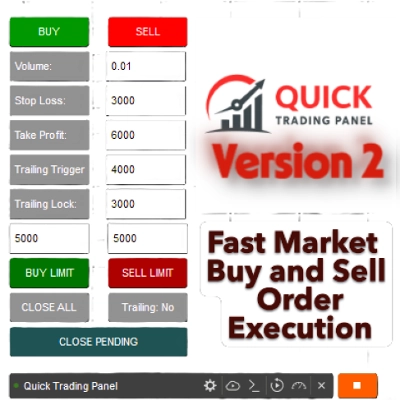
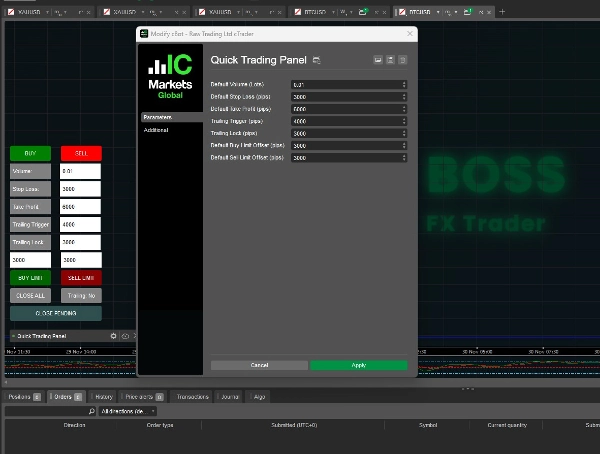
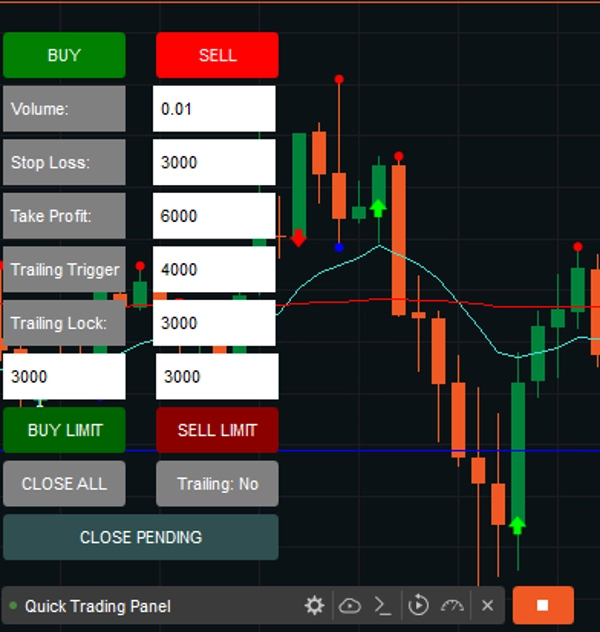
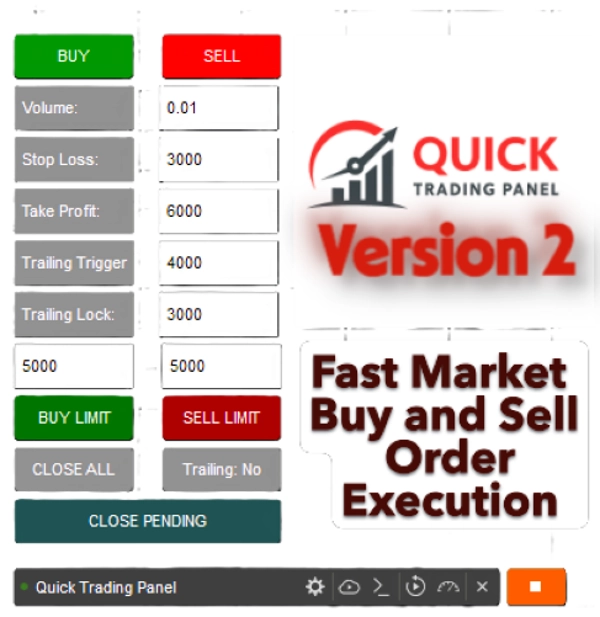
This is a cTrader cBot (Robot) that creates a small QUICK TRADING PANEL V2 directly on your chart. This includes Trailing Trigger and Locked to avoid losses once your trade is positive.
It allows you to quickly open and manage trades without typing commands or manually setting orders.

Sold the first 10 copies at $ 50; we will revert to its original price of $ 99.

1. Trade Execution (BUY / SELL)

  • You have two big buttons:
    • BUY (green) → opens a buy position on the current symbol.
    • SELL (red) → opens a sell position.
  • When you click one of these, the robot:
    1. Reads the values from the input boxes (Volume, SL, TP, etc.)
    2. Converts the volume into units (Symbol.QuantityToVolumeInUnits())
    3. Places a market order with your chosen Stop Loss (SL) and Take Profit (TP).


2. Trade Management

  • 🟦 CLOSE ALL button → closes all open positions created by this panel.
  • 🟧 Trailing: Yes/No button → toggles the trailing stop system.
    • "Yes" = trailing stop is active
    • "No" = trailing stop is disabled


3. Input Boxes with Labels

You now have input fields with labels so you know exactly what each number means.

  • Volume:
    • The trade size (in lots).
    • Example: 0.01 = 1 micro lot (1,000 units).
  • SL (Stop Loss):
    • The maximum loss (in pips) you’re willing to risk.
    • Example: 300= trade closes if price moves 300 pips against you.
  • TP (Take Profit):
    • The target profit (in pips).
    • Example: 600 = trade closes once it makes 600 pips profit.
  • Trailing Trigger:
    • The profit threshold (in pips) where the trailing stop starts working.
    • Example: 120 = trailing stop activates when the trade has at least 120 pips profit.
  • Trailing Lock:
    • How many pips of profit to lock in after trailing starts?
    • Example: 80 = once the trade hits TP + 80 pips, stop-loss moves up to secure +5 pips profit.
  • BUY Limit
    • Option to Buy limit orders on the market.
    • You can set the settings or type the pips on the chart panel, with a default set to 300 Pips.
  • SELL limit
    • Option to Sell limit orders on the market.
    • You can set the settings or type the pips on the chart panel, with a default set to 300 Pips.

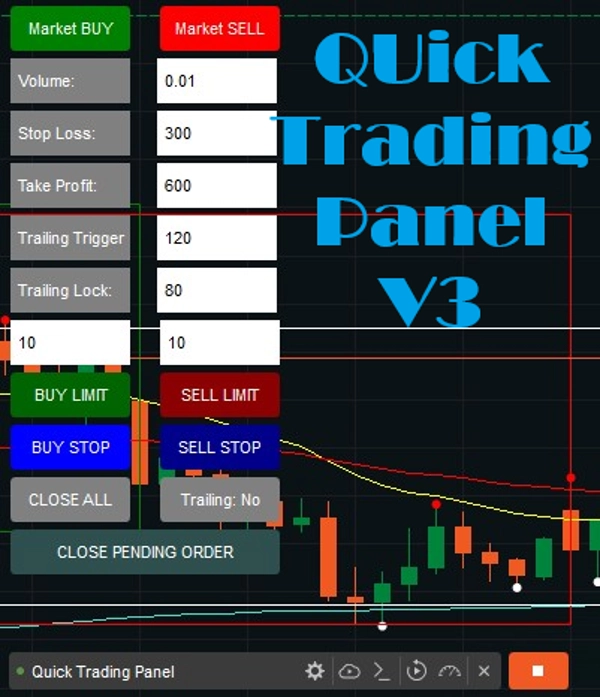
ADDED new features:

Buy Stop and Sell Stop are conditional, automated orders that trigger a market order once a specific "stop price" is reached. A Buy Stop is placed above the current market price to enter a long position (breakout) or close a short, while a Sell Stop is set below it to enter a short position or protect a long one.

Buy Stop (Above Market): Used to buy an asset only after its price rises to a certain level, usually to enter a position during an uptrend or close out a short position.

Sell Stop (Below Market): Used to sell an asset only after its price falls to a specific level, often to cut losses or protect profits on a long position.

4. Trailing Stop Logic (Auto-Adjustment)

Every tick, the bot checks open trades:

  • If trailing is enabled and profit ≥ Trailing Trigger
    • For BUY trades: Stop Loss moves up to Bid - Trailing Lock.
    • For SELL trades: Stop Loss moves down to Ask + Trailing Lock.

This way, the bot locks in profit automatically while still letting the trade run further if the trend continues.

In short:

  • This bot gives you a fast manual trading interface.
  • You can set risk (SL), reward (TP), position size (Volume), and trailing stop logic in real-time.
  • The panel is always visible in your chart, bottom-left corner.
  • Labels make sure you don’t confuse your numbers.
  • Buy and Sell Limit orders are now available in Version 2.


Note: This will work on all Assets.


Version 2 has been newly released.


Happy Trading, and check out my other products!


Summary

AI summary
Quick Trading Panel is a cTrader cBot that integrates a compact trading interface directly onto your chart, enabling faster manual trade execution and management. It features two primary buttons for immediate BUY or SELL market orders, which automatically apply user-defined parameters such as volume, stop loss (SL), and take profit (TP). The panel includes labeled input fields for precise control over trade size, risk, and reward settings.

Key functionalities include:

- Trade Execution: Open buy or sell positions instantly with preset volume, SL, and TP.
- Trade Management: Close all positions opened via the panel with a single button.
- Trailing Stop System: Toggleable trailing stop that activates after a specified profit threshold (Trailing Trigger) and locks in profit by adjusting stop loss (Trailing Lock).
- Limit Orders: Support for Buy Limit and Sell Limit orders, with configurable pip distances.
- Conditional Orders: Buy Stop and Sell Stop orders that trigger market entries once specified price levels are reached.

The panel remains visible on the chart’s bottom-left corner for quick access and supports all asset types. It automates stop loss adjustments on each tick when trailing is enabled, helping to secure profits while allowing trades to run further if favorable trends continue. This tool is designed to streamline manual trading workflows by reducing the need for manual order entry and management.
Trading profile

Customer reviews

0.0
Reviews: 0
Customer reviews
No reviews for this product yet. Already tried it? Be the first to tell others!

Discussion

FAQ

BTCUSD
Forex
Signal
Breakout
Indices
EURUSD
Commodities
GBPUSD
NZDUSD
Martingale
Prop
Scalping
SMC
Crypto
Grid
Stocks
AI
XAUUSD
NAS100
USDJPY
Products available through cTrader Store, including trading bots, indicators and plugins, are provided by third-party developers and made available for informational and technical access purposes only. cTrader Store is not a broker and does not provide investment advice, personal recommendations or any guarantee of future performance.

More from this author

Indicator
Market Sessions is very important for traders.
Indicator
Signal
Fractal Arrow Buy and Sell Indicator
Indicator
The Break of Structure (BoSCHoCh) Indicator is a smart market structure tool designed to help traders easily spot trend.
Indicator
AI
ATR
+23
The ZigZag Trend is a market structure tool that filters out small price fluctuations and highlights major swing.
Indicator
Area of Interest with the power of AI to detect the market interest.
Indicator
MultiTF Pivot and SR Indicator
Indicator
Prop
Forex
+13
Volume Meter
Indicator
AI
ATR
+27
The Fibonacci Automated Levels Indicator is a smart trading tool that automatically detects the most recent market.
Indicator
AI
ATR
+23
Candle Timer best used for Scalper
Indicator
The Market BIAS Detector is a smart trading assistant designed to identify the market.
Indicator
Forex
Spread Calculator to calculate the difference between two prices or values.
Indicator
AI
ATR
+27
Intraday MultiTimeframe Candle Status Indicator

You may also like

cBot
Prop
Forex
+9
Forex Wizard
cBot
XAUUSD
Bollinger
+1
Sfrutta il breakout delle bande di bollinger.
cBot
Fixed Lot
Prop Firm Fit
+5
Instantly copy signals to cTrader with auto-execution, advanced risk management and stealth mode.
cBot
ATR
RSI
+5
📊 EMA CROSS COMPLETE BOT - Professional Trading System
2.1
Profit factor
cBot
Fixed Lot
Key Levels
+5
Automate price-action setups with intelligent market filters, structured entries, and advanced risk management.
27%
ROI
1.94
Profit factor
cBot
Volume
Risk/Reward
+4
Pre-trade risk assistant that checks risk, R:R and daily limits before you enter a manual trade.
cBot
NZDUSD
// AUD/NZD - 2MIN TIMEFRAME // 5 YEARS BACKTEST, PROFIT 1500 USD, DRAWDOWN ABOUT 50 USD (RISKY TRADES - NO SL)
cBot
Prop
Forex
+3
Trade XAUUSD at lightning speed using Stream Deck. One-tap execution for entries, partial closes, break-even, TP & SL.
100%
ROI
2
Profit factor
cBot
Perfectly optimized to trade XAUUSD. Win rate of about 85 to 90%.
cBot
Fixed Lot
TP Manager
+5
Automatically copies trading signals from your channels or groups straight to your cTrader account.
cBot
RSI
Forex
+2
N.B.: Results with an initial invested capital of 100 euros.
cBot
Fixed Lot
Key Levels
+5
Copy signals to cTrader with auto execution, advanced risk management, and stealth mode.
cBot
Forex
BTCUSD
+11
BoletaProfit - Advanced Order Ticket full version for cTrader
cBot
Forex
Crypto
+3
Automate lot sizing with cTrader Risk Manager cBot for precise risk management in pending and market orders.
1
Profit factor
cBot
Engulfing
Fixed Lot
+5
Desktop-only: draw chart levels; BreakScout confirms, sizes and executes valid breakouts while you step away.
cBot
ATR
Risk Alerts
+3
ORB breakout-retest cBot for cTrader with ATR risk management, session controls, prop-firm safety protection.
1.76
Profit factor
cBot
AI
ATR
+5
No guessing — just confirmed breakouts, smart risk management, and disciplined execution. Less noise. More direction.
28.5%
ROI
4.44
Profit factor
cBot
Volume
Fibonacci
+5
Professional scanning and analysis with automatic target and stop.
5
Profit factor

Price

Since 29/05/2025
3.04M
Traded volume
45.22K
Pips won
29
Sales
838
Free installs