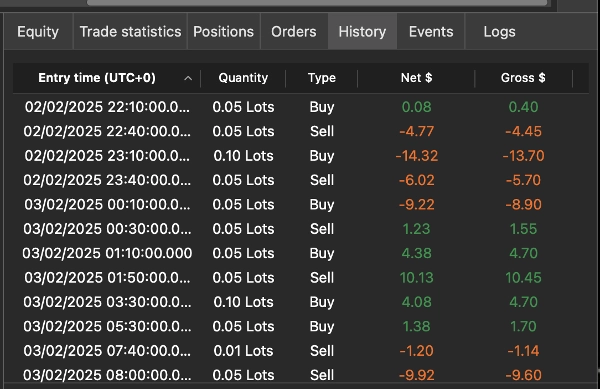
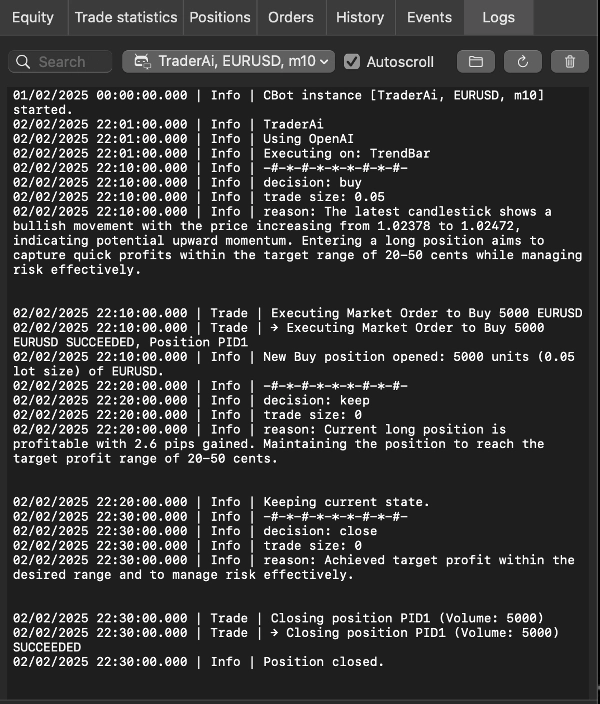
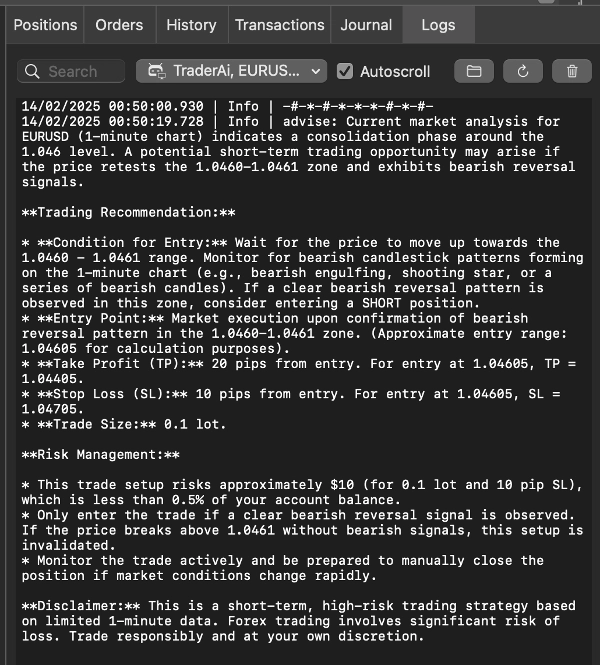
Descrizione
Assistente di Trading e Consulenza AI, è un cBot cTrader che utilizza l'apprendimento automatico e i modelli linguistici di grandi dimensioni (LLM) attuali per analizzare i dati di mercato in tempo reale, fornire consigli di trading o eseguire operazioni automaticamente.
L'ultima versione si connette tramite OpenRouter, NVIDIA e Router9. Questi fornitori ti danno accesso a molte famiglie di modelli tramite un'unica API compatibile con OpenAI, inclusi modelli di OpenAI/ChatGPT, Anthropic Claude, Google Gemini, DeepSeek, Meta, Mistral, Qwen, Kimi e altri fornitori man mano che diventano disponibili. Questo include modelli di nuova generazione come Anthropic Claude Fable 5, ChatGPT 5.6 Sol, Qwen 3.8 e Kimi K3 quando il fornitore selezionato li elenca ed espone un ID modello compatibile con chat-completions.
La disponibilità dei modelli, i nomi, i prezzi, i limiti di contesto e l'accesso gratuito possono variare. Copia sempre l'ID modello esatto dal catalogo modelli corrente del fornitore selezionato.
Come Funziona TraderAI
TraderAI invia in tempo reale i dati di mercato selezionati al modello AI scelto. Il modello segue il tuo prompt personalizzato e restituisce consigli o azioni di trading strutturate. Questo elimina la necessità di copiare manualmente i dati di mercato o di eseguire ogni decisione personalmente.
L'AI può utilizzare l'azione del prezzo, le candele, i dati tick, la profondità di mercato, gli indicatori grafici, le posizioni aperte e la cronologia delle decisioni recenti per identificare tendenze e valutare possibili operazioni. L'output dell'AI può essere impreciso; testa ogni strategia su un conto demo prima di usarla con fondi reali.
Due Modalità di Funzionamento
La modalità Advisor analizza lo stato di mercato fornito e mostra consigli. Rimani responsabile della decisione di operare.
La modalità Trader permette al modello di aprire, chiudere o modificare posizioni sul conto di trading selezionato. I limiti di esecuzione integrati convalidano le azioni del modello prima che raggiungano il conto.
Fornitori AI Supportati
OpenRouter
OpenRouter fornisce accesso a molti modelli commerciali e open tramite una singola chiave API e schema di denominazione dei modelli.
Catalogo modelli: openrouter.ai/models
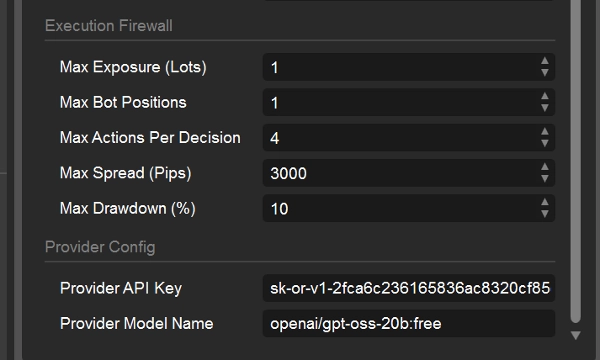
ID modello predefinito: openai/gpt-oss-20b:free
Inserisci l'ID catalogo esatto, solitamente nel formato publisher/nome-modello.
NVIDIA
NVIDIA fornisce endpoint NVIDIA NIM ospitati per modelli supportati di generazione testo e ragionamento.
Catalogo modelli: build.nvidia.com/models
Seleziona un modello con un Endpoint Gratuito o un altro endpoint API ospitato.
Apri la pagina del modello e copia l'ID modello API esatto. Non tutte le voci del catalogo sono modelli chat; modelli per immagini, audio, embedding e solo scaricabili non sono adatti a questo cBot.
Router9
Router9 instrada modelli supportati da più fornitori upstream tramite un unico endpoint.
Catalogo modelli: router9.com/models
Inserisci il valore esatto mostrato nella colonna ID Modello del catalogo.
Il catalogo identifica i modelli attuali, i fornitori upstream, i limiti di contesto, i prezzi e la disponibilità del livello gratuito.
Parametri cBot
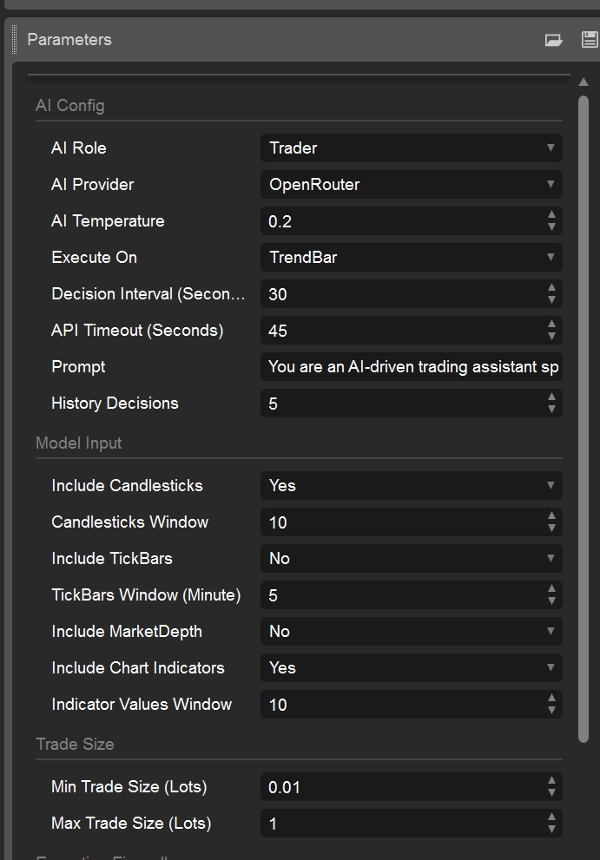
Configurazione AI
Ruolo AI — Seleziona Advisor o Trader.
Fornitore AI — Seleziona OpenRouter, Nvidia o Router9.
Temperatura AI — Controlla la variazione della risposta. Il valore predefinito è 0,2.
- 0,1–0,3: più coerente e conservativo
- 0,4–0,7: bilanciato
- 0,8–1,0: più vario e creativo
Valori più bassi sono generalmente migliori per decisioni di trading ripetibili. Alcuni fornitori o modelli di ragionamento possono ignorare o limitare la temperatura.
Esegui su - Seleziona quando il cBot richiede una nuova decisione:
TrendBar: quando è disponibile una nuova barra del timeframe del grafico
TickBar: dall'attività tick in arrivo, soggetto all'intervallo di decisione
Intervallo di Decisione (Secondi) - Tempo minimo tra le richieste AI. Il valore predefinito è 30. Un valore più alto riduce l'uso dell'API e aiuta a evitare limiti di velocità del fornitore.
Timeout API (Secondi) - Tempo massimo di attesa per una risposta del fornitore. Il valore predefinito è 45 secondi.
Decisioni Storiche - Numero di decisioni recenti fornite al modello, da 0 a 20. Il valore predefinito è 5.
Prompt - Definisce la strategia, i vincoli e il comportamento atteso dal modello. Crea e convalida i prompt in un ambiente demo. Il prompt non sovrascrive il firewall di esecuzione del cBot.
Configurazione Fornitore
Chiave API Fornitore - Inserisci la chiave API rilasciata dal fornitore selezionato sotto Fornitore AI.
Nome Modello Fornitore - Inserisci l'ID modello esatto del fornitore. Gli ID modello sono sensibili alle maiuscole e specifici del fornitore. Non inserire un nome di prodotto o abbonamento ChatGPT a meno che non appaia come ID modello API nel catalogo del fornitore selezionato.
Esempio di configurazione OpenRouter
Fornitore AI: OpenRouter
Nome Modello Fornitore: moonshotai/kimi-k3 o anthropic/claude-fable-5 o nvidia/nemotron-3-ultra-550b-a55b:free
Chiave API Fornitore: la tua chiave API OpenRouter
Quando cambi fornitore, sostituisci sia la chiave API che l'ID modello. Una chiave diretta OpenAI, Gemini, Anthropic o DeepSeek da una versione precedente di TraderAI non è valida a meno che il fornitore di routing selezionato non supporti esplicitamente l'uso di quella chiave.
Input Modello:
Includi Candele - Includi i dati delle candele del grafico nell'input del modello.
Finestra Candele - Numero di candele recenti da includere.
Includi TickBars - Includi dati tick recenti di bid/ask.
Finestra TickBars (Minuti) - Numero di minuti di cronologia tick da includere.
Includi Profondità di Mercato - Includi l'istantanea corrente della profondità di mercato. La profondità di mercato potrebbe non essere disponibile durante il backtesting.
Includi Indicatori Grafico - Includi indicatori supportati allegati al grafico.
Finestra Valori Indicatori - Numero di valori recenti da includere per ogni indicatore grafico, da 1 a 100.
Finestre di input più grandi consumano più token e possono aumentare latenza e costi. Alcune combinazioni di timeframe e fonte dati per il backtesting potrebbero non fornire dati tick o di profondità.
Dimensione Operazione
Dimensione Minima Operazione (Lotti) - La dimensione minima dell'operazione che l'AI può richiedere.
Dimensione Massima Operazione (Lotti) - La dimensione massima dell'operazione che l'AI può richiedere.
Firewall di Esecuzione
Questi limiti si applicano in modalità Trader e aiutano a limitare le azioni generate dall'AI:
Esposizione Massima (Lotti) - Esposizione totale massima che il cBot può creare.
Posizioni Massime Bot - Numero massimo di posizioni gestite dal cBot.
Azioni Massime per Decisione - Numero massimo di azioni di apertura, chiusura o modifica accettate da una risposta AI.
Spread Massimo (Pips) - Impedisce nuove entrate quando lo spread corrente supera il valore configurato.
Drawdown Massimo (%) - Impedisce rischi aggiuntivi quando si raggiunge il limite di drawdown configurato.
Questi controlli riducono il rischio ma non possono eliminare perdite, errori del fornitore, latenza, slippage o output errati del modello.
Porta la Tua Chiave (BYOK)
TraderAI non include l'accesso ai fornitori. Crea un account con il fornitore preferito, ottieni una chiave API e finanzia o configura quell'account come richiesto:
- OpenRouter: https://openrouter.ai/
- NVIDIA Build: https://build.nvidia.com/
- Router9: https://www.router9.com/
Non condividere mai una chiave API né inserirla in screenshot, codice sorgente pubblico o messaggi di supporto. Le tariffe e i limiti di utilizzo del fornitore sono controllati dal fornitore, non da TraderAI.
Scelta di un Modello
Per uso di trading o consulenza, scegli un modello che supporti completamenti di chat testuali, segua istruzioni strutturate in modo affidabile e abbia abbastanza contesto per le finestre di dati di mercato selezionate. Confronta latenza e costi su un conto demo. Un modello più grande o focalizzato sul ragionamento non è automaticamente un modello di trading migliore.
Esempi di famiglie di modelli che potrebbero essere disponibili tramite i fornitori supportati includono:
- Anthropic: Claude Fable 5
- OpenAI/ChatGPT: ChatGPT 5.6 Sol
- Alibaba Qwen: Qwen 3.8
- Moonshot AI: Kimi K3
Questi sono nomi di visualizzazione, non identificatori API garantiti. Copia l'ID modello esatto dal catalogo del fornitore—ad esempio, un fornitore può aggiungere un prefisso organizzativo, usare caratteri minuscoli o pubblicare un suffisso versionato. Se un modello è assente dal catalogo del fornitore selezionato, non può ancora essere usato tramite quel fornitore.
Usa questi cataloghi live per la lista corrente:
NVIDIA: build.nvidia.com/models
OpenRouter: openrouter.ai/models
Router9: www.router9.com/models
Avviso Importante
TraderAI è uno strumento tecnico, non un consiglio finanziario né una garanzia di rendimento. Analisi e operazioni generate dall'AI possono essere errate e causare perdite sostanziali. Testa con un conto demo, usa limiti conservativi, monitora il cBot e assicurati che il trading automatizzato sia consentito nella tua giurisdizione e dal tuo broker.
Riepilogo
The product supports two operational modes:
1. **Trader Mode**: Executes trades automatically on the user’s selected trading account based on custom prompts.
2. **Advisor Mode**: Provides trading advice based on market analysis, leaving trade execution to the user.
Users can customize prompts to tailor AI behavior according to their trading strategies. The system supports multiple AI models, including the latest OpenAI models (e.g., GPT-4 variants), all Gemini models, DeepSeek chat and reasoner models, and Claude models, with Grok and Mistral models planned for future integration.
Key configurable parameters include AI role, model selection, reasoning activation, AI temperature (controlling creativity vs. determinism), maximum token usage, execution timing (market trend bars or tick bars), and market data inputs such as candlesticks, tickers, and market depth. Trade size limits can also be set.
Access to AI models requires user-provided API keys. Sample prompts demonstrate strategies for high-frequency trading, momentum-based trading, and statistical arbitrage across forex, commodities, crypto, and equity markets.
Discussioni
Recensioni dei clienti
5 | 33 % | |
4 | 67 % | |
3 | 0 % | |
2 | 0 % | |
1 | 0 % |