

Opis
- Superior Signals Notifier
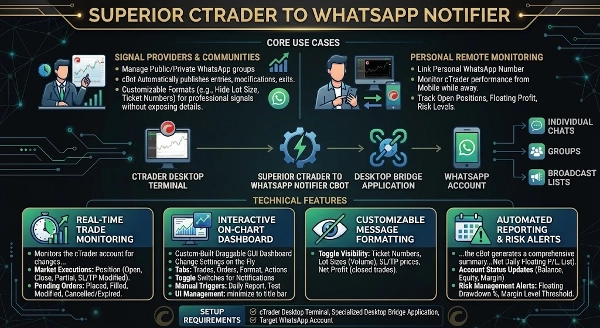
Superior Signals Notifier to narzędzie zaprojektowane do połączenia terminala desktopowego cTrader z Twoim kontem komunikatora za pomocą specjalnej aplikacji pośredniczącej. Monitoruje aktywność handlową i przesyła sformatowane aktualizacje tekstowe bezpośrednio do pojedynczych czatów, grup lub list nadawczych.
Główne zastosowania
- Dostawcy sygnałów i społeczności: To narzędzie zostało stworzone, aby wspierać Dostawców Sygnałów zarządzających grupami handlowymi lub kanałami nadawczymi. cBot automatycznie publikuje wejścia, modyfikacje i wyjścia z transakcji bezpośrednio na podłączonym czacie. Format wiadomości jest w pełni konfigurowalny (np. ukrywanie wielkości lotów lub numerów biletów), co pozwala dostawcom nadawać czyste, profesjonalne sygnały handlowe swojej społeczności bez ujawniania prywatnych danych konta.
- Osobisty monitoring zdalny: Detaliści mogą połączyć cBot ze swoim osobistym kontem komunikatora, aby monitorować wyniki konta cTrader, otwarte pozycje, zysk pływający oraz poziomy ryzyka z urządzenia mobilnego podczas nieobecności przy biurku handlowym.
Funkcje techniczne
- Monitorowanie transakcji w czasie rzeczywistym: Monitoruje konto cTrader pod kątem zmian w pozycjach i zleceniach oczekujących, wywołując powiadomienia w czasie rzeczywistym dla:
-
- Wykonania rynkowe: Pozycja otwarta, Pozycja zamknięta, Pozycja częściowo zamknięta oraz Pozycja zmodyfikowana (dostosowanie SL/TP).
- Zlecenia oczekujące: Zlecenie limit/stop złożone, zlecenie zrealizowane, zlecenie zmodyfikowane oraz zlecenie anulowane/wygasłe.
- Interaktywny pulpit na wykresie: Zawiera niestandardowy, przeciągany interfejs GUI renderowany bezpośrednio na wykresie cTrader. Pulpit pozwala użytkownikom na zmianę ustawień na bieżąco bez konieczności restartowania cBota lub otwierania zakładki parametrów.
-
- Zakładki: Zakładki podzielone według funkcji (Transakcje, Zlecenia, Format, Akcje).
- Przełączniki: Pola wyboru do natychmiastowego włączania lub wyłączania powiadomień o konkretnych zdarzeniach (np. wyłączenie modyfikacji zleceń lub włączenie alertów częściowego zamknięcia).
- Ręczne wyzwalacze: Przyciski do wywołania Raportu Dzienniego lub wysłania wiadomości Test Połączenia.
- Zarządzanie UI: Pulpit można zminimalizować do wąskiego paska tytułu, aby zaoszczędzić miejsce na wykresie.
- Konfigurowalny format wiadomości: Zapewnia kontrolę nad tym, jakie dane są uwzględniane w transmisji. Użytkownicy mogą przełączać widoczność następujących zmiennych, aby chronić prywatność lub uporządkować format sygnałów:
-
- Pokaż/Ukryj numery biletów
- Pokaż/Ukryj wielkości lotów (wolumen)
- Pokaż/Ukryj ceny Stop Loss i Take Profit
- Pokaż/Ukryj zysk netto z zamkniętych transakcji
- Automatyczne raportowanie i alerty ryzyka
-
- Zaawansowany raport dzienny: O wyznaczonej przez użytkownika godzinie cBot generuje kompleksowe podsumowanie wyników dnia (w tym całkowitą liczbę zamkniętych transakcji, dzienny zysk netto, aktualny pływający P/L oraz listy aktywnych/zamkniętych transakcji).
- Aktualizacje statusu konta: Wysyła okresowe aktualizacje zawierające aktualny Saldo, Kapitał i Poziom Marginu w ustalonych odstępach czasu (np. co 60 minut).
- Alerty zarządzania ryzykiem: Monitoruje stan konta i wysyła ostrzeżenia awaryjne, jeśli pływający drawdown przekroczy określony procent lub jeśli poziom marginu spadnie poniżej zdefiniowanego progu bezpieczeństwa.
Wymagania instalacyjne i konfiguracja Aby połączyć cTrader z aplikacją komunikatora, upewnij się, że wymagane komponenty pośredniczące są skonfigurowane. Proszę zapoznać się z dokumentacją dołączoną do pakietu produktu, aby uzyskać pełne informacje o konfiguracji.
Jak połączyć w cTrader:
- Połącz konto: Upewnij się, że aplikacja pośrednicząca jest aktywna i połączona.
- Skonfiguruj parametry cBota: Dołącz cBota do wykresu cTrader i znajdź zakładkę Ustawienia powiadomień w oknie parametrów.
- Ustaw ID odbiorcy: Wprowadź wyznaczony identyfikator odbiorcy lub grupy w parametrze
Target_ID.
Podsumowanie
Podsumowanie AI
Superior Signals Notifier is a utility designed to connect the cTrader desktop terminal with a messaging account through a bridging application. It monitors trading activity in real time and broadcasts formatted trade notifications—including position openings, modifications, partial closes, and order status changes—directly to individual chats, groups, or broadcast lists. The tool supports customizable message formatting to hide sensitive details such as lot sizes, ticket numbers, stop loss, take profit levels, and net profits, enabling professional signal sharing without exposing private account information.
Key features include an interactive on-chart dashboard with categorized tabs (Trades, Orders, Format, Actions), toggle switches to enable or disable specific notifications, manual triggers for daily reports and test messages, and a minimizable interface to save chart space. Automated reporting capabilities provide daily performance summaries, periodic account status updates (balance, equity, margin level), and risk management alerts triggered by floating drawdown or margin level thresholds.
The notifier serves both signal providers managing trading communities and individual traders seeking remote monitoring of account performance, open positions, floating profit, and risk levels via mobile devices. Setup requires configuring the bridging application and linking the cBot to a cTrader chart with the appropriate target recipient ID for message delivery.
Key features include an interactive on-chart dashboard with categorized tabs (Trades, Orders, Format, Actions), toggle switches to enable or disable specific notifications, manual triggers for daily reports and test messages, and a minimizable interface to save chart space. Automated reporting capabilities provide daily performance summaries, periodic account status updates (balance, equity, margin level), and risk management alerts triggered by floating drawdown or margin level thresholds.
The notifier serves both signal providers managing trading communities and individual traders seeking remote monitoring of account performance, open positions, floating profit, and risk levels via mobile devices. Setup requires configuring the bridging application and linking the cBot to a cTrader chart with the appropriate target recipient ID for message delivery.
Profil handlowy
Dyskusja
Opinie klientów
0.0
Opinie: 0
Opinie klientów
Ten produkt nie ma jeszcze opinii. Wypróbowałeś(-aś) go już? Bądź pierwszy(-a) i powiedz o tym innym!
Częste pytania
Partial Close
TP Manager
Stop Loss (SL) Manager
Key Levels
Volume
SL Manager
Take Profit (TP) Manager
Produkty dostępne za pośrednictwem cTrader Store, w tym boty handlowe, wskaźniki i wtyczki, dostarczane są przez deweloperów zewnętrznych i udostępniane wyłącznie w celach informacyjnych oraz w celu zapewnienia dostępu technicznego. cTrader Store nie jest brokerem i nie zapewnia doradztwa inwestycyjnego, nie udziela spersonalizowanych rekomendacji ani nie gwarantuje przyszłych wyników.


















Cena
71
Sprzedaż