

Fade Breakout Portfolio Muiti
cBot
Version 1.0, Jul 2025
Windows, Mac, Mobile, Web
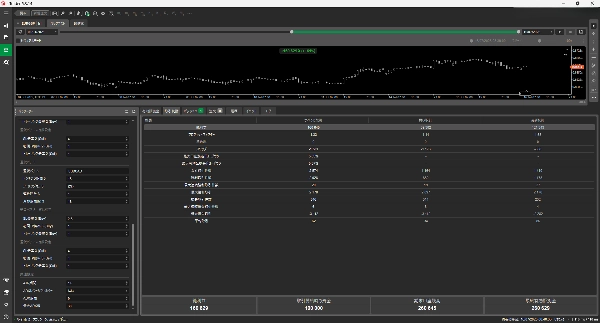
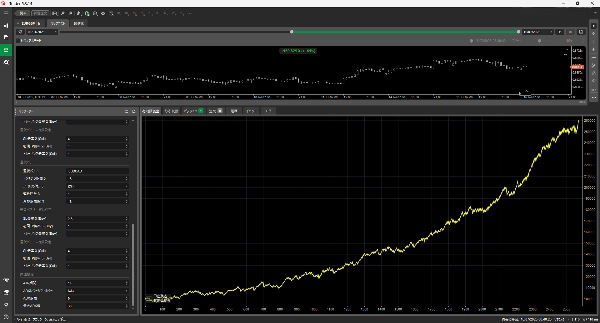

1
Verkäufe
1.94K
Kostenlose Installationen
Beschreibung
🔧 Grundkonzept
- Fade Breakout Strategie: Führt einen Trade in die entgegengesetzte Richtung direkt nach dem Ausbruch über oder unter die obere oder untere Grenze des Donchian-Kanals aus (z.B. Ausbruch nach oben → verkaufen, Ausbruch nach unten → kaufen).
- Portfoliomanagement über mehrere Symbole: Überwacht und handelt bis zu drei Währungspaare gleichzeitig.
- Positionsmanagement: Setzt automatisch SL (Stop Loss), TP (Take Profit) und Trailing-Stop-Level.
⚙️ Parameterkonfiguration
Geldmanagement
- Positionsgröße wird entweder durch eine feste Lotgröße oder basierend auf einem Risiko-Prozentsatz bestimmt.
- Unterstützt sowohl das aktuelle Guthaben als auch das Höchstguthaben für die Risikoberechnung.
Pro-Symbol-Einstellungen
- Donchian-Kanal-Periode
- SL-, TP- und Trailing-Multiplikatoren für Kauf/Verkauf
- Abkühlungsfunktion: Setzt den Handel nach einer festgelegten Anzahl aufeinanderfolgender Verluste vorübergehend aus.
Gemeinsame Einstellungen
- ATR-Periode
- ADX-Filter, um Einstiege während überhitzter Märkte zu vermeiden.
🧠 Logikfluss
OnStart()
- Initialisiert Indikatoren (Donchian, ATR, ADX) für jedes Symbol.
- Initialisiert Wörterbücher zur Verfolgung von Abkühlungen und Verlustserien.
OnBarOpened()
- Erkennt Donchian-Ausbrüche und eröffnet Trades in entgegengesetzter Richtung.
- Überspringt Einstiege, wenn ADX einen Schwellenwert überschreitet (vermeidet überhitzte Märkte).
ProcessOrder()
- Berechnet SL/TP-Abstand basierend auf ATR.
- Berechnet Volumen und platziert eine Market-Order.
OnPositionClosed()
- Erhöht die Anzahl der aufeinanderfolgenden Verluste, wenn der Trade ein Verlust war.
- Wendet eine Abkühlungsphase an, wenn das Verlustlimit erreicht ist.
ManagePositions()
- Bei Erreichen von TP wird ein Teilgewinn (halbes Volumen) mitgenommen und SL auf Break-even gesetzt.
- Verwaltet Trailing-Stop basierend auf ATR.
🧩 Ergänzende Klassen
SymbolConfig: Enthält alle konfigurationsspezifischen Parameter pro Symbol.LotSizingMode: Enum, das Methoden der Positionsgrößenbestimmung definiert.
✅ Zusammenfassung der Hauptmerkmale
- Flexibles Risikomanagement mit individuellen Einstellungen pro Symbol.
- Fade-Stil (konträre) Breakout-Strategie.
- Risikominderung durch Einstiegslimits und Abkühlungsphasen.
- Logik für schrittweisen Positionsschluss (Teilgewinnmitnahme und Trailing).
Zusammenfassung
Handelsprofil
Kundenbewertungen
0.0
Bewertungen: 0
Kundenbewertungen
Bisher gibt es keine Bewertungen für dieses Produkt. Haben Sie es schon ausprobiert? Dann können Sie die erste Person sein, die andere darüber informiert!
Diskussion
Häufig gestellte Fragen (FAQ)
Über den cTrader Store verfügbare Produkte, einschließlich Handelsbots, Indikatoren und Plugins, werden von externen Entwicklern bereitgestellt und nur zu Informations- und technischen Zugriffszwecken verfügbar gemacht. cTrader Store ist kein Broker und erbringt keine Anlageberatung, persönlichen Empfehlungen oder eine Garantie für zukünftige Performance.
Mehr von diesem Autor






















Preis
1
Verkäufe
1.94K
Kostenlose Installationen