Beschreibung
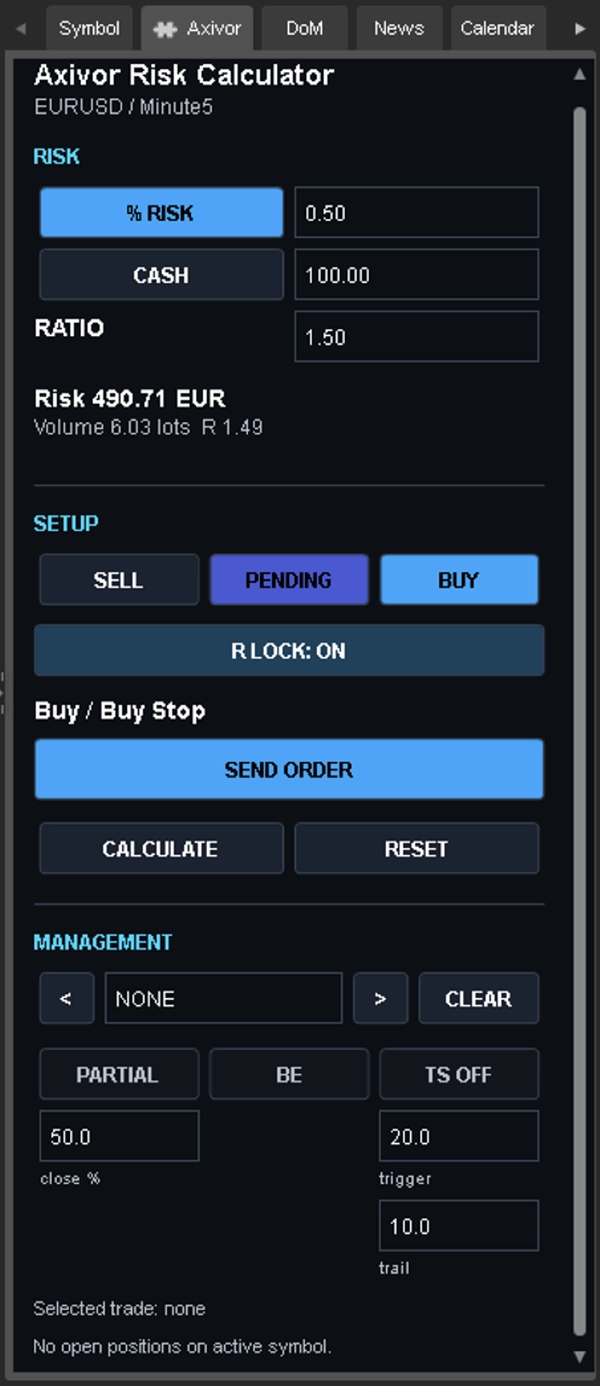
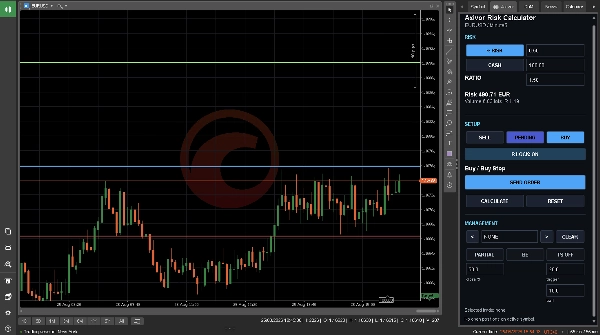
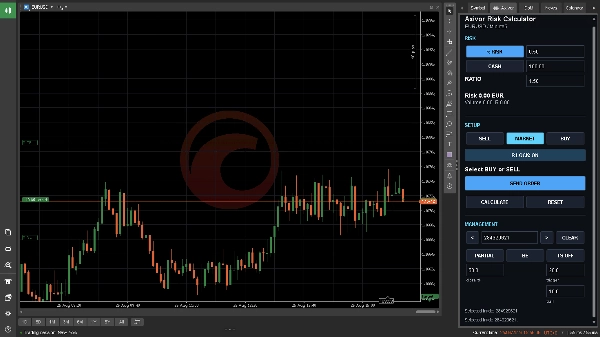
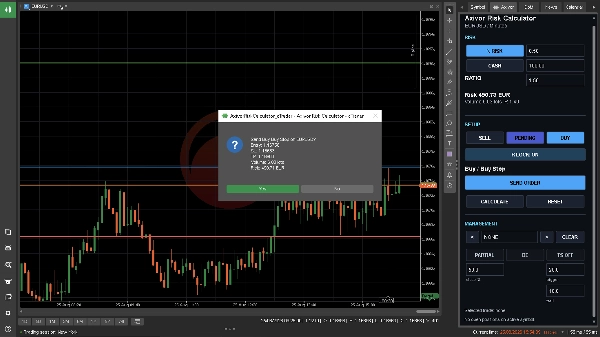
Axivor Risk Calculator ist ein Desktop-Plugin für die manuelle Handelsplanung in cTrader. Es vereint Risikobewertung, Chart-Level, Order-Überprüfung und ausgewähltes Positionsmanagement in einem Active Symbol Panel Workflow.
Das Plugin generiert keine Signale, wählt keine Handelsrichtung aus und führt keine automatisierte Strategie aus. Sie definieren das Setup und genehmigen jede Order.
Wie es funktioniert
1. Wählen Sie Kaufen oder Verkaufen und wählen Sie den Modus Markt oder Ausstehend.
2. Platzieren Sie Entry, Stop Loss und Take Profit im Chart.
3. Definieren Sie das Risiko als Prozentsatz oder festen Betrag in der Kontowährung.
4. Überprüfen Sie das cTrader-normalisierte Volumen, das monetäre Risiko und das R-Multiple.
5. Wählen Sie Order senden und überprüfen Sie die Bestätigung, bevor Sie die Ausführung genehmigen.
Das Verschieben von Chartlinien oder das Ändern von Werten berechnet den Plan neu. Es wird keine Order gesendet.
Kernfunktionen
• Prozentualer Risiko- und fester Geldbetragsgrößenbestimmung
• cTrader-native Symbolrisiko- und Volumen-Normalisierung
• Ziehbare Entry-, Stop Loss- und Take Profit-Linien
• R-Planung und R-Sperre
• Markt Kaufen und Markt Verkaufen
• Buy Limit, Buy Stop, Sell Limit und Sell Stop Workflows
• Explizite Orderbestätigung
• Teilweiser Schluss ausgewählter Positionen
• Stop Loss auf Break Even verschieben
• Pip-basierte Trailing-Stop-Steuerungen
Handelsanwendungsfall
Dies ist ein manuelles Ausführungswerkzeug für Trader, die bereits ihre eigene Analyse oder Strategie haben und eine strukturierte Methode suchen, um einen Trade vor der Einreichung zu dimensionieren und zu überprüfen. Es kann auf unterstützten cTrader Desktop-Symbolen und Chart-Perioden verwendet werden, bei denen der Broker gültige Symbol- und Kontodaten bereitstellt.
Es wird kein spezifisches Symbol, Zeitraum, Hebel oder Kontostand empfohlen. Die Eignung hängt vom Instrument, den Brokerregeln, den Kontobedingungen und den eigenen Risikolimits des Traders ab.
Berechtigungen und Kompatibilität
• Produkttyp: Desktop-Plugin
• Zugriffsrechte: Keine
• Plattformen: cTrader Windows und cTrader Mac
• Das Plugin wird nicht als Mobile/Web cBot angeboten.
Einschränkungen
• Keine Signale, Markt-Richtungsanalyse oder automatisierte Strategie
• Keine Leistungsvorhersage oder garantiertes Risikoergebnis
• Keine automatische Teil-TP-Chartlinie
• Kein ATR-Trailing oder Struktur-Trailing
• Keine MetaTrader-ähnliche Maximalabweichungskontrolle
Berechnungen basieren auf aktuellen Kontowerten und Broker/Plattform-Symbol-Daten. Gaps, Slippage, Konnektivität, Liquidität und Ausführungsregeln können dazu führen, dass die tatsächliche Ausführung oder der Verlust vom Plan abweicht.
Testen Sie den vollständigen Workflow auf einem cTrader-Demokonto mit dem vorgesehenen Broker und den Symbolen, bevor Sie den Live-Einsatz in Betracht ziehen. Überprüfen Sie Richtung, Ordertyp, Entry, Stop Loss, Take Profit, normalisiertes Volumen und monetäres Risiko vor jeder Einreichung.
Handel beinhaltet Risiken. Vergangene Leistungen garantieren keine zukünftigen Ergebnisse.
Zusammenfassung
Key features include percentage-based and fixed-cash risk sizing, cTrader-native symbol risk and volume normalization, draggable chart lines for Entry, Stop Loss, and Take Profit, and calculation of normalized volume, monetary risk, and risk/reward multiples. The plugin supports market buy/sell and pending order types (Buy Limit, Buy Stop, Sell Limit, Sell Stop), partial position closing, break-even stop loss adjustment, and pip-based trailing stop controls.
The tool is intended for traders who perform their own analysis or strategy and seek a structured approach to position sizing and trade review. It does not generate trading signals or automate strategies. Calculations rely on current account and broker data; actual trade execution may vary due to market conditions. Users should verify all parameters before order submission and test the workflow on a demo account.
Supported order types: market, limit, stop, stop-limit. Data access includes positions, orders, and chart information.
Diskussion
Kundenbewertungen
5 | 100 % | |
4 | 0 % | |
3 | 0 % | |
2 | 0 % | |
1 | 0 % |