![Trading product for [CB] RR Management cBot Forex Indices, image 1](https://cdn.ctrader.com/image/webp/0390d544-4996-4346-974b-d41dd9e73c64_32505)
![Trading product for [CB] RR Management cBot Forex Indices, image 2](https://cdn.ctrader.com/image/webp/62a2f277-6531-4405-9387-d4eec2142b06_32506)
![Trading product for [CB] RR Management cBot Forex Indices, image 3](https://cdn.ctrader.com/image/webp/b9dad7e0-8fa2-4f29-8bf7-8b47116e97fa_32507)
![Trading product for [CB] RR Management cBot Forex Indices, image 4](https://cdn.ctrader.com/image/webp/772e2aa1-7349-43fa-ae70-fdc71ff9cf24_32508)
![Trading product for [CB] RR Management cBot Forex Indices, image 5](https://cdn.ctrader.com/image/webp/f2cdb27c-4b85-472a-a3c8-a2d607c06558_32509)
![Trading product for [CB] RR Management cBot Forex Indices, image 6](https://cdn.ctrader.com/image/webp/2d928340-8ae7-49f7-8942-4263af502b02_32510)
Descripción
La herramienta de gestión de Riesgo y Recompensa de cTrader puede ayudarte fácilmente a establecer los valores de riesgo frente a recompensa, solo tienes que arrastrar las líneas de toma de ganancias y stop loss para calcular automáticamente la cantidad de riesgo o los volúmenes que se deben usar. Además, incluye una función automática de toma de ganancias que te permitirá establecer cuatro (4) escenarios diferentes para asegurar esas ganancias.
Planificar tus operaciones es una de las partes más importantes en la vida de un trader diario, si no lo haces, fracasarás; esta herramienta te permitirá establecer fácilmente tus objetivos de toma de ganancias y stop loss según tu apetito de riesgo.
Características clave
- Arrastra la línea TP/SL para calcular automáticamente los valores de riesgo/recompensa
- Toma de ganancias automática para órdenes pendientes.
- Basado en el valor siguiente para establecer la información de riesgo/recompensa
- Volúmenes: establecer los volúmenes calculará automáticamente la cantidad de riesgo
- Stop Loss: establece el SL para calcular la tasa y cantidad de TP/RR
- Take Profit: establecer el TP calculará automáticamente la tasa y cantidad de SL/RR
- Tasa de Riesgo/Recompensa: establecer la tasa RR calculará automáticamente el TP
- Cantidad de Riesgo (con/sin porcentaje): puedes establecer el valor real o con el porcentaje
- Puede usar el trailing stop
- Agregar comentarios a la orden
- Soporta órdenes Buy, Sell, Buy Stop, Sell Stop
- Establecer toma de ganancias automática (pero como es un cBot, si usas esta función no puedes detener la herramienta)
- Soporta Windows y MacOS
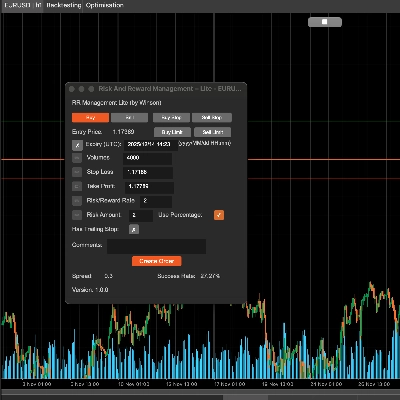
Arrastra la línea de stop loss (por defecto es verde) y calculará automáticamente la tasa de riesgo y recompensa y la cantidad de volumen para el tamaño de la posición. También puedes actualizar el volumen mediante entrada manual; cuando cambies el valor siguiente, el icono de edición a la izquierda se habilitará para que puedas actualizar los valores.
Soporte para órdenes Buy & Sell Limit
La herramienta ahora soporta órdenes limitadas de compra y venta con fecha/hora de expiración.
Usar porcentaje
Si quieres usar el porcentaje basado en tu saldo, solo marca la casilla Usar porcentaje o usará el valor real. Nota: si el saldo de tu cuenta es pequeño, el volumen calculado no será menor que el tamaño mínimo de posición permitido para el símbolo.
Tasa de Riesgo y Recompensa
Puedes establecer el riesgo frente a la recompensa para tu stop loss y toma de ganancias, así una tasa de Riesgo/Recompensa de 2 será donde tu toma de ganancias es el doble de tu riesgo; cuando haces clic en el botón de venta, el stop loss y la toma de ganancias se calcularán automáticamente usando esta proporción.
Tasa de éxito
La tasa de éxito se basa en todas tus órdenes históricas, calculará las órdenes exitosas para la tasa, y el "Trailing Stop" es solo una opción nativa de cTrader para crear una orden funcional, simplemente la paso cuando creas la orden.
Botón de toma de ganancias automática
Hay 3 niveles para establecer la toma de ganancias automática, lo que significa que puedes usar 4 condiciones para tomar ganancias, por ejemplo:
- Tomar el 50% de la toma de ganancias parcial después de superar el 60% del objetivo de ganancia.
- Tomar el 50% de la toma de ganancias parcial cuando el precio del símbolo alcance 60 o para Forex algo como 1.72245
Puedes modificar los valores anteriores en tiempo de ejecución, tendrá efecto inmediato si has iniciado el botón de toma de ganancias. También restablecerá todos los valores después de detener el cBot. Si se toma la ganancia 1, no se tomará de nuevo, eso significa que solo se ejecuta una vez por cada condición de ganancia a menos que se detenga la ganancia automática y se inicie de nuevo, lo que restablecerá todos los estados de las condiciones.
Actualización: Ahora hay soporte para que las órdenes pendientes tengan toma de ganancias automática aplicada cuando se conviertan en órdenes de mercado.
Actualización: También puedes establecer una condición de toma de ganancias en pips, así puedes elegir un % del total, el precio y también el número de pips.
Uso de volumen para tomar ganancias
En lugar de usar 50% u otro porcentaje en el cuadro de toma de ganancias, puedes usar un valor como 1000 (1K) que es el volumen de la posición.
Pero no olvides marcar la casilla verde para habilitar esta condición de toma de ganancias.
Establece la etiqueta de la orden para tomar ganancias, esto es porque puede haber múltiples órdenes al mismo tiempo, por lo que necesitas definir qué orden quieres usar para la toma de ganancias automática, y si usas esta herramienta para crear la orden, establecerá automáticamente la etiqueta de la orden aquí.
¿Cómo gestionar operaciones desde otro cBot?
También puedes usar esta herramienta para gestionar operaciones que se abren desde otro cBot simplemente estableciendo un nombre de etiqueta cuando se envía la orden y usando este mismo nombre de etiqueta en el campo de arriba para el etiqueta de la orden para tomar ganancias.
Establecer un punto de equilibrio
Esta herramienta también permitirá aplicar un punto de equilibrio a tus operaciones, nuevamente, puedes usar un porcentaje del saldo total de la cuenta o un precio fijo.
Para aplicar la configuración y volver a la pantalla principal necesitas hacer clic en el botón Iniciar toma de ganancias.
Configuración de parámetros
Cuando adjuntas el cBot a un gráfico, primero se mostrará la ventana de configuración principal.
Configuración de estilo
Establece el color y grosor de las líneas SL/TP y del precio actual aquí.
Alineación del panel
Establece la posición del panel aquí, pero también puedes usar Ctrl+Mouse para mover el panel.
Gestión RR
- Establece los valores predeterminados para la información de riesgo/recompensa.
- Toma de ganancias automática 1,2,3 - establece los valores predeterminados para la función de toma de ganancias automática, hay 3 niveles de toma de ganancias.
- Establecer punto de equilibrio automático - establece el valor predeterminado para el punto de equilibrio automático al alcanzarlo.
![Logotipo de "[CB] Pivot Points Pro"](https://cdn.ctrader.com/image/webp/43463c82-67b0-4f10-a4ba-901bba091d81_32594)