


คำอธิบาย
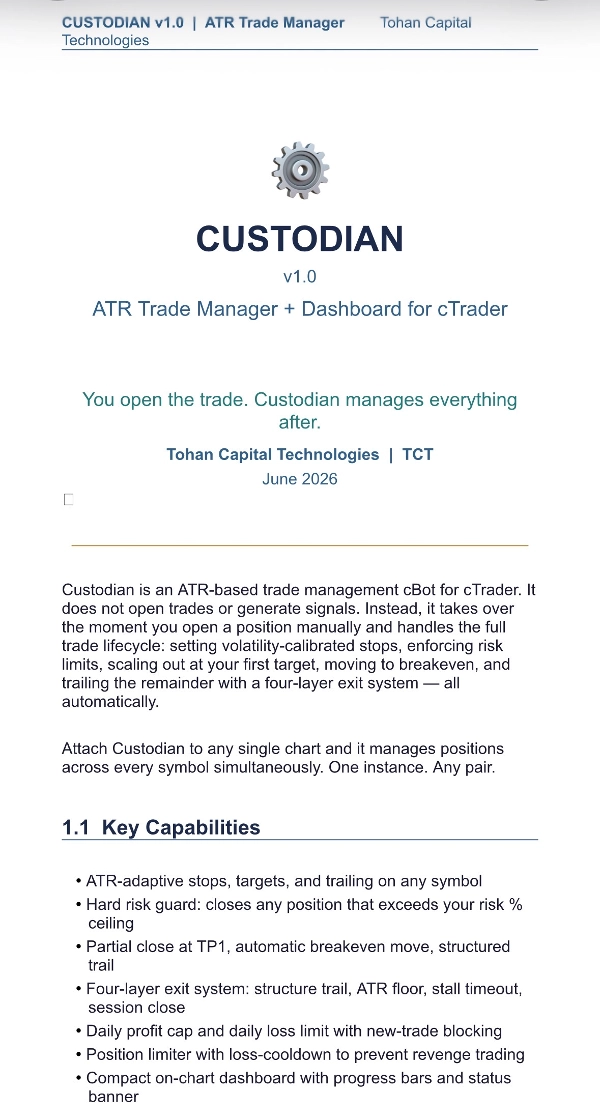
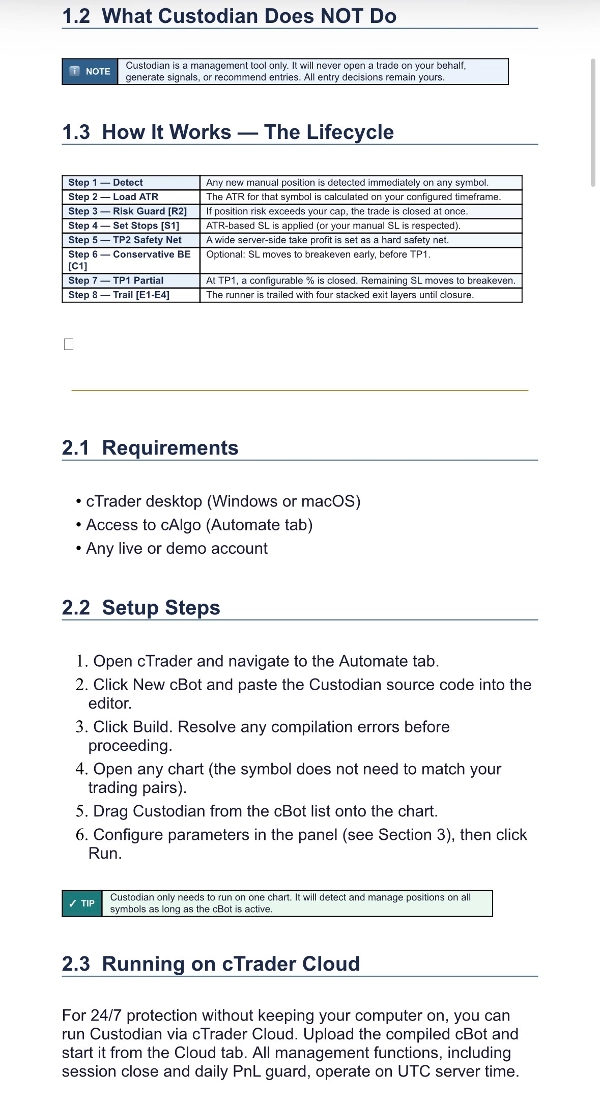
Custodian is an ATR-based trade manager for cTrader that takes over the moment you open a position — on any symbol, from a single chart. Run it on the cloud and trade on the go! Attach it once and it automatically sets volatility-adjusted stops and targets, enforces a hard risk ceiling on every entry, scales out at your first target, moves to breakeven, and trails the runner with a four-layer exit system (structure trail, ATR floor, stall timeout, and session close).
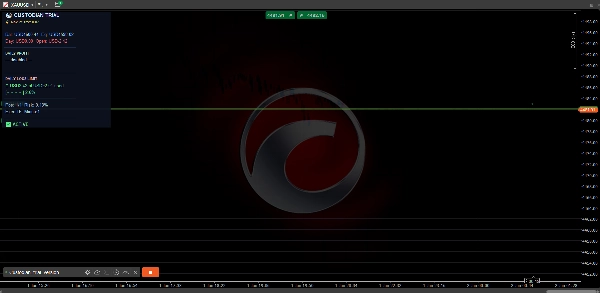
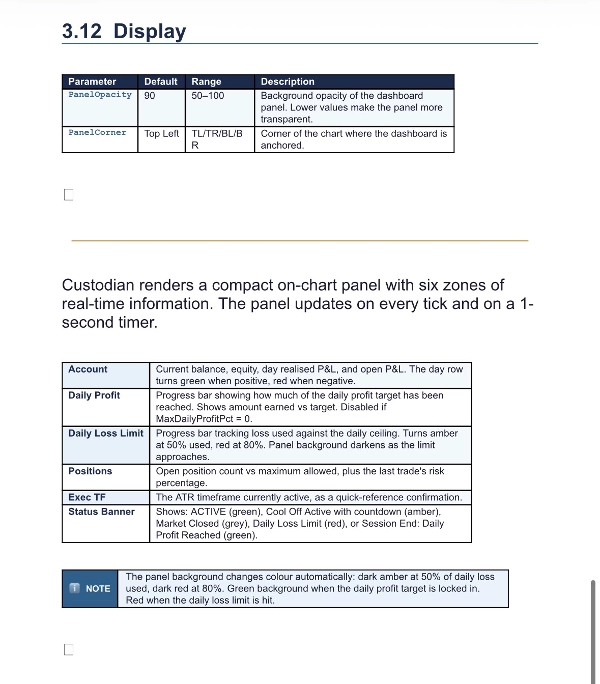
A compact on-chart dashboard keeps your balance, equity, open P&L, daily profit target, and daily loss limit in view at a glance.
No signals. No black box. No predictions. Just disciplined, mechanical trade management that does what a rule-following trader should do on every position — without hesitation, fatigue, or emotion.
Custodian manages trades you open manually; it does not generate entries. Always test on a demo account first. Not financial advice.
Detailed description & parameter setup
What it is: Custodian does not open trades. You enter manually (or via another tool); Custodian detects the position, loads that symbol's ATR, and manages the full lifecycle — sizing the stop, guarding risk, taking partials, and trailing the rest. Distances are all derived from ATR, so the same settings adapt automatically across XAUUSD, EURUSD, GBPJPY, etc.
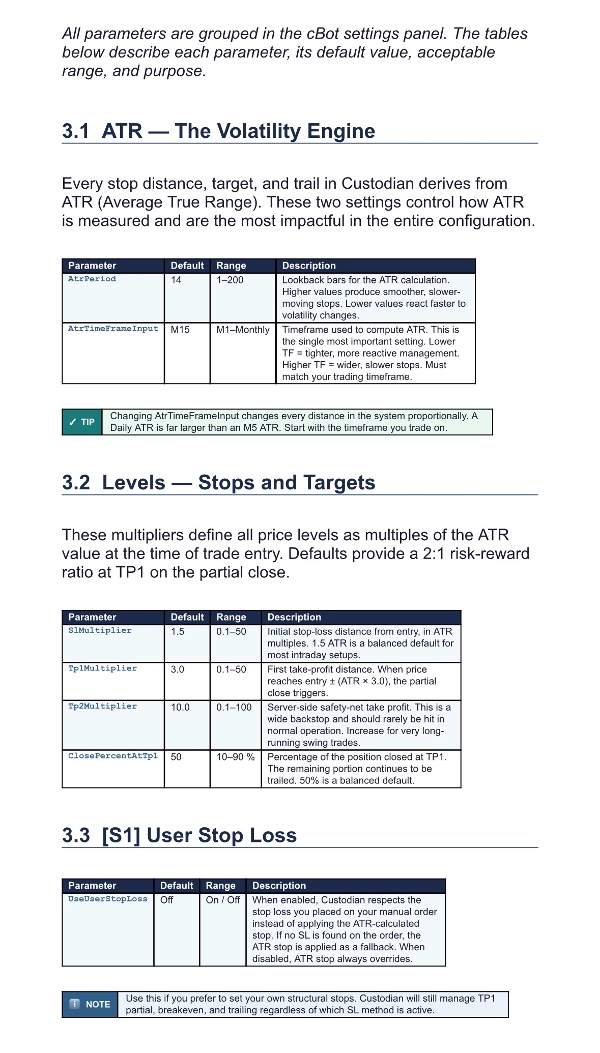
ATR (the engine)
- ATR Period (14): Lookback for the volatility calculation. Higher = smoother, slower-reacting stops.
- ATR Timeframe (M15): The timeframe ATR is measured on. Every stop/target distance scales from this — it's the single most important setting. Lower TF = tighter management; higher TF = wider, slower management.
Levels (stops & targets)
- SL Multiplier (1.5 × ATR): Initial stop distance from entry.
- TP1 Multiplier (3.0 × ATR): First target, where the partial close fires.
- TP2 Multiplier (10.0 × ATR): A wide server-side take profit that acts as a safety net in case the bot is detached.
- Close % at TP1 (50): Portion of the position closed at TP1; the remainder is moved to breakeven and trailed.
S1 — User Stop Loss
- Use User Stop Loss (off): When on, Custodian respects the SL you placed on your manual order instead of overwriting it with an ATR stop. If you placed no SL, it falls back to the ATR stop automatically.
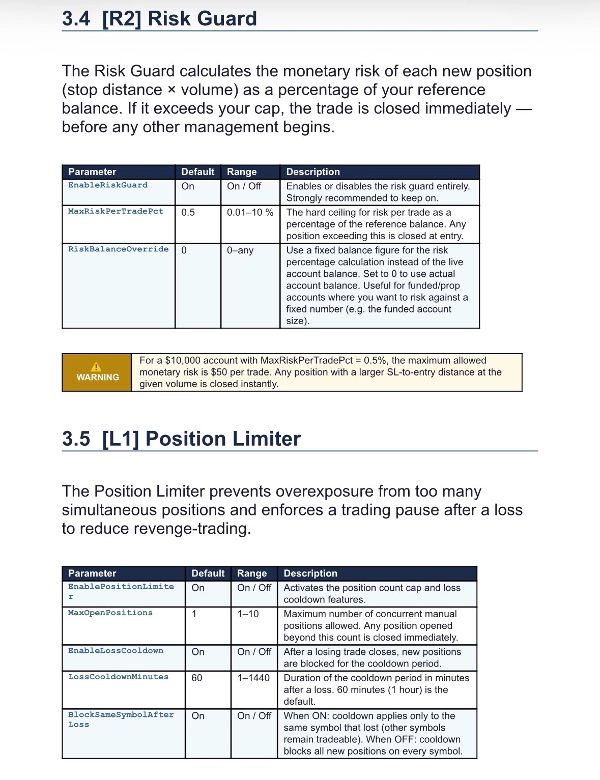
R2 — Risk Guard
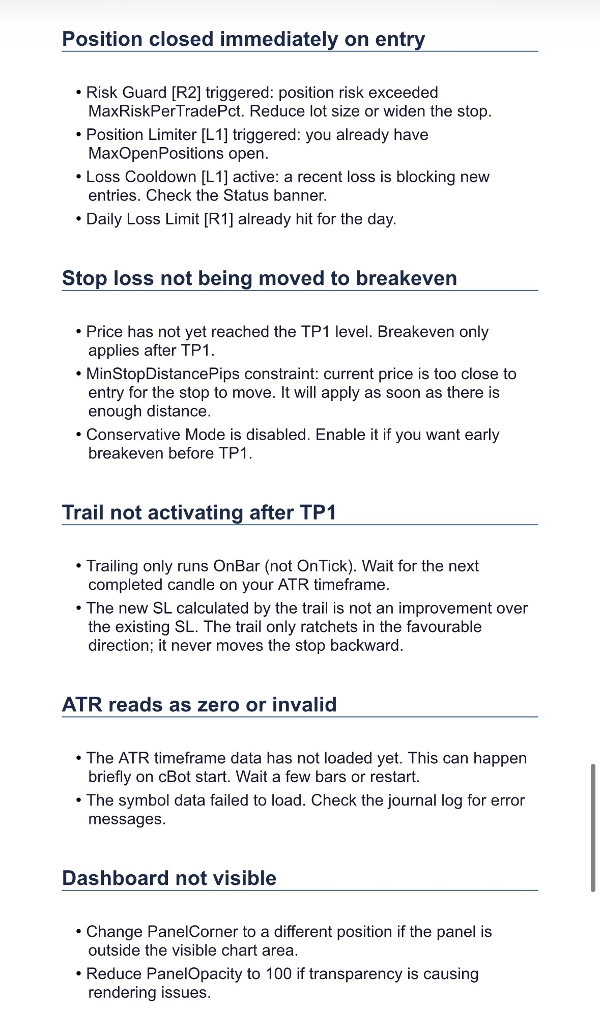
- Enable Risk Guard (on): On every new position, calculates monetary risk (stop distance × volume) as a % of balance. If it exceeds the cap, the position is closed immediately — your protection against oversized entries.
- Max Risk Per Trade % (0.5): The hard ceiling.
- Risk Balance Override (0 = live balance): Use a fixed balance figure for the % math — handy for funded/prop accounts.
L1 — Position Limiter
- Enable Position Limiter (on): Caps concurrent manual positions.
- Max Open Positions (1): The limit; extra positions beyond it are closed.
- Enable Loss Cooldown (on): After a loss, blocks new entries for a set period (anti-revenge-trading).
- Loss Cooldown minutes (60).
- Block Same Symbol After Loss (on): When on, the cooldown only blocks re-entering the same symbol that just lost — other symbols stay tradeable. When off, the cooldown blocks all new positions.
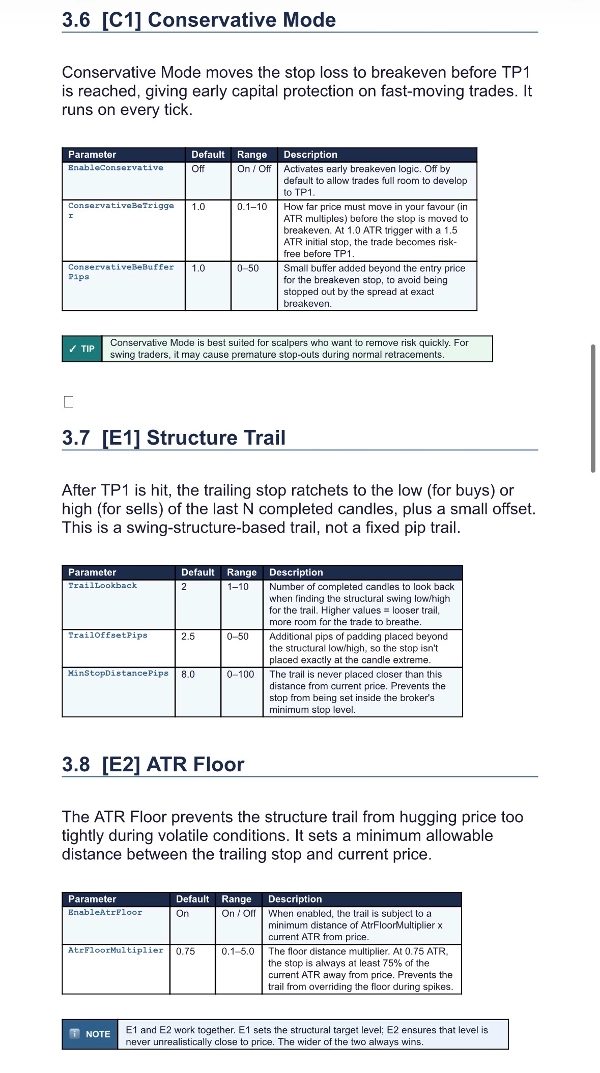
C1 — Conservative Mode
- Enable Conservative Mode (off): Moves the stop to breakeven early, before TP1 is reached.
- Conservative BE Trigger (1.0 × ATR): How far price must move in your favor before the stop jumps to breakeven.
- Conservative BE Buffer pips (1.0): Small cushion placed beyond entry so breakeven isn't stopped out by spread.
E1 — Structure Trail
- Trail Lookback Candles (2): After TP1, the stop ratchets to the low (buys) / high (sells) of the last N candles.
- Trail Offset pips (2.5): Padding beyond that structure point.
- Min Stop Distance pips (8.0): The stop is never placed closer than this to current price.
E2 — ATR Floor
- Enable ATR Floor (on): Prevents the structure trail from hugging price too tightly in volatile conditions.
- ATR Floor Multiplier (0.75): The trail is never allowed closer than this × current ATR — it gives the trade room to breathe.
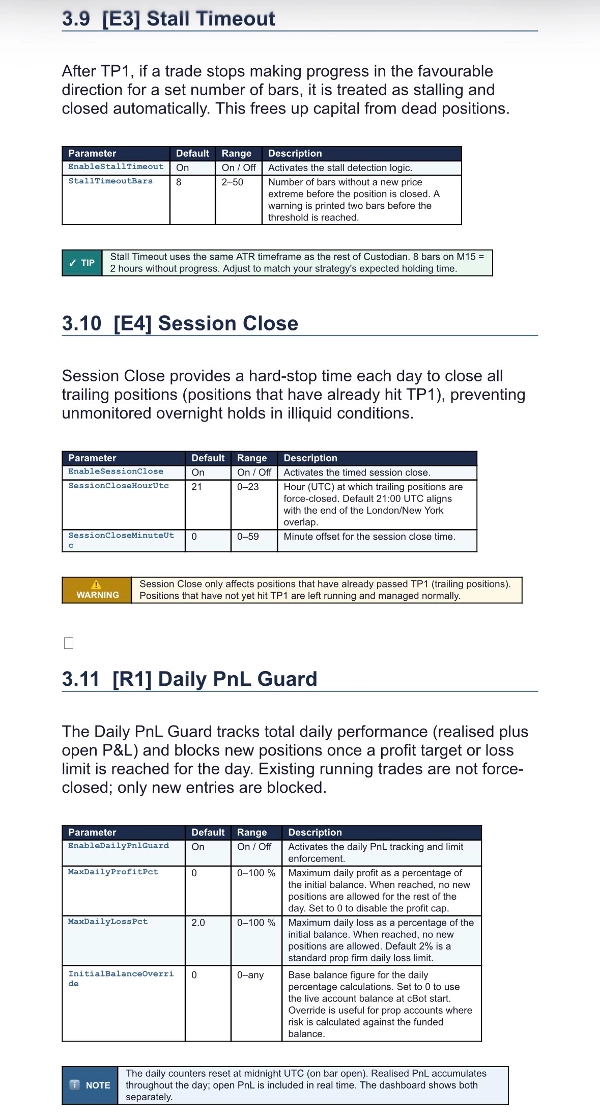
E3 — Stall Timeout
- Enable Stall Timeout (on): After TP1, if the trade fails to make a new favorable extreme for N bars, it's closed to free up dead capital.
- Stall Timeout Bars (8).
E4 — Session Close
- Enable Session Close (on): Hard-closes trailing positions (those past TP1) at a set time to avoid holding into rollover/illiquid hours.
- Session Close Hour / Minute UTC (21:00).
R1 — Daily PnL Guard
- Enable Daily PnL Guard (on): Tracks realized + open P&L for the day.
- Max Daily Profit % (0 = off): Once hit, new positions are blocked for the day (lock in green days).
- Max Daily Loss % (2.0): Once hit, new positions are blocked. Note: running trades are left to play out; only new entries are stopped.
- Initial Balance Override (0 = live balance): Base figure for the daily % math.
Display
- Panel Opacity (90) and Panel Corner (Top Left): Cosmetic placement of the dashboard.
Suggested starting profiles
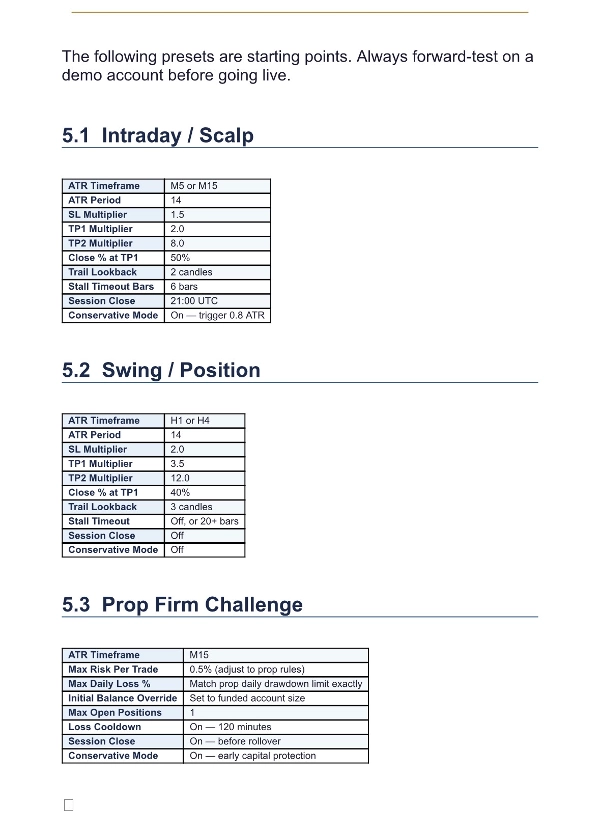
- Intraday scalp: ATR TF M5–M15, SL 1.5×, TP1 2.0×, Close 50%, Trail Lookback 2, Stall 6–8 bars.
- Swing / position: ATR TF H1–H4, SL 2.0×, TP1 3.0–4.0×, Close 40%, Trail Lookback 3, Stall off or high, Session Close off.
สรุป
การสนทนา
รีวิวจากลูกค้า
คำถามที่พบบ่อย















ราคา