
Description
🛡️ Introducing Account Guardian PRO — Version 2.0
We are pleased to announce the release of the updated version of Account Guardian PRO. Following user feedback and an in-depth review of the codebase, this update addresses critical fixes to the drawdown protection logic, delivering a more reliable and robust risk management tool for your trading account.
If you have already purchased a previous version, you are entitled to receive this update completely free of charge. Simply reach out to us on Discord and our team will provide you with the latest version promptly.
Here's a concise summary of all changes made to the cBot compared to the original version:
1. State management replaced with an enum (BotState) The original used two boolean flags (_isClosing and _stopForPeriod) which could conflict. Both were replaced by a single BotState enum with three clear states: Running, StoppedForPeriod, and HaltedForLoss. This was the root cause of the DD block not working — _isClosing was reset to false in the same tick it was set to true, so the action fired but the state was immediately cleared.
2. Period reset is now always executed The original OnTick() returned early if there were no open positions (Positions.Count == 0), which prevented the daily and weekly balance baselines from being updated. The reset logic is now extracted into a dedicated CheckPeriodReset() method that runs every tick regardless.
3. Initial baseline uses Equity instead of Balance _initialAccountBalance was set using Account.Balance at startup. If there were already open positions with floating P&L, the total drawdown calculation was off from the start. It now uses Account Equity for an accurate baseline.
4. ClosePosition() now checks the result The original called ClosePosition() silently with no error handling. The fixed version checks result.IsSuccessful and logs a warning if a position fails to close (e.g. market closed, broker error).
5. Period pause correctly resets on new day/week In the original, _stopForPeriod was reset inside the date-check block only if OnTick() reached that point — which it wouldn't if there were no open positions. The reset now happens reliably inside CheckPeriodReset().
6. Parameters use explicit Enable labels The boolean parameter labels were changed from decorative strings like "--- DAILY DRAWDOWN ---" to functional names like "Enable Daily Drawdown Limit", which display correctly in the cTrader UI.
7. Helper method GetWeek() extracted The week-of-year calculation was duplicated in the original. It's now a single private method called wherever needed.
Account Guardian Pro is a powerful and flexible management tool for your trading account. It's not a bot that opens trades on its own, but rather an automated co-pilot 🧑✈️ for your manual trading. Its sole purpose is to strictly enforce your risk and profit rules by closing all open positions when certain thresholds are met.
Think of this bot as your personal risk manager working 24/7, allowing you to focus on your trading strategy with the peace of mind that a safety net 🥅 is always active.
What is PROP Account Guardian?
How to Activate and Use the Bot (Quick Guide) 🚀
Follow these simple steps to get the guardian up and running:
- Activation (The Most Important Step) ✅
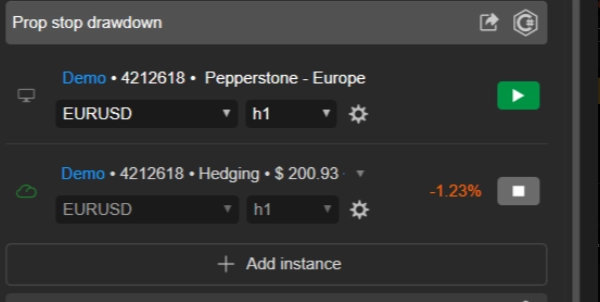
- You only need to run one single instance of the bot to protect your entire account.
- Choose any chart you like 📉 (many traders use a chart they don't actively trade, like AUD/CAD M1, just to "host" the bot).
- Add the
Account Guardian ProcBot instance to that single chart. - You do not need to open an instance for every asset you trade! ❌
- Configuration ⚙️
- Before you press "Play," set up the bot's parameters according to your trading plan. Decide which loss limits and profit targets you want to enable and with what values.
- Launch & Monitor ▶️
- Once the parameters are set, press the "Play" button on the cBot instance.
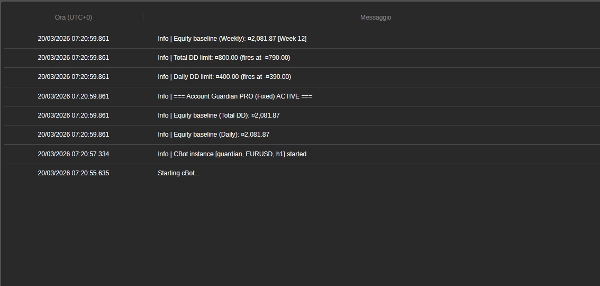
- You will see messages appear in the bot's "Log" tab 📜, confirming that it's active and showing the limits you've set.
- That's it! You can now focus on your manual trading. The bot will run quietly in the background and will only take action when one of your rules is met.
🚨 IMPORTANT ADVISORY FOR PROP FIRM TRADERS 🚨
This bot is equipped with a professional-grade equity protection system, essential for passing prop firm challenges. To maximize your chances of success, we strongly advise against setting the bot's Max Daily Drawdown (%) parameter to the same value as your prop firm's limit (e.g., 4% or 5%).
💡 The Winning Strategy: Set a Stricter Limit
The key is to use the bot's drawdown parameter as your personal, more conservative daily stop-loss, staying well inside the prop firm's absolute limit.
🎯 Practical Example:
- If your prop firm allows a 4% daily drawdown...
- set the bot's
Max Daily Drawdown (%)parameter to 1% or 1.5%.
✅ Why This Works: If you encounter a losing day, the bot will trigger its Hard Stop after a small, controlled loss (e.g., 1%). This protects your capital, keeps you far from violating the prop firm's rules, and allows you to trade again the next day. This strategy is designed to help you survive losing streaks and dramatically increase your long-term probability of success.
🧠 Remember: The goal of a challenge is not to risk your entire daily buffer in a single day, but to survive long-term. Use the bot's risk parameters to enforce iron discipline on your trading.
Parameter Details Breakdown 📋
Here is an explanation of every parameter you will find in the bot's interface.
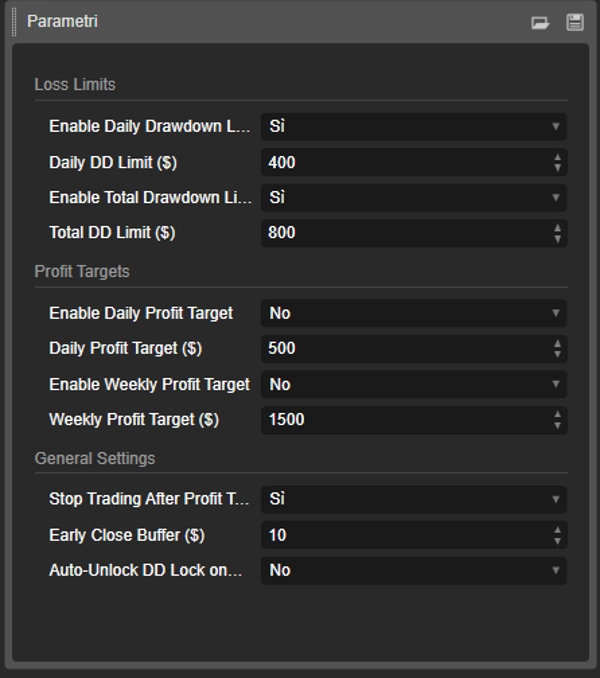
Group: Loss Limits 🛑
- EnableDailyDrawdownLimit (
Yes/No) - Explanation: Enables (
Yes) or disables (No) the daily maximum drawdown check. - How it works: If enabled, the bot will calculate the maximum loss from the account balance at the start of the day.
- Explanation: Enables (
- Daily DD Limit ($) (e.g.,
400.0) - Explanation: Sets the maximum loss amount (in your account's currency) that you are willing to accept in a single day. This should be a positive number.
- EnableTotalDrawdownLimit (
Yes/No) - Explanation: Enables (
Yes) or disables (No) the total maximum drawdown check. - How it works: If enabled, the bot will calculate the maximum loss from the balance you had when you first started the bot.
- Explanation: Enables (
- Total DD Limit ($) (e.g.,
800.0) - Explanation: Sets the maximum total loss amount you are willing to accept.
Group: Profit Targets 🎯
- EnableDailyProfitTarget (
Yes/No) - Explanation: Enables (
Yes) or disables (No) the daily profit target.
- Explanation: Enables (
- Daily Profit Target ($) (e.g.,
500.0) - Explanation: Sets the daily profit amount at which the bot will close all open positions.
- EnableWeeklyProfitTarget (
Yes/No) - Explanation: Enables (
Yes) or disables (No) the weekly profit target.
- Explanation: Enables (
- Weekly Profit Target ($) (e.g.,
1500.0) - Explanation: Sets the weekly profit amount (calculated from Monday) at which the bot will close all positions.
Group: General Settings 🔧
- Stop Trading After Profit Target? (
Yes/No) - Explanation: This crucial parameter decides what happens after a profit target is reached.
- If
Yes: The bot closes all positions and stops monitoring until the next day (or week). This is the safest option to lock in your profits. 🔒 - If
No: The bot closes the positions but continues to monitor. If you open new trades and they go into loss, the drawdown limits are still active and could be triggered. 👀
- Early Close Buffer ($) (e.g.,
10.0) - Explanation: This is your safety margin 🛡️. The amount entered here is subtracted from your drawdown limits to create an earlier trigger point.
- Example: If your
Daily DD Limitis $400 and yourBufferis $10, the bot will intervene and close everything as soon as the drawdown reaches $390, ensuring you never hit your absolute maximum limit.
Summary
Key features include:
- Daily and total drawdown limits to cap losses within set amounts.
- Daily and weekly profit targets that trigger position closures upon achievement.
- Configurable parameters with clear enable/disable options and safety buffers for early intervention.
- Robust state management ensuring reliable enforcement of drawdown protection.
- Continuous period resets for accurate baseline tracking of equity and balance.
- Error handling for position closures to ensure proper execution.
- Single-instance operation protecting the entire account, regardless of the number of traded assets.
The bot is suitable for various markets including Forex, indices, commodities, stocks, and cryptocurrencies. It supports swing trading with medium trade frequency and is compatible with prop firm trading challenges, advising conservative drawdown settings to enhance long-term survival.
Designed for use on any chart within the cTrader platform, PROP Account Guardian v.2 runs quietly in the background, providing 24/7 risk oversight aligned with your trading plan.
Customer reviews
5 | 0 % | |
4 | 100 % | |
3 | 0 % | |
2 | 0 % | |
1 | 0 % |