
Description
Qu'est-ce que PROP Account Guardian ?
La version payante est disponible ici : https://ctrader.com/it/products/2093?u=Labot
Account Guardian Pro est un outil de gestion puissant et flexible pour votre compte de trading. Ce n'est pas un bot qui ouvre des trades de manière autonome, mais plutôt un copilote automatisé 🧑✈️ pour votre trading manuel. Son seul but est de faire respecter strictement vos règles de risque et de profit en fermant toutes les positions ouvertes lorsque certains seuils sont atteints.
Considérez ce bot comme votre gestionnaire de risque personnel travaillant 24h/24 et 7j/7, vous permettant de vous concentrer sur votre stratégie de trading avec la tranquillité d'esprit qu'un filet de sécurité 🥅 est toujours actif.
Note sur la version d'essai : Cette version du bot est une version d'essai limitée et fonctionnera uniquement sur les comptes Démo pendant une période de 7 jours à partir de son premier lancement. Tous les paramètres décrits ci-dessous sont actifs et entièrement testables.
Pour le backtesting et la validation en direct de ces cBots, j'utilise IC Markets et ICTrading : Visitez IC Markets Visitez IC Trading
Comment activer et utiliser le bot (Guide rapide) 🚀
Suivez ces étapes simples pour mettre le guardian en marche :
- Activation (L'étape la plus importante) ✅
-
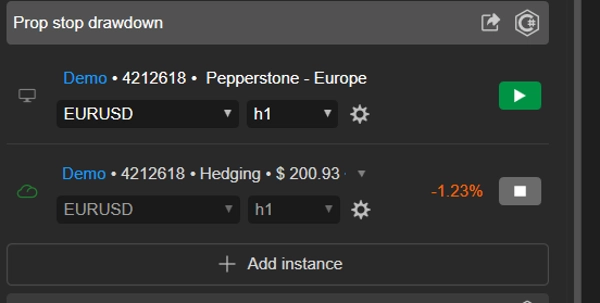
- Vous n'avez besoin de lancer qu'une seule instance du bot pour protéger l'ensemble de votre compte.
- Choisissez n'importe quel graphique que vous souhaitez 📉 (beaucoup de traders utilisent un graphique qu'ils ne tradent pas activement, comme AUD/CAD M1, juste pour "héberger" le bot).
- Ajoutez l'instance
Account Guardian ProcBot à ce seul graphique. - Vous n'avez pas besoin d'ouvrir une instance pour chaque actif que vous tradez ! ❌
- Configuration ⚙️
-
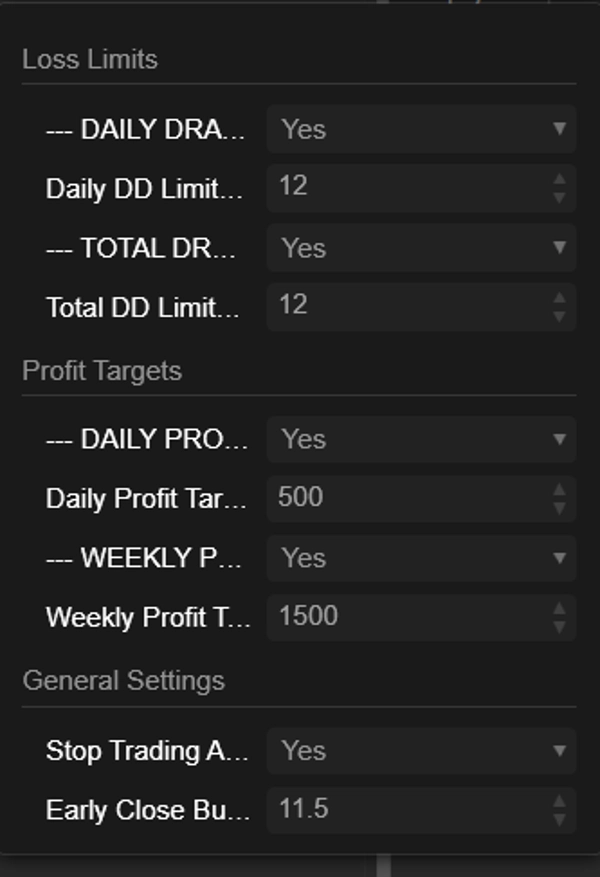
- Avant d'appuyer sur "Play", configurez les paramètres du bot selon votre plan de trading. Décidez quelles limites de pertes et objectifs de profit vous souhaitez activer et avec quelles valeurs.
- Lancer & Surveiller ▶️
-
- Une fois les paramètres définis, appuyez sur le bouton "Play" sur l'instance du cBot.
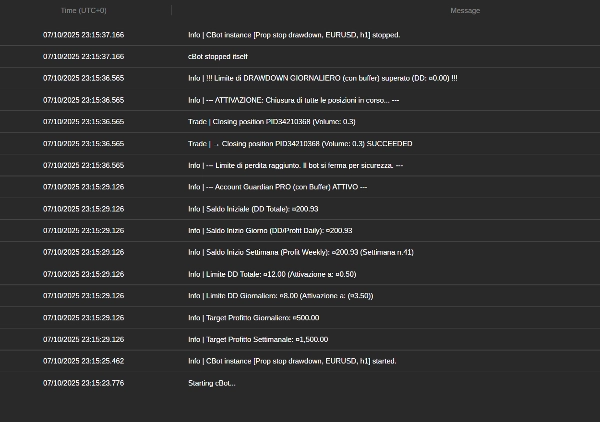
- Vous verrez des messages apparaître dans l'onglet "Log" du bot 📜, confirmant qu'il est actif et affichant les limites que vous avez définies.
- C'est tout ! Vous pouvez maintenant vous concentrer sur votre trading manuel. Le bot fonctionnera silencieusement en arrière-plan et n'interviendra que lorsqu'une de vos règles sera atteinte.
Détail des paramètres 📋
Voici une explication de chaque paramètre que vous trouverez dans l'interface du bot.
Groupe : Limites de pertes 🛑
- EnableDailyDrawdownLimit (
Yes/No) -
- Explication : Active (
Yes) ou désactive (No) la vérification du drawdown maximal quotidien. - Fonctionnement : Si activé, le bot calculera la perte maximale à partir du solde du compte au début de la journée.
- Explication : Active (
- Limite de DD quotidienne ($) (par exemple,
400.0) -
- Explication : Définit le montant maximal de perte (dans la devise de votre compte) que vous êtes prêt à accepter en une seule journée. Ce doit être un nombre positif.
- EnableTotalDrawdownLimit (
Yes/No) -
- Explication : Active (
Yes) ou désactive (No) la vérification du drawdown maximal total. - Fonctionnement : Si activé, le bot calculera la perte maximale à partir du solde que vous aviez lorsque vous avez lancé le bot pour la première fois.
- Explication : Active (
- Limite totale de DD ($) (par exemple,
800.0) -
- Explication : Définit le montant maximal total de perte que vous êtes prêt à accepter.
Groupe : Objectifs de profit 🎯
- EnableDailyProfitTarget (
Yes/No) -
- Explication : Active (
Yes) ou désactive (No) l'objectif de profit quotidien.
- Explication : Active (
- Objectif de profit quotidien ($) (par exemple,
500.0) -
- Explication : Définit le montant de profit quotidien auquel le bot fermera toutes les positions ouvertes.
- EnableWeeklyProfitTarget (
Yes/No) -
- Explication : Active (
Yes) ou désactive (No) l'objectif de profit hebdomadaire.
- Explication : Active (
- Objectif de profit hebdomadaire ($) (par exemple,
1500.0) -
- Explication : Définit le montant de profit hebdomadaire (calculé à partir du lundi) auquel le bot fermera toutes les positions.
Groupe : Paramètres généraux 🔧
- Arrêter le trading après l'objectif de profit ? (
Yes/No) -
- Explication : Ce paramètre crucial décide ce qui se passe après qu'un objectif de profit est atteint.
- Si
Oui: Le bot ferme toutes les positions et arrête la surveillance jusqu'au lendemain (ou à la semaine suivante). C'est l'option la plus sûre pour sécuriser vos profits. 🔒 - Si
Non: Le bot ferme les positions mais continue à surveiller. Si vous ouvrez de nouveaux trades et qu'ils génèrent une perte, les limites de drawdown sont toujours actives et pourraient être déclenchées. 👀
- Marge de fermeture anticipée ($) (par exemple,
10.0) -
- Explication : C'est votre marge de sécurité 🛡️. Le montant saisi ici est soustrait de vos limites de drawdown pour créer un point de déclenchement anticipé.
- Exemple : Si votre
Limite de DD quotidienneest de 400 $ et votreBufferest de 10 $, le bot interviendra et fermera tout dès que le drawdown atteindra 390 $, vous assurant de ne jamais atteindre votre limite maximale absolue.