![Trading product for [CB] RR Management cBot Forex Indices, image 1](https://cdn.ctrader.com/image/webp/0390d544-4996-4346-974b-d41dd9e73c64_32505)
![Trading product for [CB] RR Management cBot Forex Indices, image 2](https://cdn.ctrader.com/image/webp/62a2f277-6531-4405-9387-d4eec2142b06_32506)
![Trading product for [CB] RR Management cBot Forex Indices, image 3](https://cdn.ctrader.com/image/webp/b9dad7e0-8fa2-4f29-8bf7-8b47116e97fa_32507)
![Trading product for [CB] RR Management cBot Forex Indices, image 4](https://cdn.ctrader.com/image/webp/772e2aa1-7349-43fa-ae70-fdc71ff9cf24_32508)
![Trading product for [CB] RR Management cBot Forex Indices, image 5](https://cdn.ctrader.com/image/webp/f2cdb27c-4b85-472a-a3c8-a2d607c06558_32509)
![Trading product for [CB] RR Management cBot Forex Indices, image 6](https://cdn.ctrader.com/image/webp/2d928340-8ae7-49f7-8942-4263af502b02_32510)
Penerangan
Alat Pengurusan Risiko & Ganjaran cTrader boleh membantu anda dengan mudah untuk menetapkan nilai risiko berbanding ganjaran, anda hanya perlu menyeret garis ambil untung & henti rugi untuk mengira secara automatik jumlah risiko atau volum yang perlu digunakan. Juga, disertakan ciri ambil untung automatik yang membolehkan anda menetapkan empat (4) senario berbeza untuk mengunci keuntungan tersebut.
Merancang dagangan anda adalah salah satu bahagian paling penting dalam kehidupan pedagang harian, jika anda gagal melakukan ini anda akan gagal, alat ini membolehkan anda dengan mudah menetapkan sasaran ambil untung dan henti rugi bergantung pada selera risiko anda.
Ciri-ciri Utama
- Seret garis TP/SL untuk mengira secara automatik nilai risiko/ganjaran
- Ambil untung automatik untuk pesanan tertunda.
- Berdasarkan nilai di bawah untuk menetapkan maklumat risiko/ganjaran
- Volum: tetapkan volum akan mengira secara automatik jumlah risiko
- Henti Rugi: tetapkan SL untuk mengira kadar dan jumlah TP/RR
- Ambil Untung: tetapkan TP akan mengira secara automatik kadar dan jumlah SL/RR
- Kadar Risiko/Ganjaran: tetapkan kadar RR akan mengira secara automatik TP
- Jumlah Risiko (dengan/tanpa peratusan): anda boleh menetapkan nilai jumlah sebenar atau dengan peratusan
- Boleh menggunakan henti susur
- Tambah komen pada pesanan
- Sokong pesanan Beli, Jual, Beli Henti, Jual Henti
- Tetapkan ambil untung automatik (tetapi kerana ini adalah cBot jadi jika menggunakan fungsi ini anda tidak boleh menghentikan alat)
- Sokong Windows dan MacOS
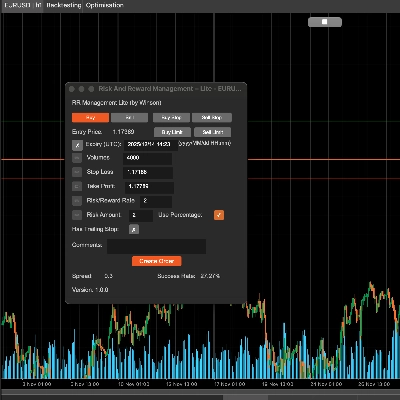
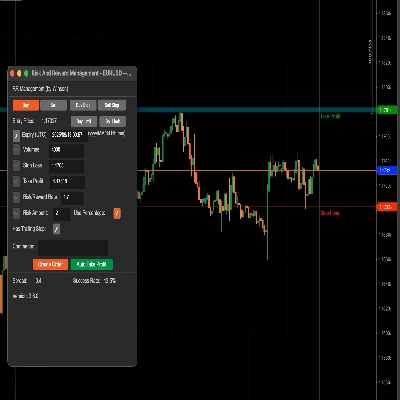
Seret garis henti rugi (lalai adalah hijau) dan ia akan mengira secara automatik kadar risiko & ganjaran dan jumlah volum untuk saiz posisi. Anda juga boleh mengemas kini volum dengan input manual, apabila anda mengubah nilai di bawah, ikon edit kiri akan diaktifkan supaya anda boleh mengemas kini nilai.
Sokongan untuk Pesanan Had Beli & Jual
Alat ini kini menyokong kedua-dua pesanan had beli dan jual dengan tarikh/masa tamat tempoh.
Gunakan Peratusan
Jika anda ingin menggunakan peratusan berdasarkan baki anda, hanya klik kotak semak Gunakan Peratusan atau ia akan menggunakan nilai jumlah sebenar. Nota: jika baki akaun anda kecil, volum yang dikira tidak akan menjadi lebih rendah daripada saiz posisi terendah yang dibenarkan untuk simbol tersebut.
Kadar Risiko & Ganjaran
Anda boleh menetapkan risiko berbanding ganjaran untuk henti rugi dan ambil untung anda, jadi kadar Risiko/Ganjaran 2 bermakna ambil untung anda adalah dua kali ganda risiko anda, apabila anda klik pada butang jual, henti rugi dan ambil untung akan dikira secara automatik menggunakan nisbah ini.
Kadar Kejayaan
Kadar kejayaan berdasarkan semua pesanan sejarah anda, ia akan mengira pesanan berjaya untuk kadar tersebut, dan "Henti Susur" hanyalah pilihan asli untuk cTrader untuk mencipta pesanan berfungsi, saya hanya lulus ini apabila anda mencipta pesanan.
Butang Ambil Untung Automatik
Terdapat 3 tahap untuk menetapkan ambil untung automatik, yang bermaksud anda boleh menggunakan 4 syarat untuk mengambil untung, contohnya:
- Ambil 50% ambil untung separa selepas mencapai lebih 60% sasaran keuntungan.
- Ambil 50% ambil untung separa apabila harga simbol mencapai 60 atau untuk Forex sesuatu seperti 1.72245
Anda boleh mengubah nilai di atas semasa runtime, ia akan berkuat kuasa serta-merta jika anda telah memulakan butang ambil untung. Ia juga akan menetapkan semula semua nilai selepas menghentikan cBot. Jika keuntungan 1 maka tidak akan diambil untung lagi, itu bermakna hanya berjalan sekali untuk setiap syarat keuntungan kecuali menghentikan keuntungan automatik dan memulakan semula, akan menetapkan semula semua status syarat.
Kemas Kini: Kini terdapat sokongan untuk pesanan tertunda supaya ambil untung automatik boleh digunakan apabila ia menjadi pesanan pasaran.
Kemas Kini: Anda juga boleh menetapkan syarat ambil untung dalam pips, jadi anda boleh memilih % daripada jumlah, harga dan juga bilangan pips.
Menggunakan Volum untuk Mengambil Untung
Daripada menggunakan 50% atau peratusan lain dalam kotak Ambil Untung, anda boleh menggunakan nilai seperti 1000 (1K) yang merupakan volum posisi.
Tetapi jangan lupa mesti tandakan kotak semak hijau untuk mengaktifkan syarat ambil untung ini.
Tetapkan label pesanan untuk mengambil untung, ini kerana mungkin terdapat pelbagai pesanan pada masa yang sama, jadi anda perlu menentukan pesanan mana yang anda mahu gunakan ambil untung automatik, dan jika anda menggunakan alat ini untuk mencipta pesanan, ia akan menetapkan label pesanan secara automatik di sini.
Bagaimana Mengurus Dagangan dari cBot Lain?
Anda juga boleh menggunakan alat ini untuk mengurus dagangan yang dibuka dari cBot lain dengan hanya menetapkan nama label apabila pesanan dihantar dan menggunakan nama label yang sama dalam medan di atas untuk label pesanan untuk mengambil untung.
Tetapkan Break-Even
Alat ini juga membolehkan break-even digunakan pada dagangan anda, sekali lagi, anda boleh menggunakan sama ada peratusan daripada jumlah baki akaun atau harga tetap.
Untuk menggunakan tetapan dan kembali ke skrin utama anda perlu klik pada Mula Ambil Untung butang.
Tetapan Parameter
Apabila anda melampirkan cBot ke carta anda akan pertama kali ditunjukkan tetingkap tetapan utama.
Tetapan Gaya
Tetapkan warna dan ketebalan garis SL/TP dan harga semasa di sini.
Penjajaran Panel
Tetapkan posisi panel di sini, tetapi anda juga boleh menggunakan Ctrl+Tetikus untuk menggerakkan panel.
Pengurusan RR
- Tetapkan nilai lalai untuk maklumat risiko/ganjaran.
- Ambil Untung Automatik 1,2,3 - tetapkan nilai lalai untuk fungsi ambil untung automatik, terdapat 3 tahap ambil untung.
- Tetapan Automatik Break-Even - tetapkan nilai lalai untuk break-even automatik apabila mencapainya.
![Logo "[CB] Pivot Points Pro"](https://cdn.ctrader.com/image/webp/43463c82-67b0-4f10-a4ba-901bba091d81_32594)