Mô tả
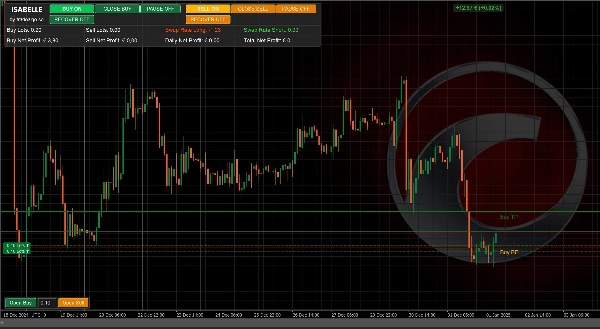
Isabelle là một trợ lý giao dịch tự động toàn phần và bán tự động tinh vi dành cho các nhà giao dịch muốn tận hưởng cả hai thế giới: tự động hóa mạnh mẽ và kiểm soát trên biểu đồ. Chạy nó hoàn toàn tự động với thời gian thông minh, logic lưới thích ứng với biến động, chế độ phục hồi và quản lý lợi nhuận theo dõi ảo — hoặc tự điều khiển với các bảng điều khiển trực quan cho phép bạn tạm dừng, phục hồi và mở/đóng vị thế thủ công.
Có gì mới trong phiên bản 5.0.0
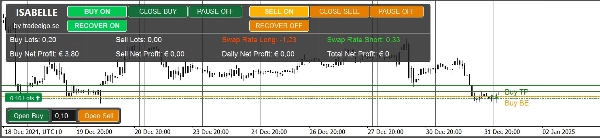
- Bảng điều khiển chính mới với phân tích bổ sung:
-
- Tổng số lô bên cạnh (Mua/Bán)
- Tỷ lệ hoán đổi trực tiếp (dài/ngắn) với màu sắc tích cực/tiêu cực
- Mở rộng các chỉ số lợi nhuận (Mua, Bán, Hàng ngày, Tổng cộng)
- Bộ lọc giao dịch mới
-
- Bộ lọc hướng Trọng tâm Trọng lực (CoG) (tùy chọn)
- Bộ lọc RSI với điều khiển khung thời gian và ngưỡng (tùy chọn)
- Cải tiến trải nghiệm người dùng chung, cập nhật hình ảnh trên biểu đồ mượt mà hơn và tối ưu hiệu suất nội bộ.
Tại sao các nhà giao dịch chọn Isabelle
- Linh hoạt theo thiết kế: Các đầu vào của Isabelle bao gồm thời gian, khoảng cách lưới, tạm dừng động, bộ lọc, theo dõi, phục hồi và giao diện người dùng — vì vậy bạn có thể cấu hình nó phù hợp với hầu hết các phong cách giao dịch: lưới tự động hoàn toàn, đảo chiều có kỷ luật, scalping bán thủ công với hỗ trợ tự động hóa hoặc quản lý phiên tập trung vào phục hồi.
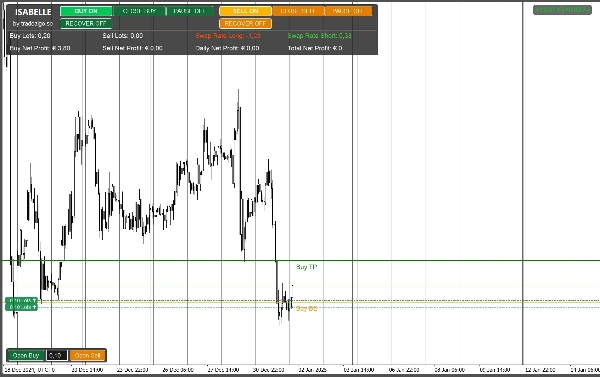
- Hình ảnh chính xác: Các đường BE/TP/SL/theo dõi trên biểu đồ cùng với bảng lợi nhuận rõ ràng giúp bạn nhận biết rủi ro và tiến trình ngay lập tức.
- Nhận biết phục hồi: Bật hoặc tự động kích hoạt phục hồi sau một ngưỡng nhất định. Giảm mục tiêu lợi nhuận một cách thông minh trong các giai đoạn khó khăn.
- Thích ứng với biến động: Một động cơ Độ lệch Chuẩn làm mượt động thái kéo dài hoặc nén khoảng tạm dừng giữa các lệnh để phù hợp hơn với điều kiện thị trường hiện tại.
Khả năng cốt lõi
- Giao dịch lưới với bước cấu hình được, tăng trưởng khối lượng, số lệnh tối đa mỗi bên và SL cố định tùy chọn.
- Tạm dừng động dựa trên biến động làm mượt (kỳ StdDev + khung thời gian) với giới hạn min/max.
- Chế độ phục hồi với bốn hành vi mục tiêu: Không thay đổi, Một nửa, Chia theo vị thế, hoặc Hòa vốn.
- Lợi nhuận ảo / Theo dõi lợi nhuận:
-
- TP cố định (điểm từ hòa vốn ròng bao gồm hoa hồng & hoán đổi), hoặc
- Theo dõi ảo kích hoạt sau khi đạt mục tiêu.
- Bộ lọc & An toàn:
-
- Bộ lọc chênh lệch giá, cửa sổ giao dịch, bộ lọc CoG và RSI tùy chọn.
- Bảng điều khiển trên biểu đồ:
-
- Tóm tắt lợi nhuận (Mua/Bán/Hàng ngày/Tổng), Lô theo bên, Tỷ lệ hoán đổi dài/ngắn
- Nút MUA/BÁN thủ công, công tắc tạm dừng bên, và công tắc phục hồi.
- Lớp phủ hình ảnh:
-
- Tự động vẽ BE, kích hoạt TP, SL, và (khi hoạt động) Theo dõi các đường.
Ghi chú demo: Bản demo Store chỉ hoạt động trong kiểm thử lại để đánh giá logic và giao diện người dùng. Để thử nghiệm trực tiếp/tiếp theo bạn cần bản có giấy phép.
Quy trình làm việc được đề xuất
Lưới tự động hoàn toàn:
Đặt giờ giao dịch, khoảng cách bước, số lệnh tối đa, lô cơ bản & hệ số nhân; bật tạm dừng động; để bộ lọc tắt hoặc thiên về nhẹ.
Điều khiển bán thủ công:
Tắt lệnh hạt giống, sử dụng các nút thủ công trên bảng để mở hướng ban đầu, giữ phục hồi sẵn có, và để theo dõi/TP quản lý thoát.
Phiên tập trung vào phục hồi:
Bật Phục hồi tự động sau N vị thế, chọn hành vi mục tiêu giảm, và dựa vào hình ảnh (đường BE/TP + bảng) để giám sát.
Nhắc nhở rủi ro
Isabelle là một công cụ mạnh mẽ. Nếu cấu hình sai hoặc sử dụng đòn bẩy cao, giao dịch lưới có thể gây ra thua lỗ lớn hoặc thảm họa. Luôn thử nghiệm trước trên bản demo, đặt kích thước thận trọng và sử dụng bộ lọc/điều khiển thời gian và tính năng phục hồi một cách cẩn thận.
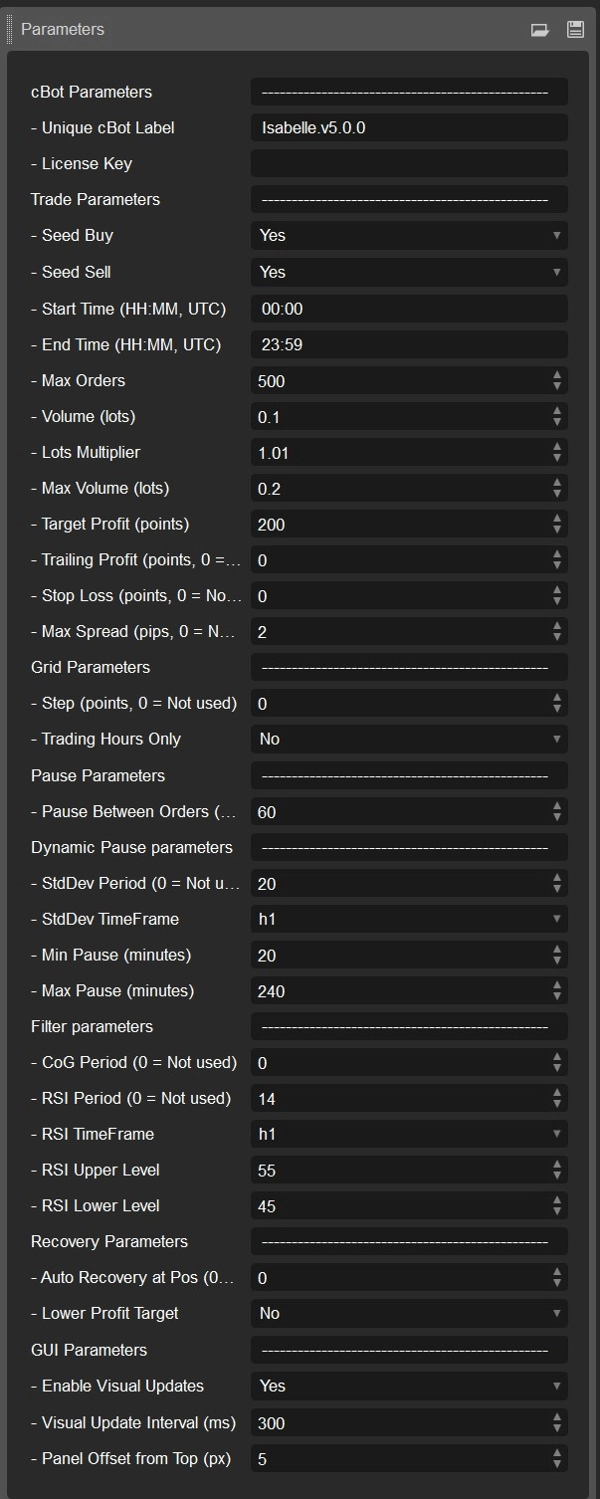
Tham khảo đầy đủ các tham số (v5.0.0)
Tất cả các tham số dưới đây phản ánh nguồn hiện tại và mặc định.
Nhận dạng / Cấp phép
- Nhãn CBot (mặc định:
Isabelle.v5.0.0) — Nhóm vị thế/lịch sử cho phiên bản này. Thay đổi khi chạy nhiều bản sao. - Khóa giấy phép — Yêu cầu cho các bản có giấy phép (không dùng trong bản demo/kiểm thử đầy đủ).
Tham số giao dịch
- Mua hạt giống (mặc định: BẬT) — Mở lệnh MUA đầu tiên tự động khi được phép.
- Bán hạt giống (mặc định: BẬT) — Mở lệnh BÁN đầu tiên tự động khi được phép.
- Thời gian bắt đầu (UTC) (mặc định:
00:00) — Thời gian sớm nhất để mở vị thế mới. - Thời gian kết thúc (UTC) (mặc định:
23:59) — Thời gian muộn nhất để mở vị thế mới. - Số lệnh tối đa (mặc định: 500) — Giới hạn mở vị thế mỗi bên (MUA/BÁN).
- Khối lượng (lô) (mặc định: 0.01) — Kích thước lô ban đầu cho vị thế đầu tiên mỗi bên.
- Hệ số nhân lô (mặc định: 1.01) — Hệ số tăng trưởng cho mỗi lệnh lưới bổ sung (1.0 = kích thước cố định).
- Khối lượng tối đa (lô) (mặc định: 0.02) — Giới hạn cứng cho mỗi lệnh đơn (sau hệ số nhân).
- Mục tiêu lợi nhuận (điểm) (mặc định: 50) — Khoảng cách từ hòa vốn ròng đến kích hoạt TP (10 điểm ≈ 1 pip trên nhiều ký hiệu).
- Theo dõi lợi nhuận (điểm) (mặc định: 0) — Nếu 0: đóng tại TP cố định; nếu >0: sử dụng theo dõi ảo với kích thước này sau kích hoạt TP.
- Dừng lỗ (điểm) (mặc định: 0) — SL cố định tùy chọn từ điểm vào trọng số (0 = tắt).
- Chênh lệch tối đa (pip) (mặc định: 1.0) — Chặn lệnh mới nếu chênh lệch hiện tại ≥ số này (0 = tắt).
Tham số lưới
- Bước (điểm) (mặc định: 0) — Khoảng cách tối thiểu từ điểm vào cuối cùng để thêm lệnh lưới khác (0 = không lọc khoảng cách).
- Chỉ giờ giao dịch (mặc định: TẮT) — Nếu BẬT, các lệnh lưới/hạt giống chỉ xảy ra trong khoảng Thời gian bắt đầu–Kết thúc.
Tham số tạm dừng
- Tạm dừng giữa các lệnh (phút) (mặc định: 60) — Thời gian làm mát cơ bản mỗi bên; có thể bị ghi đè bởi Tạm dừng động.
Tạm dừng động (Thích ứng biến động)
- Kỳ StdDev (mặc định: 20) — Độ dài lấy mẫu StdDev (0 = tắt).
- Khung thời gian StdDev (mặc định: Giờ) — Khung thời gian thanh để lấy mẫu biến động.
- Tạm dừng tối thiểu (phút) (mặc định: 20) — Giới hạn dưới của tạm dừng thích ứng.
- Tạm dừng tối đa (phút) (mặc định: 240) — Giới hạn trên của tạm dừng thích ứng.
Tham số bộ lọc (tất cả tùy chọn)
- Kỳ CoG (mặc định: 50, 0 = tắt) — Yêu cầu CoG dốc theo hướng giao dịch (Mua cần dốc lên; Bán cần dốc xuống).
- Kỳ RSI (mặc định: 14, 0 = tắt) — Lọc RSI dựa trên khung thời gian dưới đây.
- Khung thời gian RSI (mặc định: Giờ) — Khung thời gian lấy mẫu RSI.
- Mức trên RSI (mặc định: 55) — Chỉ được phép bán nếu RSI ≥ Mức trên (khi bộ lọc RSI bật).
- Mức dưới RSI (mặc định: 45) — Chỉ được phép mua nếu RSI ≤ Mức dưới (khi bộ lọc RSI bật).
Tham số phục hồi
- Phục hồi tự động tại số vị thế (mặc định: 0 = tắt) — Tự động bật phục hồi sau N vị thế mở ở một bên.
- Mục tiêu lợi nhuận thấp hơn (mặc định:
Không) — Hành vi khi đang phục hồi: -
- Không — Giữ mục tiêu không đổi
- Một nửa — Mục tiêu lợi nhuận / 2
- Chia theo vị thế — Mục tiêu lợi nhuận / số vị thế mở (tối thiểu 1 điểm)
- Hòa vốn — Kích hoạt chính xác tại hòa vốn (mục tiêu trở thành 0)
Giao diện người dùng / Hình ảnh
- Bật cập nhật hình ảnh (mặc định: BẬT) — Vẽ các đường BE/TP/SL/theo dõi và nhãn lợi nhuận. Tắt để kiểm thử lại nhanh hơn.
- Khoảng thời gian cập nhật hình ảnh (ms) (mặc định: 300) — Gom các cập nhật (0 = cập nhật mỗi tick).
- Độ lệch bảng điều khiển từ trên xuống (px) (mặc định: 5) — Dịch chuyển dọc cho bảng điều khiển trên để tránh che chỉ báo.
Hình ảnh & bảng điều khiển
- Bảng chính (góc trên bên trái)
Lợi nhuận ròng Mua/Bán, Hàng ngày và Tổng cộng Lợi nhuận ròng, Lô Mua/Bán, Tỷ lệ hoán đổi dài/ngắn với màu sắc trực quan. - Bảng giao dịch (góc dưới bên trái)
Nút MUA/BÁN thủ công, công tắc tạm dừng bên, công tắc phục hồi và phản hồi trạng thái trực tiếp. - Lớp phủ biểu đồ
-
- Đường BE (sau hoa hồng & hoán đổi)
- Đường kích hoạt TP (từ BE theo Mục tiêu lợi nhuận)
- Đường SL tùy chọn (từ điểm vào trọng số)
- Đường theo dõi ảo khi theo dõi hoạt động
Demo và bản có giấy phép
- Bản demo: Chỉ kiểm thử lại. Dùng để đánh giá logic, giao diện và hiệu suất dưới các cấu hình khác nhau.
- Bản có giấy phép: Cần thiết cho thử nghiệm trực tiếp hoặc tiếp theo. Liên hệ tác giả để biết điều khoản cấp phép.
Bắt đầu (công thức nhanh)
- Kiểm thử lại ký hiệu của bạn với Mua/Bán hạt giống BẬT, chọn Khối lượng và Số lệnh tối đa thận trọng.
- Đặt Bước và bật Tạm dừng động với min/max hợp lý.
- Thêm bộ lọc RSI và/hoặc CoG nếu bạn muốn chọn lọc theo hướng.
- Quyết định giữa TP cố định và Theo dõi ảo (đặt Theo dõi lợi nhuận > 0).
- Xem xét hành vi và ngưỡng Phục hồi; kiểm tra các chuỗi trường hợp xấu nhất.
- Chuyển sang thử nghiệm tiếp theo trên demo với bản có giấy phép trước khi vào hoạt động thực.
Tóm tắt
New in version 5.0.0 are enhanced analytics on the main panel, including side lots totals, live swap rates with color coding, expanded profit readouts, and new trade filters based on Center of Gravity and RSI indicators. The interface provides precise visual overlays such as breakeven, take profit activation, stop loss, and trailing lines, along with comprehensive profit and status panels.
Isabelle supports multiple markets including Forex, Indices, Commodities, and Cryptocurrencies, with symbols like EURUSD, GBPUSD, BTCUSD, XAUUSD, and NAS100. The demo version operates in backtesting mode only, enabling evaluation of logic and UI, while licensed builds are required for live or forward testing. The bot offers flexible configuration to suit various trading styles, including hands-off grid trading, semi-manual scalping, and recovery-focused sessions.
Đánh giá của khách hàng
5 | 0 % | |
4 | 0 % | |
3 | 100 % | |
2 | 0 % | |
1 | 0 % |