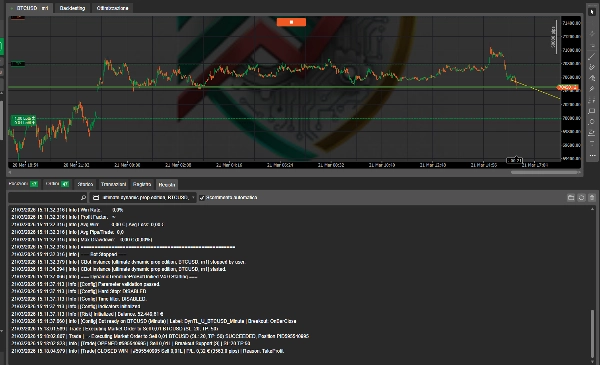
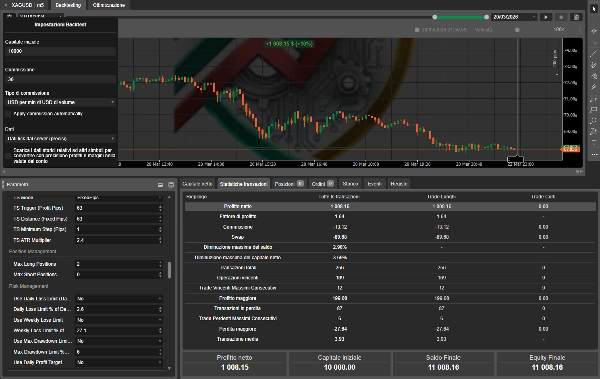
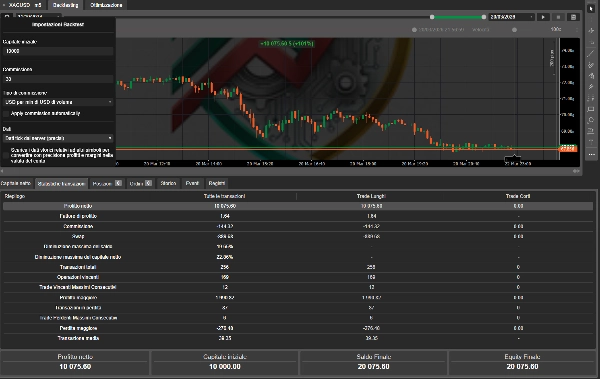
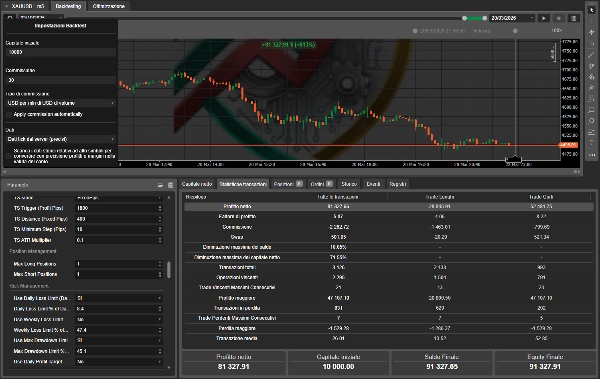

คำอธิบาย
Dynamic Trendline Deluxe Pro Bot — cBot สำหรับ cTrader เวอร์ชัน 4.0 · การอัปเดตครั้งใหญ่ 🚀
🆕 มีอะไรใหม่ในเวอร์ชัน 4.0
เวอร์ชัน 4.0 เป็นการพัฒนาครั้งใหญ่ที่สร้างขึ้นบนพื้นฐาน Deluxe Pro ทุกฟีเจอร์ใหม่ได้รับแรงบันดาลใจจากความคิดเห็นของเทรดเดอร์จริงและข้อกำหนดของบริษัทโปรป ทุกกลยุทธ์แนวโน้มหลักยังคงเหมือนเดิม — การเพิ่มทั้งหมดถูกวางซ้อนโดยไม่ทำลายการตั้งค่าที่มีอยู่
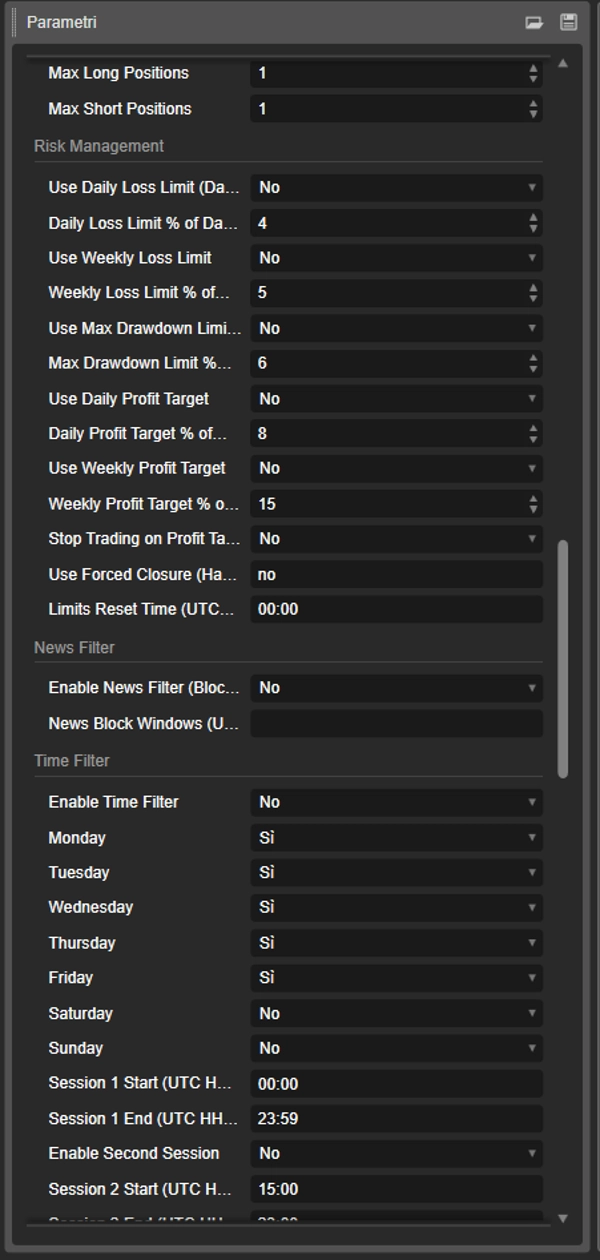
🚨 Hard Stop (ปิดการซื้อขายบังคับ) — เมื่อเกิดการขาดทุนสะสมรายวันหรือเกินขีดจำกัดการขาดทุนสูงสุด บอทจะปิดตำแหน่งเปิดทั้งหมดในสัญลักษณ์นั้นทันที เป็นตัวช่วยปกป้องบัญชีที่ดีที่สุดสำหรับความท้าทายของบริษัทโปรป ตอนนี้เป็นแค่กล่องเลือกง่ายๆ — ไม่มีการป้อนข้อความที่สับสนอีกต่อไป
🎯 เป้าหมายกำไรรายวันและรายสัปดาห์ — ตั้งเป้าหมายกำไรรายวันหรือรายสัปดาห์เป็น % ของยอดเงิน เมื่อถึงเป้าหมาย บอทจะหยุดเปิดการซื้อขายใหม่ตามต้องการ เพื่อรักษากำไรสะสมก่อนที่จะเสียคืน
🛡️ ขีดจำกัดการขาดทุนสูงสุด (อิงตามส่วนของทุน) — เป็นขีดจำกัดขั้นต่ำที่แน่นอนบนส่วนของทุน หากส่วนของทุนในบัญชีของคุณต่ำกว่าร้อยละที่ตั้งไว้ของยอดเงินเริ่มต้น การซื้อขายจะหยุดทันทีไม่ว่าจะมีกำไรหรือขาดทุนที่เกิดขึ้นแล้วก็ตาม
📊 รายงานสถานะรายชั่วโมง — ทุกชั่วโมงบอทจะแสดงภาพรวมความเสี่ยงเต็มรูปแบบในบันทึก: ส่วนของทุน, % การขาดทุนรายวัน, % การขาดทุนรวม, อัตราชนะ, ปัจจัยกำไร และ กำไร/ขาดทุน โปร่งใสเต็มที่ตลอดเวลา
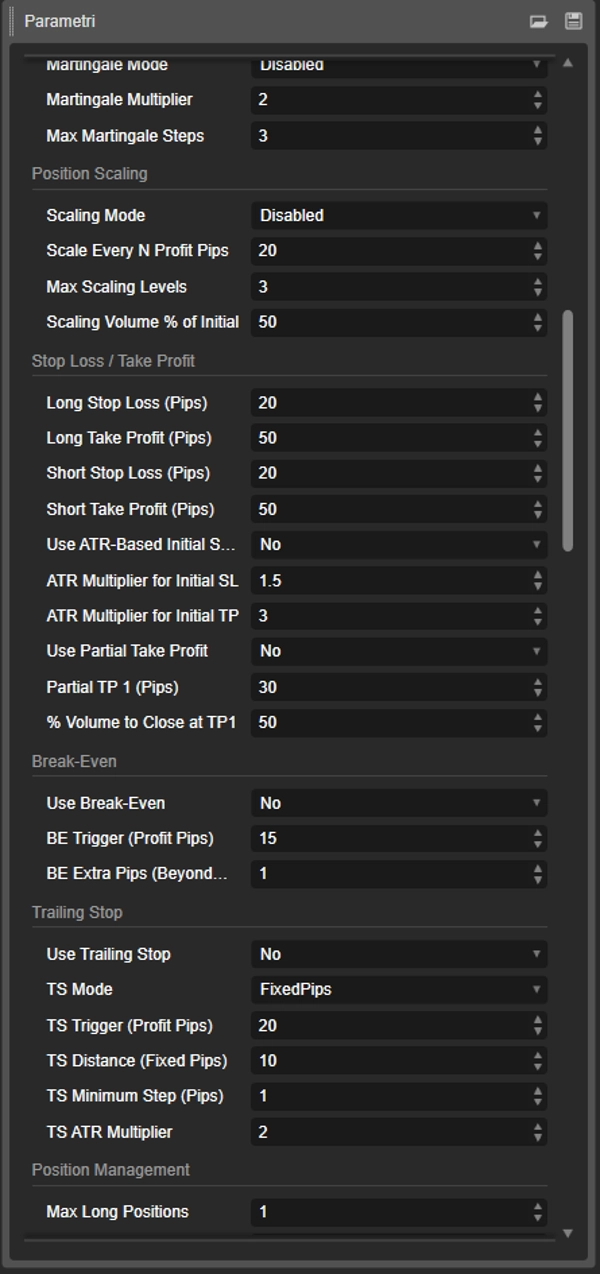
📈 Martingale / Anti-Martingale — ระบบเพิ่มขนาดล็อตแบบเลือกได้ Martingale เพิ่มขนาดล็อตหลังจากขาดทุน; Anti-Martingale หลังจากชนะ ทั้งสองระบบถูกจำกัดโดยขีดจำกัดขั้นตอนที่ตั้งค่าได้
🔺 การปรับขนาดตำแหน่ง (Pyramid In / Scale Out) — Pyramid In เพิ่มตำแหน่งบางส่วนในทิศทางของการเทรดที่ชนะทุก N พิปกำไร Scale Out ปิดบางส่วนอย่างค่อยเป็นค่อยไปในแต่ละขั้นตอนพิป
📰 ตัวกรองข่าว (บล็อกช่วงเวลา) — กำหนดช่วงเวลาตามเวลา UTC ที่บอทจะไม่เปิดการซื้อขายใหม่ เหมาะสำหรับบล็อกการเข้าเทรดรอบเหตุการณ์ข่าวที่มีผลกระทบสูง เช่น NFP, CPI หรือการประกาศของ Fed
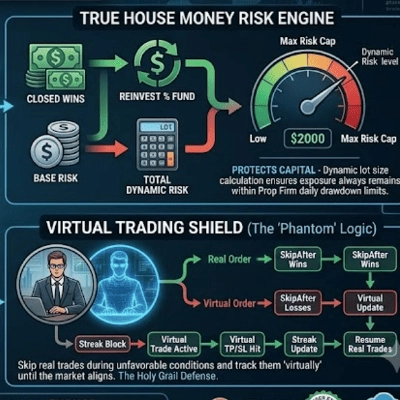
⚡ ตัวกรองสเปรด + CoolDown + ขีดจำกัด SL สูงสุด — การป้องกันการเข้าเทรดสามอย่าง: บล็อกการเทรดเมื่อสเปรดเกินเกณฑ์, บังคับจำนวนแท่งขั้นต่ำระหว่างการเข้าเทรด, และจำกัด SL ของการเทรดแต่ละครั้งเป็นเบรกเกอร์วงจรต่อการเทรด
📋 รายงานผลการดำเนินงานเซสชันสุดท้าย — เมื่อบอทหยุดทำงาน จะแสดงสรุปครบถ้วน: จำนวนการเทรดทั้งหมด, อัตราชนะ, ปัจจัยกำไร, พิปเฉลี่ยต่อการเทรด และการขาดทุนสูงสุดที่บันทึกในเซสชัน
🔧 การตรวจสอบพารามิเตอร์เริ่มต้น — ก่อนเริ่มเทรด บอทจะตรวจสอบการตั้งค่าที่อันตรายหรือขัดแย้งและแสดงคำเตือนในบันทึก — ช่วยจับข้อผิดพลาดก่อนที่จะทำให้คุณเสียเงิน
⚠️ คำแนะนำสำคัญสำหรับเทรดเดอร์บริษัทโปรป
บอทนี้มาพร้อมกับระบบปกป้องส่วนของทุนระดับมืออาชีพที่จำเป็นสำหรับความท้าทายของบริษัทโปรป เราขอแนะนำอย่างยิ่งไม่ให้ตั้งค่าขีดจำกัดการขาดทุนรายวันสูงสุด (%) ของบอทให้เท่ากับขีดจำกัดของบริษัทโปรปของคุณ (เช่น 4% หรือ 5%)
💡 กลยุทธ์ที่ชนะ: ตั้งขีดจำกัดที่เข้มงวดและระมัดระวังมากขึ้น ใช้พารามิเตอร์การขาดทุนของบอทเป็นจุดหยุดขาดทุนรายวันส่วนตัวของคุณ ให้อยู่ภายในขีดจำกัดที่แน่นอนของบริษัทโปรป
🎯 ตัวอย่างที่ใช้งานได้จริง: → ขีดจำกัดการขาดทุนรายวันของบริษัทโปรป: 4% → ❌ ผิด: ตั้งขีดจำกัดบอทที่ 4% — อันตราย → ✅ ถูกต้อง: ตั้งขีดจำกัดบอทที่ 1% – 1.5%
ถ้าคุณเจอวันที่แย่ บอทจะทำงาน Hard Stop หลังจากขาดทุนเล็กน้อยและควบคุมได้ — ห่างไกลจากการละเมิดกฎของบริษัทโปรป เป้าหมายไม่ใช่ใช้บัฟเฟอร์รายวันทั้งหมดในเซสชันเดียว แต่เพื่ออยู่รอดนานพอที่จะชนะ 🧠
⚙️ บทนำ
Dynamic Trendline Deluxe Pro Bot เป็น cBot ที่หลากหลายสำหรับแพลตฟอร์ม cTrader โดยกลยุทธ์ของมันอิงจากการระบุปฏิสัมพันธ์ราคากับเส้นแนวโน้มแนวรับและแนวต้านที่คำนวณแบบไดนามิก ปรัชญาหลักของมันคือ "อยู่รอดก่อน กำไรทีหลัง" — สร้างขึ้นตั้งแต่ต้นเพื่อผ่านการประเมินที่เข้มงวดของบริษัทเทรดดิ้งแบบเจ้าของ
📌 หมายเหตุ: การปรับแต่งทำบน IC Markets ผลลัพธ์อาจแตกต่างกับโบรกเกอร์อื่น
📐 กลยุทธ์หลัก: เส้นแนวโน้มไดนามิกและสัญญาณ
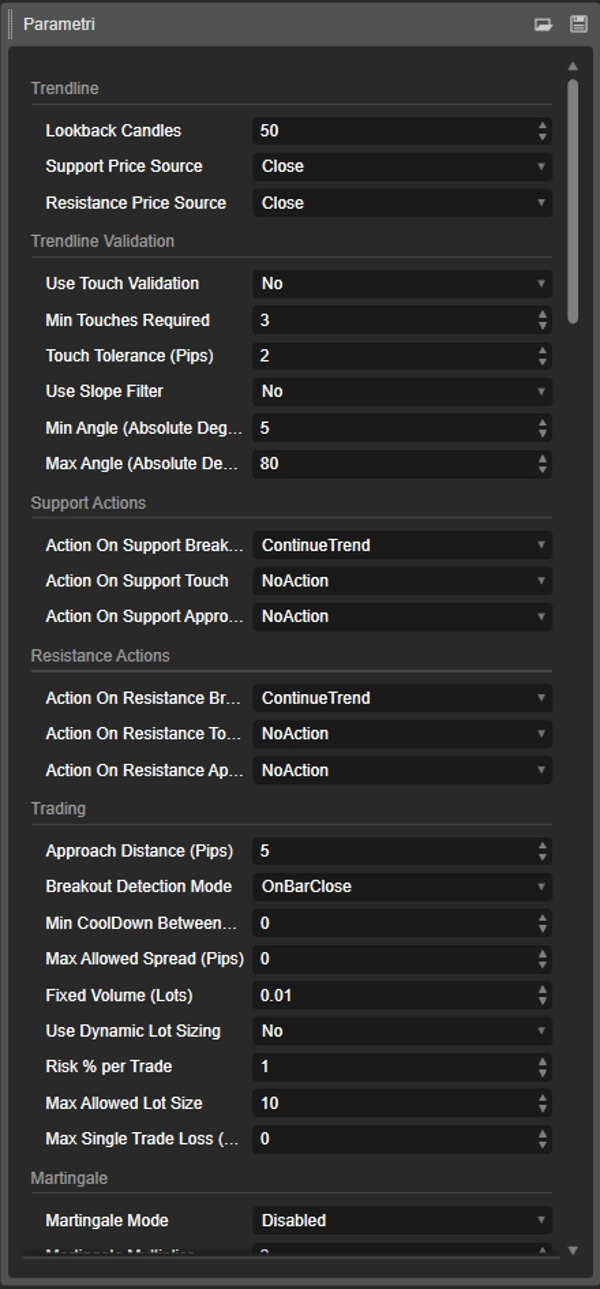
ในแต่ละแท่งเทียนใหม่ บอทจะวิเคราะห์แท่งเทียนย้อนหลังเพื่อระบุจุดต่ำสุดและสูงสุดสำคัญ เชื่อมต่อสองจุดสุดขั้วเพื่อสร้างเส้นแนวโน้มไดนามิก เส้นนี้จะถูกคำนวณใหม่ในทุกแท่งเทียน ปรับตัวอย่างต่อเนื่องตามการเปลี่ยนแปลงของตลาด
การตรวจสอบอย่างชาญฉลาด:
- การตรวจสอบการสัมผัส — ยืนยันความเกี่ยวข้องของเส้นโดยต้องมีจำนวนการสัมผัสแท่งเทียนขั้นต่ำภายในความคลาดเคลื่อนพิป
- ตัวกรองความชัน — ลบเส้นที่แบนเกินไปหรือชันเกินไปตามเกณฑ์มุมที่ตั้งค่าได้
มีการตรวจสอบสัญญาณสามประเภท:
- 📍 Breakout — การเบรกเส้นอย่างชัดเจน ตรวจจับได้เมื่อปิดแท่งเทียนหรือทุกครั้งที่มีการเคลื่อนไหวของราคา
- 📍 Touch — ราคาสัมผัสเส้นโดยไม่มีการเบรกที่สำคัญ
- 📍 Approach — ราคาเข้ามาใกล้ภายในระยะพิปที่ตั้งค่าได้โดยไม่สัมผัสเส้น
สำหรับแต่ละสัญญาณและประเภทเส้น ผู้ใช้ตั้งการกระทำแยกต่างหาก: ContinueTrend, Invert, หรือ NoAction มีสองกลไกบังคับที่สามารถข้ามการตั้งค่าการกระทำและตัวกรองทั้งหมด: การบังคับด้วยมือและการบังคับอัตโนมัติที่อิงความผันผวน ATR
🔧 คุณสมบัติหลัก
การจัดการปริมาณและความเสี่ยง 📊
- การตั้งขนาดล็อตแบบคงที่หรือไดนามิกตาม % ความเสี่ยงต่อการเทรด
- ขีดจำกัดขนาดล็อตสูงสุดที่อนุญาต
- 🆕 การขาดทุนสูงสุดต่อการเทรด (พิป) — เบรกเกอร์วงจรต่อการเทรด
- 🆕 Martingale / Anti-Martingale พร้อมตัวคูณและขีดจำกัดขั้นตอนที่ตั้งค่าได้
- 🆕 การปรับขนาดตำแหน่ง: Pyramid In หรือ Scale Out
ชุดจัดการการเทรด 📈
- การตั้งค่า Stop Loss / Take Profit เริ่มต้นแบบคงที่หรืออิง ATR
- การทำกำไรบางส่วน — ปิดบางส่วนที่เป้าหมายแรก
- Break-Even — เลื่อน SL ไปที่จุดเข้าเมื่อถึงเกณฑ์กำไร
- Trailing Stop — แบบพิปคงที่หรืออิง ATR พร้อม 🆕 ขั้นตอนขั้นต่ำเพื่อหลีกเลี่ยงการปรับเปลี่ยนมากเกินไป
การควบคุมการเข้าเทรด ⚡
- 🆕 ระยะเวลาพักขั้นต่ำระหว่างการเทรด (แท่งเทียน)
- 🆕 สเปรดสูงสุดที่อนุญาต (พิป)
- การตรวจจับ Breakout: ปิดแท่งเทียนหรือข้ามทุกครั้งที่มีการเคลื่อนไหว
การจัดการความเสี่ยง 🛡️
- ขีดจำกัดการขาดทุนรายวันและรายสัปดาห์พร้อมเวลาตั้งค่าการรีเซ็ต
- 🆕 ขีดจำกัดการขาดทุนสูงสุด (พื้นฐานส่วนของทุน)
- 🆕 เป้าหมายกำไรรายวันและรายสัปดาห์
- 🆕 Hard Stop (ปิดตำแหน่งทั้งหมดเมื่อเกินขีดจำกัด)
ตัวกรองการทำงาน ⏱️
- ตัวกรองเวลา — วันเฉพาะและเซสชันการเทรด UTC สูงสุดสองช่วง
- 🆕 ตัวกรองข่าว — บล็อกการเทรดในช่วงเวลาที่ตั้งค่าได้ตามเวลา UTC
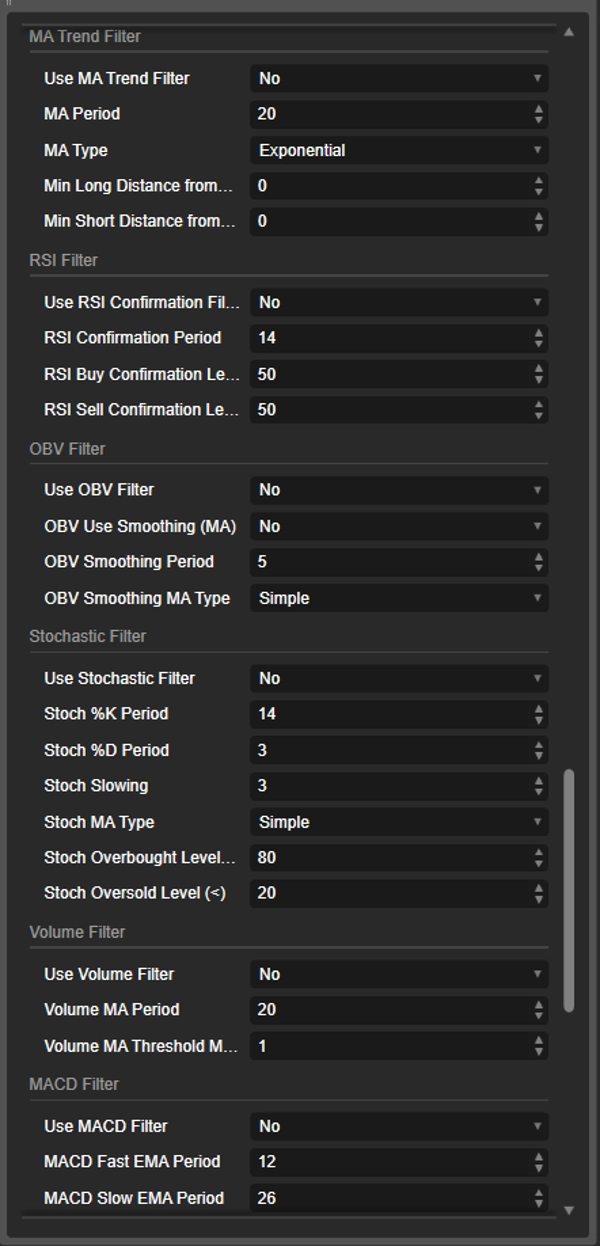
ตัวกรองตัวชี้วัด 🔍 (ข้ามทั้งหมดเมื่อมีการบังคับใช้)
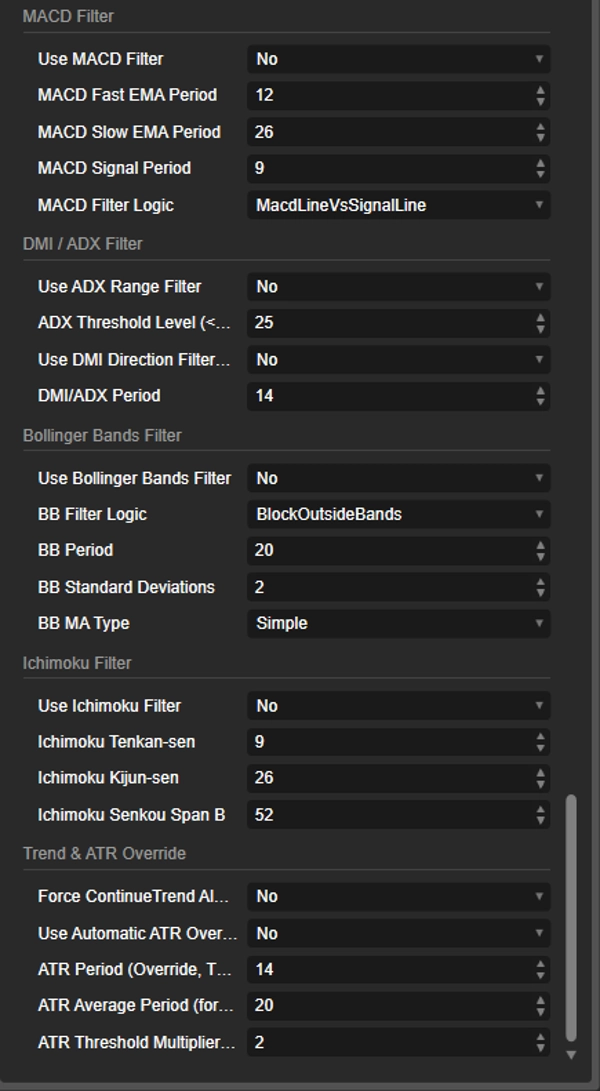
- ตัวกรองแนวโน้มค่าเฉลี่ยเคลื่อนที่
- การยืนยัน RSI
- OBV (พร้อมการปรับเรียบแบบเลือกได้)
- Stochastic Oscillator
- ปริมาณเทียบกับ MA
- MACD (เส้นเทียบกับสัญญาณหรือเส้นเทียบกับศูนย์)
- ตัวกรองช่วง ADX
- ตัวกรองทิศทาง DMI (DI+/DI-)
- Bollinger Bands (3 โหมดตรรกะ)
- Ichimoku Kinko Hyo (เมฆ Kumo)
รายงาน 📋
🆕 รายงานสถานะความเสี่ยงรายชั่วโมง (ส่วนของทุน, DD%, อัตราชนะ, ปัจจัยกำไร)
🆕 รายงานผลการดำเนินงานเซสชันสุดท้าย (อัตราชนะ, ปัจจัยกำไร, พิปเฉลี่ย, DD สูงสุด)
🆕 การตรวจสอบพารามิเตอร์เริ่มต้นพร้อมคำเตือนในบันทึก
📊 มีอะไรใหม่เมื่อเทียบกับเวอร์ชันก่อนหน้า
✅ มีในทั้งสองเวอร์ชัน: กลยุทธ์เส้นแนวโน้มไดนามิก · ตัวกรองตัวชี้วัด 9 ตัว · SL/TP อิง ATR · การทำกำไรบางส่วน / Break-Even / Trailing Stop · การตั้งขนาดล็อตไดนามิก · ตัวกรองเวลา · ขีดจำกัดการขาดทุนรายวันและรายสัปดาห์
🆕 ใหม่เฉพาะใน V4.0:
- ขีดจำกัดการขาดทุนสูงสุด (อิงส่วนของทุน)
- เป้าหมายกำไรรายวันและรายสัปดาห์
- Hard Stop (ปิดการซื้อขายบังคับ)
- Martingale / Anti-Martingale
- การปรับขนาดตำแหน่ง (Pyramid In / Scale Out)
- ตัวกรองข่าว (บล็อกช่วงเวลา)
- ตัวกรองสเปรด / CoolDown / ขีดจำกัด SL สูงสุด
- ขั้นตอนขั้นต่ำของ Trailing Stop
- รายงานความเสี่ยงรายชั่วโมง + รายงานเซสชันสุดท้าย
- การตรวจสอบพารามิเตอร์เริ่มต้น
⚠️ คำเตือนความเสี่ยง
การเทรดเครื่องมือทางการเงิน รวมถึง Forex และ CFDs มีความเสี่ยงสูงและอาจไม่เหมาะกับนักลงทุนทุกคน มีความเป็นไปได้จริงที่คุณอาจสูญเสียเงินลงทุนทั้งหมดหรือมากกว่านั้น อย่าลงทุนเงินที่คุณไม่สามารถเสียได้ ผลการดำเนินงานในอดีต รวมถึงผลการทดสอบย้อนหลัง ไม่ได้บ่งชี้หรือรับประกันผลลัพธ์ในอนาคต
Dynamic Trendline Deluxe Pro Bot เป็นเครื่องมือซอฟต์แวร์และไม่รับประกันผลกำไร คำอธิบายนี้ไม่ได้เป็นคำแนะนำทางการเงินหรือการลงทุน ผู้ใช้ต้องรับผิดชอบต่อการตัดสินใจเทรดของตนเองอย่างเต็มที่ ขอแนะนำอย่างยิ่งให้ทดสอบกลยุทธ์ใดๆ บนบัญชีทดลองเป็นระยะเวลาที่เหมาะสมก่อนใช้เงินจริง
สรุป
Key features include comprehensive risk and trade management tools: fixed or dynamic lot sizing based on risk percentage, maximum lot size caps, and per-trade loss limits. It supports Martingale and Anti-Martingale volume progression, position scaling through pyramiding or scaling out, and flexible stop loss/take profit settings with partial profit-taking, break-even adjustments, and trailing stops.
Risk controls are robust, featuring daily and weekly loss limits, equity-based maximum drawdown floors, hard stop forced closures on limit breaches, and profit targets that can pause new trades. Operational filters include time-based trading sessions and news event blocks to avoid high-impact periods. Multiple technical indicator filters (e.g., Moving Average, RSI, MACD, Bollinger Bands, Ichimoku) provide additional trade validation.
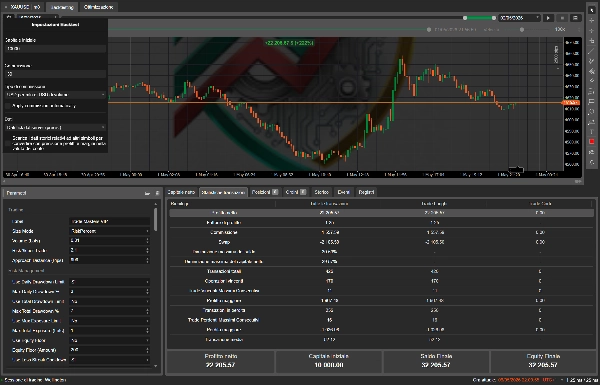
The bot generates hourly risk status reports and final session summaries, and validates startup parameters to prevent misconfiguration. It is optimized for prop firm trading challenges, emphasizing capital preservation with configurable conservative drawdown limits. Backtesting was conducted on IC Markets with 500:1 leverage, supporting symbols including BTCUSD, XAUUSD, NAS100, and Forex pairs. Recommended minimum balance is $1,000.
รีวิวจากลูกค้า
5 | 50 % | |
4 | 50 % | |
3 | 0 % | |
2 | 0 % | |
1 | 0 % |