Deskripsi
Hotkey Trader + Auto TP/SL
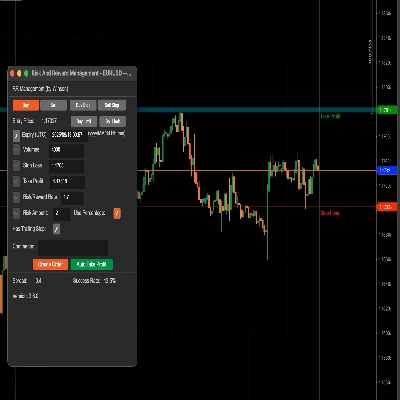
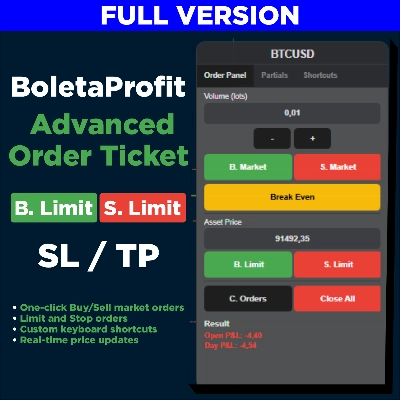
Hotkey Trader + Auto TP/SL adalah cBot perdagangan manual cepat yang dirancang untuk trader yang menginginkan tindakan Long, Short, Flat, Bebas Risiko dan Hedge secara langsung dari grafik.
Ini juga mencakup manajer TP/SL otomatis dengan ukuran fleksibel berdasarkan Pips, Uang, atau % dari saldo akun, plus fitur opsional SL Cover untuk melindungi keuntungan saat perdagangan bergerak sesuai keinginan Anda.
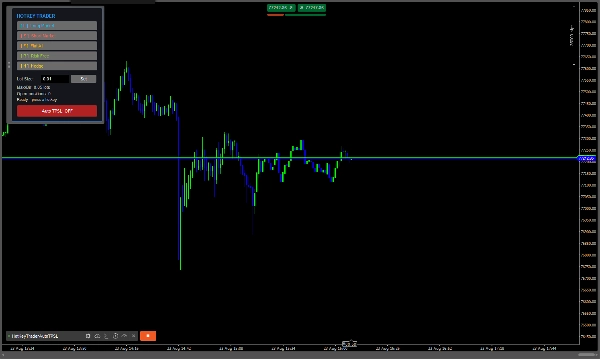
Panel perdagangan sepenuhnya dapat dipindahkan, dan semua tindakan perdagangan utama dapat dilakukan menggunakan hotkey keyboard yang dapat disesuaikan.
Fitur Utama
- ⚡ Long / Short — Membuka perdagangan pasar secara instan.
- 🛑 Flat All — Menutup semua posisi terbuka pada simbol saat ini.
- 🔒 Bebas Risiko — Memindahkan Stop Loss ke harga masuk untuk posisi yang menguntungkan.
- 🔄 Hedge — Secara otomatis membuka posisi berlawanan untuk menetralkan eksposur bersih saat ini.
- 🎯 TP/SL Otomatis — Secara otomatis menerapkan TP dan SL ke posisi.
- 🛡️ SL Cover — Secara otomatis memindahkan SL ke dalam keuntungan setelah pergerakan harga tertentu.
- 📊 Mode Posisi atau Transaksi — Menggunakan TP/SL bersama berdasarkan harga masuk rata-rata grup atau TP/SL individual untuk setiap posisi.
- 🎹 Hotkey Kustom — Pilih tombol Anda sendiri untuk semua tindakan perdagangan.
- 🖱️ Panel Perdagangan yang Dapat Dipindahkan — Seret panel ke mana saja di grafik.
Pengaturan Input
Pengaturan Perdagangan
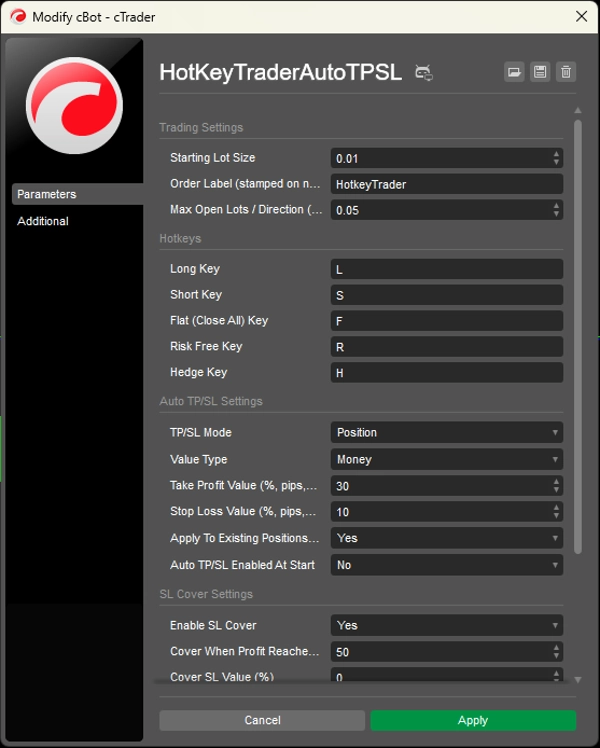
Ukuran Lot Awal
Ukuran lot default yang digunakan saat menekan Long atau Short.
Label Order
Label yang diberikan pada posisi yang dibuka melalui panel hotkey. Ini juga berguna untuk mengidentifikasi posisi mana yang harus dikelola oleh sistem Auto TP/SL.
Maksimum Lot Terbuka / Arah
Eksposur bersih maksimum yang diizinkan dalam satu arah.
Hotkey
Tombol Long
Tombol keyboard yang digunakan untuk membuka posisi Beli.
Default: L
Tombol Short
Tombol keyboard yang digunakan untuk membuka posisi Jual.
Default: S
Tombol Flat (Tutup Semua)
Menutup semua posisi terbuka untuk simbol saat ini.
Default: F
Tombol Bebas Risiko
Memindahkan Stop Loss dari posisi yang menguntungkan ke harga masuk.
Default: R
Tombol Hedge
Membuka perdagangan berlawanan yang sama dengan eksposur bersih saat ini untuk menetralkan posisi.
Default: H
Pengaturan Auto TP/SL
Mode TP/SL
- Posisi — Mengelompokkan posisi berdasarkan simbol dan arah serta menggunakan harga masuk rata-rata tertimbang mereka untuk menghitung TP/SL bersama.
- Transaksi — Menghitung TP/SL secara terpisah untuk setiap posisi individual.
Jenis Nilai
Pilih bagaimana jarak TP dan SL dihitung:
- Persen — Berdasarkan persentase saldo akun.
- Pips — Jarak pip tetap.
- Uang — Jumlah uang tetap dalam mata uang akun.
Nilai Take Profit
Mengatur target TP sesuai dengan Jenis Nilai yang dipilih.
Contoh:
30dengan Pips = 30 pips30dengan Uang = 30 unit mata uang akun30dengan Persen = 30% dari saldo akun
Nilai Stop Loss
Mengatur jarak SL sesuai dengan Jenis Nilai yang dipilih.
Terapkan ke Posisi yang Ada Saat Mulai
Jika diaktifkan, bot akan menerapkan pengaturan Auto TP/SL-nya ke posisi yang ada saat cBot mulai berjalan.
Auto TP/SL Diaktifkan Saat Mulai
Menentukan apakah mesin Auto TP/SL mulai MENYALA atau MATI saat cBot diluncurkan.
Pengaturan SL Cover
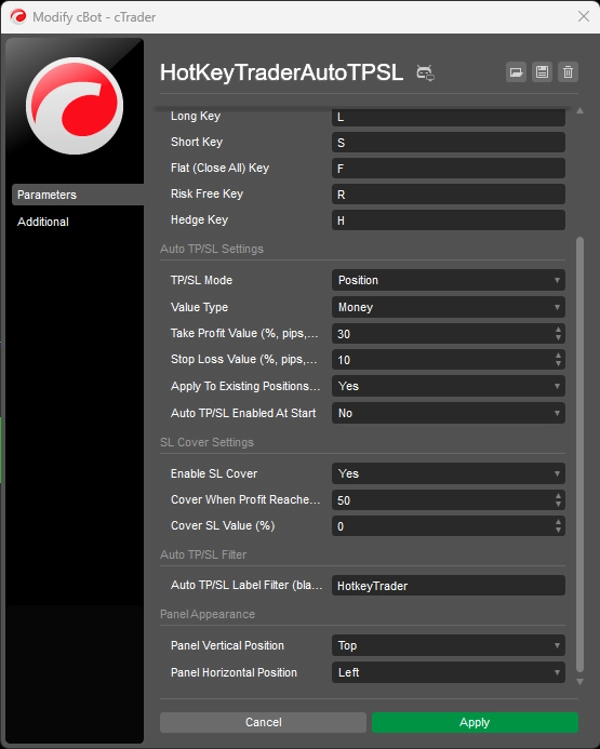
Aktifkan SL Cover
Mengaktifkan pergerakan otomatis Stop Loss saat perdagangan mencapai tingkat keuntungan yang diperlukan.
Cover Saat Keuntungan Mencapai (%)
Persentase pergerakan harga dari harga masuk yang diperlukan sebelum SL Cover aktif.
Nilai Cover SL (%)
Menentukan di mana Stop Loss baru ditempatkan relatif terhadap harga masuk.
0= SL pindah ke harga masuk (break-even)- Nilai positif = SL pindah ke dalam keuntungan
Filter Auto TP/SL
Filter Label Auto TP/SL
Mengontrol posisi mana yang dikelola oleh mesin Auto TP/SL.
- Masukkan label seperti
HotkeyTrader→ hanya posisi dengan label tersebut yang dikelola. - Biarkan kosong → semua posisi terbuka, pada simbol apa pun, dapat dikelola.
Penampilan Panel
Posisi Vertikal Panel
Mengatur posisi vertikal awal panel perdagangan.
Posisi Horizontal Panel
Mengatur posisi horizontal awal panel perdagangan.
Panel kemudian dapat diseret ke mana saja di grafik.
Catatan Penting
Untuk Uang dan Persen dalam perhitungan TP/SL, bot mengonversi target moneter menjadi jarak harga menggunakan nilai tick dan ukuran tick simbol. Kode itu sendiri merekomendasikan untuk menguji perhitungan ini pada akun demo terlebih dahulu, karena normalisasi nilai tick dapat berbeda antara broker. TP/SL berbasis Pip tidak memiliki ketergantungan ini
Ringkasan
Key features include an automatic TP/SL manager with flexible sizing options based on pips, monetary value, or percentage of account balance. The bot offers two TP/SL modes: Position mode, which groups positions by symbol and direction for shared TP/SL based on weighted-average entry price, and Transaction mode, which applies TP/SL individually per position. An optional SL Cover feature automatically moves the stop loss into profit after a specified price movement.
Input settings allow configuration of starting lot size, order labels for position management, maximum net exposure per direction, and hotkey assignments. The panel’s initial position on the chart can be set and then adjusted by dragging. For monetary and percentage TP/SL calculations, the bot converts targets into price distances using symbol tick values, with pip-based calculations independent of broker variations.
Diskusi
Ulasan pelanggan
5 | 50 % | |
4 | 50 % | |
3 | 0 % | |
2 | 0 % | |
1 | 0 % |