Broker'lar ve Prop'lar
İşletmeler için
00
Days
:
00
Hours
:
00
Minutes
:
00
Seconds
Masaüstü eklentisi
NAS100
NZDUSD
Martingale
Forex
Fibonacci
EURUSD
MACD
BTCUSD
Indices
ATR
Stocks
Grid
RSI
Breakout
XAUUSD
FVG
Commodities
Signal
Bollinger
GBPUSD
VWAP
ZigZag
Supertrend
Crypto
USDJPY
Scalping
LookPosOrder
5.0
01/10/2025
1
Desktop
Başlangıç 12/01/2025
Satışlar
1
"LookPosOrder" yüklenen resmi"LookPosOrder" yüklenen resmi"LookPosOrder" yüklenen resmi


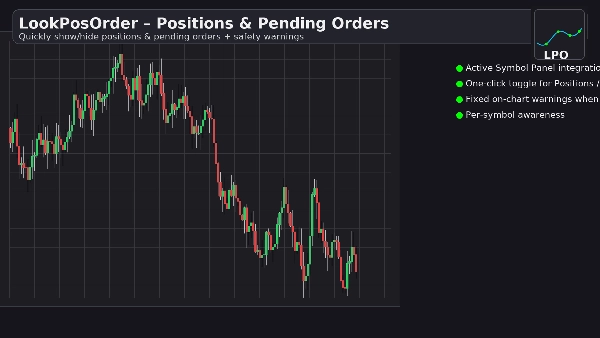
LookPosOrder helps you avoid costly surprises by making it effortless to show or hide Positions and Pending Orders—and by warning you clearly when anything is hidden for the current symbol.

What it does

  • Adds a clean control block in the Active Symbol Panel (ASP) with two checkboxes:
    • Positions: are visible / are hidden
    • Pendings: are visible / are hidden
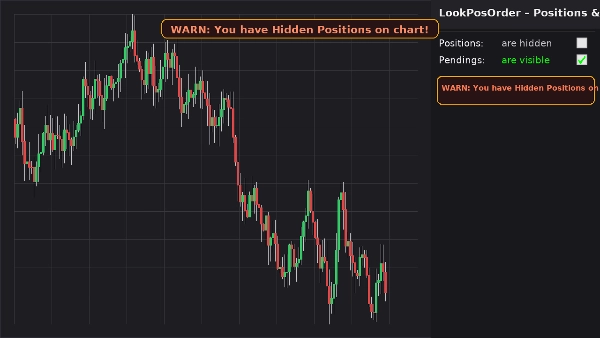
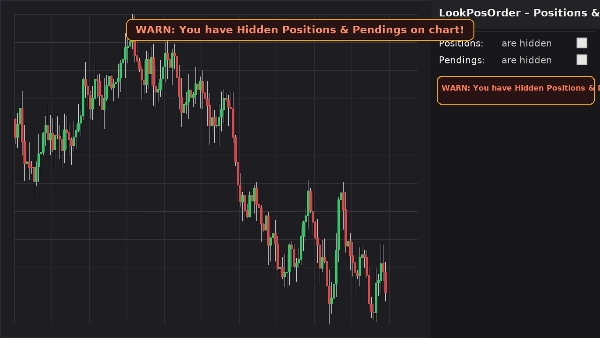
  • Shows a fixed on-chart warning banner (doesn’t move when you pan/zoom) if hidden items exist for the current symbol.
  • Mirrors the same warning inline in the ASP block.
  • Remembers your preferences per symbol.

Why traders love it

  • Prevent mistakes: never forget that something’s hidden on your chart.
  • Fast toggling: zero hunting through chart menus.
  • Per-symbol awareness: only warns when the current symbol actually has hidden items.
  • Lightweight & clean: minimal UI, instantly responsive.

Key Features

  • Active Symbol Panel integration
  • One-click toggles for Positions and Pending Orders
  • Fixed on-chart warning banner when hidden items exist
  • Inline warning inside the ASP block
  • Per-symbol awareness (filters positions/orders to the current symbol)
  • Settings persistence (per symbol)
  • Works alongside native Display Settings (auto-syncs if changed from the chart menu)

Requirements

  • cTrader 5.4.9 or later recommended
  • Desktop platform

Installation

  1. Download the plugin file.
  2. Open cTrader → AutomatePluginsImport.
  3. Enable LookPosOrder Plugin.
  4. Open a chart, select the symbol, and use the LookPosOrder block in the right-hand ASP.

How to Use

  • Toggle Positions and Pendings via checkboxes.
  • If something is hidden and exists for the current symbol, you’ll see a warning:
    • “WARN: You have Hidden Positions on chart!”
    • “WARN: You have Hidden Pendings on chart!”
    • “WARN: You have Hidden Positions & Pendings on chart!”

FAQ

Q: Does the plugin change my orders or positions?
A: No. It only toggles chart visibility using native Display Settings.

Q: Will it warn me for other symbols?
A: No. Warnings are raised only when the current symbol has hidden items.

Q: What if I change visibility from the chart’s own menu?
A: The plugin auto-syncs the checkboxes and warnings.

Q: Performance impact?
A: Negligible. It’s a lightweight UI overlay and ASP block.


Refund

  • Refunds: 14-day money-back guarantee if the plugin doesn’t work as described on your setup.

Privacy

The plugin does not collect or transmit personal data. It only interacts with cTrader’s local chart and UI.

5.0
Değerlendirmeler: 1
5
100 %
4
0 %
3
0 %
2
0 %
1
0 %
Müşteri değerlendirmeleri
November 4, 2025
Never miss a hidden trade again 🕵️‍♂️ - LookPosOrder gives you two quick toggles: show/hide Positions & Pendings, plus a bold on-chart alert when something’s hidden. Fast, clean, symbol-aware and super handy for serious traders who hate surprises. A tiny UI add-on that keeps your vision sharp and your risk under control.
Bu oluşturanın diğer ürünleri
Gösterge
NAS100
NZDUSD
Martingale
+24
LookPosOrderIndicator
On-chart draggable panel to show/hide Positions & Pending Orders with fixed warning banner and inline alerts per symbol.
Şunları da beğenebilirsiniz
ColorfulTickVolumeV2
Changes the Tick Volume color based on price movement, synchronized with BullFillColor and BearFillColor in ColourOption
cTrader Web
This is a sample plugin that allows directly accessing cTrader web inside cTrader desktop.
Masaüstü eklentisi
NAS100
NZDUSD
XAUUSD
+10
PnL Calendar
Visual calendar with daily PnL, trades, win rate, profit factor, and performance insights.
Masaüstü eklentisi
Commodities
Forex
Close open trades before friday close
Close all non crypto trades at 19:55 utc Friday
ChatGPT Plugin v1.0
ChatGPT Plugin for cTrader
Twitter.algo
cTrader Twitter Plugin integrates real-time Twitter updates into your trading platform, allowing you to track market tre
AlgoBuilderX Plugin
AlgoBuilderX makes cBot creation easy – build and automate your trading strategies on cTrader with zero programming.
DeepSeek Plugin v1.0
DeepSeek Plugin for cTrader
Masaüstü eklentisi
Indices
RSI
Prop
+4
RSI Scanner
RSI Scanner - Fully Adjustable
Masaüstü eklentisi
Indices
Prop
Commodities
+3
RiskManagement - Full
Professional risk management plugin with automatic lot calculation, chart panels, and R:R automation. Version 1.4.2.
Masaüstü eklentisi
Indices
Prop
Forex
OmniSim Demo v2
Multiple timeframes, multiple instruments, one cBot, one go! OmniSimulation
Masaüstü eklentisi
Breakout
Signal
RiskRewardCalculator
The Risk-Reward plugin is a tool to visualize a trading idea based on other analysis tools,
Masaüstü eklentisi
RSI
XAUUSD
Breakout
+13
AI Trading Agent
ChatGPT AI Trading Agent, predict market moves, detect trends, and execute profitable trades. free trial is available.
Masaüstü eklentisi
NAS100
NZDUSD
Martingale
+26
Trade Analytics
Trade Analytics delivers advanced trading insights and heatmaps directly inside TradeWatch.
Masaüstü eklentisi
Indices
Commodities
Forex
+1
Go To Date 1.0
This plugin allows you to jump to a specific data on a chart.
Masaüstü eklentisi
Indices
Commodities
Forex
Deriv Charts
Deriv Charts Plugin for cTrader
Masaüstü eklentisi
NAS100
NZDUSD
Martingale
+26
PnL Studio
Turn your trading history into a crystal clear performance dashboard - right inside cTrader.
Masaüstü eklentisi
Indices
Stocks
Forex
+1
MarketInsights
Get TradingView charts & heatmaps directly in cTrader!