
Açıklama
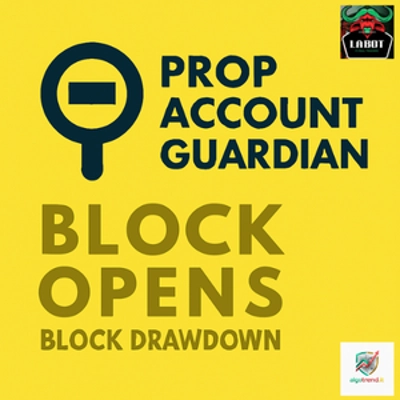
🛡️ Account Guardian PRO — Sürüm 2.0 Tanıtımı
Account Guardian PRO'nun güncellenmiş sürümünün yayınlandığını duyurmaktan memnuniyet duyuyoruz. Kullanıcı geri bildirimleri ve kod tabanının derinlemesine incelenmesi sonucunda, bu güncelleme çekilme koruma mantığındaki kritik hataları gidererek, işlem hesabınız için daha güvenilir ve sağlam bir risk yönetim aracı sunmaktadır.
Daha önce bir sürüm satın aldıysanız, bu güncellemeyi tamamen ücretsiz olarak alma hakkınız vardır. Sadece Discord üzerinden bize ulaşın, ekibimiz size en son sürümü hızlıca sağlayacaktır.
İşte orijinal sürüme kıyasla cBot'ta yapılan tüm değişikliklerin kısa bir özeti:
1. Durum yönetimi enum ile değiştirildi (BotState) Orijinal sürümde çakışabilecek iki boolean bayrak (_isClosing ve _stopForPeriod) kullanılıyordu. Bunların yerine üç net durumu olan tek bir BotState enum'u getirildi: Running, StoppedForPeriod ve HaltedForLoss. Bu, DD bloğunun çalışmamasının temel sebebiydi — _isClosing aynı tick içinde önce true olarak ayarlanıp hemen sonra false olarak sıfırlanıyordu, böylece işlem tetikleniyor ama durum hemen temizleniyordu.
2. Periyot sıfırlaması artık her zaman çalıştırılıyor Orijinal OnTick() açık pozisyon yoksa (Positions.Count == 0) erken dönüyordu, bu da günlük ve haftalık bakiye temel değerlerinin güncellenmesini engelliyordu. Sıfırlama mantığı artık her tick'te çalışan özel bir CheckPeriodReset() metoduna çıkarıldı.
3. Başlangıç temel değeri olarak Equity kullanılıyor, Balance yerine _initialAccountBalance başlangıçta Account.Balance ile ayarlanıyordu. Eğer zaten açık pozisyonlar ve yüzen kar/zarar varsa, toplam çekilme hesaplaması baştan hatalı oluyordu. Artık doğru temel için Account Equity kullanılıyor.
4. ClosePosition() artık sonucu kontrol ediyor Orijinal sürümde ClosePosition() sessizce çağrılıyor ve hata kontrolü yapılmıyordu. Düzeltme sürümü result.IsSuccessful kontrol ediyor ve pozisyon kapanmazsa (örneğin piyasa kapalı, broker hatası) uyarı kaydediyor.
5. Periyot duraklatma yeni gün/haftada doğru sıfırlanıyor Orijinal sürümde _stopForPeriod tarih kontrol bloğunda sadece OnTick() o noktaya ulaşırsa sıfırlanıyordu — açık pozisyon yoksa ulaşmıyordu. Sıfırlama artık güvenilir şekilde CheckPeriodReset() içinde gerçekleşiyor.
6. Parametreler açık Enable etiketleri kullanıyor Boolean parametre etiketleri dekoratif ifadelerden (örneğin "--- DAILY DRAWDOWN ---") fonksiyonel isimlere (örneğin "Enable Daily Drawdown Limit") değiştirildi, böylece cTrader arayüzünde doğru görüntüleniyorlar.
7. Yardımcı metod GetWeek() çıkarıldı Orijinal sürümde yılın haftası hesaplaması çoğaltılmıştı. Artık ihtiyaç duyulan her yerde çağrılan tek bir özel metod olarak var.
Account Guardian Pro, işlem hesabınız için güçlü ve esnek bir yönetim aracıdır. Kendi başına işlem açan bir bot değil, manuel işlemleriniz için otomatik bir yardımcı pilot 🧑✈️ olarak çalışır. Tek amacı, belirli eşikler karşılandığında tüm açık pozisyonları kapatarak risk ve kar kurallarınızı sıkı şekilde uygulamaktır.
Bu botu, 7/24 çalışan kişisel risk yöneticiniz olarak düşünün; böylece işlem stratejinize odaklanabilir ve her zaman aktif olan bir güvenlik ağı 🥅 ile içiniz rahat olur.
PROP Account Guardian nedir?
Botu Aktifleştirme ve Kullanma (Hızlı Rehber) 🚀
Koruyucuyu çalıştırmak için bu basit adımları izleyin:
- Aktivasyon (En Önemli Adım) ✅
-
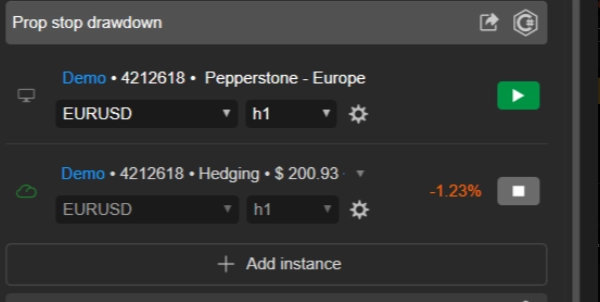
- Tüm hesabınızı korumak için sadece tek bir örnek botu çalıştırmanız yeterlidir.
- İstediğiniz herhangi bir grafik seçin 📉 (birçok trader, botu "barındırmak" için aktif işlem yapmadıkları AUD/CAD M1 gibi bir grafik kullanır).
- O tek grafiğe
Account Guardian ProcBot örneğini ekleyin. - İşlem yaptığınız her varlık için ayrı bir örnek açmanıza gerek yoktur! ❌
- Konfigürasyon ⚙️
-
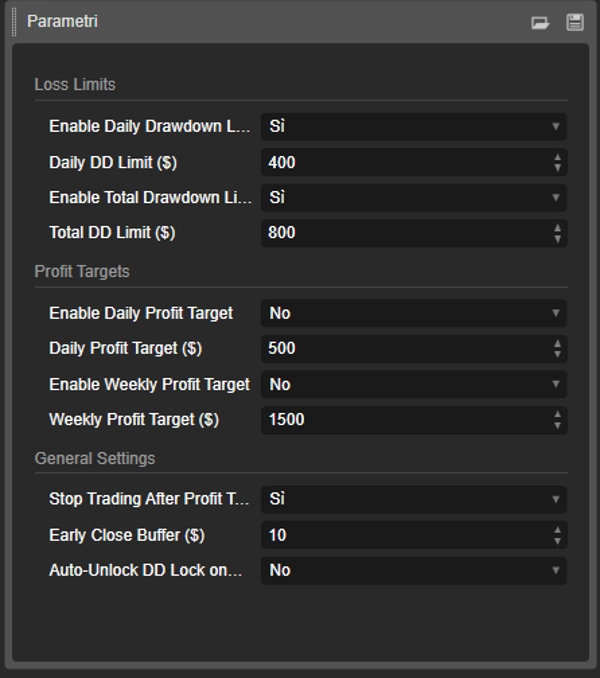
- "Oynat" düğmesine basmadan önce, botun parametrelerini işlem planınıza göre ayarlayın. Hangi zarar limitlerini ve kar hedeflerini etkinleştirmek istediğinize ve hangi değerlerle karar verin.
- Başlat & İzle ▶️
-
- Parametreler ayarlandıktan sonra, cBot örneğinde "Oynat" düğmesine basın.
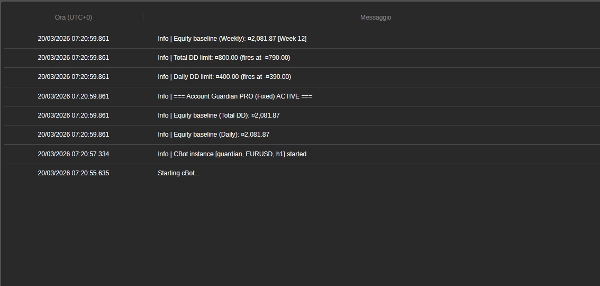
- Botun "Log" sekmesinde 📜 mesajlar görünecek, botun aktif olduğunu ve ayarladığınız limitleri gösterecek.
- Hepsi bu kadar! Artık manuel işlemlerinize odaklanabilirsiniz. Bot arka planda sessizce çalışacak ve sadece kurallarınızdan biri karşılandığında harekete geçecektir.
🚨 PROP FİRMA TİCARETİ YAPANLAR İÇİN ÖNEMLİ UYARI 🚨
Bu bot, prop firma zorluklarını geçmek için gerekli profesyonel düzeyde bir sermaye koruma sistemi ile donatılmıştır. Başarı şansınızı maksimize etmek için, botun Max Daily Drawdown (%) parametresini prop firmanızın limitiyle (örneğin %4 veya %5) aynı değere ayarlamamanızı şiddetle tavsiye ediyoruz.
💡 Kazanan Strateji: Daha Sıkı Bir Limit Belirleyin
Anahtar, botun çekilme parametresini kişisel, daha muhafazakar günlük stop-loss olarak kullanmak ve prop firmanın mutlak limitinin çok altında kalmaktır.
🎯 Pratik Örnek:
- Eğer prop firmanız günlük %4 çekilme izni veriyorsa...
- botun
Max Daily Drawdown (%)parametresini %1 veya %1.5 olarak ayarlayın.
✅ Bunun Neden İşe Yaradığı: Kaybeden bir gün yaşarsanız, bot küçük ve kontrollü bir zarardan (örneğin %1) sonra Hard Stop tetikleyecektir. Bu sermayenizi korur, prop firmanın kurallarını ihlal etmekten uzak tutar ve ertesi gün tekrar işlem yapmanıza olanak sağlar. Bu strateji, kayıp serilerini atlatmanıza ve uzun vadede başarı olasılığınızı dramatik şekilde artırmanıza yardımcı olmak için tasarlanmıştır.
🧠 Unutmayın: Bir zorluğun amacı, tüm günlük tamponunuzu tek bir günde riske atmak değil, uzun vadede hayatta kalmaktır. Botun risk parametrelerini kullanarak işlem disiplininizi demir gibi sağlam tutun.
Parametre Detayları Açıklaması 📋
İşte bot arayüzünde bulacağınız her parametrenin açıklaması.
Grup: Zarar Limitleri 🛑
- EnableDailyDrawdownLimit (
Evet/Hayır) -
- Açıklama: Günlük maksimum çekilme kontrolünü etkinleştirir (
Evet) veya devre dışı bırakır (Hayır). - Nasıl çalışır: Etkinleştirilirse, bot gün başında hesap bakiyesinden maksimum zararı hesaplar.
- Açıklama: Günlük maksimum çekilme kontrolünü etkinleştirir (
- Günlük DD Limiti ($) (örneğin,
400.0) -
- Açıklama: Tek bir günde kabul etmeye razı olduğunuz maksimum zarar miktarını (hesap para biriminizde) belirler. Pozitif bir sayı olmalıdır.
- EnableTotalDrawdownLimit (
Evet/Hayır) -
- Açıklama: Toplam maksimum çekilme kontrolünü etkinleştirir (
Evet) veya devre dışı bırakır (Hayır). - Nasıl çalışır: Etkinleştirilirse, bot ilk başlattığınızdaki bakiyeden maksimum zararı hesaplar.
- Açıklama: Toplam maksimum çekilme kontrolünü etkinleştirir (
- Toplam DD Limiti ($) (örneğin,
800.0) -
- Açıklama: Kabul etmeye razı olduğunuz maksimum toplam zarar miktarını belirler.
Grup: Kar Hedefleri 🎯
- EnableDailyProfitTarget (
Evet/Hayır) -
- Açıklama: Günlük kar hedefini etkinleştirir (
Evet) veya devre dışı bırakır (Hayır).
- Açıklama: Günlük kar hedefini etkinleştirir (
- Günlük Kar Hedefi ($) (örneğin,
500.0) -
- Açıklama: Botun tüm açık pozisyonları kapatacağı günlük kar miktarını belirler.
- EnableWeeklyProfitTarget (
Evet/Hayır) -
- Açıklama: Haftalık kar hedefini etkinleştirir (
Evet) veya devre dışı bırakır (Hayır).
- Açıklama: Haftalık kar hedefini etkinleştirir (
- Haftalık Kar Hedefi ($) (örneğin,
1500.0) -
- Açıklama: Pazartesiden itibaren hesaplanan haftalık kar miktarını belirler ve bot tüm pozisyonları kapatır.
Grup: Genel Ayarlar 🔧
- Kar Hedefinden Sonra İşlem Durdurulsun mu? (
Evet/Hayır) -
- Açıklama: Bu kritik parametre, kar hedefi ulaşıldıktan sonra ne olacağını belirler.
- Eğer
Evetise: Bot tüm pozisyonları kapatır ve bir sonraki güne (veya haftaya) kadar izlemeyi durdurur. Bu, karlarınızı güvence altına almak için en güvenli seçenektir. 🔒 - Eğer
Hayırise: Bot pozisyonları kapatır ancak izlemeye devam eder. Yeni işlemler açarsanız ve zarar ederse, çekilme limitleri hala aktiftir ve tetiklenebilir. 👀
- Erken Kapatma Tamponu ($) (örneğin,
10.0) -
- Açıklama: Bu sizin güvenlik marjınızdır 🛡️. Buraya girilen miktar, çekilme limitlerinizden düşülerek daha erken bir tetikleme noktası oluşturur.
- Örnek: Eğer
Günlük DD Limiti$400 veTampon$10 ise, bot çekilme $390'a ulaştığında müdahale edip her şeyi kapatacaktır, böylece mutlak maksimum limitinize asla ulaşmazsınız.
Özet
Key features include:
- Daily and total drawdown limits to cap losses within set amounts.
- Daily and weekly profit targets that trigger position closures upon achievement.
- Configurable parameters with clear enable/disable options and safety buffers for early intervention.
- Robust state management ensuring reliable enforcement of drawdown protection.
- Continuous period resets for accurate baseline tracking of equity and balance.
- Error handling for position closures to ensure proper execution.
- Single-instance operation protecting the entire account, regardless of the number of traded assets.
The bot is suitable for various markets including Forex, indices, commodities, stocks, and cryptocurrencies. It supports swing trading with medium trade frequency and is compatible with prop firm trading challenges, advising conservative drawdown settings to enhance long-term survival.
Designed for use on any chart within the cTrader platform, PROP Account Guardian v.2 runs quietly in the background, providing 24/7 risk oversight aligned with your trading plan.
Müşteri değerlendirmeleri
5 | 0 % | |
4 | 100 % | |
3 | 0 % | |
2 | 0 % | |
1 | 0 % |