
Mô tả
Bullion Horizon giao dịch vàng trên biểu đồ H1. Mỗi giờ, trên thanh đóng, nó ghi nhận bốn chỉ số và chỉ hành động khi đủ số chỉ số đồng thuận. Như đã giao, nó chạy một lưới vàng: vé đầu tiên mở theo tín hiệu, các vé tiếp theo được thêm vào theo các bước cố định ngược hướng di chuyển, và toàn bộ bên được đóng cùng lúc khi lợi nhuận giỏ cố định đạt được. Hai cài đặt trước vé đơn với dừng lỗ cứng và mục tiêu cứng được tích hợp cho những ai không muốn dùng lưới.
CÁCH NÓ GIAO DỊCH
Bốn chỉ số được lấy trên thanh H1 đóng cuối cùng, mỗi chỉ số có giá trị −1, 0 hoặc +1:
• Xu hướng: đóng cửa trên trung bình 20 thanh, trung bình này trên trung bình 50 thanh (hoặc ngược lại với lệnh bán).
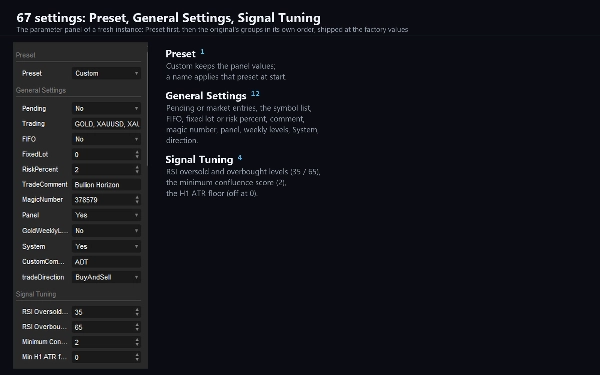
• RSI: dưới mức quá bán cho lệnh mua, trên mức quá mua cho lệnh bán (35 và 65 theo mặc định).
• Chu kỳ: giá đóng cửa so với giá đóng cửa 20 thanh trước.
• Hành động giá: đỉnh cao hơn với đáy cao hơn, hoặc đỉnh thấp hơn với đáy thấp hơn.
Tổng điểm được so sánh với Điểm Đồng Thuận Tối Thiểu (2 theo mặc định; các cài đặt vé đơn yêu cầu 3). Một ngưỡng ATR tùy chọn bỏ qua các thanh yên tĩnh; giới hạn spread bỏ qua các thanh có spread quá rộng.
BA CHẾ ĐỘ RỦI RO
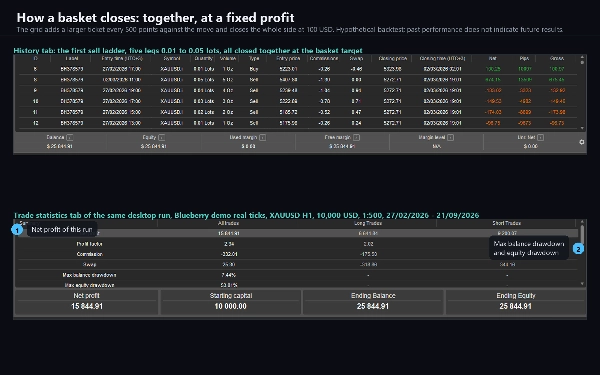
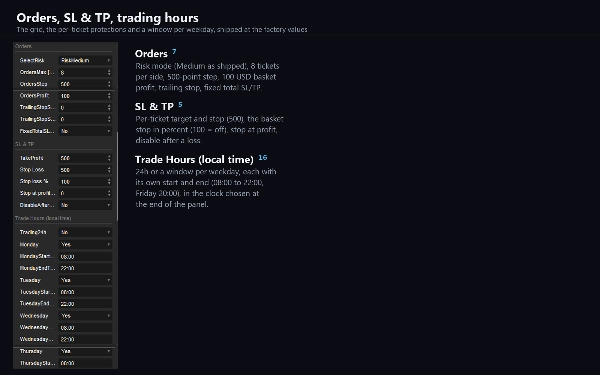
• Rủi ro Trung bình (mặc định): một lưới lên đến 8 vé mỗi bên. Vé đầu tiên mở theo tín hiệu với 0.01 lot; mỗi 500 điểm ngược lại (5.00 trên giá vàng hai chữ số thập phân) thêm một vé, mỗi vé 0.01 lot lớn hơn vé trước, và toàn bộ bên đóng cùng lúc khi lợi nhuận mở đạt 100 đơn vị tài khoản. Rủi ro Cao chạy cùng lưới dưới nhãn riêng.
• Rủi ro Thấp: một vé một lần với dừng lỗ cứng và mục tiêu cứng, kích thước dựa trên Phần trăm Rủi ro và khoảng cách dừng. Thang phục hồi tùy chọn mở rộng vé tiếp theo sau khi dừng, giới hạn số lần.
Một dừng giỏ theo phần trăm số dư, dừng lợi nhuận giỏ và đóng hàng ngày theo thời gian có sẵn trong mọi chế độ.
LƯỚI CÓ THỂ LÀM GÌ
Lưới thêm vào bên đang thua. Trong một chuyển động tiếp tục ngược thang, lỗ mở tăng lên với mỗi vé, và với đủ vé và đòn bẩy có thể đạt gọi ký quỹ; cấu hình mặc định không có dừng giỏ, đúng như tác giả vận hành. Đặt Dừng Giỏ theo mức chịu đựng của bạn, kích thước tài khoản sao cho mức giảm vốn công bố vẫn trong tầm kiểm soát, và đọc cảnh báo rủi ro trước khi giao dịch.
BỘ LỌC TIN TỨC VÀ GIỜ GIAO DỊCH
Khi bật bộ lọc tin tức, không mở lệnh mới từ 60 phút trước đến 60 phút sau sự kiện USD hoặc EUR có tác động cao, đọc từ lịch kinh tế công khai qua dịch vụ mạng của cTrader; khi không đọc được lịch, dùng mẫu cố định các giờ phát hành thông thường. Mỗi ngày trong tuần có cửa sổ giao dịch riêng (08:00 đến 22:00 mặc định, thứ Sáu đến 20:00), theo đồng hồ bạn chọn: máy tính, máy chủ hoặc bù giờ cố định.
BẢNG ĐIỀU KHIỂN
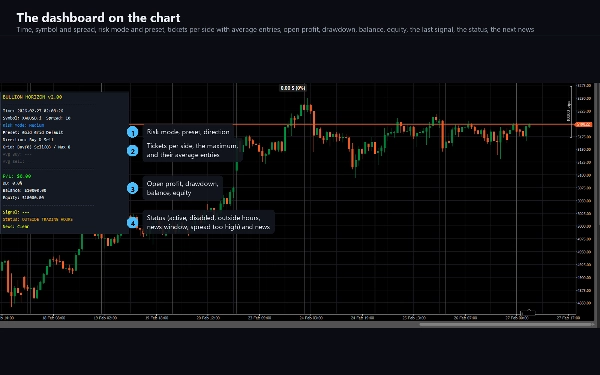
Bảng trên biểu đồ hiển thị thời gian, ký hiệu và spread, chế độ rủi ro, cài đặt trước đang dùng và hướng, số vé mỗi bên và điểm vào trung bình, lợi nhuận mở, giảm vốn, số dư và vốn chủ sở hữu, tín hiệu cuối với bốn điểm số, trạng thái (đang giao dịch, hệ thống tắt, ngoài giờ giao dịch, cửa sổ tin tức, spread quá cao) và sự kiện tin tức tiếp theo. Các mức hàng tuần tùy chọn vẽ pivot tuần trước, hai kháng cự và hai hỗ trợ.
CÀI ĐẶT CHÍNH
Chọn Rủi ro, Tối đa Lệnh, Bước Lệnh, Lợi nhuận Lệnh, Lot và Bước Lot (lưới), Phần trăm Rủi ro, Lot Cố định, Dừng Lỗ và Chốt Lời (vé đơn), Điểm Đồng Thuận Tối Thiểu, mức RSI, Spread Tối đa, Giao dịch (danh sách ký hiệu, đúng chính tả của nhà môi giới), Số Ma thuật (nhãn mỗi vị trí), Dừng Theo Sau, Dừng Giỏ. Mỗi trong 67 tham số đều có tài liệu.
TÁM CÀI ĐẶT TRƯỚC
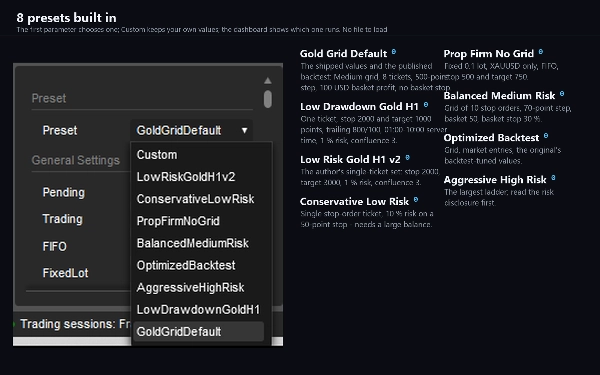
Gold Grid Mặc định (giá trị giao), Low Drawdown Gold H1, Low Risk Gold H1, Bảo thủ, Prop Firm No Grid, Rủi ro Trung bình Cân bằng, Backtest Tối ưu, Rủi ro Cao Mạnh mẽ — tích hợp trong cBot: tham số đầu chọn một, Tùy chỉnh giữ giá trị riêng, và bảng điều khiển hiển thị cái đang chạy. Hai trong số đó kích thước 10% vốn trên dừng 50 điểm và không thể ký quỹ trên 10.000 USD; được tài liệu như vậy.
TÀI KHOẢN PROP FIRM
Xây dựng để chạy trên tài khoản được cấp vốn và thử thách cũng như của bạn: cài đặt Prop Firm No Grid giao dịch một vé một lần với lot cố định, FIFO, dừng lỗ cứng và mục tiêu cứng không dùng lưới, và cửa sổ giao dịch ngày trong tuần, bộ lọc tin tức và đóng hàng ngày theo thời gian giữ cBot trong quy tắc hầu hết các công ty công bố. Kiểm tra quy tắc công ty bạn về lưới, phòng ngừa rủi ro và giao dịch tin tức trước khi chọn cài đặt lưới.
KÝ HIỆU, KHUNG THỜI GIAN, SỐ DƯ ĐỀ XUẤT
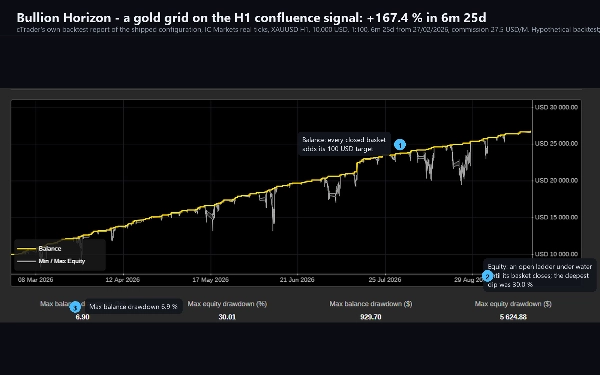
XAUUSD (hoặc chính tả của nhà môi giới bạn), H1, tài khoản phòng ngừa rủi ro với đòn bẩy 1:100 hoặc cao hơn, và số dư ít nhất bằng mức tối thiểu đề xuất ghi trong backtest: gấp ba lần mức giảm vốn đã thể hiện trên 10.000 USD.
GIẢ ĐỊNH BACKTEST
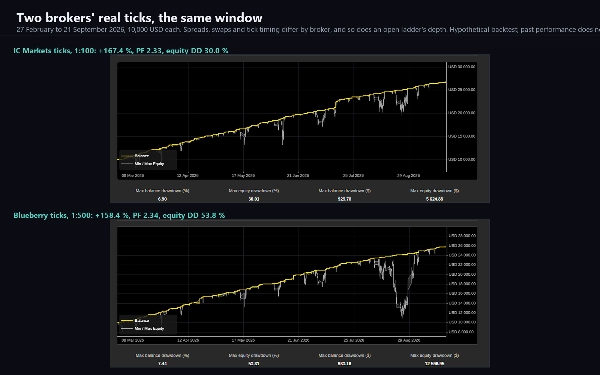
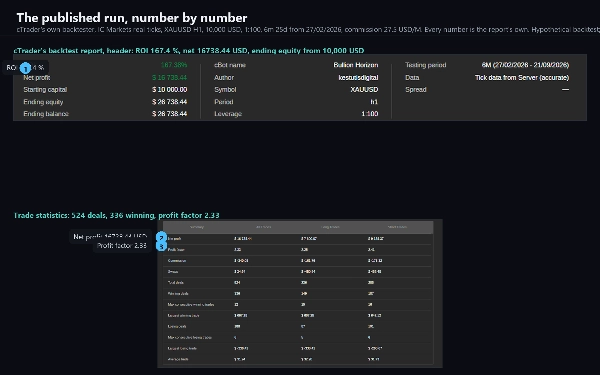
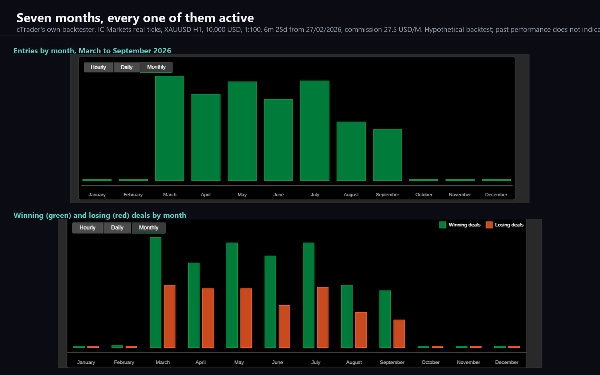
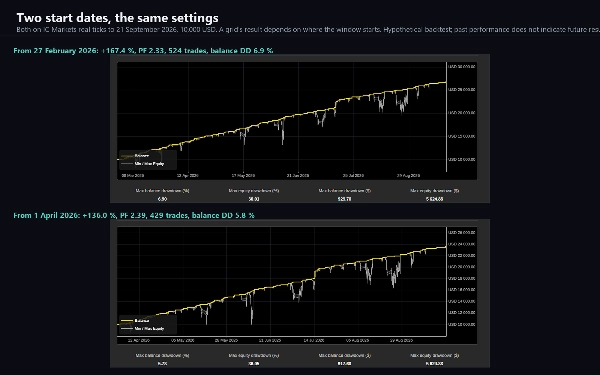
Số liệu công bố là backtest của cTrader trên cấu hình giao đã giao trên dữ liệu tick thực IC Markets, XAUUSD H1, 10.000 USD, đòn bẩy 1:100, hoa hồng 27,5 USD trên một triệu USD khối lượng, không trượt giá, từ 27 tháng 2 năm 2026 đến 21 tháng 9 năm 2026; bộ kiểm tra không thể áp dụng bộ lọc tin tức. Backtest chỉ đúng cho giai đoạn, dữ liệu, số dư và đòn bẩy của nó — hãy chạy backtest riêng trên dữ liệu nhà môi giới bạn trước khi giao dịch.
MUA MỘT LẦN HOẶC HÀNG THÁNG
Mua một lần cho mỗi bản cập nhật phiên bản 2, hoặc đăng ký hàng tháng và dừng bất cứ lúc nào bạn muốn: kế hoạch hàng tháng là cách chạy cBot trên tài khoản riêng trước khi quyết định.
GHI CHÚ KỸ THUẬT
Không yêu cầu quyền truy cập. Cần tài khoản phòng ngừa rủi ro cho các chế độ lưới. Chạy trên cTrader Desktop và Web; giữ nền tảng chạy, hoặc dùng VPS. Nhật ký gỡ lỗi ghi mọi tín hiệu và cố gắng đặt lệnh vào nhật ký phiên để hỗ trợ.
HỖ TRỢ
Các câu hỏi gửi vào thảo luận trên trang này; vui lòng đính kèm nhật ký phiên và giá trị tham số của bạn.
Giao dịch sản phẩm có đòn bẩy có rủi ro mất vốn; kết quả backtest chỉ mang tính giả định và hiệu suất quá khứ không đảm bảo kết quả tương lai.
Tóm tắt
The bot primarily operates a gold grid strategy: it opens an initial position on a signal and adds further positions at fixed intervals against the move, closing all positions together once a preset basket profit is reached. Alternatively, it offers single-ticket presets with fixed stop loss and take profit for users preferring no grid exposure.
Three risk modes are available: Medium Risk (default grid with up to 8 tickets), High Risk (similar grid with higher exposure), and Low Risk (single-ticket with hard stops and optional recovery ladder). Risk management tools include basket stop loss, basket profit target, trailing stops, and filters for news events, trading hours, spread, and volatility (ATR floor).
A dashboard displays real-time trading status, signals, risk mode, open profit, drawdown, and upcoming news events. The bot supports eight built-in presets tailored for different risk profiles and includes a Prop Firm No Grid preset compatible with funded accounts.
Recommended setup: XAUUSD on H1 timeframe, hedging account with 1:100 leverage or higher, and a minimum balance aligned with backtested drawdown. The bot runs on cTrader Desktop and Web platforms.
Thảo luận
Đánh giá của khách hàng
5 | 100 % | |
4 | 0 % | |
3 | 0 % | |
2 | 0 % | |
1 | 0 % |












![Logo "[Fx4U]Risk & Reward Trading Tool Pro"](https://cdn.ctrader.com/image/webp/e26324ec-9547-4365-a38e-ccd0e7c4d86f_31374)