

The Position Manager
cBot
2 购买
版本 1.4, Sep 2026
Windows 版、Mac 版, Web
3.6
评价:3

注册日期 12/12/2024
2
销售
36.76K
免费安装
说明
让我向您介绍 => 头寸管理器
- 一体化的 交易管理 适用于 交易者 和 开发者
对于交易者 => 保护 利润,限制 亏损并且执行 通过可配置输入实现纪律。
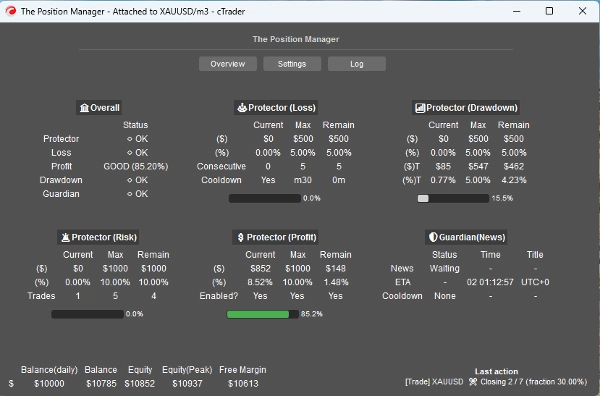
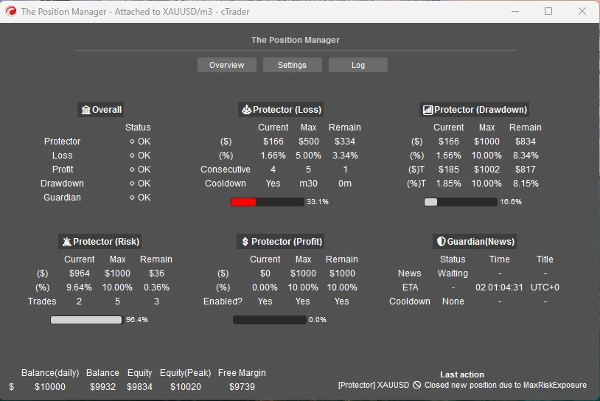
头寸管理器 有4个模块,名副其实:
- 投资组合保护器
- 守护交易
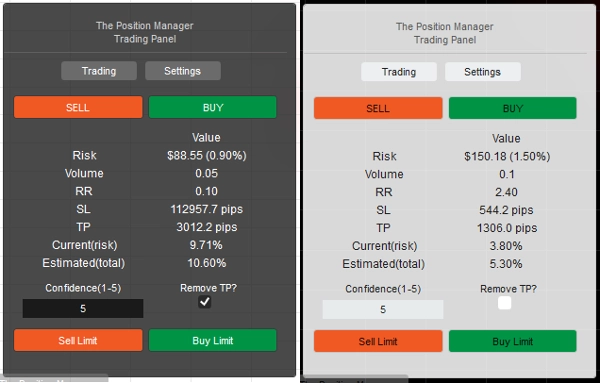
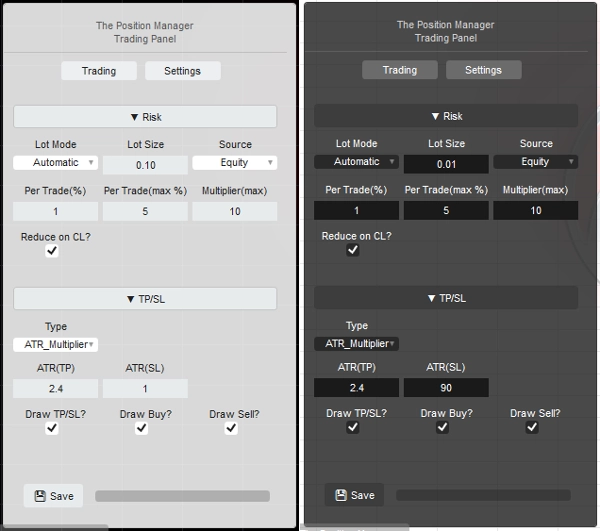
- 风险管理 (用于手动/半自动交易)
- 交易管理 (跟踪止盈,部分止盈/止损)
每个模块都有子模块以便更好地管理。
使用案例:
- 交易者 寻求 投资组合保护 + 智能加仓 在 桌面端、移动端和网页端交易。
-
- 如果您完全通过桌面端交易,使用 无头模式=> 关闭
- 如果您也通过移动端/网页交易,使用 无头模式=> 开启
- 自营交易者 有 固定风险限制。
- 开发者 想要将 交易信号转化为实际入场。
如何使用:
- 第一次使用时,我强烈建议:
- 仅创建一个“头寸管理器”实例,配置为:
- 无头模式 => 关闭 (UI模式)
- 实例模式 => 两者 (管理器 + 交易面板)
- 然后了解其行为,最好在回测中(可视模式) 再上线。
请记住 => “头寸管理器”本身不会开仓:
- 它管理现有头寸!
- 同时提供账户级管理。
对于小账户,您可以提高百分比。
对于大账户,您可以降低百分比。
无论如何,请始终根据您的账户规模调整输入参数。
熟悉参数/行为后,您可以在 cTrader Cloud 上运行,以便 在移动端/网页端管理头寸,只需遵循 两条简单 规则:
- 无头模式=> 开启
- 此外,只能添加一个“头寸管理器”实例:
-
- 否则,它们可能会相互“冲突”,因为大多数操作是针对整个符号的。
- 本地运行时也适用相同规则。
让我 解释每个参数 和 预期行为:
虽然有些直观, 参数很多...
请 耐心阅读每一个。
==== 头寸管理 ====
- 无头模式? => 此模式下可用的功能有:
-
- 投资组合保护器
-
- 所有功能均可用。
- 守护交易
-
- 如果无头模式 => 开启,新闻过滤器将被禁用。
- 跟踪止盈
-
- 对于任何符号,头寸 不应有 止盈。
- 部分平仓
-
- 对于任何符号,头寸 必须有 止盈或止损
=> 无头关闭(UI模式)
- 实例模式:
-
- 管理器 => 只应添加 一个实例。
- 交易 => 纯 交易面板 (风险管理模块),您可以添加多个实例。
- 两者 => 只应添加 一个实例:
-
- 管理器 将以窗口形式显示。
- 交易 将在图表上显示。
- 面板类型/位置:不言自明
- 存储方式:
-
- 使用 经纪商 在每次重启时保存/加载相同设置。
- 使用 经纪商_符号 如果您想将每个符号配置用作一种“风险配置文件”。
=> 无头关闭/开启 - 本地
- 允许消息模式?
-
- 不言自明
- 使用 [交易,双模式] 实例模式时,将“TP/SL => 类型”更改为“点数”,以便通过消息设置TP/SL。
- 允许消息交易?
-
- 允许通过消息开仓。
- 如果 无头开启,风险管理配置不可用。
- 如果 无头关闭,使用 [交易,双模式] 实例模式时,您可以按需配置风险管理模块。
=> 无头开启 / 账户通用
- 最小保本百分比(%):
-
- 对于每个头寸,当保本逻辑由 跟踪/部分利润模块执行时,不是将止损直接移至入场价(这会导致负盈亏)。
- 止损将被移动 x% 向前 到入场价。
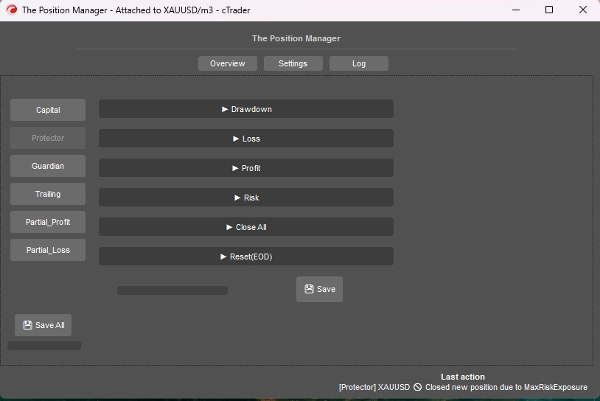
=> 无头开启 / 保护者回撤
- 回撤模式:
-
- 每日 => 基于当日余额
- 跟踪 => 基于峰值权益
- 回撤类型:
-
- 百分比 => 当日余额的百分比,适合动态增长。
- 固定 => 固定金额,适合严格规则
- 最大回撤 => 百分比或固定 (不言自明)
=> 无头开启 / 保护者亏损
- 亏损来源: => 目前仅基于“当日余额”。
-
- 如果权益低于当日余额,则触发/计数。
- 亏损类型:
-
- 百分比 => 当日余额的百分比,适合动态增长。
- 固定 => 固定金额,适合严格规则
- 最大每日亏损² => 百分比或固定 (不言自明)
- 连续亏损(CL):
-
- 启用连续亏损时关闭头寸。
- 连续计数:
-
- 不言自明
- 冷却时间重置(CL):
-
- 冷却时间用于重置计数并允许开新头寸。
=> 无头开启 / 保护者利润
- 启用利润上限? => 不言自明
-
- 一旦达到 最大利润,新头寸将被关闭。
- 利润来源: => 始终基于当日余额
- 利润类型:
-
- 百分比 => 当日余额的百分比,适合动态增长。
- 固定 => 固定金额,适合严格规则
- 最大利润² => 百分比或固定 (不言自明)
=> 无头开启 / 保护者风险
- 总风险暴露(%):
-
- 它还考虑了处于保本状态的头寸。
- 总开仓数:
-
- 如果 总计数 等于 总开仓数,新头寸将被关闭。
=> 无头开启 / 保护者全部平仓
- 是否在日终平仓? => 在日终关闭所有头寸
- 是否在周终平仓? => 在周终(周五)关闭所有头寸,使用日终时间作为参考。
=> 无头开启 / 保护者重置(日终)
- 重置权益峰值跟踪的时间,以及执行全部平仓逻辑的时间(如适用)。
- 重置(小时) => 0时 - 23时
- 重置(分钟) => 0分 – 59分
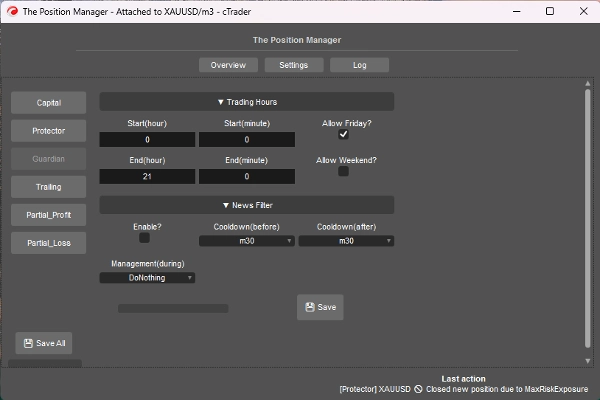
=> 无头开启 / 守护者
- 在 交易时间之外或 允许的日子开仓的头寸将被自动关闭。
-
- 开始/结束(小时) => 0时 – 23时
- 开始/结束(分钟) => 0分 – 59分
- 允许周五? => 不言自明
- 允许周末? (加密货币) => 不言自明
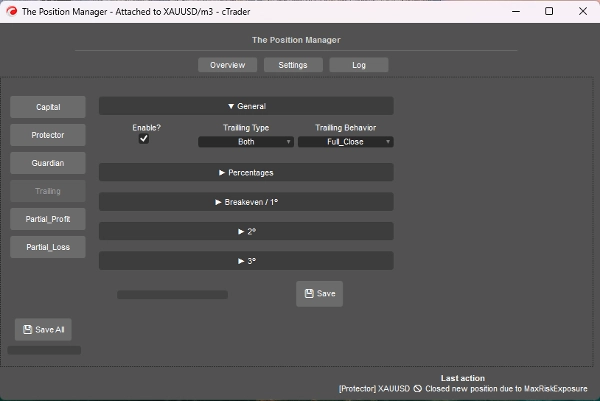
=> 无头开启 / 跟踪止盈
- 这是基于权益的止盈
- 启用?
-
- 对于无止盈的头寸,适合趋势跟随头寸。
- => 类型:
-
- 百分比 => 纯权益百分比
- 回撤 => 基于跟踪回撤概念 (峰值权益),考虑价格的回撤/回调。
- 两者 => 默认启用部分平仓行为:
-
- 部分平仓使用百分比类型。
- 完全退出使用回撤类型。
- 行为:
-
- 完全平仓:
-
- 一旦达到目标百分比权益,关闭所有无止盈的头寸。
- 此外,当 达到目标百分比权益的一半,止损移动至保本。
- 部分平仓:
-
- 启用部分平仓。
- 请注意 => 如果头寸大小(手数)太小,无法部分平仓,则头寸将全部关闭。
- 最小利润(%):
-
- 激活跟踪逻辑的最小利润。
- => 完全平仓百分比(%):
-
- 仅适用于 “完全平仓”行为。
- => [两者] 关闭回撤百分比(%):
-
- 仅适用于“两者”类型。
- => [%仅] 智能止损?"
-
- 仅适用于“百分比”类型。
- 它类似于回撤类型,但使用跟踪止损更具反应性
- 部分1(%) / 部分2(%)
-
- 执行部分平仓的目标百分比权益 (百分比或两者)
- 始终确认跟踪类型是百分比还是回撤
- 部分1(百分比顺序) / 部分2(百分比顺序)
-
- 不言自明
- => 关闭3(%):
-
- 执行完全关闭无止盈头寸的目标百分比权益。
- 仅适用于 百分比或回撤 类型
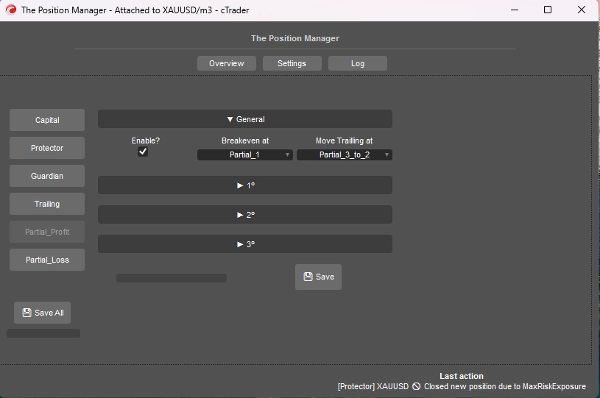
=> 无头开启 / 部分利润
- 启用?
-
- 对于有止盈的头寸,适合日内交易或剥头皮头寸。
- 入场价 将为0%
- 止盈价 将为100%
- 部分价格 将基于此方法计算。
- 保本于:
-
- 不言自明,当选定部分触发时,将止损移至保本。
- => 移动跟踪止损于:
-
- 不言自明,当选定部分触发时,将止损移至前一个部分价格。
- 请注意 => 确保部分2或部分3已激活。
- 部分1(%) /
部分2(%) /
部分3(%) -
- 百分比 介于 入场价和止盈价之间。
- => 启用第2部分?
=> 启用第3部分? -
- 不言自明
- 部分1(百分比顺序) /
部分2(百分比顺序) /
部分3(百分比顺序) -
- 不言自明
=> 无头开启 / 部分亏损
- 启用?
-
- 对于有止损的头寸,适合限制亏损 的亏损交易 可能会回归趋势方向。
- 入场价 将为0%
- 止损价 将为100%
- 部分价格 将基于此方法计算。
- 部分1(%) /
部分2(%) /
部分3(%) -
- 百分比 介于 入场价和止损价之间。
- => 启用第2部分?
=> 启用第3部分? -
- 不言自明
- 部分1(百分比顺序) /
部分2(百分比顺序) /
部分3(百分比顺序) -
- 不言自明
====================================================
对于开发者 => 即插即用 适用于 任何策略 通过 消息/订阅 的 cTrader Algo。
- 适用于 半自动或全自动 系统:
- 半自动: 订单仍由我们自己开,但:
-
- 止损和止盈由消息/订阅设置。
- 全自动: 订单信号通过消息/订阅发送到“头寸管理器”
-
- “风险管理”配置可能在此方法中不可用。
非常简单,您只需使用以下类发送信号:
public class TradeSignal
{
public string Symbol { get; set; }
public TradeType Direction { get; set; }
public double StopLossPips { get; set; }
public double? TakeProfitPips { get; set; } // null = without TP
public string StrategyId { get; set; }
public double? EntryPrice { get; set; } // null = market, otherwise limit order.
public DateTime Timestamp { get; set; }
public int Confidence { get; set; } // 1–5
}
然后:
Messages.Send("ThePositionManager", signal);
简短示例:
TradeSignal signal = new()
{
Symbol = Symbol.Name,
Direction = TradeType.Buy,
StopLossPips = 1500,
TakeProfitPips = 3000,
StrategyId = "MyStrategy",
Confidence = 5
};
Messages.Send("ThePositionManager", signal);
摘要
AI summary
The Position Manager is a comprehensive trade management tool designed for traders and developers to manage existing positions effectively. It does not open trades but provides account-level management to protect profits, limit losses, and enforce trading discipline through configurable inputs.
Key features include four main modules: Portfolio Protector, Guardian Trading, Risk Manager (for manual or semi-automated trading), and Trade Manager (supporting trailing take profit and partial take profit/stop loss). The tool supports intelligent scaling and portfolio protection across Desktop, Mobile, and Web platforms, with a Headless mode option for managing positions remotely via cTrader Cloud.
For traders, it offers configurable risk controls such as daily and trailing drawdown limits, profit caps, exposure limits, and automated position closing based on trading hours or drawdown thresholds. Trailing profit and partial profit/loss management allow dynamic adjustment of stop loss and take profit levels to optimize trade exits.
Developers can integrate The Position Manager with automated strategies by sending trade signals via messages, enabling semi or fully automated order management with customizable stop loss and take profit settings.
The tool supports saving settings by broker or symbol, and includes detailed parameters for break-even management, risk exposure, and partial close orders, making it adaptable to various account sizes and trading styles.
Key features include four main modules: Portfolio Protector, Guardian Trading, Risk Manager (for manual or semi-automated trading), and Trade Manager (supporting trailing take profit and partial take profit/stop loss). The tool supports intelligent scaling and portfolio protection across Desktop, Mobile, and Web platforms, with a Headless mode option for managing positions remotely via cTrader Cloud.
For traders, it offers configurable risk controls such as daily and trailing drawdown limits, profit caps, exposure limits, and automated position closing based on trading hours or drawdown thresholds. Trailing profit and partial profit/loss management allow dynamic adjustment of stop loss and take profit levels to optimize trade exits.
Developers can integrate The Position Manager with automated strategies by sending trade signals via messages, enabling semi or fully automated order management with customizable stop loss and take profit settings.
The tool supports saving settings by broker or symbol, and includes detailed parameters for break-even management, risk exposure, and partial close orders, making it adaptable to various account sizes and trading styles.
交易概览
客户评价
3.6
评价:3
5 | 0 % | |
4 | 67 % | |
3 | 33 % | |
2 | 0 % | |
1 | 0 % |
客户评价
May 4, 2026
The Position Manager feels much closer to a professional trade-management middleware than a typical cTrader utility. The architecture is surprisingly deep, with serious portfolio protection, partial management, and prop-style risk controls built into the framework. But right now the product is held back by a critical startup crash and very high operational complexity. Technically impressive system overall, though it still needs stronger runtime hardening before it feels fully production-ready.
May 1, 2026
not a miracle button, but it has a clear role. It helps with risk management, while the weak spot is that bad settings can create false confidence. Better rechecked it on 30 trades.
April 23, 2026
This feels useful once you already has a plan. The main value is sizing and stop planning, not chasing every signal that appears.
讨论
常见问答
Partial Close
Stop Loss (SL) Manager
One-click Trading
ATR
Break Even
Trailing Stop Manager
Take Profit (TP) Manager
cTrader Store 提供的所有产品,包括交易机器人、指标和插件,均由第三方开发者提供,仅供信息参考和技术访问之用。cTrader Store 并非经纪商,不提供投资建议、个人推荐或任何未来业绩保证。
















价格
注册日期 12/12/2024
2
销售
36.76K
免费安装