Descripción
Superior cTrader a Telegram Notifier
Sistema de Copiador de Operaciones y Notificaciones de cTrader
Superior cTrader a Telegram Notifier es una utilidad diseñada para conectar el terminal de escritorio cTrader directamente con la aplicación Telegram. Utiliza la API de cAlgo para monitorear la actividad comercial y transmitir actualizaciones de texto formateadas a chats, canales o grupos de Telegram.
Casos de Uso Principales
1. Proveedores de Señales y Comunidades Esta herramienta está diseñada para ayudar a los Proveedores de Señales que gestionan canales públicos o privados de Telegram. El bot publica automáticamente entradas, modificaciones y salidas de operaciones directamente en Telegram. Debido a que los formatos de los mensajes son personalizables (por ejemplo, ocultar tamaños de lote o números de ticket), los proveedores pueden transmitir señales comerciales limpias y profesionales a sus grupos VIP o canales gratuitos sin exponer detalles privados de la cuenta.
2. Monitoreo Remoto Personal Los traders minoristas pueden vincular el bot a su cuenta personal de Telegram. Esto permite monitorear el rendimiento de su cuenta cTrader, posiciones abiertas, ganancias flotantes y niveles de riesgo desde su dispositivo móvil mientras están lejos del escritorio de trading.
Características Técnicas
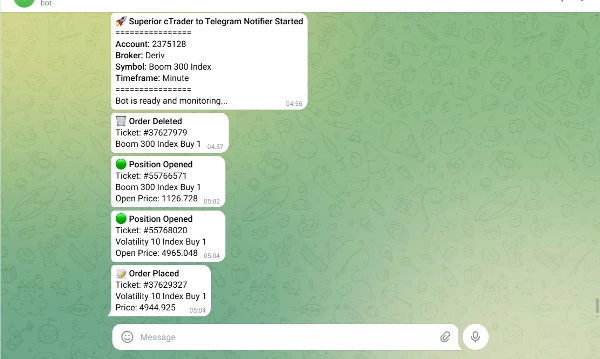
Monitoreo de Operaciones en Tiempo Real
Monitorea la cuenta cTrader para cambios en posiciones y órdenes pendientes, activando notificaciones en tiempo real para:
- Ejecuciones de Mercado: Posición Abierta, Posición Cerrada, Posición Parcialmente Cerrada y Posición Modificada (SL/TP ajustados).
- Órdenes Pendientes: Orden Limit/Stop Colocada, Orden Modificada y Orden Eliminada.
Panel Interactivo en el Gráfico
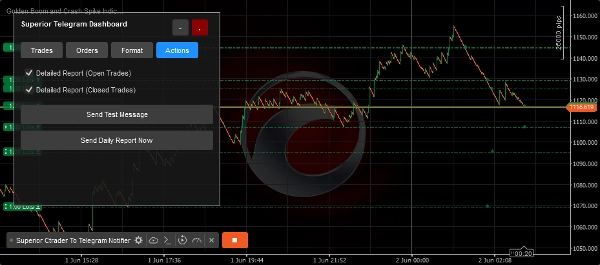
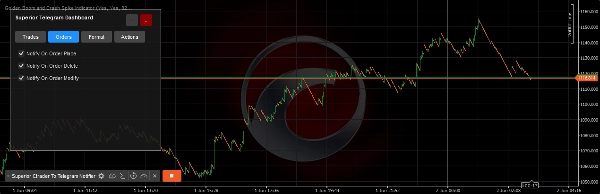
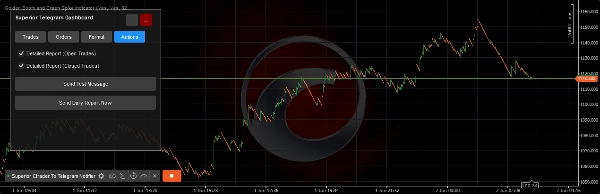
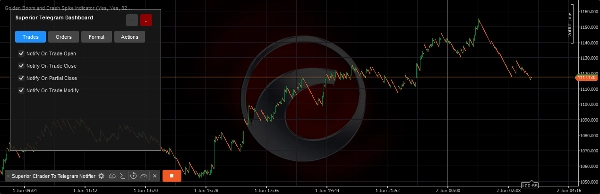
Incluye un panel GUI personalizado y arrastrable que se muestra directamente en el gráfico de cTrader. El panel permite a los usuarios cambiar configuraciones al instante sin necesidad de reiniciar el cBot o abrir el menú de parámetros.
- Pestañas: Pestañas categorizadas por funciones (Operaciones, Órdenes, Formato, Acciones).
- Interruptores de Alternancia: Casillas para activar/desactivar instantáneamente notificaciones específicas de eventos (por ejemplo, desactivar modificaciones de órdenes o activar alertas de cierre parcial).
- Disparadores Manuales: Botones para activar un Informe Diario o enviar un mensaje de Prueba de Conexión.
- Gestión de la Interfaz: El panel puede minimizarse a una barra de título delgada para ahorrar espacio en el gráfico.
Formato de Mensajes Personalizable
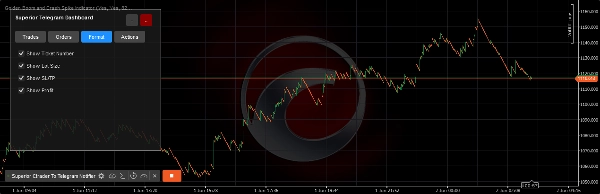
Ofrece control estricto sobre qué datos se incluyen en la transmisión de Telegram. Los usuarios pueden alternar la visibilidad de las siguientes variables para proteger la privacidad o limpiar los formatos de señal:
- Mostrar/Ocultar Números de Ticket
- Mostrar/Ocultar Tamaños de Lote (Volumen)
- Mostrar/Ocultar precios de Stop Loss y Take Profit
- Mostrar/Ocultar Ganancia Neta en operaciones cerradas
Reportes Automatizados y Alertas de Riesgo
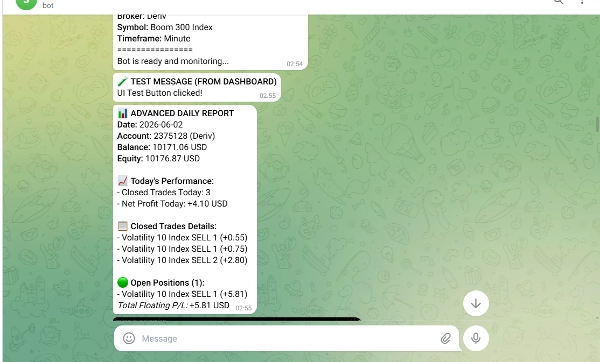
- Informe Diario Avanzado: A una hora definida por el usuario, el cBot genera un resumen completo del rendimiento del día. Esto incluye el total de operaciones cerradas, ganancia neta diaria, P/L flotante actual y una lista de todas las operaciones activas/cerradas.
- Actualizaciones del Estado de la Cuenta: Envía actualizaciones periódicas que contienen el Balance actual, el Equity y el Margen Libre en un intervalo establecido (por ejemplo, cada 60 minutos).
- Alertas de Gestión de Riesgos: Monitorea la salud de la cuenta y envía advertencias de emergencia si el Drawdown Flotante supera un porcentaje especificado, o si el Nivel de Margen cae por debajo de un umbral de seguridad definido.
Requisitos de Configuración
- Un Token de Bot de Telegram (obtenido de BotFather).
- Un ID de Chat de Telegram (el ID de tu chat personal, canal o grupo).
Resumen
Key features include a customizable on-chart dashboard with tabs for Trades, Orders, Format, and Actions, allowing users to toggle specific notifications, trigger daily reports, and manage settings without restarting the cBot. Message formatting options let users control the visibility of ticket numbers, lot sizes, stop loss/take profit prices, and net profit to protect privacy or streamline signal presentation.
The system supports automated daily performance reports summarizing closed trades, net profit, floating P/L, and active trades. Periodic account status updates provide balance, equity, and free margin information. Risk management alerts notify users if floating drawdown or margin levels cross defined thresholds.
Designed for signal providers managing Telegram channels and retail traders seeking remote account monitoring, this tool requires a Telegram Bot Token and Chat ID for setup. It facilitates professional trade signal broadcasting and personal trade monitoring via mobile devices.