
คำอธิบาย
🛡️ แนะนำ Account Guardian PRO — เวอร์ชัน 2.0
เรายินดีที่จะประกาศการเปิดตัวเวอร์ชันที่อัปเดตของ Account Guardian PRO หลังจากได้รับข้อเสนอแนะจากผู้ใช้และการตรวจสอบโค้ดอย่างละเอียด การอัปเดตนี้แก้ไขข้อผิดพลาดสำคัญในตรรกะการป้องกันการขาดทุนสูงสุด (drawdown) เพื่อมอบเครื่องมือบริหารความเสี่ยงที่น่าเชื่อถือและแข็งแกร่งยิ่งขึ้นสำหรับบัญชีการซื้อขายของคุณ
หากคุณได้ซื้อเวอร์ชันก่อนหน้านี้แล้ว คุณมีสิทธิ์ได้รับการอัปเดตนี้ ฟรีโดยสมบูรณ์ เพียงติดต่อเราทาง Discord และทีมงานของเราจะจัดส่งเวอร์ชันล่าสุดให้คุณอย่างรวดเร็ว
นี่คือสรุปสั้น ๆ ของการเปลี่ยนแปลงทั้งหมดที่ทำกับ cBot เมื่อเทียบกับเวอร์ชันเดิม:
1. การจัดการสถานะถูกแทนที่ด้วย enum (BotState) เวอร์ชันเดิมใช้ธง boolean สองตัว (_isClosing และ _stopForPeriod) ซึ่งอาจขัดแย้งกัน ทั้งสองถูกแทนที่ด้วย enum BotState เพียงตัวเดียวที่มีสถานะชัดเจนสามสถานะ: Running, StoppedForPeriod และ HaltedForLoss นี่คือ สาเหตุหลักที่บล็อก DD ไม่ทำงาน — _isClosing ถูกรีเซ็ตเป็น false ในเทิกเดียวกับที่ถูกตั้งเป็น true ดังนั้นการกระทำถูกเรียกใช้แต่สถานะถูกล้างทันที
2. การรีเซ็ตช่วงเวลาจะถูกดำเนินการเสมอ เวอร์ชันเดิม OnTick() จะคืนค่าก่อนหากไม่มีตำแหน่งเปิด (Positions.Count == 0) ซึ่งป้องกันไม่ให้ฐานสมดุลรายวันและรายสัปดาห์ได้รับการอัปเดต ตรรกะการรีเซ็ตถูกแยกออกมาเป็นเมธอดเฉพาะชื่อ CheckPeriodReset() ที่ทำงานทุกเทิกไม่ว่าจะเกิดอะไรขึ้น
3. ฐานเริ่มต้นใช้ Equity แทน Balance _initialAccountBalance ถูกตั้งโดยใช้ Account.Balance ตอนเริ่มต้น หากมีตำแหน่งเปิดที่มีกำไร/ขาดทุนลอยตัวอยู่แล้ว การคำนวณ drawdown รวมจะผิดพลาดตั้งแต่ต้น ตอนนี้ใช้ Account Equity เพื่อฐานที่ถูกต้อง
4. ClosePosition() ตรวจสอบผลลัพธ์แล้ว เวอร์ชันเดิมเรียก ClosePosition() แบบเงียบ ๆ โดยไม่มีการจัดการข้อผิดพลาด เวอร์ชันที่แก้ไขตรวจสอบ result.IsSuccessful และบันทึกคำเตือนหากตำแหน่งปิดไม่สำเร็จ (เช่น ตลาดปิด ข้อผิดพลาดของโบรกเกอร์)
5. การหยุดช่วงเวลาจะรีเซ็ตอย่างถูกต้องในวัน/สัปดาห์ใหม่ ในเวอร์ชันเดิม _stopForPeriod ถูกรีเซ็ตภายในบล็อกตรวจสอบวันที่เฉพาะเมื่อ OnTick() ถึงจุดนั้น — ซึ่งจะไม่เกิดขึ้นหากไม่มีตำแหน่งเปิด การรีเซ็ตตอนนี้เกิดขึ้นอย่างน่าเชื่อถือภายใน CheckPeriodReset().
6. พารามิเตอร์ใช้ป้ายกำกับ Enable อย่างชัดเจน ป้ายกำกับพารามิเตอร์ boolean ถูกเปลี่ยนจากข้อความตกแต่งเช่น "--- DAILY DRAWDOWN ---" เป็นชื่อฟังก์ชันเช่น "Enable Daily Drawdown Limit" ซึ่งแสดงผลได้ถูกต้องใน UI ของ cTrader
7. เมธอดช่วยเหลือ GetWeek() ถูกแยกออกมา การคำนวณสัปดาห์ของปีถูกทำซ้ำในเวอร์ชันเดิม ตอนนี้เป็นเมธอดส่วนตัวเพียงตัวเดียวที่เรียกใช้เมื่อจำเป็น
Account Guardian Pro เป็นเครื่องมือบริหารจัดการที่ทรงพลังและยืดหยุ่นสำหรับบัญชีการซื้อขายของคุณ มันไม่ใช่บอทที่เปิดการซื้อขายเอง แต่เป็น ผู้ช่วยอัตโนมัติ 🧑✈️ สำหรับการซื้อขายด้วยตนเองของคุณ จุดประสงค์เดียวคือการบังคับใช้กฎความเสี่ยงและกำไรของคุณอย่างเคร่งครัดโดยปิดตำแหน่งเปิดทั้งหมดเมื่อถึงเกณฑ์ที่กำหนด
คิดว่าบอทนี้เป็นผู้จัดการความเสี่ยงส่วนตัวของคุณที่ทำงานตลอด 24/7 ช่วยให้คุณมุ่งเน้นไปที่กลยุทธ์การซื้อขายด้วยความสบายใจว่าเครือข่ายความปลอดภัย 🥅 จะทำงานอยู่เสมอ
PROP Account Guardian คืออะไร?
วิธีเปิดใช้งานและใช้บอท (คู่มือด่วน) 🚀
ทำตามขั้นตอนง่าย ๆ เหล่านี้เพื่อเริ่มใช้งาน guardian:
- การเปิดใช้งาน (ขั้นตอนที่สำคัญที่สุด) ✅
-
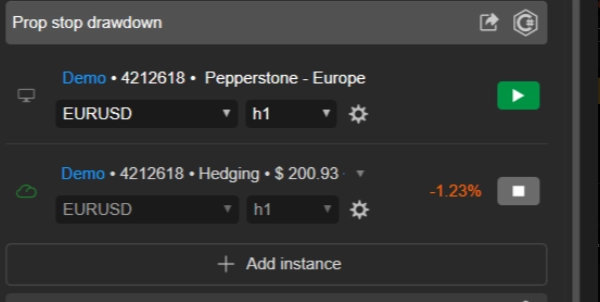
- คุณต้องรัน อินสแตนซ์บอทเพียงตัวเดียว เพื่อปกป้องบัญชีทั้งหมดของคุณ
- เลือก กราฟใดก็ได้ ที่คุณชอบ 📉 (เทรดเดอร์หลายคนใช้กราฟที่ไม่ได้เทรดจริง เช่น AUD/CAD M1 เพื่อ "โฮสต์" บอท)
- เพิ่มอินสแตนซ์
Account Guardian Proลงในกราฟนั้นเพียงตัวเดียว - คุณไม่จำเป็นต้องเปิดอินสแตนซ์สำหรับสินทรัพย์ทุกตัวที่คุณเทรด! ❌
- การตั้งค่า ⚙️
-
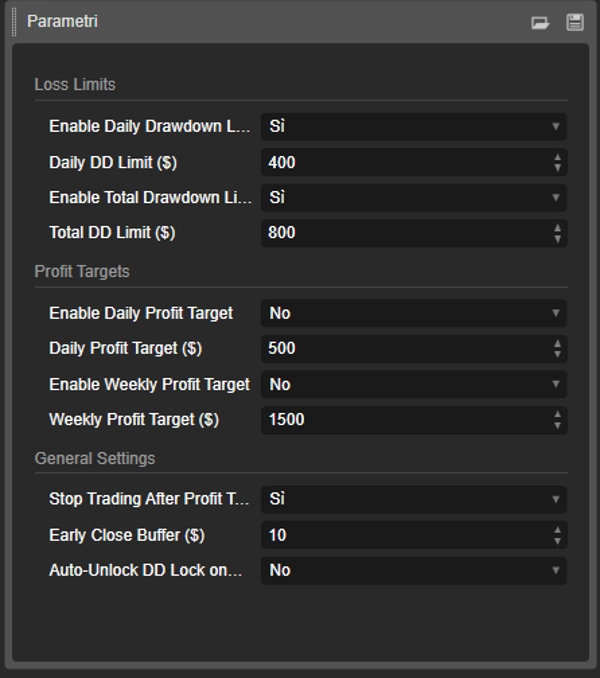
- ก่อนกด "เล่น" ให้ตั้งค่าพารามิเตอร์ของบอทตามแผนการซื้อขายของคุณ ตัดสินใจว่าคุณต้องการเปิดใช้งานขีดจำกัดการขาดทุนและเป้าหมายกำไรใดบ้างและด้วยค่าเท่าใด
- เริ่มต้น & ตรวจสอบ ▶️
-
- เมื่อพารามิเตอร์ถูกตั้งค่าแล้ว ให้กดปุ่ม "เล่น" บนอินสแตนซ์ cBot
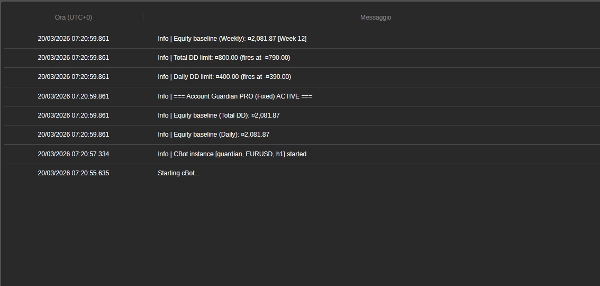
- คุณจะเห็นข้อความปรากฏในแท็บ "บันทึก" ของบอท 📜 ยืนยันว่าบอททำงานและแสดงขีดจำกัดที่คุณตั้งไว้
- เท่านี้ก็เสร็จ! ตอนนี้คุณสามารถมุ่งเน้นไปที่การซื้อขายด้วยตนเองของคุณ บอทจะทำงานเงียบ ๆ ในพื้นหลังและจะดำเนินการเฉพาะเมื่อกฎใดกฎหนึ่งของคุณถูกกระตุ้น
🚨 คำแนะนำสำคัญสำหรับเทรดเดอร์ PROP FIRM 🚨
บอทนี้มาพร้อมกับระบบป้องกันทุนระดับมืออาชีพ ซึ่งจำเป็นสำหรับการผ่านความท้าทายของ prop firm เพื่อเพิ่มโอกาสความสำเร็จของคุณ เรา ขอแนะนำอย่างยิ่งให้หลีกเลี่ยง การตั้งค่าพารามิเตอร์ Max Daily Drawdown (%) ของบอทให้เท่ากับขีดจำกัดของ prop firm ของคุณ (เช่น 4% หรือ 5%)
💡 กลยุทธ์ที่ชนะ: ตั้งขีดจำกัดที่เข้มงวดกว่า
กุญแจคือการใช้พารามิเตอร์ drawdown ของบอทเป็น จุดหยุดขาดทุนรายวันส่วนตัวที่ระมัดระวังมากขึ้น อยู่ภายในขีดจำกัดสูงสุดของ prop firm อย่างปลอดภัย
🎯 ตัวอย่างปฏิบัติ:
- หาก prop firm ของคุณอนุญาตให้มี 4% drawdown รายวัน...
- ตั้งค่าพารามิเตอร์
Max Daily Drawdown (%)ของบอทเป็น 1% หรือ 1.5%.
✅ เหตุผลที่ได้ผล: หากคุณเจอวันที่ขาดทุน บอทจะทำงาน Hard Stop หลังจากขาดทุนเล็กน้อยที่ควบคุมได้ (เช่น 1%) ซึ่งช่วยปกป้องทุนของคุณ หลีกเลี่ยงการละเมิดกฎของ prop firm และช่วยให้คุณสามารถเทรดใหม่ในวันถัดไป กลยุทธ์นี้ถูกออกแบบมาเพื่อช่วยให้คุณรอดพ้นจากช่วงขาดทุนและเพิ่มโอกาสความสำเร็จในระยะยาวอย่างมาก
🧠 จำไว้: เป้าหมายของความท้าทายไม่ใช่การเสี่ยงเงินสำรองรายวันทั้งหมดในวันเดียว แต่คือการ อยู่รอดในระยะยาว ใช้พารามิเตอร์ความเสี่ยงของบอทเพื่อบังคับวินัยเหล็กในการเดิมพันของคุณ
รายละเอียดพารามิเตอร์ 📋
นี่คือคำอธิบายของพารามิเตอร์ทั้งหมดที่คุณจะพบในอินเทอร์เฟซของบอท
กลุ่ม: ขีดจำกัดการขาดทุน 🛑
- EnableDailyDrawdownLimit (
Yes/No) -
- คำอธิบาย: เปิดใช้งาน (
Yes) หรือปิดใช้งาน (No) การตรวจสอบขีดจำกัดการขาดทุนรายวันสูงสุด - วิธีทำงาน: หากเปิดใช้งาน บอทจะคำนวณการขาดทุนสูงสุดจากยอดเงินในบัญชี ณ จุดเริ่มต้นของวัน
- คำอธิบาย: เปิดใช้งาน (
- Daily DD Limit ($) (เช่น
400.0) -
- คำอธิบาย: กำหนดจำนวนขาดทุนสูงสุด (ในสกุลเงินบัญชีของคุณ) ที่คุณยอมรับได้ในหนึ่งวัน ค่านี้ควรเป็นจำนวนบวก
- EnableTotalDrawdownLimit (
Yes/No) -
- คำอธิบาย: เปิดใช้งาน (
Yes) หรือปิดใช้งาน (No) การตรวจสอบขีดจำกัดการขาดทุนรวมสูงสุด - วิธีทำงาน: หากเปิดใช้งาน บอทจะคำนวณการขาดทุนสูงสุดจากยอดเงินที่คุณมีเมื่อเริ่มใช้งานบอทครั้งแรก
- คำอธิบาย: เปิดใช้งาน (
- Total DD Limit ($) (เช่น
800.0) -
- คำอธิบาย: กำหนดจำนวนขาดทุนรวมสูงสุดที่คุณยอมรับได้
กลุ่ม: เป้าหมายกำไร 🎯
- EnableDailyProfitTarget (
Yes/No) -
- คำอธิบาย: เปิดใช้งาน (
Yes) หรือปิดใช้งาน (No) เป้าหมายกำไรรายวัน
- คำอธิบาย: เปิดใช้งาน (
- Daily Profit Target ($) (เช่น
500.0) -
- คำอธิบาย: กำหนดจำนวนกำไรรายวันที่บอทจะปิดตำแหน่งเปิดทั้งหมด
- EnableWeeklyProfitTarget (
Yes/No) -
- คำอธิบาย: เปิดใช้งาน (
Yes) หรือปิดใช้งาน (No) เป้าหมายกำไรรายสัปดาห์
- คำอธิบาย: เปิดใช้งาน (
- Weekly Profit Target ($) (เช่น
1500.0) -
- คำอธิบาย: กำหนดจำนวนกำไรรายสัปดาห์ (คำนวณจากวันจันทร์) ที่บอทจะปิดตำแหน่งทั้งหมด
กลุ่ม: การตั้งค่าทั่วไป 🔧
- หยุดเทรดหลังจากถึงเป้าหมายกำไร? (
Yes/No) -
- คำอธิบาย: พารามิเตอร์สำคัญนี้กำหนดสิ่งที่จะเกิดขึ้นหลังจากถึงเป้าหมายกำไร
- ถ้า
Yes: บอทจะปิดตำแหน่งทั้งหมดและ หยุดตรวจสอบ จนกว่าจะถึงวันถัดไป (หรือสัปดาห์) นี่เป็นตัวเลือกที่ปลอดภัยที่สุดเพื่อรักษากำไรของคุณ 🔒 - ถ้า
No: บอทจะปิดตำแหน่งแต่ ยังคงตรวจสอบ หากคุณเปิดการซื้อขายใหม่และขาดทุน ขีดจำกัด drawdown จะยังคงทำงานและอาจถูกกระตุ้น 👀
- Early Close Buffer ($) (เช่น
10.0) -
- คำอธิบาย: นี่คือ ขอบเขตความปลอดภัย 🛡️ จำนวนที่ป้อนที่นี่จะถูกหักออกจากขีดจำกัด drawdown ของคุณเพื่อสร้างจุดกระตุ้นที่เกิดขึ้นก่อน
- ตัวอย่าง: หาก
Daily DD Limitของคุณคือ $400 และBufferคือ $10 บอทจะเข้าแทรกแซงและปิดทุกอย่างทันทีที่ drawdown ถึง $390 เพื่อให้แน่ใจว่าคุณจะไม่ถึงขีดจำกัดสูงสุดที่แท้จริง
สรุป
Key features include:
- Daily and total drawdown limits to cap losses within set amounts.
- Daily and weekly profit targets that trigger position closures upon achievement.
- Configurable parameters with clear enable/disable options and safety buffers for early intervention.
- Robust state management ensuring reliable enforcement of drawdown protection.
- Continuous period resets for accurate baseline tracking of equity and balance.
- Error handling for position closures to ensure proper execution.
- Single-instance operation protecting the entire account, regardless of the number of traded assets.
The bot is suitable for various markets including Forex, indices, commodities, stocks, and cryptocurrencies. It supports swing trading with medium trade frequency and is compatible with prop firm trading challenges, advising conservative drawdown settings to enhance long-term survival.
Designed for use on any chart within the cTrader platform, PROP Account Guardian v.2 runs quietly in the background, providing 24/7 risk oversight aligned with your trading plan.
รีวิวจากลูกค้า
5 | 0 % | |
4 | 100 % | |
3 | 0 % | |
2 | 0 % | |
1 | 0 % |