说明
- 高级信号通知器
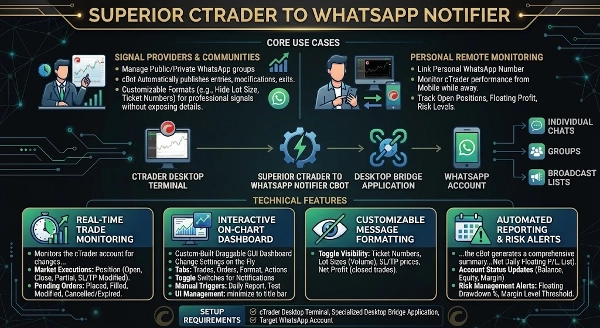
高级信号通知器是一款实用工具,旨在通过专用的桥接应用程序将cTrader桌面终端连接到您的消息账户。它监控交易活动,并将格式化的文本更新直接广播到个人聊天、群组或广播列表。
核心使用场景
- 信号提供者与社区: 该工具旨在帮助管理交易群组或广播频道的信号提供者。cBot会自动发布交易入场、修改和退出信息,直接发送到您连接的聊天中。消息格式完全可定制(例如,隐藏手数或订单号),允许提供者向其社区广播干净、专业的交易信号,而不暴露私人账户详情。
- 个人远程监控: 散户交易者可以将cBot连接到个人消息账户,以便在远离交易台时通过移动设备监控cTrader账户表现、持仓、浮动利润和风险水平。
技术特性
- 实时交易监控: 监控cTrader账户中持仓和挂单的变化,触发以下实时通知:
-
- 市价执行: 持仓开仓、持仓平仓、持仓部分平仓及持仓修改(止损/止盈调整)。
- 挂单: 限价/止损单下单、订单成交、订单修改及订单取消/过期。
- 交互式图表仪表盘: 包含一个定制的、可拖动的GUI仪表盘,直接渲染在cTrader图表上。该仪表盘允许用户即时更改设置,无需重启cBot或打开参数标签。
-
- 标签页: 按功能分类的标签页(交易、订单、格式、操作)。
- 切换开关: 复选框,用于即时启用或禁用特定事件通知(例如,关闭订单修改通知或开启部分平仓提醒)。
- 手动触发: 按钮用于触发日报告或发送测试连接消息。
- 界面管理: 仪表盘可以最小化为细长的标题栏,以节省图表空间。
- 可定制的消息格式: 提供对广播内容的控制。用户可以切换以下变量的可见性,以保护隐私或简化信号格式:
-
- 显示/隐藏订单号
- 显示/隐藏手数(交易量)
- 显示/隐藏止损和止盈价格
- 显示/隐藏已平仓交易的净利润
- 自动报告与风险警报
-
- 高级日报告: 在用户定义的时间,cBot生成当天表现的综合摘要(包括总平仓交易数、净日利润、当前浮动盈亏及活跃/已平仓交易列表)。
- 账户状态更新: 按设定间隔(例如每60分钟)发送包含当前余额、权益和保证金水平的定期更新。
- 风险管理警报: 监控账户健康状况,当浮动回撤超过指定百分比或保证金水平低于定义的安全阈值时发送紧急警告。
安装要求与设置 要将cTrader连接到您的消息应用,请确保已配置所需的桥接组件。请参阅产品包中附带的文档以获取完整的配置详情。
如何在cTrader中连接:
- 链接账户: 确保桥接应用处于激活并已连接状态。
- 配置cBot参数: 将cBot附加到cTrader图表,并在参数窗口中找到通知设置标签。
- 设置目标ID: 在
Target_ID参数中输入指定的接收者ID或群组标识符。
摘要
AI 摘要
Superior Signals Notifier is a utility designed to connect the cTrader desktop terminal with a messaging account through a bridging application. It monitors trading activity in real time and broadcasts formatted trade notifications—including position openings, modifications, partial closes, and order status changes—directly to individual chats, groups, or broadcast lists. The tool supports customizable message formatting to hide sensitive details such as lot sizes, ticket numbers, stop loss, take profit levels, and net profits, enabling professional signal sharing without exposing private account information.
Key features include an interactive on-chart dashboard with categorized tabs (Trades, Orders, Format, Actions), toggle switches to enable or disable specific notifications, manual triggers for daily reports and test messages, and a minimizable interface to save chart space. Automated reporting capabilities provide daily performance summaries, periodic account status updates (balance, equity, margin level), and risk management alerts triggered by floating drawdown or margin level thresholds.
The notifier serves both signal providers managing trading communities and individual traders seeking remote monitoring of account performance, open positions, floating profit, and risk levels via mobile devices. Setup requires configuring the bridging application and linking the cBot to a cTrader chart with the appropriate target recipient ID for message delivery.
Key features include an interactive on-chart dashboard with categorized tabs (Trades, Orders, Format, Actions), toggle switches to enable or disable specific notifications, manual triggers for daily reports and test messages, and a minimizable interface to save chart space. Automated reporting capabilities provide daily performance summaries, periodic account status updates (balance, equity, margin level), and risk management alerts triggered by floating drawdown or margin level thresholds.
The notifier serves both signal providers managing trading communities and individual traders seeking remote monitoring of account performance, open positions, floating profit, and risk levels via mobile devices. Setup requires configuring the bridging application and linking the cBot to a cTrader chart with the appropriate target recipient ID for message delivery.
交易概览
讨论
客户评价
0.0
评价:0
客户评价
该产品尚无评价。已经试过了?抢先告诉其他人!
常见问答
Partial Close
TP Manager
Stop Loss (SL) Manager
Key Levels
Volume
SL Manager
Take Profit (TP) Manager
cTrader Store 提供的所有产品,包括交易机器人、指标和插件,均由第三方开发者提供,仅供信息参考和技术访问之用。cTrader Store 并非经纪商,不提供投资建议、个人推荐或任何未来业绩保证。