Descrição
QX Renko 3Plus (Grátis | Bot Educacional Renko)
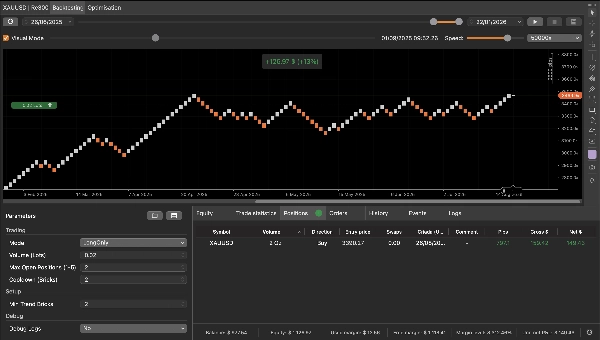
Este robô começou a partir de um pedido simples: um amigo queria entender, de forma prática, como um cBot pode detectar setups e executar entradas/saídas em um gráfico Renko. Eu construí uma lógica curta, limpa e fácil de auditar especificamente para fins educacionais. Agora estou publicando esta versão gratuita na cTrader Store pelo mesmo motivo: para ajudar você a aprender Renko e mostrar meu trabalho como desenvolvedor.
O que ele faz (em uma linha)
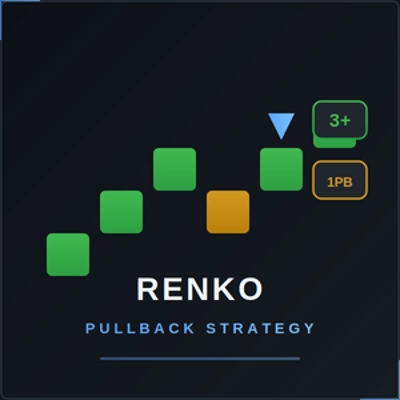
Ele procura uma tendência curta (3+ tijolos da mesma cor), espera por exatamente 1 tijolo de pullback, e entra no tijolo de continuação; sai no primeiro tijolo oposto.
Como funciona no Renko (passo a passo)
1) Detecção de sequência de tendência
- A cada tijolo fechado, o bot verifica se o tijolo está ALTA ou BAIXA.
- Ele conta tijolos consecutivos na mesma direção.
- Quando atinge Min Trend Bricks (padrão: 3), ele ativa o setup nessa direção.
Exemplo (altista): ALTA, ALTA, ALTA → setup ativado para compra.
2) Pullback é obrigatório (EXATAMENTE 1 tijolo)
Após ativar:
- O bot exige **um—e somente um—**tijolo na direção oposta (o pullback).
- Se receber 2 ou mais tijolos de pullback, o setup é cancelado e o bot espera por uma nova sequência de 3+ novamente.
Exemplo (altista): ALTA, ALTA, ALTA (ativado) → BAIXA (pullback = 1) ✅
Se virar BAIXA, BAIXA (pullback > 1) ❌ cancelado.
3) Entrada na continuação
- Após o pullback único, o próximo tijolo deve retornar para a direção ativada (continuação).
- Quando esse tijolo de continuação fechar, o bot executa a entrada no mercado.
Exemplo (altista): ALTA, ALTA, ALTA (ativado) → BAIXA (pullback) → ALTA (continuação) → ENTRAR COMPRA
5) Regra simples de saída educacional
- Se um tijolo fechar contra a direção aberta, o bot fecha as posições desse lado:
-
- Um tijolo BAIXA fecha posições de COMPRA.
- Um tijolo ALTA fecha posições de VENDA.
Isto é intencionalmente simples para que você possa ver claramente como as saídas “primeiro oposto” se comportam no Renko.
Parâmetros principais
Negociação
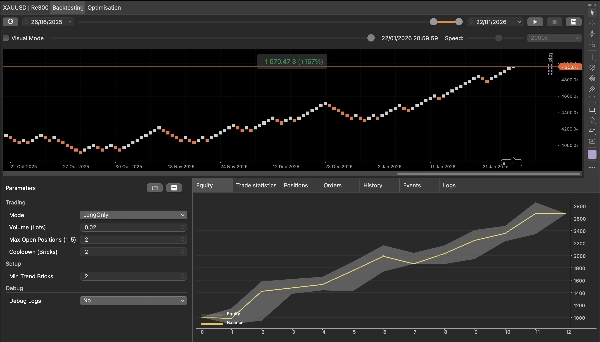
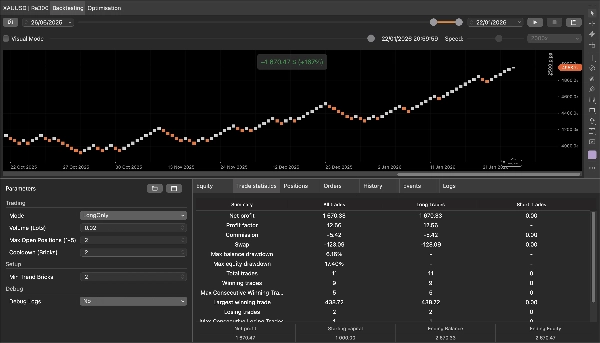
- Modo: Ambos / Apenas Long / Apenas Short
- Volume (Lotes): tamanho da ordem em lotes
- Máximo de Posições Abertas: máximo de posições simultâneas (mesma etiqueta)
- Cooldown (Tijolos): número mínimo de tijolos entre entradas na mesma direção
Setup
- Min Trend Bricks: número mínimo de tijolos consecutivos para ativar o setup
Depuração
- Logs de Depuração: ativa logs detalhados mostrando ativação, contagem de pullback, cancelamentos, bloqueios e entradas.
Notas importantes (use da forma correta)
- Use em um gráfico Renko. O tamanho do tijolo é definido pelas configurações do seu gráfico.
- O bot age apenas em tijolos fechados (evita sinais enquanto um tijolo ainda está se formando).
- Esta é uma ferramenta educacional: a lógica é intencionalmente mínima para aprendizado e auditoria.
- Não é aconselhamento financeiro. Sempre teste em demo/backtests antes de operar ao vivo.
Para quem é
- Qualquer pessoa aprendendo Renko e padrões de continuação de tendência.
- Traders que querem um exemplo limpo de um setup de máquina de estados (ativado → pullback → continuação).
- Desenvolvedores que querem uma implementação de referência simples e segura para compilação.
Resumo
The bot operates exclusively on closed bricks to avoid premature signals and includes configurable parameters such as trading mode (both long and short, long only, or short only), order volume, maximum open positions, cooldown period between entries, and minimum trend bricks to arm setups. Debug logs can be enabled to track the bot’s decision-making process, including arming, pullback counting, cancellations, and entries.
QX Renko 3 Plus serves as a practical tool for traders learning Renko chart automation, developers seeking a clean, compile-safe example of a state-machine setup, and anyone interested in understanding trend continuation strategies on Renko charts. It supports various markets including forex, indices, commodities, and cryptocurrencies, as indicated by its relevant tags.
Conversa
Avaliações de clientes
5 | 0 % | |
4 | 50 % | |
3 | 0 % | |
2 | 0 % | |
1 | 50 % |














![Logótipo de "[StellarStrategies] Scheduled Trade Executor"](https://cdn.ctrader.com/image/webp/daefc6af-7eca-453e-878d-1b981be2c401_25646)