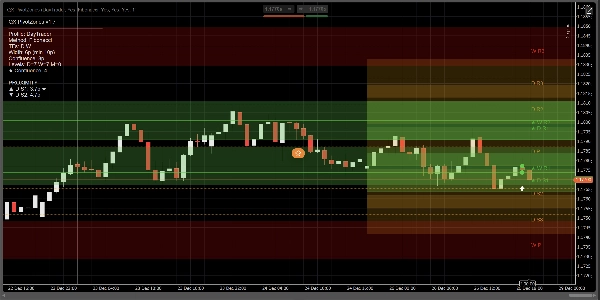
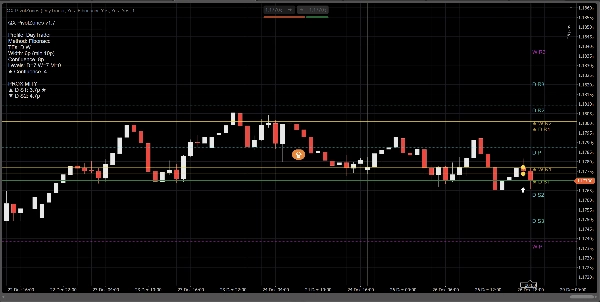
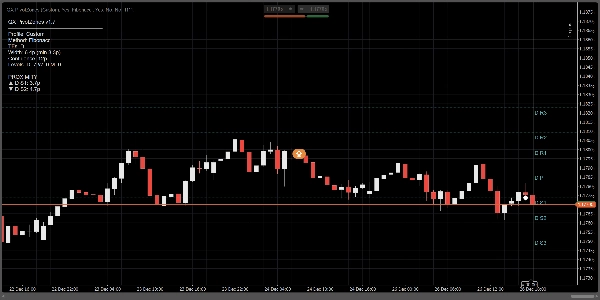
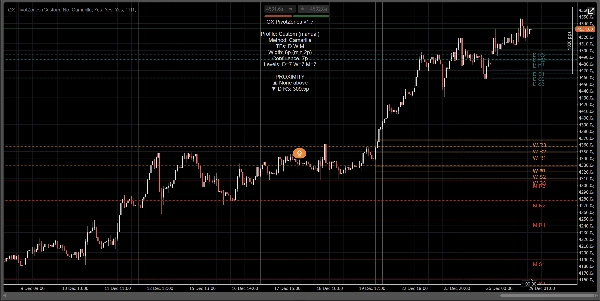
Descrição
QX PivotZones é um indicador de Pontos de Pivô criado para decisões reais de negociação, não apenas linhas estáticas que o preço ignora"
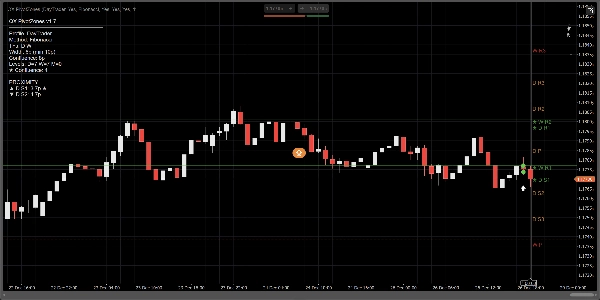
Ele calcula Pivôs Diários, Semanais e Mensais usando Clássico, Fibonacci, Camarilla ou Woodie, e os plota como verdadeiras zonas de preço (bandas) com largura ajustável (Pips ou baseada em ATR). A principal vantagem é simples: ele destaca automaticamente confluência multi-temporal e transforma pivôs em áreas acionáveis, não “fantasias de linha perfeita”.
Por que é diferente das ferramentas típicas de Fibonacci Pivot / FiboPoints:
A maioria dos indicadores “FiboPoints” para por aí, nas linhas básicas de pivô. O QX PivotZones adiciona o que os traders realmente precisam:
- Detecção Automática de Confluência D/W/M: quando pivôs de diferentes períodos se agrupam, o nível é destacado (★) e pintado usando a cor da confluência.
- Zonas (Bandas) em vez de linhas finas: defina a largura em pips ou ATR. Isso reduz o ruído de reações de “quase toque”.
- Filtro de Níveis Mais Próximos (opcional): mostra apenas as zonas mais relevantes acima e abaixo do preço atual.
- Alertas Úteis: disparam ao Entrar na Zona, Tocar a Linha, ou Ambos, com cooldown e filtragem opcional “Apenas Confluência”.
- Painel de Informações + Proximidade: veja os TFs habilitados, método, largura da zona, contagem de confluência e distância para a zona mais próxima acima/abaixo.
Como usar:
1) Escolha um perfil
- Scalper: intradiário, menos níveis, zonas adaptativas mais apertadas.
- DayTrader: Diário + Semanal (padrão).
- Swing: Diário + Semanal + Mensal.
- Personalizado: controle manual de tudo.
Dica: Se quiser “DayTrader + Mensal”, desative as substituições de perfil (ou use Personalizado) e habilite Mostrar Mensal manualmente.
2) Configure as zonas (o ponto principal)
Em Modo de Largura da Zona:
- Pips para bandas fixas e consistentes.
- ATR para bandas adaptativas à volatilidade.
Parâmetros chave:
- Largura da Zona (pips) ou ATR k
- Largura Mínima da Zona (pips) para evitar bandas muito finas
- Preencher Zonas para pintar as zonas
- Estender Zonas para a Direita para projetar as bandas na parte visível à direita
3) Habilite a Confluência (o principal diferencial)
- Destacar Confluência: LIGADO
- Modo de Confluência:
-
- Pips para tolerância fixa
- ATR para tolerância adaptativa
- Distância de Confluência ou Confluência ATR k
Níveis confluentes recebem:
- Cor de confluência
- Marcador ★ na etiqueta
- Contagem mostrada no painel
4) Alertas (negocie sem ficar olhando para a tela)
- Alertas: Entrar na Zona, Tocar a Linha, ou Ambos
- Alertas: Apenas Confluência: reduz o ruído
- Cooldown do Alerta (barras): evita spam
- Exibir Ícones de Alerta: marca eventos no gráfico
Predefinições rápidas (sugeridas)
Scalping (M5–M15)
- Modo de Largura da Zona: ATR
- ATR k: 0.15–0.25
- Modo de Confluência: Pips
- Distância de Confluência: 4–8 pips
- Apenas Zonas Mais Próximas: LIGADO (3 acima / 3 abaixo)
Day Trading (M15–H1)
- Modo de Largura da Zona: Pips
- Largura: 6–10 pips
- Confluência: 8–12 pips
- Habilitar Diário + Semanal
Swing (H4–D1)
- Modo de Largura da Zona: ATR
- ATR k: 0.25–0.45
- Habilitar Diário + Semanal + Mensal
O que faz (e o que não faz)
- Este não é um gerador de sinais de compra/venda.
- É um mapa de estrutura de mercado / zona de S&R com alertas de eventos (entrada/toque) e destaque de confluência.
- Melhores casos de uso: reações em pivôs, rejeição/aceitação, pullbacks, alvos, escalação e proteção de trades.
Resumo
Key features include automatic detection and highlighting of multi-timeframe confluence (daily/weekly/monthly), which marks clustered pivot zones with distinct colors and symbols. Users can filter to show only the nearest relevant zones around the current price. The indicator offers configurable alerts for entering or touching zones, with options to limit alerts to confluence zones and apply cooldown periods to reduce noise.
An information panel provides details on active timeframes, pivot methods, zone widths, confluence counts, and proximity to zones. Predefined profiles support different trading styles such as scalping, day trading, and swing trading, with customizable settings for zone width and confluence parameters.
QX PivotZones functions as a market structure and support/resistance zone tool with event alerts, intended for use in analyzing reactions at pivots, pullbacks, targets, and trade management across various markets including forex, indices, commodities, and cryptocurrencies.
Avaliações de clientes
5 | 33 % | |
4 | 67 % | |
3 | 0 % | |
2 | 0 % | |
1 | 0 % |
















![Logótipo de "High-Low Divergence [Iridio Capital]"](https://cdn.ctrader.com/image/webp/10a9e91b-243a-43f6-bbfe-7376bad5a214_61554)