
Descrição
Volume Profile TPO Bubble — por The Quant
Volume Profile TPO Bubble é um indicador premium para cTrader criado por The Quant.
Quer se juntar a nós? Links na bio
━━━━━━━━━━━━━━━━━━━━━━
VOLUME PROFILE TPO BUBBLE
━━━━━━━━━━━━━━━━━━━━━━
Volume Profile TPO Bubble é um indicador completo de leitura de mercado para cTrader.
Ele reúne ferramentas poderosas de leitura de mercado em um indicador limpo:
◆ Volume Profile
◆ Gráfico de Bolhas
◆ TPO
◆ Sinais de Quebra e Reteste de POC para robôs
Esta ferramenta é projetada para traders que querem ler zonas de volume com mais clareza, identificar níveis importantes de POC e usar esses níveis em estratégias manuais ou automatizadas.
Foi desenvolvido para cTrader, com foco tanto em análise visual quanto em automação via cBot.
━━━━━━━━━━━━━━━━━━━━━━
O QUE ESTE INDICADOR FAZ
━━━━━━━━━━━━━━━━━━━━━━
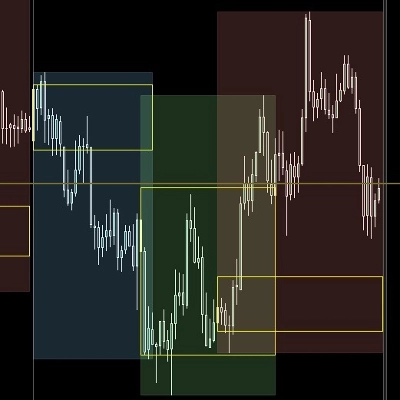
Zonas de Atividade do Mercado
Volume Profile TPO Bubble ajuda você a identificar as zonas onde o mercado esteve ativo.
Essas zonas são chamadas de POCs, ou Pontos de Controle.
Um POC é uma área de preço onde a atividade foi concentrada.
Quando o preço retorna a essa área, ele pode quebrá-la, retestá-la, rejeitá-la ou reagir a partir dela.
Objetivo Principal
O objetivo é não prever o mercado.
O objetivo é tornar as zonas importantes do mercado mais fáceis de ver, mais fáceis de entender e mais fáceis de usar em uma estratégia.
━━━━━━━━━━━━━━━━━━━━━━
MODOS VISUAIS PRINCIPAIS
━━━━━━━━━━━━━━━━━━━━━━
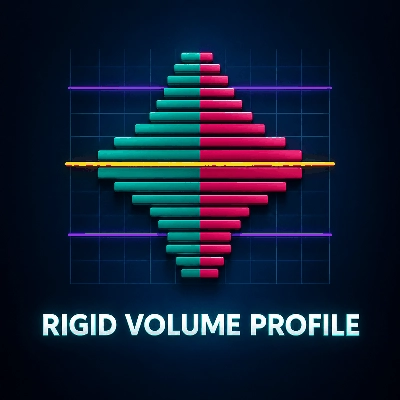
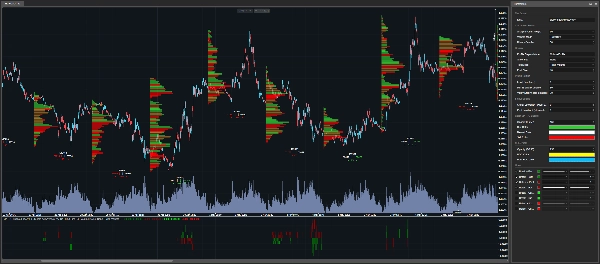
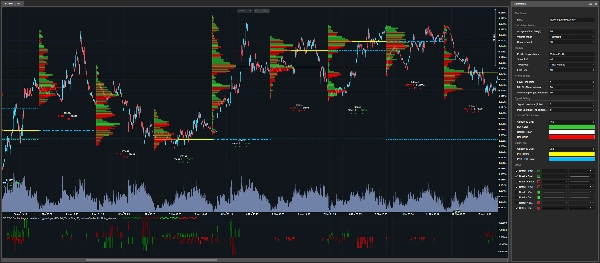
◆ Volume Profile
O modo Volume Profile exibe barras horizontais de volume diretamente no gráfico do cTrader.
Quanto maior a barra, mais importante foi a zona de preço durante a vela de análise selecionada.
Este modo é útil quando você quer ver a estrutura completa da distribuição de volume.
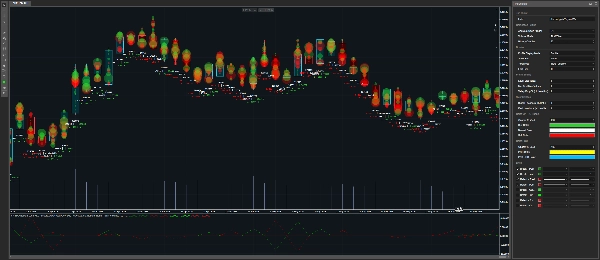
◆ Gráfico de Bolhas
O modo Gráfico de Bolhas exibe zonas importantes de volume como bolhas.
Quanto maior a bolha, mais importante é a zona detectada.
Este modo é feito para leitura visual rápida.
Ajuda você a identificar rapidamente as áreas mais importantes no gráfico.
Se você quiser usar o indicador principalmente como um Gráfico de Bolhas, pode definir Mostrar POC para Nenhum, e então ajustar:
• % Mínimo do Volume Máximo
• Queda do Vale %
Essas configurações controlam quantas bolhas você quer ver.
Valores menores mostram mais bolhas.
Valores maiores mantêm apenas as zonas mais limpas.
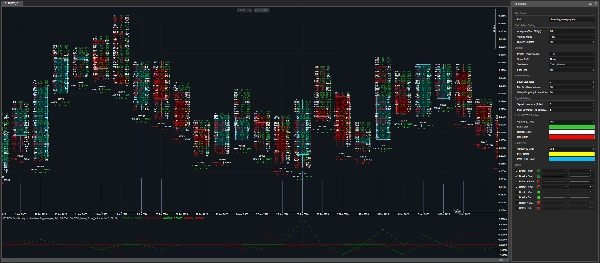
◆ TPO
O modo TPO oferece uma visão mais detalhada do que aconteceu dentro de uma vela.
Ele exibe:
• Volume de compra
• Volume de venda
• Delta
• Atividade por nível de preço
Este modo é útil quando você quer entender a estrutura interna de uma zona, não apenas ver onde o volume esteve.
━━━━━━━━━━━━━━━━━━━━━━
LÓGICA DE TICK E TICKXSIZE
━━━━━━━━━━━━━━━━━━━━━━
Contexto de Volume CFD
Em CFDs, os traders não recebem volume centralizado de bolsa como nos mercados futuros.
Em vez disso, o volume é baseado em dados de ticks do corretor.
Este indicador oferece dois modos de cálculo de volume:
• Tick
• TickXSize
◆ Tick
Cada tick conta como uma unidade.
Esta é a leitura simples do fluxo de ticks do corretor.
◆ TickXSize
Os ticks são ponderados pelo tamanho do movimento de preço.
Um tick que move o preço em 1 pip tem mais peso que um tick que move o preço em 0,1 pip.
Isso pode ajudar a revelar zonas onde o movimento teve mais impacto, mesmo que a contagem bruta de ticks sozinha não torne a zona óbvia.
Diferença Simples
Tick conta eventos.
TickXSize conta eventos com o peso do movimento.
━━━━━━━━━━━━━━━━━━━━━━
DETECÇÃO DE POC
━━━━━━━━━━━━━━━━━━━━━━
Como os POCs São Detectados
O indicador detecta zonas de POC usando picos de volume e lógica de filtragem.
Uma zona deve ser forte o suficiente e isolada o suficiente para ser considerada relevante.
Isso ajuda a evitar a exibição de cada pequena área ruidosa no gráfico.
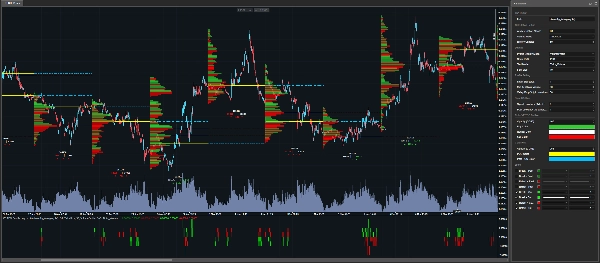
POCs Atuais e Passados
POCs Atuais podem ser exibidos diretamente no gráfico.
Eles também podem ser estendidos para a próxima vela de análise com linhas pontilhadas.
POCs Passados também podem ser exibidos, permitindo que os traders acompanhem níveis antigos que ainda podem ser importantes.
━━━━━━━━━━━━━━━━━━━━━━
SINAIS PRONTOS PARA ROBÔS DE QUEBRA E RETESTE
━━━━━━━━━━━━━━━━━━━━━━
Indicador Visual e Ferramenta de Automação
Volume Profile TPO Bubble não é apenas um indicador visual.
Ele também expõe séries de saída que podem ser usadas dentro de um cBot ou robô de negociação.
Tipos de Sinais Detectados
O indicador pode detectar:
• Quebra dos níveis atuais de POC
• Reteste dos níveis atuais de POC
• Quebra dos níveis passados de POC
• Reteste dos níveis passados de POC
Isso permite que um robô detecte quando o preço interage com zonas importantes de volume.
━━━━━━━━━━━━━━━━━━━━━━
PONTUAÇÕES DE SINAL
━━━━━━━━━━━━━━━━━━━━━━
O Que a Pontuação Significa
O indicador não retorna apenas um sinal.
Ele também retorna uma pontuação.
A pontuação informa ao robô qual zona de POC foi tocada, quebrada ou retestada.
Lógica da Pontuação
A classificação é baseada no preço de abertura da vela de análise selecionada.
Pontuações positivas representam zonas de POC acima da abertura.
Pontuações negativas representam zonas de POC abaixo da abertura.
Exemplos
• +1 = primeira zona de POC acima da abertura
• -1 = primeira zona de POC abaixo da abertura
• +2 = segunda zona de POC acima da abertura
• -3 = terceira zona de POC abaixo da abertura
Quanto mais distante o número de zero, mais distante a zona está da abertura.
Por Que Isso Importa para Automação
Isso é útil para automação porque o robô não sabe apenas que um sinal aconteceu.
Ele também sabe onde o sinal aconteceu.
━━━━━━━━━━━━━━━━━━━━━━
PARÂMETROS
━━━━━━━━━━━━━━━━━━━━━━
Todos os parâmetros estão organizados por categoria para que você possa entender rapidamente o que cada configuração controla.
━━━━━━━━━━━━━━━━━━━━━━
CONFIGURAÇÕES DE CÁLCULO
━━━━━━━━━━━━━━━━━━━━━━
◆ Intervalo de Análise
• Seleciona o intervalo de tempo usado para construir os perfis.
• Este intervalo é a base usada para construir perfis, detectar POCs e organizar pontuações de sinal.
Exemplos:
• Diário = um perfil por dia
• H4 = um perfil a cada quatro horas
◆ Modo de Volume
• Escolhe como o volume de ticks é calculado.
Modos disponíveis:
• Tick = um tick equivale a uma unidade
• TickXSize = ticks são ponderados pelo tamanho do movimento de preço
Tick é o modo simples.
TickXSize dá mais importância aos ticks que movem o preço com mais força.
◆ Velas do Histórico
• Define quantas velas passadas do Intervalo de Análise selecionado são mantidas no gráfico.
• Mais velas fornecem mais contexto histórico.
• Menos velas mantêm o gráfico mais leve.
• O indicador pode manter uma pequena margem adicional internamente para que POCs, Quebras e Retestes sejam calculados corretamente.
━━━━━━━━━━━━━━━━━━━━━━
CONFIGURAÇÕES DE EXIBIÇÃO
━━━━━━━━━━━━━━━━━━━━━━
◆ Modo de Exibição do Perfil
• Escolha o que é exibido no gráfico:
• Nenhum
• Volume Profile
• Bolha
• TPO
Nenhum é útil para automação porque remove desenhos do gráfico enquanto mantém as saídas do indicador disponíveis.
Isso permite que os traders mantenham um gráfico limpo e ainda usem os sinais dentro de um robô.
◆ Mostrar POC
• Controla quais níveis de POC são exibidos.
Opções disponíveis:
• Nenhum = sem linhas de POC
• PoC = níveis atuais de POC
• PoC Passado = níveis passados de POC
• Todos = níveis atuais e passados de POC
POCs atuais podem ser estendidos para a próxima vela de análise com linhas pontilhadas.
◆ Modo de Texto
• Controla a informação de volume exibida abaixo da vela.
Opções disponíveis:
• Nenhum = sem texto
• Volume de Ticks = informação de volume de ticks
• Percentual Delta = desequilíbrio mostrado em porcentagem
Para automação, isso pode ser definido como Nenhum para manter o gráfico limpo.
◆ Tamanho da Fonte
• Controla o tamanho do texto exibido.
• Aumente para melhor legibilidade.
• Diminua se o gráfico estiver muito cheio.
━━━━━━━━━━━━━━━━━━━━━━
CONFIGURAÇÕES DE PERFIL
━━━━━━━━━━━━━━━━━━━━━━
◆ Tamanho do Nível
• Controla o tamanho de cada nível de preço.
• Valores menores dão mais detalhes.
• Valores maiores criam um perfil mais limpo e leve.
• O indicador inclui um mecanismo de segurança para evitar a criação de muitos objetos no gráfico.
Se uma mensagem recomendar aumentar o Tamanho do Nível, significa que o indicador está protegendo o gráfico de sobrecarga desnecessária.
Nesse caso, um nível mínimo seguro já é aplicado internamente.
◆ % Mínimo do Volume Máximo
• Filtra zonas com base em sua força.
• O indicador primeiro encontra a zona de volume mais forte dentro da vela.
• Depois mantém apenas as zonas que alcançam pelo menos a porcentagem selecionada dessa zona máxima.
Exemplo:
• Se % Mínimo do Volume Máximo estiver definido para 80%, apenas zonas com pelo menos 80% da zona de volume mais alta podem ser selecionadas.
Valores menores mostram mais zonas.
Valores maiores mostram menos, mas zonas mais fortes.
% Mínimo do Volume Máximo é o filtro de potência.
◆ Queda do Vale %
• Verifica se um POC está claramente isolado.
• Pense no POC como o topo de uma montanha.
• Para confirmar que é um pico real, o indicador verifica se o volume cai o suficiente ao redor dele.
Valores menores aceitam mais zonas.
Valores maiores mantêm apenas zonas mais limpas e separadas.
Queda do Vale é o filtro de isolamento.
━━━━━━━━━━━━━━━━━━━━━━
CONFIGURAÇÕES DE SINAL
━━━━━━━━━━━━━━━━━━━━━━
◆ Retrospectiva do Sinal
• Escolhe qual vela fechada fornece os POCs usados para os sinais atuais de Quebra e Reteste.
Valores disponíveis:
• 0 = última vela fechada
• 1 = vela antes da última vela fechada
• 2 = ainda mais atrás
Isso permite que os traders testem sinais baseados em referências de POC mais recentes ou mais antigas.
◆ Retrospectiva Passada
• Define quantas velas antigas são escaneadas para construir níveis passados de POC.
• Um valor maior permite que o indicador procure por zonas antigas de POC que ainda podem ser importantes.
━━━━━━━━━━━━━━━━━━━━━━
CONFIGURAÇÕES DE COR
━━━━━━━━━━━━━━━━━━━━━━
◆ Cores do Perfil
Estas configurações personalizam as cores do perfil visual:
• Cor de Compra
• Cor de Venda
• Cor Neutra
• Opacidade do Perfil
Estas configurações controlam a aparência dos elementos de Volume Profile, Gráfico de Bolhas e TPO.
◆ Cores do POC
Estas configurações personalizam as cores dos níveis atuais e passados de POC:
• Cor do POC
• Cor do POC Passado
• Opacidade do POC
Usar cores diferentes para POCs atuais e POCs passados facilita a leitura do gráfico.
━━━━━━━━━━━━━━━━━━━━━━
PARA QUEM É ESTE INDICADOR?
━━━━━━━━━━━━━━━━━━━━━━
Este indicador é projetado para:
◆ Usuários de cTrader
◆ Traders de Volume Profile
◆ Traders de TPO
◆ Usuários de Gráfico de Bolhas
◆ Traders de POC
◆ Traders de algoritmo
◆ Desenvolvedores de cBot
◆ Traders que querem ferramentas visuais e saídas prontas para robôs
◆ Traders que querem testar a lógica de Quebra e Reteste em torno de zonas de volume
━━━━━━━━━━━━━━━━━━━━━━
NOTA IMPORTANTE
━━━━━━━━━━━━━━━━━━━━━━
Este indicador não é um botão mágico.
Ele não prevê o mercado.
Ajuda os traders a identificar zonas importantes do mercado, observar reações de preço e construir estratégias que podem ser testadas, otimizadas e automatizadas.
Sempre teste sua estratégia antes de usá-la ao vivo.
━━━━━━━━━━━━━━━━━━━━━━
THE QUANT
━━━━━━━━━━━━━━━━━━━━━━
The Quant é um projeto de trading e trading algorítmico focado em:
◆ Dados
◆ Automação
◆ Backtesting
◆ Otimização
◆ Anti-overfitting
O objetivo é ajudar os traders a passar de ideias para estratégias testáveis, estruturadas e automatizáveis.
The Quant, para crentes em dados.
Resumo
Designed for both manual traders and algorithmic developers, it supports cBot automation by providing break and retest signals of current and past POC levels, along with scoring to indicate the relative position of these zones to the candle open price. This facilitates the creation and testing of volume-based trading strategies.
Volume calculation can be set to simple tick counts or weighted by price movement size (TickXSize), enhancing the detection of impactful volume zones, especially in CFD markets where volume data is broker-dependent. The indicator offers customizable display modes, filtering parameters for volume zone strength and isolation, and color settings for clarity.
Intended for cTrader users interested in volume profile, TPO, bubble chart visualization, and automated trading strategies, it aids in identifying significant volume zones and price reactions without predicting market direction.
Avaliações de clientes
5 | 100 % | |
4 | 0 % | |
3 | 0 % | |
2 | 0 % | |
1 | 0 % |
![Logótipo de "[Hamster-Coder] Moving Average MTF"](https://cdn.ctrader.com/image/webp/b11b98b1-194d-4b8e-b00e-d611826ad159_31226)