

Beschreibung
Precision FVG Analyse - Professioneller Fair Value Gap Indikator
Überblick
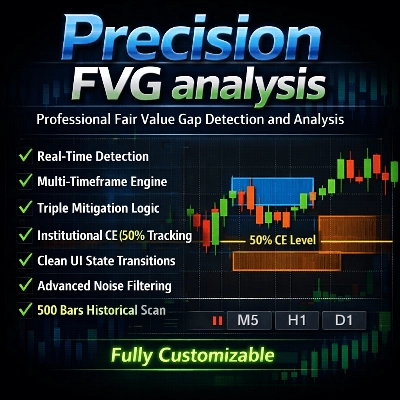
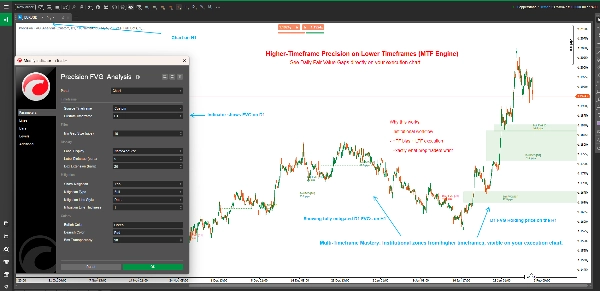
Precision FVG Analyse ist ein leistungsstarker und flexibler Fair Value Gap (FVG) Erkennungsindikator, der für ernsthafte Trader entwickelt wurde, die Smart Money Concepts (SMC) und ICT-Methoden nutzen. Dieser fortschrittliche Indikator identifiziert, verfolgt und visualisiert Fair Value Gaps automatisch über mehrere Zeitrahmen hinweg mit ausgefeilten Mitigations-Tracking-Funktionen.
Fair Value Gaps stellen Ungleichgewichte im Markt dar, bei denen sich der Preis zu schnell bewegt hat und Ineffizienzen hinterlässt, die oft erneut besucht werden. Das Verständnis und der Handel mit diesen Gaps sind für moderne Price-Action-Trader entscheidend.
Hauptmerkmale
🎯 Multi-Zeitrahmen-Analyse
- Adaptive Zeitrahmenerkennung: Wählen Sie, ob FVGs aus dem aktuellen Chart-Zeitrahmen oder einem beliebigen benutzerdefinierten Zeitrahmen angezeigt werden sollen
- Cross-Timeframe Trading: Höhere Zeitrahmen-FVGs auf niedrigeren Zeitrahmen-Charts anzeigen für besseren Handelskontext
- Intelligente Zeitrahmenbeschriftungen: Automatische Zeitrahmenerkennung in Beschriftungen bei Verwendung benutzerdefinierter Zeitrahmen
📊 Fortschrittliches Mitigations-Tracking
- Drei Mitigationstypen:
-
- Volle Mitigation: Der Preis füllt die gesamte Lücke vollständig (am konservativsten)
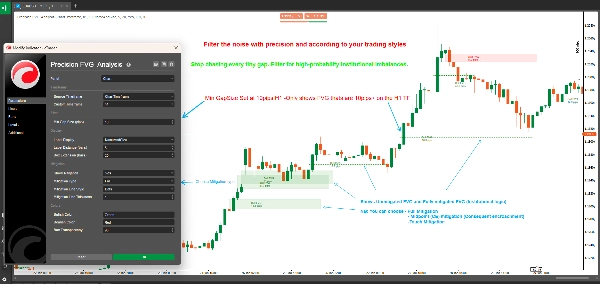
- 50% Mittelpunkt (CE): Der Preis erreicht das Consequent Encroachment Level (ausgewogener Ansatz)
- Touch Mitigation: Der Preis berührt die Gap-Grenze (am sensibelsten)
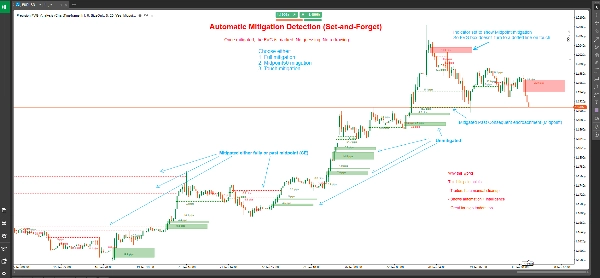
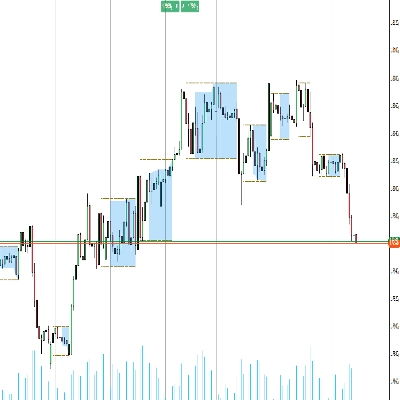
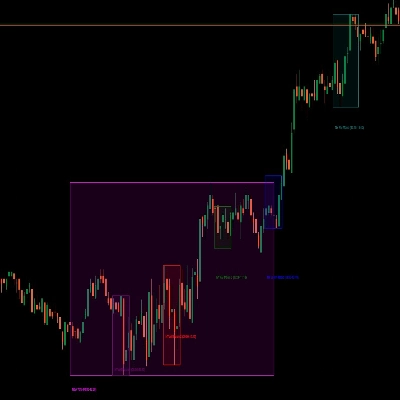
- Visuelle Statusänderungen: Unmitigierte FVGs werden als gefüllte Kästen angezeigt; mitigierte FVGs werden in gepunktete Linien umgewandelt
- Präzise Mitigationsmarkierung: Zeigt die genaue Kerze, bei der die Mitigation stattfand
🎨 Vollständig anpassbare Anzeige
- Flexible Box-Erweiterung: Steuern Sie, wie weit sich FVG-Boxen in die Zukunft erstrecken (0-500 Balken)
- Intelligentes Beschriftungssystem: Wählen Sie aus vier Beschriftungsmodi:
-
- Name und Größe: Vollständige Details mit FVG-Typ und Pip-Größe
- Nur Größe: Nur die Gap-Größe in Pips
- Nur Name: FVG-Typ Identifikation
- Keine: Sauberer Chart ohne Beschriftungen
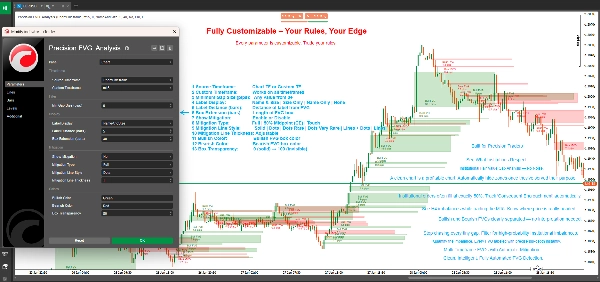
- Benutzerdefinierte Farben: Getrennte Farbpaletten für bullische und bärische Gaps
- Einstellbare Transparenz: Box-Transparenz von 0-100%
- Anpassung der Mitigationslinie: Wählen Sie Linienstil und Dicke für mitigierte FVGs
⚙️ Professionelle Filterung
- Filter für minimale Gap-Größe: Legen Sie die minimale Pip-Anforderung fest, um unwichtige Gaps herauszufiltern
- Automatische Erkennung: Echtzeit-FVG-Erkennung bei jedem neuen Kerzenschluss
- Historisches Scannen: Scannt beim Start automatisch bis zu 500 historische Balken
Was sind Fair Value Gaps?
Fair Value Gaps (FVGs) entstehen, wenn es eine Preisineffizienz zwischen drei aufeinanderfolgenden Kerzen gibt:
Bullisches FVG: Entsteht, wenn das Tief der aktuellen Kerze höher ist als das Hoch der Kerze von vor zwei Balken, wobei die mittlere Kerze über diesem Hoch schließt. Dies erzeugt eine Aufwärtslücke, die oft als Unterstützung dient.
Bärisches FVG: Entsteht, wenn das Hoch der aktuellen Kerze niedriger ist als das Tief der Kerze von vor zwei Balken, wobei die mittlere Kerze unter diesem Tief schließt. Dies erzeugt eine Abwärtslücke, die oft als Widerstand dient.
Diese Gaps repräsentieren Bereiche, in denen aggressives Kaufen oder Verkaufen stattfand und Preisungleichgewichte hinterließ, die der Markt häufig für "fairen Wert" erneut aufsucht, bevor er in die ursprüngliche Richtung weiterläuft.
Verständnis der Mitigationstypen
Volle Mitigation (Konservativ)
- Bullisches FVG: Wird mitigiert, wenn der Preis unter das untere Ende der Lücke handelt
- Bärisches FVG: Wird mitigiert, wenn der Preis über das obere Ende der Lücke handelt
- Anwendungsfall: Bestätigung, dass die Lücke vollständig geschlossen wurde, geeignet für Swing-Trader und Strategien, die Bestätigung suchen
50% Mittelpunkt / CE (Ausgewogen)
- Bullisches FVG: Wird mitigiert, wenn der Preis den Mittelpunkt erreicht oder unterschreitet
- Bärisches FVG: Wird mitigiert, wenn der Preis den Mittelpunkt erreicht oder überschreitet
- Anwendungsfall: Das Consequent Encroachment (CE) Level ist oft der Ort, an dem Institutionen Orders platzieren, was dies ideal für Einstiege mit gutem Risiko-Ertrags-Verhältnis macht
Touch Mitigation (Aggressiv)
- Bullisches FVG: Wird mitigiert, wenn der Preis die obere Grenze berührt oder überschreitet
- Bärisches FVG: Wird mitigiert, wenn der Preis die untere Grenze berührt oder unterschreitet
- Anwendungsfall: Frühwarnsystem für Trader, die Reaktionen an FVG-Grenzen erfassen wollen, ideal für Scalping und schnelle Einstiege
Anwendung
Grundlegende Einrichtung
- Fügen Sie Precision FVG Analyse zu Ihrem Chart hinzu
- Legen Sie Ihren bevorzugten Quell-Zeitrahmen fest:
-
- Wählen Sie "ChartTimeframe", um FVGs im aktuellen Chart zu erkennen
- Wählen Sie "Custom" und wählen Sie einen spezifischen Zeitrahmen (z.B. H4, D1), um FVGs höherer Zeitrahmen zu sehen
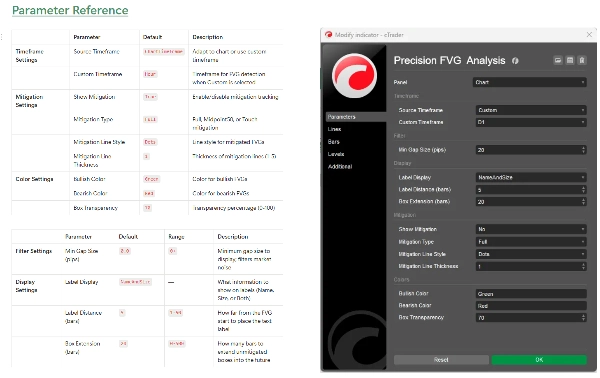
- Konfigurieren Sie Min Gap Size, um kleine, unwichtige Gaps herauszufiltern (empfohlen: 2-5 Pips für Forex)
Mitigations-Konfiguration
- Aktivieren Sie Show Mitigation, um das Mitigations-Tracking zu aktivieren
- Wählen Sie Ihren Mitigationstyp basierend auf Ihrem Handelsstil:
-
- Daytrader und Scalper: Erwägen Sie "Touch" oder "Midpoint50"
- Swing-Trader: Verwenden Sie "Full" zur Bestätigung
- Passen Sie das Aussehen der Mitigationslinie mit Linienstil und Dicke
Visuelle Anpassung
- Stellen Sie Box Extension ein, um zu steuern, wie weit sich die Boxen projizieren (Standard 20 Balken)
- Wählen Sie Ihre Beschriftungsanzeige Präferenz
- Passen Sie Bullische Farbe und Bärische Farbe an Ihr Chart-Thema an
- Feinjustieren Sie Box-Transparenz für optimale Sichtbarkeit
Handelsstrategien
Strategie 1: Höherer Zeitrahmen FVG mit Einstieg im niedrigeren Zeitrahmen
- Stellen Sie den Indikator auf H4 oder D1 Zeitrahmen in einem M15 oder M5 Chart ein
- Identifizieren Sie unmitigierte FVGs höherer Zeitrahmen
- Warten Sie, bis der Preis sich dem FVG im niedrigeren Zeitrahmen nähert
- Suchen Sie nach Bestätigung im niedrigeren Zeitrahmen (Kerzenmuster, Orderblöcke, etc.)
- Einstieg, wenn der Preis Ihr gewähltes Mitigationsniveau erreicht
Strategie 2: FVG-Konfluenzzonen
- Verwenden Sie mehrere Instanzen des Indikators mit unterschiedlichen Zeitrahmen
- Identifizieren Sie Bereiche, in denen sich mehrere Zeitrahmen-FVGs überlappen
- Diese Konfluenzzonen bieten Handelsplätze mit hoher Wahrscheinlichkeit
- Nutzen Sie das Mitigations-Tracking, um Ihre Einstiege präzise zu timen
Strategie 3: Breakout-Bestätigung
- Identifizieren Sie wichtige Unterstützungs-/Widerstandsniveaus
- Beobachten Sie die FVG-Bildung während Breakouts
- Unmitigierte FVGs in Richtung des Breakouts deuten auf eine Fortsetzung hin
- Mitigierte FVGs deuten auf einen möglichen gescheiterten Ausbruch oder eine Umkehr hin
Strategie 4: Mitigationsbasiertes Scalping
- Verwenden Sie Touch Mitigation auf niedrigeren Zeitrahmen (M1, M5)
- Einstieg sofort, wenn das FVG berührt wird
- Ziel ist das vorherige Swing-Hoch/-Tief
- Verwenden Sie enge Stops unterhalb/oberhalb des FVG
Technische Spezifikationen
- Plattform: cTrader
- Typ: Overlay-Indikator
- Berechnung: Echtzeit bei Kerzenschluss
- Historische Balken: Scannt bis zu 500 Balken bei Initialisierung
- Maximale aktive FVGs: 500 gleichzeitige Gaps
- Ressourcennutzung: Leichtgewichtig und für Leistung optimiert
Beste Praktiken
Allgemeine Handelsrichtlinien
- Mit anderen Konzepten kombinieren: FVGs funktionieren am besten in Kombination mit Orderblöcken, Liquiditätspools und Marktstruktur
- Marktkontext respektieren: FVGs höherer Zeitrahmen haben mehr Gewicht als solche niedrigerer Zeitrahmen
- Mehrere Zeitrahmen verwenden: Schichten Sie FVGs verschiedener Zeitrahmen für Konfluenz
- Risikomanagement: Verwenden Sie immer angemessene Stop-Losses; nicht alle FVGs halten
Optimierungstipps
- Min Gap Size anpassen: Basierend auf der durchschnittlichen Volatilität Ihres Instruments einstellen
- Box Extension: Länger für Swing-Trading (50-100 Balken), kürzer für Day-Trading (10-20 Balken)
- Mitigationstyp: An Ihren Handelszeitrahmen und Stil anpassen
- Beschriftungsabstand: Basierend auf Chart-Unordnung und Zoomstufe anpassen
Häufige Fehler vermeiden
- Überhandelung: Nicht jedes FVG ist eine Handelsgelegenheit
- Kontext ignorieren: FVGs gegen starke Trends sind weniger zuverlässig
- Falscher Mitigationstyp: Scalper, die volle Mitigation verwenden, verpassen Einstiege; Swing-Trader mit Touch werden ausgestoppt
- Keine Bestätigung: Warten Sie immer auf Price-Action-Bestätigung an FVG-Niveaus
Häufig gestellte Fragen
F: Warum verschwinden manche FVGs sofort? A: Wenn "Show Mitigation" mit "Touch" Mitigation aktiviert ist, werden FVGs, die sofort zurückverfolgt werden, schnell in gepunktete Linien umgewandelt. Dies ist normales Verhalten.
F: Kann ich mehrere Zeitrahmen-FVGs gleichzeitig sehen? A: Ja! Fügen Sie den Indikator mehrfach mit verschiedenen benutzerdefinierten Zeitrahmen zu Ihrem Chart hinzu für Multi-Zeitrahmen-Analyse.
F: Was unterscheidet diesen von anderen FVG-Indikatoren? A: Precision FVG Analyse bietet Multi-Zeitrahmen-Fähigkeit, drei Mitigationstypen und überlegene visuelle Klarheit mit zustandsbasierter Darstellung (Boxen vs. Linien).
F: Welchen Mitigationstyp sollte ich verwenden? A: Beginnen Sie mit Midpoint50 (CE), da es frühe Signale mit Zuverlässigkeit ausbalanciert. Passen Sie es basierend auf Ihren Ergebnissen und Handelsstil an.
F: Funktioniert das auf allen Instrumenten? A: Ja, der Indikator funktioniert auf Forex, Indizes, Rohstoffen und Kryptowährungen. Passen Sie den Parameter "Min Gap Size" basierend auf der Volatilität des Instruments an.
F: Wie weit zurück reicht das historische Scannen? A: Der Indikator scannt bis zu 500 Balken bei der Initialisierung und bietet umfassenden historischen Kontext.
Support und Updates
Dieser Indikator wird aktiv gepflegt und aktualisiert. Benutzer erhalten:
- Regelmäßige Updates mit neuen Funktionen
- Leistungsoptimierungen
- Fehlerbehebungen und Verbesserungen
- Dokumentationsupdates
Für Fragen, Vorschläge oder Support kontaktieren Sie bitte das cTrader Store Messaging-System.
Haftungsausschluss
Der Handel birgt ein erhebliches Verlustrisiko und ist nicht für alle Anleger geeignet. Die vergangene Performance ist kein Indikator für zukünftige Ergebnisse. Dieser Indikator ist ein Analysewerkzeug und stellt keine Finanzberatung dar. Üben Sie stets ein angemessenes Risikomanagement und riskieren Sie niemals mehr, als Sie sich leisten können zu verlieren.
Versionsverlauf
Version 1.0 (Aktuell)
- Multi-Zeitrahmen FVG-Erkennung
- Drei Mitigationstypen (Full, Midpoint50, Touch)
- Visuelle Statusänderungen (Boxen zu gepunkteten Linien)
- Anpassbare Farben und Transparenz
- Flexibles Beschriftungssystem
- Historisches Scannen (500 Balken)
- Echtzeit-Erkennung und -Verfolgung
Precision FVG Analyse - Heben Sie Ihren Fair Value Gap Handel auf das professionelle Niveau.
Zusammenfassung
Key features include adaptive multi-timeframe detection, allowing users to view FVGs from the current or custom timeframes, and advanced mitigation tracking with three types: Full Mitigation (complete gap fill), 50% Midpoint (Consequent Encroachment), and Touch Mitigation (gap boundary touch). Visual states change accordingly, with unmitigated gaps shown as filled boxes and mitigated ones as dotted lines, including precise candle marking of mitigation events.
The indicator offers extensive customization options such as box extension length, label display modes (name, size, both, or none), separate bullish/bearish color schemes, transparency control, and mitigation line styling. It filters gaps by minimum size and scans up to 500 historical bars on initialization for comprehensive context.
Applicable to Forex, Indices, Commodities, Cryptocurrencies, and Stocks, it supports various trading strategies including multi-timeframe analysis, confluence zones, breakout confirmation, and mitigation-based scalping. The tool operates in real-time on bar close and is optimized for performance with up to 500 active gaps tracked concurrently.
Kundenbewertungen
5 | 50 % | |
4 | 50 % | |
3 | 0 % | |
2 | 0 % | |
1 | 0 % |
Diskussion
Häufig gestellte Fragen (FAQ)






Preis