

wt.Tick Imbalance Bars
إضافة سطح المكتب
الإصدار 1.0، Feb 2026
Windows, Mac
5.0
التقييمات: 3
98.17M
حجم التداول
147.13K
الربح بالبيب
89
المبيعات
522
التثبيتات المجانية
الوصف
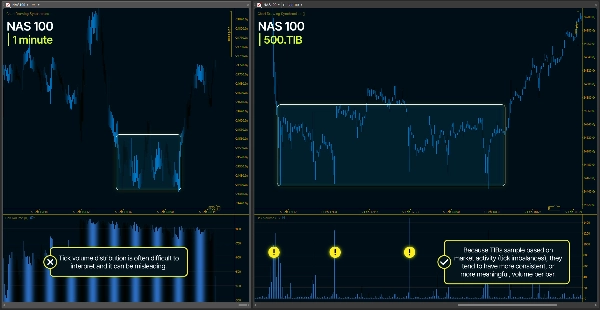
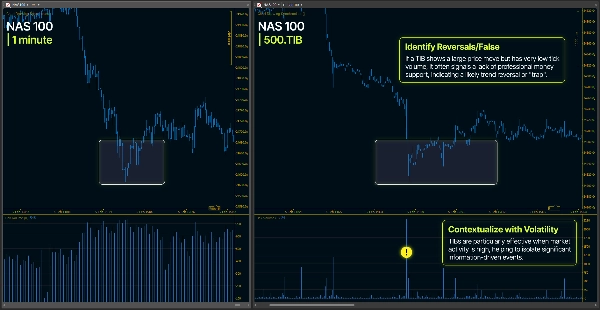
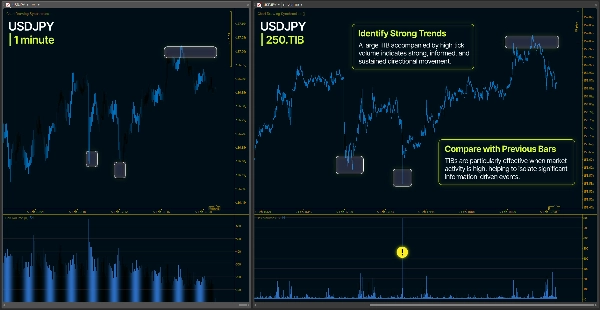
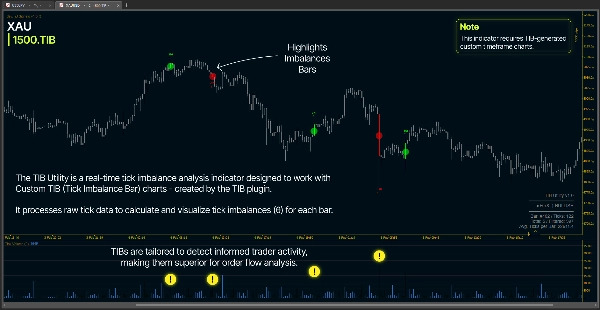
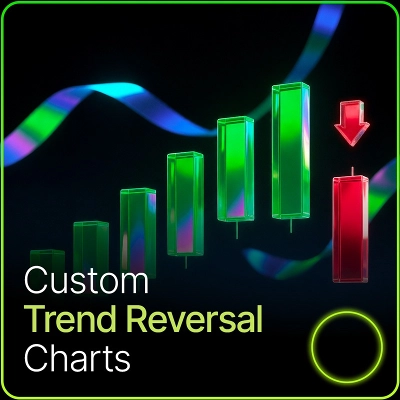
يقوم ملحق أشرطة عدم التوازن في التيك (TIB) بإطار زمني مخصص بإنشاء أطر زمنية مخصصة بناءً على ديناميكيات تدفق التيك بدلاً من الفواصل الزمنية الثابتة. على عكس الأطر الزمنية التقليدية (1 دقيقة، 5 دقائق، 1 ساعة)، تتشكل أشرطة TIB عندما يصل عدم التوازن التراكمي للتيك إلى عتبة ديناميكية.
المفهوم الرئيسي
- يتم تصنيف كل تيك كـ +1 (تيك صاعد)، -1 (تيك هابط)، أو العلامة السابقة (لا تغيير في السعر)
- تتراكم هذه التيكات الموقعة لتكوين عدم توازن جاري: θ (ثيتا)
- عندما يصل |θ| إلى عتبة، يتشكل شريط جديد
- تتكيف العتبة بناءً على أنماط تدفق التيك الأخيرة
- يؤدي هذا إلى إنشاء أشرطة تعكس النشاط الفعلي للسوق بدلاً من تقسيمات زمنية عشوائية
العتبة التكيفية. يستخدم الملحق المتوسط المتحرك المرجح أسيًا (EWMA) لتقدير احتمال التيكات الصاعدة مقابل التيكات الهابطة. يتم تحديث هذا التقدير باستمرار وضبط عتبة تشكيل الشريط، مما يجعل الإطار الزمني متكيفًا مع تغيرات ظروف السوق.
التجميع التكيفي. عندما يغلق الشريط عادةً بعدد قليل جدًا من التيكات (شريط صغير)، يدخل الملحق تلقائيًا في وضع التجميع ويستمر في تراكم التيكات حتى الوصول إلى عتبة دنيا. هذا يمنع الأشرطة المجزأة مع الحفاظ على خوارزمية TIB الأساسية.
دليل معلمات الملحق
حجم الشريط المتوقع
- النطاق: 50 - 10000
- ما يفعله: يحدد عدد التيكات المستهدف لكل شريط
- التأثير: القيم الأعلى تخلق أشرطة أقل وأكبر؛ القيم الأقل تخلق أشرطة أكثر وأصغر
- التأثير المباشر: هذا هو التحكم الأساسي في تكرار الأشرطة
معامل ألفا لـ EWMA
- النطاق: 0,001 - 0.9 (القيمة الافتراضية الموصى بها 0,001)
- ما يفعله: يتحكم في مدى استجابة العتبة لأنماط التيك الأخيرة
- التأثير:
-
- القيم الأعلى = أكثر تفاعلية، تتبع التغيرات الأخيرة بسرعة
- القيم الأقل = أكثر استقرارًا، تميل إلى التنعيم على فترات أطول
- التأثير على الأشرطة: يؤثر على سرعة تعديل حجم الشريط لتغير ظروف السوق
عدم التوازن الابتدائي
- النطاق: 0.0 - 1.0 (القيمة الافتراضية الموصى بها 0.5)
- ما يفعله: يحدد تقدير احتمال التيكات الصاعدة في البداية
- التأثير:
-
- 0.5 = نقطة بداية محايدة (50% صعود، 50% هبوط)
- فوق 0.5 = ميل صعودي عند التهيئة
- تحت 0.5 = ميل هبوطي عند التهيئة
- التأثير على الأشرطة: يؤثر فقط على الأشرطة القليلة الأولى، ثم يتولى EWMA المهمة
امتداد الاسم
- ما يفعله: يضيف لاحقة مخصصة لاسم الإطار الزمني
- التأثير: "Live" ينشئ "1000.TIB-Live"، مما يسمح بوجود نسخ متعددة بإعدادات مختلفة
- الغرض: يميز بين تكوينات TIB المختلفة في قائمة الإطارات الزمنية المخصصة
أقصى عدد أيام للتاريخ
- النطاق: 1 - 30 (القيمة الافتراضية الموصى بها >5)
- ما يفعله: يحدد عدد أيام بيانات التيك التاريخية التي يتم تحميلها
- التأثير: المزيد من الأيام = المزيد من الأشرطة التاريخية ولكن وقت تحميل أولي أطول
- المقايضة: تحميل 30 يومًا من بيانات التيك قد يستغرق وقتًا كبيرًا حسب حجم التيك
- ملاحظة: قيمة النطاق تحسب أيضًا أيام عطلة نهاية الأسبوع.
الحد الأدنى لعدد التيكات لكل شريط
- النطاق: 10 - 500
- ما يفعله: يحدد الحد الأدنى لعدد التيكات المسموح بها في أي شريط
- التأثير: عندما يغلق شريط بعدد أقل من التيكات، يتم تفعيل وضع التجميع
- الغرض: يمنع الأشرطة الصغيرة خلال فترات النشاط المنخفض
- الإعداد الشائع: 5-10% من حجم الشريط المتوقع
لا تتردد في الاتصال بي للحصول على دليل الاستخدام الكامل. يسعدني إرشادك خلال إعداد كل شيء بشكل صحيح.
هذا الملحق (المنتج) مرتبط مباشرة بالمنتجات التالية:
1. WT - أشرطة عدم التوازن في التيك - نسخة المؤشر
- الاستخدام: نفس خوارزمية TIB الأساسية تُطبق (مُغطاة على أطر زمنية أصلية في cTrader)
- وصف كامل متاح في صفحة منتج المؤشر
2. wt.TiB أداة مساعدة - نسخة المؤشر
- الاستخدام: يبرز ويوفر إشعارات / تنبيهات لأحداث متعلقة بـ TIB
- وصف كامل متاح في صفحة منتج المؤشر
ملاحظة مهمة
يتم تضمين مؤشر TIB وملحق TIB بدون تكلفة إضافية مع شراء أي من المنتجين. على الرغم من أنهما مدرجان كمنتجات منفصلة، إلا أن شراء واحد فقط مطلوب. على سبيل المثال، شراء مؤشر TIB يمنحك أيضًا الوصول إلى ملحق TIB، والعكس صحيح. يرجى الاتصال بي بعد الشراء لاستلام الملف المرتبط.
الملخص
ملف تعريف الإضافة
فئة الإضافات
الخدمات
الوصول إلى البيانات
بيانات السوق
المراكز
الأوامر
الرسم البياني
أنواع الأوامر المدعومة
السوق
حد
إيقاف
إيقاف - حد
ضوابط المخاطر المدعومة
إيقاف الخسارة
جني الأرباح
إيقاف الخسارة المتحرك
فلتر الجلسة
فلتر الفروقات السعرية
فلتر الأخبار
نقطة التعادل
إيقاف خسارة رأس المال
الحدود اليومية
الحد الأقصى للتراجع
تقييمات العملاء
5.0
التقييمات: 3
5 | 100 % | |
4 | 0 % | |
3 | 0 % | |
2 | 0 % | |
1 | 0 % |
تقييمات العملاء
February 11, 2026
Useful tool, but not for lazy entries. It supports reviewing information faster and feels more useful if the trader stays selective.
February 11, 2026
No reason to judge this from 1 good trade. A better check is 10 minute checks, 20 percent less clicking and 2 weeks before using a larger account.
February 8, 2026
The product feels practical for platform workflow if the trader keeps control. A 90 setup sample on M5 should show whether it really helps.
مناقشة
الأسئلة الشائعة
Prop
Forex
Signal
Breakout
Scalping
Indices
Commodities
يتم توفير المنتجات المتاحة من خلال cTrader Store، بما في ذلك روبوتات التداول والمؤشرات والإضافات، من قبل مطوري الطرف الثالث وإتاحتها لأغراض الوصول المعلوماتي والفني فقط. cTrader Store ليس وسيطًا ولا يقدم نصائح استثمارية أو توصيات شخصية أو أي ضمان للأداء المستقبلي.






![شعار "Custom Timeframes [Iridio Capital]"](https://cdn.ctrader.com/image/webp/4d75a920-23c7-4fea-a7b5-594a9d067f2e_63286)









السعر
98.17M
حجم التداول
147.13K
الربح بالبيب
89
المبيعات
522
التثبيتات المجانية