


Description
Permettez-moi de vous présenter => Le Gestionnaire de Positions
- La gestion tout-en-un du trading pour les Traders et Développeurs
Pour les Traders => Protégez les profits, Limitez les pertes et Faites respecter la discipline grâce à des paramètres configurables.
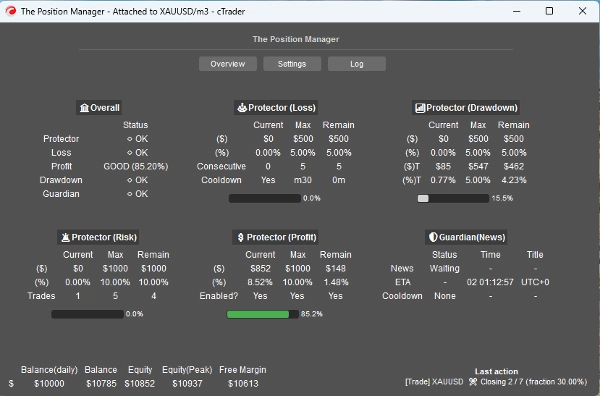
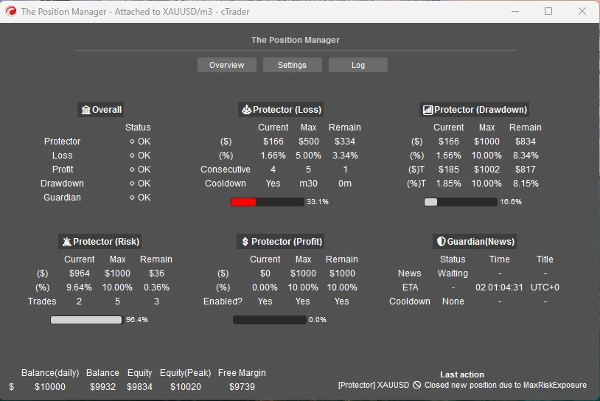
Le Gestionnaire de Positions comprend 4 modules qui justifient son nom :
- Protecteur de Portefeuille
- Trading Gardien
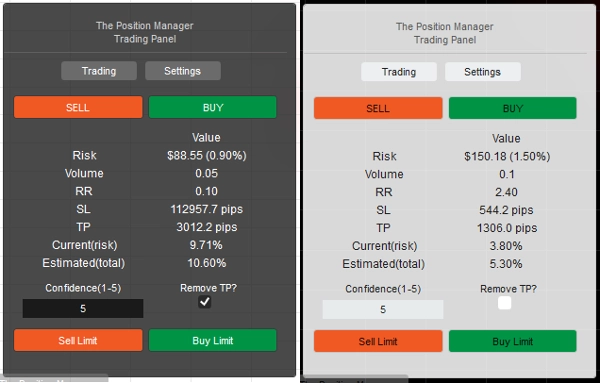
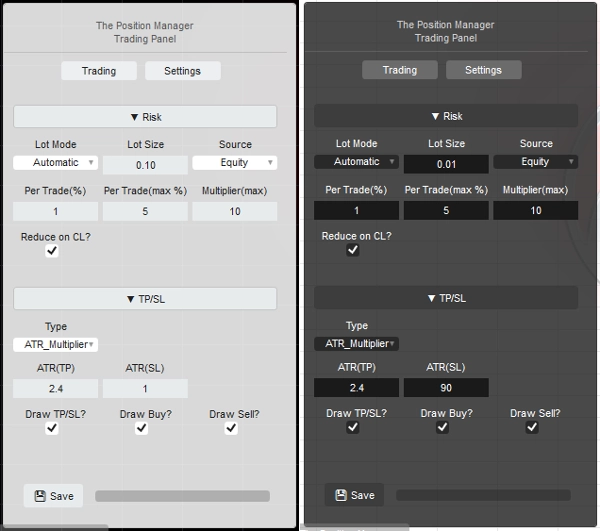
- Gestionnaire de Risque (pour trading manuel/semi-automatisé)
- Gestionnaire de Trading (TP suiveur, TP/SL partiels)
Chacun avec des sous-modules pour une meilleure gestion.
Cas d'utilisation :
- Traders cherchant la protection du portefeuille + une montée en puissance intelligente lors du trading sur Desktop, Mobile et Web.
-
- Si vous tradez entièrement via Desktop, utilisez Mode Headless => OFF
- Si vous tradez également via Mobile/Web, utilisez Mode Headless => ON
- Prop-Traders avec des limites de risque fixes.
- Développeurs souhaitant transformer les signaux de trading en entrées réelles.
Comment utiliser :
- Pour la première utilisation, je recommande fortement de :
- Créer une seule instance de "Le Gestionnaire de Positions" avec :
- Mode Headless => OFF (mode UI)
- Mode Instance => Les deux (Gestionnaire + Panneau de Trading)
- Puis apprendre son comportement, de préférence en backtesting(mode visuel) avant de passer en live.
Gardez à l'esprit => "Le Gestionnaire de Positions" n'ouvre pas de positions lui-même :
- Il gère celles existantes !
- tout en fournissant une gestion au niveau du compte.
Pour les petits comptes, vous pouvez augmenter les pourcentages.
Pour les gros comptes, vous pouvez diminuer les pourcentages.
Dans tous les cas, adaptez toujours les paramètres à la taille de votre compte.
Une fois que vous êtes familiarisé avec les paramètres/comportement, vous pouvez l'exécuter sur cTrader Cloud afin de gérer les positions sur Mobile/Web, il y a juste deux règles simples à suivre :
- Mode Headless => ON
- Aussi, une seule instance de "Le Gestionnaire de Positions" doit être ajoutée :
-
- Sinon, elles pourraient “se battre” entre elles, car la plupart des opérations concernent tous les symboles.
- La même règle s'applique lors d'une exécution locale.
Permettez-moi de vous expliquer les paramètres et le comportement attendu pour chacun :
Même si certains sont intuitifs, il y a beaucoup de paramètres...
Veuillez lire chacun avec patience.
==== La Gestion des Positions ====
- Mode Headless ? => Les fonctionnalités disponibles dans ce mode sont :
-
- Protecteur de Portefeuille
-
- Toutes les fonctionnalités sont disponibles.
- Trading Gardien
-
- Le filtre d'actualités est désactivé si Mode Headless => ON.
- Profit Suiveur
-
- Pour tout symbole, les positions ne doivent pas avoir de Take Profit.
- Fermetures Partielles
-
- Pour tout symbole, les positions doivent avoir un Take Profit ou un Stop Loss
=> Headless OFF (mode UI)
- Mode Instance :
-
- Gestionnaire => Une seule instance doit être ajoutée.
- Trading => Panneau de trading pur (module Gestionnaire de Risque), vous pouvez ajouter plusieurs instances.
- Les deux => Une seule instance doit être ajoutée :
-
- Gestionnaire sera affiché en tant que fenêtre.
- Trading sera affiché sur le graphique.
- Type/Position du Panneau : Explicite
- Stockage par :
-
- Utilisez Broker pour sauvegarder/charger les mêmes paramètres à chaque redémarrage.
- Utilisez Broker_Symbol si vous souhaitez utiliser chaque configuration de symbole comme un “profil de risque”.
=> Headless OFF/ON - Localement
- Autoriser le mode message ?
-
- Explicite
- Lors de l'utilisation de [Trading, Both] Mode Instance, changez le “TP/SL => Type” en “Pips” dans les paramètres du panneau pour que le TP/SL puisse être défini par message.
- Autoriser le trading par message ?
-
- Autoriser l'ouverture de positions via les messages.
- Si Headless ON, la configuration du Gestionnaire de Risque n'est pas possible.
- Si Headless OFF, lors de l'utilisation de [Trading, Both] Mode Instance, vous pouvez configurer le module Gestionnaire de Risque comme vous le souhaitez.
=> Headless ON / Général Compte
- Breakeven Minimal (%) :
-
- Pour chaque position, lorsque la logique Breakeven est exécutée par les modules Trailing/Partial Profit, au lieu de déplacer le SL directement au prix d'entrée (ce qui conduit à un PnL négatif).
- Le SL sera déplacé x% en avant vers le prix d'entrée.
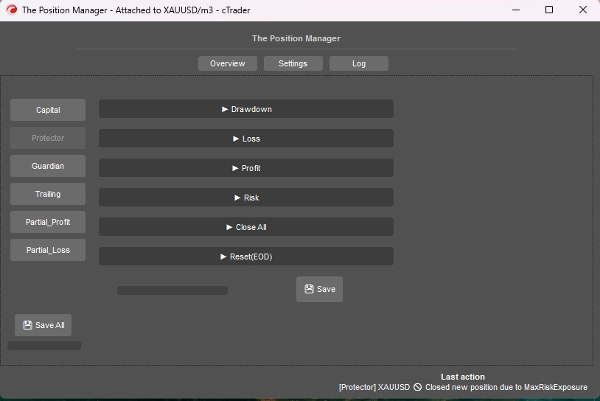
=> Headless ON / Protecteur Drawdown
- Mode Drawdown :
-
- Quotidien => Basé sur le solde du jour
- Suiveur => Basé sur le pic d'équité
- Type de Drawdown :
-
- Pourcentage => % du solde du jour, idéal pour une croissance dynamique.
- Fixe => Montant fixe, idéal pour des règles strictes
- Drawdown Max => % ou fixe (explicite)
=> Headless ON / Protecteur Perte
- Source de Perte : => Actuellement, basé uniquement sur le “Solde du Jour”.
-
- Si l'équité descend en dessous du solde du jour, alors cela sera déclenché/comptabilisé.
- Type de Perte :
-
- Pourcentage => % du solde du jour, idéal pour une croissance dynamique.
- Fixe => Montant fixe, idéal pour des règles strictes
- Perte Max Quotidienne² => % ou fixe (explicite)
- Pertes Consécutives (CL) :
-
- Active la fermeture des positions en cas de pertes consécutives.
- Compte Consécutif :
-
- Explicite
- Temps de Recharge pour Réinitialiser (CL) :
-
- Temps de recharge pour réinitialiser le compte et permettre l'ouverture de nouvelles positions.
=> Headless ON / Protecteur Profit
- Activer le plafond de profit ? => Explicite
-
- Une fois que le Profit Maximal est atteint, les nouvelles positions seront fermées.
- Source de Profit : => Toujours basé sur le solde du jour
- Type de Profit :
-
- Pourcentage => % du solde du jour, idéal pour une croissance dynamique.
- Fixe => Montant fixe, idéal pour des règles strictes
- Profit Maximal² => % ou fixe (explicite)
=> Headless ON / Protecteur Risque
- Exposition Totale (%) :
-
- Elle prend aussi en compte les positions en Breakeven.
- Nombre Total de Trades Ouverts :
-
- Les nouvelles positions seront fermées si le Nombre Total est égal au Nombre Total de Trades Ouverts
=> Headless ON / Protecteur FermerTout
- Fermer à la fin de la journée ? => Fermer toutes les positions à la fin de la journée
- Fermer à la fin de la semaine ? => Fermer toutes les positions à la fin de la semaine (vendredi), utilise les heures de fin de journée comme référence.
=> Headless ON / Protecteur Réinitialisation (EOD)
- Heure pour “réinitialiser” le suivi du pic d'équité, ainsi que la logique CloseAll exécutée, si applicable.
- Réinitialisation (Heure) => 0h - 23h
- Réinitialisation (Minute) => 0m – 59m
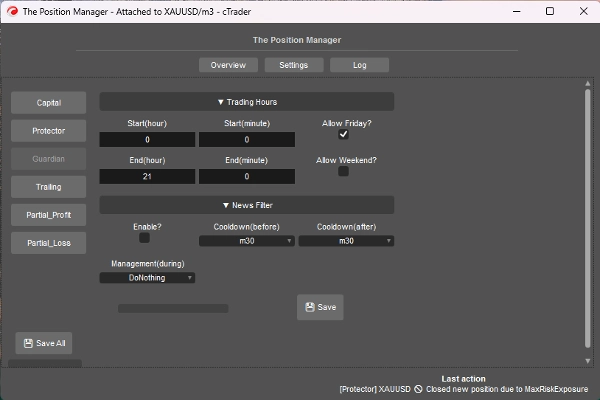
=> Headless ON / Gardien
- Les positions ouvertes en dehors des heures de trading ou du jour autorisé seront automatiquement fermées.
-
- Début/Fin (Heure) => 0h – 23h
- Début/Fin (Minute) => 0m – 59m
- Autoriser le vendredi ? => Explicite
- Autoriser le week-end ? (crypto) => Explicite
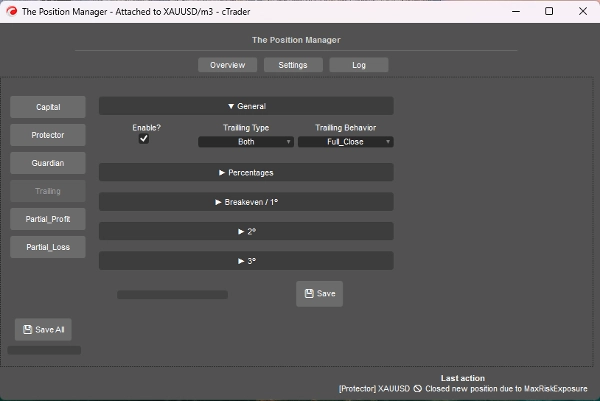
=> Headless ON / Profit Suiveur
- C'est un Take Profit basé sur l'équité
- Activer ?
-
- Pour les positions sans TP, idéal pour les positions suivant la tendance.
- => Type :
-
- Pourcentage => Pourcentage pur d'équité
- Drawdown => Basé sur le concept de DD suiveur (Pic d'équité), pensez en termes de retraits/retracements de prix.
- Les deux => Le comportement Partial_Close est activé par défaut :
-
- Type pourcentage pour les partiels.
- Type drawdown pour la sortie complète.
- Comportement :
-
- Fermeture complète :
-
- Une fois le % cible d'équité atteint, fermer toutes les positions sans TP.
- Aussi, lorsque la moitié du % cible d'équité est atteinte, le SL est déplacé au breakeven.
- Fermeture partielle :
-
- Activer les fermetures partielles.
- Gardez à l'esprit => Si la taille de la position (taille du lot) est trop petite pour une fermeture partielle, la position sera entièrement fermée.
- Profit Minimal (%) :
-
- Le profit minimal pour activer la logique de trailing.
- => Fermeture complète à (%) :
-
- Pour comportement “Fermeture complète” uniquement.
- => [Les deux] Fermeture Drawdown (%) :
-
- Pour le type “Les deux” uniquement.
- => [Seulement %] SL Intelligent ?"
-
- Pour le type “Pourcentage” uniquement.
- C'est assez similaire au type Drawdown, mais plus réactif grâce au SL suiveur
- Partiel 1 (%) / Partiel 2 (%)
-
- % cible d'équité pour exécuter les partiels (Pourcentage ou Les deux)
- Vérifiez toujours si le type Trailing est Pourcentage ou Drawdown
- Partiel 1 (% ordre) / Partiel 2 (% ordre)
-
- Explicite
- => Fermeture 3 (%) :
-
- % cible d'équité pour fermer complètement les positions sans TP.
- Pour types Pourcentage ou Drawdown uniquement
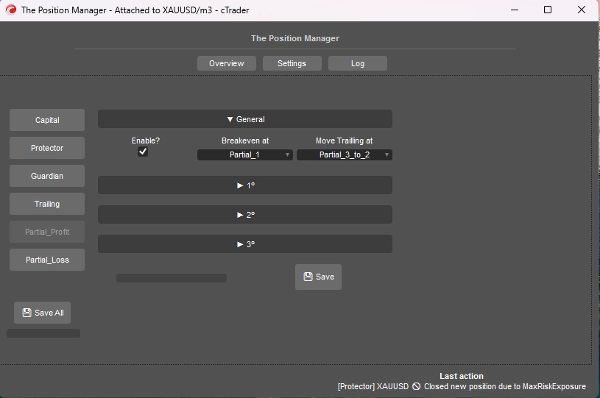
=> Headless ON / Profit Partiel
- Activer ?
-
- Pour les positions avec TP, idéal pour le day-trading ou le scalping.
- Le prix d'entrée sera le 0%
- Le Take Profit sera le 100%
- Les prix partiels seront calculés selon cette approche.
- Breakeven à :
-
- Explicite, déplacer le SL au BE lorsque le partiel sélectionné est déclenché.
- => Déplacer le Trailing à :
-
- Explicite, déplacer le SL au prix partiel précédent lorsque le partiel sélectionné est déclenché.
- Gardez à l'esprit => Assurez-vous que le 2e ou 3e partiel est activé.
- Partiel 1 (%) /
Partiel 2 (%) /
Partiel 3 (%) -
- Pourcentages entre Prix d'entrée et Take Profit.
- => Activer 2e ?
=> Activer 3e ? -
- Explicite
- Partiel 1 (% ordre) /
Partiel 2 (% ordre) /
Partiel 3 (% ordre) -
- Explicite
=> Headless ON / Perte Partielle
- Activer ?
-
- Pour les positions avec SL, idéal pour limiter les pertes des trades perdants qui pourraient revenir dans la direction.
- Le prix d'entrée sera le 0%
- Le Stop Loss sera le 100%
- Les prix partiels seront calculés selon cette approche.
- Partiel 1 (%) /
Partiel 2 (%) /
Partiel 3 (%) -
- Pourcentages entre Prix d'entrée et Stop Loss.
- => Activer 2e ?
=> Activer 3e ? -
- Explicite
- Partiel 1 (% ordre) /
Partiel 2 (% ordre) /
Partiel 3 (% ordre) -
- Explicite
====================================================
Pour les Développeurs => Plug-and-Play pour toute stratégie via Messages/abonnements de cTrader Algo.
- Pour les systèmes semi ou entièrement automatisés :
- Semi : Les ordres sont toujours ouverts par nous-mêmes, mais :
-
- Le SL et le TP sont définis par Messages/abonnements.
- Entièrement : Les signaux d'ordre sont envoyés via Messages/abonnements à “Le Gestionnaire de Positions”
-
- La configuration du “Gestionnaire de Risque” peut ne pas être disponible dans cette approche.
C'est assez simple, vous devez juste envoyer le signal en utilisant la classe suivante :
public class TradeSignal
{
public string Symbol { get; set; }
public TradeType Direction { get; set; }
public double StopLossPips { get; set; }
public double? TakeProfitPips { get; set; } // null = sans TP
public string StrategyId { get; set; }
public double? EntryPrice { get; set; } // null = marché, sinon ordre limite.
public DateTime Timestamp { get; set; }
public int Confidence { get; set; } // 1–5
}
Ensuite :
Messages.Send("ThePositionManager", signal);
Exemple court :
TradeSignal signal = new()
{
Symbol = Symbol.Name,
Direction = TradeType.Buy,
StopLossPips = 1500,
TakeProfitPips = 3000,
StrategyId = "MyStrategy",
Confidence = 5
};
Messages.Send("ThePositionManager", signal);
Résumé
Key features include four main modules: Portfolio Protector, Guardian Trading, Risk Manager (for manual or semi-automated trading), and Trade Manager (supporting trailing take profit and partial take profit/stop loss). The tool supports intelligent scaling and portfolio protection across Desktop, Mobile, and Web platforms, with a Headless mode option for managing positions remotely via cTrader Cloud.
For traders, it offers configurable risk controls such as daily and trailing drawdown limits, profit caps, exposure limits, and automated position closing based on trading hours or drawdown thresholds. Trailing profit and partial profit/loss management allow dynamic adjustment of stop loss and take profit levels to optimize trade exits.
Developers can integrate The Position Manager with automated strategies by sending trade signals via messages, enabling semi or fully automated order management with customizable stop loss and take profit settings.
The tool supports saving settings by broker or symbol, and includes detailed parameters for break-even management, risk exposure, and partial close orders, making it adaptable to various account sizes and trading styles.
Avis clients
5 | 0 % | |
4 | 67 % | |
3 | 33 % | |
2 | 0 % | |
1 | 0 % |
Discussion
Questions fréquentes
Vous pourriez aussi aimer











Prix