![Trading product for [CB] RR Management cBot Forex Indices, image 1](https://cdn.ctrader.com/image/webp/0390d544-4996-4346-974b-d41dd9e73c64_32505)
![Trading product for [CB] RR Management cBot Forex Indices, image 2](https://cdn.ctrader.com/image/webp/62a2f277-6531-4405-9387-d4eec2142b06_32506)
![Trading product for [CB] RR Management cBot Forex Indices, image 3](https://cdn.ctrader.com/image/webp/b9dad7e0-8fa2-4f29-8bf7-8b47116e97fa_32507)
![Trading product for [CB] RR Management cBot Forex Indices, image 4](https://cdn.ctrader.com/image/webp/772e2aa1-7349-43fa-ae70-fdc71ff9cf24_32508)
![Trading product for [CB] RR Management cBot Forex Indices, image 5](https://cdn.ctrader.com/image/webp/f2cdb27c-4b85-472a-a3c8-a2d607c06558_32509)
![Trading product for [CB] RR Management cBot Forex Indices, image 6](https://cdn.ctrader.com/image/webp/2d928340-8ae7-49f7-8942-4263af502b02_32510)
الوصف
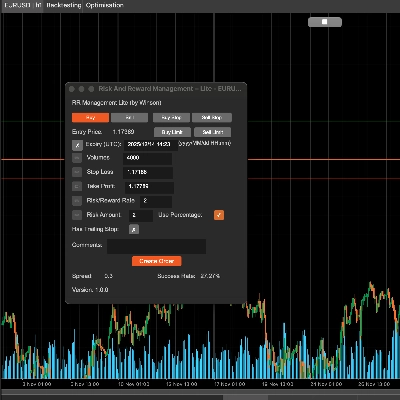
يمكن لأداة إدارة المخاطر والمكافآت في cTrader مساعدتك بسهولة في تعيين قيم المخاطرة مقابل المكافأة، يمكنك فقط سحب خطوط جني الأرباح ووقف الخسارة لحساب مبلغ المخاطرة أو الأحجام المطلوبة تلقائيًا. كما يتضمن ميزة جني الأرباح التلقائي التي ستسمح لك بتعيين أربعة (4) سيناريوهات مختلفة لقفل تلك الأرباح.
تخطيط تداولاتك هو أحد أهم أجزاء حياة المتداول اليومي، إذا فشلت في القيام بذلك ستفشل، ستسمح لك هذه الأداة بسهولة بتعيين أهداف جني الأرباح ووقف الخسارة بناءً على شهية المخاطرة الخاصة بك.
الميزات الرئيسية
- اسحب خط TP/SL لحساب قيم المخاطرة/المكافأة تلقائيًا
- جني الأرباح التلقائي للـ الأوامر المعلقة .
- استنادًا إلى القيمة أدناه لتعيين معلومات المخاطرة/المكافأة
- الأحجام: تعيين الأحجام سيحسب مبلغ المخاطرة تلقائيًا
- وقف الخسارة: تعيين SL لحساب معدل ومبلغ TP/RR
- جني الأرباح: تعيين TP سيحسب تلقائيًا معدل ومبلغ SL/RR
- معدل المخاطرة/المكافأة: تعيين معدل RR سيحسب TP تلقائيًا
- مبلغ المخاطرة (مع/بدون نسبة مئوية): يمكنك تعيين القيمة الفعلية للمبلغ أو مع النسبة المئوية
- يمكن استخدام وقف التتبع
- إضافة التعليقات إلى الأمر
- دعم أوامر الشراء، البيع، شراء إيقاف، بيع إيقاف
- تعيين جني الأرباح التلقائي (ولكن لأن هذه cBot فإذا استخدمت هذه الوظيفة لا يمكنك إيقاف الأداة)
- دعم ويندوز وماك أو إس
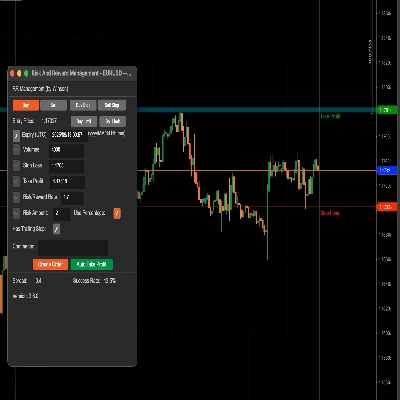
اسحب خط وقف الخسارة (الافتراضي أخضر) وسيحسب تلقائيًا معدل المخاطرة والمكافأة ومقدار الحجم لحجم المركز. يمكنك أيضًا تحديث الحجم عن طريق الإدخال اليدوي، عند تغيير القيمة أدناه، سيتم تمكين أيقونة التحرير اليسرى بحيث يمكنك تحديث القيم.
دعم أوامر الحد للشراء والبيع
الأداة تدعم الآن أوامر الحد للشراء والبيع مع تاريخ/وقت انتهاء الصلاحية.
استخدام النسبة المئوية
إذا كنت تريد استخدام النسبة المئوية بناءً على رصيدك، فقط انقر على مربع اختيار استخدام النسبة المئوية أو سيستخدم القيمة الفعلية للمبلغ. ملاحظة: إذا كان رصيد حسابك صغيرًا، فلن ينخفض الحجم المحسوب إلى أقل من أصغر حجم مركز مسموح به للرمز.
معدل المخاطرة والمكافأة
يمكنك تعيين المخاطرة مقابل المكافأة لوقف الخسارة وجني الأرباح، لذا فإن معدل المخاطرة/المكافأة 2 سيكون حيث يكون جني أرباحك ضعف مخاطرتك، عند النقر على زر البيع سيتم حساب وقف الخسارة وجني الأرباح تلقائيًا باستخدام هذه النسبة.
معدل النجاح
معدل النجاح يعتمد على جميع أوامرك السابقة، سيحسب الأوامر الناجحة للمعدل، و"وقف التتبع" هو مجرد خيار أصلي لـ cTrader لإنشاء أمر ليعمل، أنا فقط أمرر هذا عند إنشاء الأمر.
زر جني الأرباح التلقائي
هناك 3 مستويات لتعيين جني الأرباح التلقائي، مما يعني أنه يمكنك استخدام 4 شروط لجني الأرباح، على سبيل المثال:
- جني 50% من الأرباح الجزئية بعد تحقيق أكثر من 60% من هدف الربح.
- جني 50% من الأرباح الجزئية عندما يصل سعر الرمز إلى 60 أو لزوج العملات شيء مثل 1.72245
يمكنك تعديل القيم أعلاه أثناء التشغيل، ستسري التغييرات فورًا إذا كنت قد بدأت زر جني الأرباح. كما سيتم إعادة تعيين جميع القيم بعد إيقاف cBot. إذا تم تحقيق الربح 1 فلن يتم جني الأرباح مرة أخرى، هذا يعني أنه يعمل مرة واحدة فقط لكل شرط ربح ما لم يتم إيقاف الربح التلقائي وتشغيله مرة أخرى، سيعيد تعيين جميع حالات الشروط.
تحديث: هناك الآن دعم للأوامر المعلقة لتطبيق جني الأرباح التلقائي عندما تتحول إلى أوامر السوق.
تحديث: يمكنك أيضًا تعيين شرط جني الأرباح بوحدات النقاط (pips)، بحيث يمكنك اختيار نسبة مئوية من الإجمالي، السعر وعدد النقاط أيضًا.
استخدام الحجم لجني الأرباح
بدلاً من استخدام 50% أو نسبة مئوية أخرى في مربع جني الأرباح، يمكنك استخدام قيمة مثل 1000 (1K) وهي حجم المركز.
لكن لا تنسَ يجب تحديد مربع الاختيار الأخضر لتمكين شرط جني الأرباح هذا.
تعيين تسمية الأمر لجني الأرباح، وذلك لأنه قد يكون هناك عدة أوامر في نفس الوقت، لذا تحتاج إلى تحديد أي أمر تريد استخدام جني الأرباح التلقائي له، وإذا استخدمت هذه الأداة لإنشاء الأمر، فسيتم تعيين تسمية الأمر هنا تلقائيًا.
كيفية إدارة التداولات من cBot آخر؟
يمكنك أيضًا استخدام هذه الأداة لإدارة التداولات التي تم فتحها من cBot آخر ببساطة عن طريق تعيين اسم تسمية عند تقديم الأمر واستخدام نفس اسم التسمية هذا في الحقل أعلاه لـ تسمية الأمر لجني الأرباح.
تعيين نقطة التعادل
ستسمح هذه الأداة أيضًا بتطبيق نقطة التعادل على تداولاتك، مرة أخرى، يمكنك استخدام إما نسبة مئوية من إجمالي رصيد الحساب أو سعر ثابت.
لتطبيق الإعدادات والعودة إلى الشاشة الرئيسية تحتاج إلى النقر على زر بدء جني الأرباح.
إعدادات المعلمات
عند إرفاق cBot بالرسم البياني سيتم عرض نافذة الإعدادات الرئيسية أولاً.
إعدادات النمط
قم بتعيين لون وسمك خطوط SL/TP والسعر الحالي هنا.
محاذاة اللوحة
قم بتعيين موقع اللوحة هنا، ولكن يمكنك أيضًا استخدام Ctrl+الفأرة لتحريك اللوحة.
إدارة RR
- تعيين القيم الافتراضية لمعلومات المخاطرة/المكافأة.
- جني الأرباح التلقائي 1،2،3 - تعيين القيم الافتراضية لوظيفة جني الأرباح التلقائي، هناك 3 مستويات لجني الأرباح.
- تعيين نقطة التعادل التلقائي - تعيين القيمة الافتراضية لنقطة التعادل التلقائية عند الوصول إليها.
![شعار "[CB] Pivot Points Pro"](https://cdn.ctrader.com/image/webp/43463c82-67b0-4f10-a4ba-901bba091d81_32594)