

Deskripsi
Gunakan Renko
Cara Menggunakan Bot Grid Trading
Panduan ini menjelaskan cara menggunakan Bot Grid Trading secara efektif. Bot ini mengotomatiskan grid trading dengan menempatkan order beli dan jual pada interval harga yang ditentukan, memungkinkan trader mendapatkan keuntungan dari pergerakan pasar.
Langkah 1: Konfigurasikan Parameter
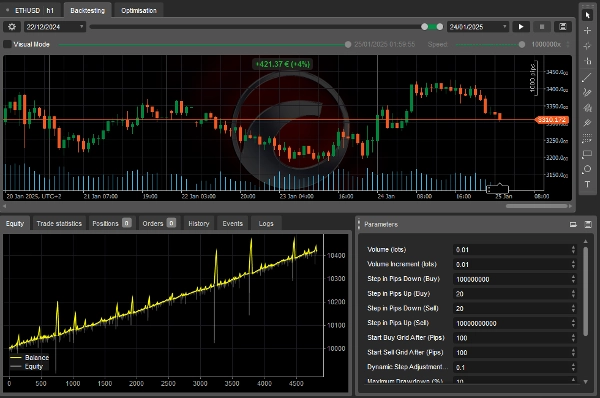
Bot memungkinkan Anda menyesuaikan beberapa pengaturan agar sesuai dengan strategi trading Anda. Berikut adalah parameter utama:
Pengaturan Volume
- Volume Awal (lot) – Ukuran perdagangan awal.
- Penambahan Volume (lot) – Jumlah yang ditambahkan ke setiap perdagangan baru.
Pengaturan Langkah Grid
- Langkah Turun dalam Pips (Beli) – Jarak di bawah order beli terakhir untuk pembelian berikutnya.
- Langkah Naik dalam Pips (Beli) – Jarak di atas order beli terakhir untuk pembelian berikutnya.
- Langkah Turun dalam Pips (Jual) – Jarak di bawah order jual terakhir untuk penjualan berikutnya.
- Langkah Naik dalam Pips (Jual) – Jarak di atas order jual terakhir untuk penjualan berikutnya.
Aktivasi Grid
- Mulai Grid Beli Setelah (Pips) – Kenaikan harga yang diperlukan untuk memulai grid beli.
- Mulai Grid Jual Setelah (Pips) – Penurunan harga yang diperlukan untuk memulai grid jual.
Penyesuaian Dinamis
- Faktor Penyesuaian Langkah Dinamis – Menyesuaikan ukuran langkah grid berdasarkan jumlah perdagangan terbuka.
Manajemen Risiko
- Drawdown Maksimum (%) – Kerugian maksimum sebagai persentase dari saldo akun.
- Gunakan Trailing Drawdown – Jika diaktifkan, bot melacak ekuitas puncak untuk menyesuaikan batas drawdown.
Kondisi Keuntungan
- Keuntungan Bersih Maksimum (Hanya Grid Beli) – Keuntungan tertinggi sebelum menutup semua posisi beli.
- Keuntungan Bersih Maksimum (Hanya Grid Jual) – Keuntungan tertinggi sebelum menutup semua posisi jual.
- Keuntungan Bersih Maksimum (Kedua Grid) – Keuntungan tertinggi yang diizinkan di kedua grid.
Langkah 2: Mulai Bot
- Atur Preferensi Anda – Sesuaikan pengaturan berdasarkan tingkat risiko dan strategi Anda.
- Pastikan Dana Cukup – Pastikan akun trading Anda memiliki margin yang cukup.
- Jalankan Bot – Klik "Start" untuk mengaktifkan trading. Bot akan secara otomatis membuka dan mengelola posisi.
Langkah 3: Pantau Bot
- Periksa Perdagangan Terbuka – Bot mengikuti strategi grid untuk masuk dan keluar posisi.
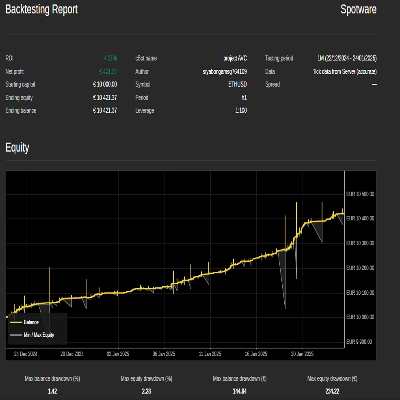
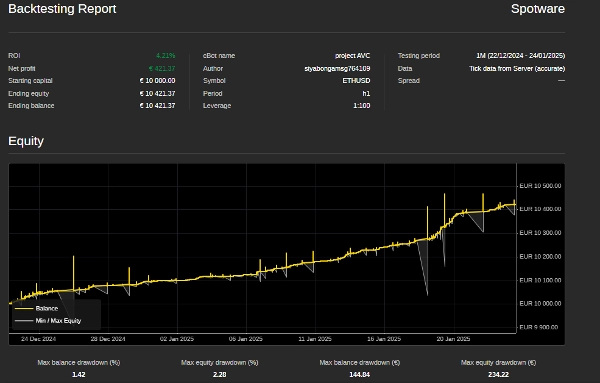
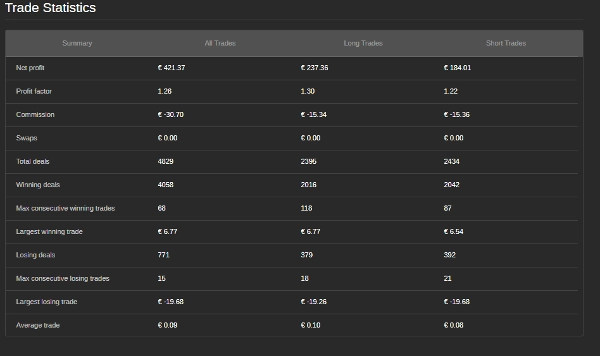
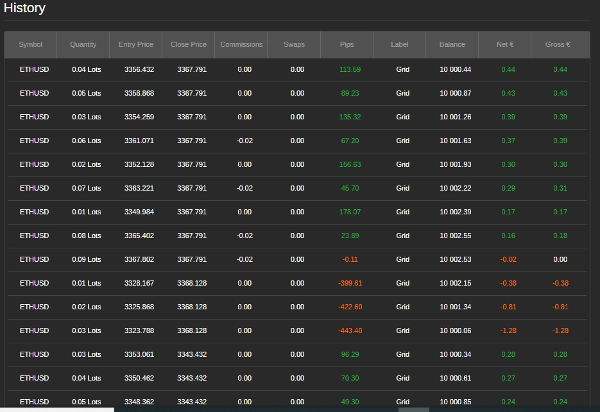
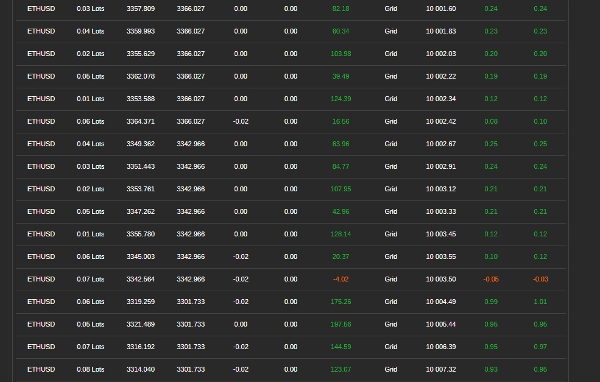
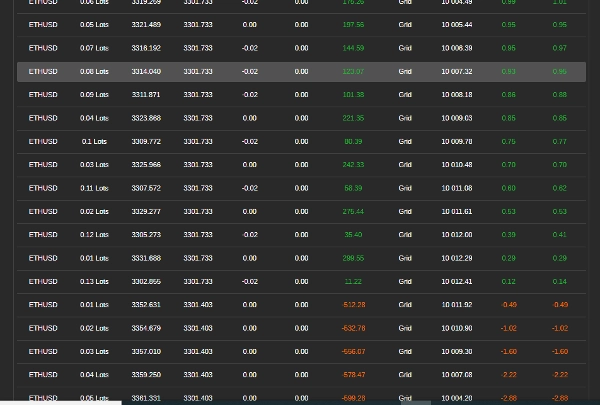
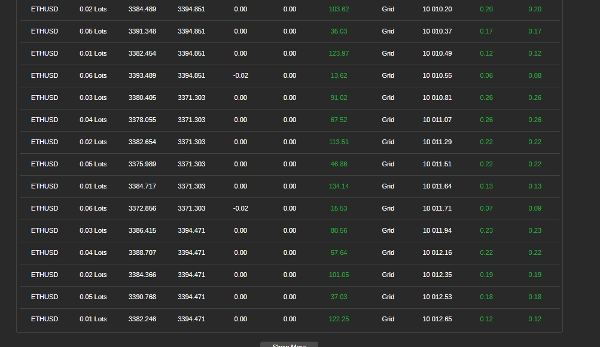
- Lacak Kinerja – Tinjau keuntungan, drawdown, dan riwayat perdagangan. Bot akan menutup perdagangan jika batas keuntungan atau risiko tercapai.
Langkah 4: Hentikan atau Mulai Ulang Bot
- Menghentikan Bot – Klik "Stop" untuk menghentikan trading dan menutup semua posisi.
- Memulai Ulang Bot – Jika bot berhenti karena mencapai batasnya, Anda dapat memulainya kembali secara manual.
Tips untuk Hasil Terbaik
- Mulai dengan Kecil – Gunakan ukuran perdagangan dan jarak langkah kecil untuk pengujian.
- Sesuaikan Pengaturan – Optimalkan langkah grid, penambahan volume, dan tingkat risiko berdasarkan kondisi pasar.
- Perhatikan Drawdown – Pastikan kerugian tetap dalam toleransi risiko Anda.
Informasi Kontak
Untuk dukungan atau pertanyaan:
- WhatsApp: +27 73 714 0490
- Email: siyabongamsg764109@gmail.com
Penafian Trading
Trading melibatkan risiko dan mungkin tidak cocok untuk semua investor. Tidak ada jaminan keuntungan, dan kinerja masa lalu tidak menunjukkan hasil di masa depan. Anda bertanggung jawab atas semua keputusan trading. Gunakan bot ini dengan hati-hati, lakukan backtesting, dan trading di akun demo sebelum live. Cari nasihat keuangan profesional jika diperlukan.
Dengan mengikuti langkah-langkah ini, Anda dapat menggunakan Bot Grid Trading untuk mengotomatiskan strategi trading Anda. Selalu trading dengan bertanggung jawab.
Menghindari trading selama peristiwa berita besar sangat penting karena periode ini sering ditandai dengan volatilitas tinggi dan pergerakan harga yang tidak dapat diprediksi. Trading berita dapat menyebabkan perilaku pasar yang tidak stabil yang menyimpang dari tren biasa, meningkatkan risiko kerugian. Demikian pula, trading di pasar yang bergerak sideways—di mana harga bergerak mendatar tanpa arah yang jelas—dapat menghasilkan breakout palsu dan peluang keuntungan terbatas, sehingga sulit untuk menerapkan strategi yang koheren. Selain itu, hari dengan volume rendah biasanya memiliki likuiditas yang berkurang, yang dapat menyebabkan spread yang lebih lebar dan slippage, semakin mempersulit eksekusi perdagangan. Dengan menghindari trading berita, pasar sideways, dan periode volume rendah, trader dapat fokus pada kondisi pasar yang lebih stabil yang menawarkan tren yang lebih jelas dan eksekusi yang lebih baik, yang pada akhirnya meningkatkan kinerja trading secara keseluruhan.
Ringkasan
Risk management features include setting a maximum drawdown percentage and an optional trailing drawdown that tracks peak equity to adjust limits. Profit conditions allow defining maximum net profit thresholds for buy grids, sell grids, or both combined, upon which the bot closes positions.
To operate, users configure settings according to their strategy and risk tolerance, ensure sufficient margin, and start the bot to automatically manage trades. Monitoring involves reviewing open trades, profits, drawdown, and trade history, with automatic closure of trades when limits are reached. The bot can be stopped to close all positions or restarted manually if stopped due to limit triggers.
Best practices include starting with small trade sizes and step distances, adjusting settings based on market conditions, and avoiding trading during major news events, ranging markets, or low volume periods to reduce volatility and execution risks.
Ulasan pelanggan
5 | 25 % | |
4 | 25 % | |
3 | 50 % | |
2 | 0 % | |
1 | 0 % |
Diskusi
Pertanyaan umum
Produk lain dari penulis ini















Harga