

Description
How to Use the Grid Trading Bot with RSI
This bot automates grid trading using the Relative Strength Index (RSI) to guide trade entries and exits. It manages positions based on predefined rules to maximize profits while controlling risks. Follow these steps to set up, configure, and use the bot effectively.
Step 1: Setting Up the Bot
- Add the Bot to Your Trading Platform
- Open your trading platform (e.g., cTrader).
- Go to the "Robots" section and add the bot to your chart.
- Attach the Bot to a Trading Pair
- Select a currency pair (e.g., EUR/USD, GBP/USD) where you want the bot to trade.
- Ensure Your Account Has Enough Funds
- Make sure your account has sufficient balance to support trades, as grid trading involves multiple open positions.
Step 2: Configuring the Bot Settings
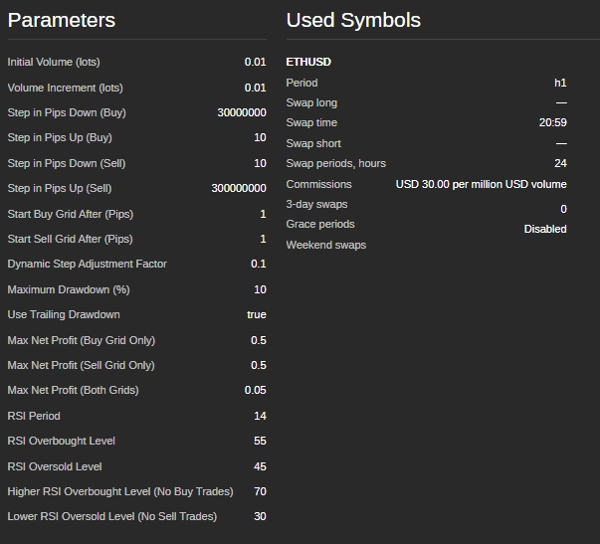
The bot allows customization based on market conditions and risk tolerance. Below are the main parameters you can adjust:
Trade Volume Settings
- Initial Trade Size (lots) – The size of the first trade in the grid.
- Volume Increment (lots) – How much the trade size increases after each position.
Grid Levels (Trade Spacing)
- Buy Step (pips) – The distance between consecutive buy orders.
- Sell Step (pips) – The distance between consecutive sell orders.
- Start Buy Grid (pips) – The price movement required before buy trades begin.
- Start Sell Grid (pips) – The price movement required before sell trades begin.
RSI-Based Trade Conditions
- RSI Period – The number of candles used to calculate the RSI.
- Overbought Level – If RSI goes above this level, the market is considered overbought (potential sell zone).
- Oversold Level – If RSI drops below this level, the market is considered oversold (potential buy zone).
- No Buy Zone RSI Level – If RSI is too high, the bot avoids buying.
- No Sell Zone RSI Level – If RSI is too low, the bot avoids selling.
Risk Management Features
- Maximum Drawdown (%) – The highest loss allowed before the bot stops trading.
- Trailing Drawdown – Adjusts the max drawdown limit dynamically as account equity grows.
- Profit Target Per Grid – The bot closes all trades in a grid once the total profit reaches this value.
Step 3: Running the Bot
- Double-Check Settings
- Ensure all parameters are set according to your risk management strategy.
- Start the Bot
- Click the “Start” button in the platform.
- The bot will begin analyzing the market and executing trades automatically.
Step 4: Monitoring and Managing Trades
- Check Trade Logs
- The bot provides real-time updates about its actions in the platform’s log window.
- Monitor Account Drawdown
- Keep track of your account balance to ensure losses do not exceed acceptable limits.
- Review Profit and Loss
- The bot automatically closes positions when profit targets are met.
Step 5: Stopping the Bot
- Manual Stop
- If you wish to stop trading, click the "Stop" button.
- Automatic Stop
- The bot stops itself if the maximum drawdown is reached or if the account balance becomes too low to open new trades.
Tips for Best Performance
- Test on a Demo Account First – Before using real money, test the bot to understand its behavior.
- Adjust Settings for Market Conditions – The bot works best in sideways or mildly trending markets.
- Monitor News and Market Events – Avoid running the bot during major economic events or news releases.
- Avoid Low-Volume Markets – Trading during times of low market activity can lead to poor execution and higher risk.
Example Settings for EUR/USD
- Initial Trade Size: 0.01 lots
- Trade Step: 20 pips
- RSI Period: 14
- RSI Overbought Level: 70
- RSI Oversold Level: 30
- Max Drawdown: 5%
- Profit Target per Grid: $5
Need Help?
If you experience issues or have questions, contact the bot’s support team @ siyabongamsg764109@gmail.com or Whats App +2773 714 0490.
Avoiding trading during major news events is crucial because these periods are often marked by heightened volatility and unpredictable price movements. News trading can lead to erratic market behavior that deviates from typical trends, increasing the risk of losses. Similarly, trading in a ranging market—where prices move sideways without clear direction—can result in false breakouts and limited profit opportunities, making it difficult to implement a coherent strategy. Additionally, low volume days typically feature reduced liquidity, which can cause wider spreads and slippage, further complicating trade execution. By steering clear of news trading, ranging markets, and low volume periods, traders can focus on more stable market conditions that offer clearer trends and better execution, ultimately enhancing their overall trading performance.
Summary
Risk management features allow users to set maximum drawdown limits, trailing drawdown adjustments, and profit targets per grid, enabling the bot to stop trading automatically under specified loss conditions. The bot supports trading on currency pairs like EUR/USD and GBP/USD, with example settings including a 0.01 lot initial trade size, 20-pip trade steps, RSI period of 14, and a 5% max drawdown.
Users add the bot to their trading platform, attach it to a chosen trading pair, configure settings according to market conditions and risk tolerance, and start the bot to begin automated trading. The bot provides real-time trade logs and manages positions to close trades when profit targets are met. It is recommended to test the bot on a demo account and avoid trading during major news events, ranging markets, or low-volume periods for optimal performance.
Customer reviews
5 | 100 % | |
4 | 0 % | |
3 | 0 % | |
2 | 0 % | |
1 | 0 % |
Discussion
FAQ
More from this author










Price