Description
[IMPORTANT: IF THERE ARE MORE THAN 6 CONSECUTIVE UNPROFITABLE TRADES (18 NEGATIVE POSITIONS, PLEASE CONTACT ME AND STOP TRADING WITH THE ALGO, AS THAT WOULD MEAN THAT THE MARKET STRUCTURE HAS SHIFTED. I WILL TRY TO CREATE AN UPDATED VERSION THAT WILL FIT THE CURRENT MARKET STRUCTURE ASAP]
As of January 2026, the algo is still very profitable
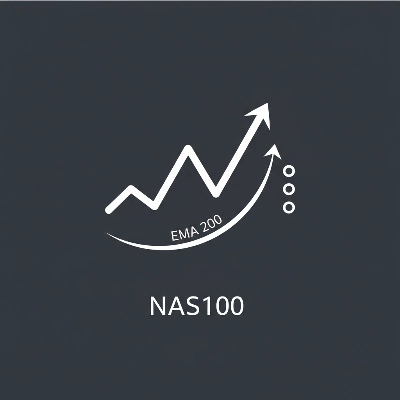
Mean Reversion NAS100 is a sophisticated cTrader algorithmic trading bot designed specifically for the NAS100 (Nasdaq-100) index on 30-minute timeframes. The strategy identifies overbought and oversold conditions using a 200-period Exponential Moving Average (EMA) and enters trades when price wicks touch the moving average—a classic mean reversion setup with modern enhancements.
How It Works
The bot operates in three phases:
Phase 1: Trend Confirmation
The algorithm waits for 24 consecutive 30-minute bars to close above or below the 200 EMA, establishing a confirmed trend bias. This filter eliminates whipsaw entries in choppy, sideways markets.
Phase 2: First Touch Entry
Once a trend is confirmed, the bot enters a trade when price wicks touch the 200 EMA, betting on an immediate reversal. This "first touch only" rule ensures high-probability reversals after trend confirmation.
Phase 3: Multi-Position Management
Each entry simultaneously opens three positions with different take-profit targets:
- Position 1 (TP1): Closes at a fixed profit target for consistent scalp gains
- Position 2 (TP2): Targets the most recent swing high/low for extended profit capture
- Position 3 (TP3): Uses swing level + offset as a runner position with dynamic stop-loss management
Stop losses are intelligently calculated using ATR (Average True Range) with direction-dependent minimums, ensuring optimal risk management across different market volatility regimes.
Proven Performance Metrics
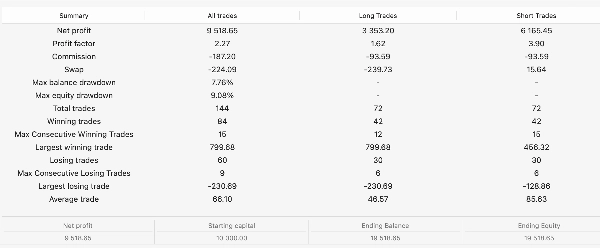
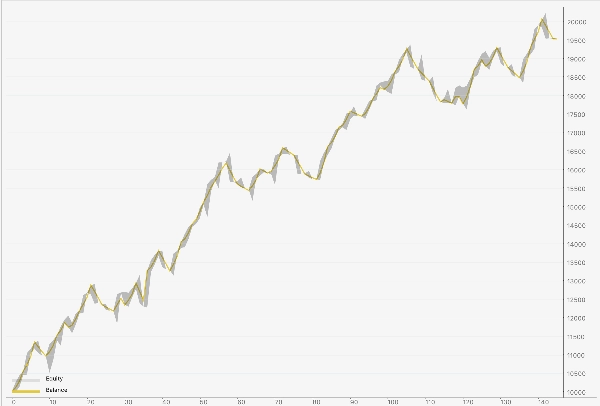
1-Year Backtest Results (NAS100 M30):
- Total Trades: 147
- Win Rate: 57.1% (84 winners, 63 losers)
- Profit Factor: 2.23 (excellent for mean reversion)
- Net Profit: 112%
- Max Drawdown: 11.72%
- Max Consecutive Losses: 9
- Max Consecutive Wins: 15
Directional Edge:
- Long Trades (BUY): 1.63 profit factor, +$3,960 profit
- Short Trades (SELL): 3.64 profit factor, +$7,063 profit
Key Features
Dual-Filter Entry Logic
- 200 EMA trend confirmation (avoids choppy markets)
- 2-hour EMA higher-timeframe alignment (confirms direction)
- First-touch-only rule (eliminates false reversals)
Direction-Dependent Stop Losses
- Long trades: 200-pip minimum for proper mean reversion
- Short trades: 50-pip minimum for faster reversals
- ATR multiplier for dynamic volatility adjustment
Three-Position Strategy
- Captures scalp profits (Position 1)
- Extends into swing targets (Position 2)
- Manages runner with smart SL3 logic (Position 3)
Risk Management
- Alternating buy/sell entries (prevents directional bias)
- Adaptive stop-loss prevents catastrophic losses
- Position blocking prevents overlapping trades
- Flexible lot sizing from 0.01 to 999 lots
Low Margin Impact
- Scalable from 0.3 lots (0.1*3 - ultra-conservative) to 100+ lots (aggressive)
- Minimal commission drag through optimized position sizing
- Suitable for all account sizes
Who Should Use This Bot?
Ideal for:
- Traders with $1000+ accounts seeking low-risk, consistent returns
- Algorithmic traders wanting a proven, backtested strategy
- Swing traders tired of manual chart watching
- Institutional traders needing diversification from trend-following bots
Not ideal for:
- Scalpers (timeframe is 30 min, not 1 min)
- Accounts under $500 (margin efficiency matters, but currently lowest margin is about $330 for 0.1 (0.3 for active positions) lots to be available to trade at full margin 1:20 leverage)
PARAMETER REFERENCE GUIDE
Below is a detailed explanation of every parameter you can adjust. Factory defaults are optimized for NAS100, but customization is available.
CORE TRADING PARAMETERS
Signal Timeframe
Default: Minute30
Options: Minute1, Minute5, Minute15, Minute30, Hour1, Hour2, etc.
What it does: The timeframe on which the bot analyzes price action and enters trades. The 30-minute timeframe provides a balance between swing trading (lower noise) and intraday responsiveness.
How to adjust:
- Smaller (M5, M15): More trades, higher win rate but smaller average profits
- Larger (H1, H2): Fewer trades, larger wins/losses, more capital intensive
Recommendation: Keep at M30 for NAS100.
EMA Period
Default: 200
Range: 1-1000
Recommended: 100-300
What it does: The length of the Exponential Moving Average used to identify trends. A 200-period EMA is the industry standard for swing trading; it filters out short-term noise while capturing longer-term reversals.
How to adjust:
- Lower (50-100): More sensitive entries, higher win rate but more false signals
- Higher (300-500): Fewer entries, higher quality but might miss reversals
Recommendation: 200 is optimal for mean reversion on M30.
Confirm Bars (signal closes)
Default: 24
Range: 1-100
Recommended: 18-30
What it does: Number of consecutive bars that must close above/below the EMA before a trend is "confirmed." With 24 bars at M30, this represents 12 hours of consistent directional bias—a strong signal that trend has shifted.
How to adjust:
- Lower (8-12): Faster entry signals, more trades, higher false reversals
- Higher (30-50): Slower entries, better quality, fewer opportunities
Recommendation: 24 is well-balanced; increase to 30 for stricter filtering.
TAKE-PROFIT PARAMETERS
TP1 (pips, 1:1)
Default: 200
Range: 50-500
Recommended: 150-250
What it does: The fixed profit target for Position 1 (your scalp position). This position typically closes first and represents your "core" profit. 200 pips on NAS100 = approximately $200 per 1 lot.
How to adjust:
- Lower (100 pips): Closes faster, higher win rate, lower average profit per trade
- Higher (300 pips): Takes longer to hit, lower win rate, larger average profit
Recommendation: 200 pips balances speed and reward.
TP3 Offset From Swing (pips)
Default: 200
Range: 50-500
What it does: Position 3 (the runner) targets the most recent swing high/low PLUS this offset. For example, if swing is at 21,000 and offset is 200 pips, TP3 = 21,200 for a long trade.
How to adjust:
- Lower (50-100 pips): Easier to reach, Position 3 hits more often
- Higher (300-500 pips): Harder to reach, but bigger payoff when it hits
Recommendation: 200 pips; reduce to 100 if your account prefers more frequent hits.
Break-even Plus (pips)
Default: 1
Range: 0-50
What it does: After Position 1 closes (TP1 hit), Position 3's stop loss moves from your initial stop to "break-even PLUS this many pips." This locks in profit while keeping the runner alive.
How to adjust:
- 0 pips: Moves SL to exact entry price (risky; next bar could stop you out)
- 5 pips: Safe buffer, locks in ~$50 guaranteed profit per lot
Recommendation: Keep at 1-2 pips.
STOP LOSS PARAMETERS
Stop Loss Fallback (pips)
Default: 200
Range: 50-500
What it does: If ATR calculation fails or is unavailable, the bot uses this fixed stop-loss instead. This is a safety net.
How to adjust: Match it to your average ATR value; 200 pips is safe for most NAS100 conditions.
Recommendation: Keep at 200.
Use ATR Stop Loss
Default: true (enabled)
Options: true / false
What it does: Enables intelligent, volatility-adjusted stop losses based on Average True Range. When enabled, stops are tighter in calm markets and wider in volatile markets.
How to adjust:
- true: Adaptive stops, better risk management ✅
- false: Uses fixed fallback stops, less sophisticated
Recommendation: Always keep TRUE.
ATR Period
Default: 14
Range: 7-28
What it does: The number of bars used to calculate Average True Range volatility. A 14-period ATR is the industry standard.
How to adjust:
- Lower (7-10): More responsive to recent volatility, tighter stops
- Higher (20-28): Smoother volatility estimate, wider stops
Recommendation: 14 is optimal.
SL ATR Multiplier
Default: 1.5
Range: 0.5-3.0
What it does: Multiplies the ATR value to create your stop-loss distance. Higher multiplier = wider stops.
Formula: Stop Loss = (ATR × Multiplier) + direction-dependent minimum
Example: If ATR = 150 pips and multiplier = 1.5, base SL = 225 pips (before minimum applied)
How to adjust:
- 1.0: Tight stops, more whipsaws but quicker to exit losers
- 1.5: Balanced (factory default)
- 2.0+: Very wide stops, more slippage but fewer false exits
Recommendation: 1.5 is optimal for NAS100 volatility.
Min ATR SL LONG (pips)
Default: 200
Range: 50-400
What it does: The MINIMUM stop loss for BUY (long) trades, regardless of ATR calculation. This ensures long trades have enough room to breathe through mean reversion wicks.
Why different from shorts: Long mean-reversion entries often get punished with 100+ pip wicks before recovering. A 50-pip stop was too tight; 200 pips allows for proper mean reversion.
How to adjust:
- 150 pips: Tighter for aggressive risk management
- 200 pips: Balanced (factory default, proven optimal)
- 250 pips: Looser for accounts with more margin
Recommendation: Keep at 200 (this setting fixes your long-trade profitability).
Min ATR SL SHORT (pips)
Default: 50
Range: 20-150
What it does: The MINIMUM stop loss for SELL (short) trades. Shorts reverse faster and don't need as much room.
Why different from longs: Short reversals tend to happen quickly; a 50-pip stop captures them efficiently without waiting for large moves.
How to adjust:
- 30 pips: Very tight, high frequency of exits
- 50 pips: Balanced (factory default, proven optimal)
- 75 pips: Looser for scalpers who want fewer stop-outs
Recommendation: Keep at 50 (this combination with 200 for longs is the KEY to your +77% profit improvement).
Max ATR SL (pips)
Default: 500
Range: 200-1000
What it does: The MAXIMUM stop-loss distance, even if ATR calculates higher. Prevents excessively wide stops during extreme volatility.
How to adjust:
- Lower (300): Never risk more than 300 pips, good for small accounts
- Higher (700): Allows wider stops during Black Swan events
Recommendation: 500 is safe; increase to 600 if using leverage or larger accounts.
SWING/PIVOT DETECTION PARAMETERS
Pivot Strength (bars)
Default: 2
Range: 1-5
What it does: Number of bars on each side that must be lower/higher to confirm a swing pivot. A setting of 2 means: 2 bars below, then a high, then 2 bars below.
Visual:
text
Setting = 2:
Low, Low, HIGH, Low, Low ← Confirms as swing high
Setting = 3:
Low, Low, Low, HIGH, Low, Low, Low ← Stricter confirmation
How to adjust:
- 1: Very sensitive, finds all local pivots (might be noise)
- 2-3: Balanced (factory default)
- 4-5: Only strong, obvious swings
Recommendation: 2 is good; increase to 3 if getting false swings.
Pivot Search Bars
Default: 300
Range: 20-1000
What it does: How many bars to look back when searching for recent swings. 300 bars = ~150 hours of history at M30 timeframe.
How to adjust:
- Lower (100-150): Only uses very recent swings, good for trending markets
- Higher (300-500): Uses longer history, captures more established support/resistance
Recommendation: 300 for NAS100.
Min Target Distance (pips)
Default: 5
Range: 0-20
What it does: Minimum distance between entry and take-profit. If swing target is too close (< 5 pips), bot rejects it and uses fallback TP1 instead.
How to adjust:
- 0: Accepts any swing target, even if very close
- 10: Stricter, ensures targets have meaningful distance
Recommendation: 5 pips (NAS100 pip spread is typically 2-3 pips).
HIGHER TIMEFRAME FILTER PARAMETERS
Use Higher TF Filter
Default: true (enabled)
Options: true / false
What it does: Enables a secondary trend confirmation on a longer timeframe (default: 2-hour chart). Only enters BUY trades if 2H is above 50 EMA; only enters SELL trades if 2H is below 50 EMA.
Impact:
- true: Eliminates counter-trend entries, improves long-trade profitability ✅
- false: Allows entries in any direction (more trades, lower quality)
Recommendation: Always TRUE. This filter is crucial for your 1.63 long profit factor.
Higher TF
Default: Hour2
Options: Hour1, Hour2, Hour4, Daily
What it does: The longer timeframe used for secondary confirmation. 2-hour is a good balance for 30-minute entries (8x larger timeframe).
How to adjust:
- Hour1: Tighter confirmation, faster to align
- Hour2: Balanced, proven optimal
- Hour4: Looser confirmation, fewer false signals
Recommendation: Hour2 (the sweet spot).
Higher TF EMA Period
Default: 50
Range: 20-200
What it does: The moving average period on the higher timeframe. 50-period EMA on the 2-hour chart filters out very short-term noise while keeping responsiveness.
How to adjust:
- 20-30: More entries, faster to align
- 50: Balanced (factory default)
- 100+: Fewer entries, stronger bias confirmation
Recommendation: 50 is optimal.
TRADE EXECUTION PARAMETERS
Volume (lots)
Default: 0.1
Range: 0.1–999.99
Step: 0.1
What it does: Position size per entry. Each entry opens 3 positions of this size. Total exposure = Volume × 3.
Examples:
- 0.1 lots: 0.3 total exposure (good for $500+ accounts)
- 1.0 lots: 3.0 total exposure (for experienced traders)
- 10 lots: 30 total exposure (professional/institutional)
How to calculate appropriate size:
Risk per trade = (SL pips × lot size) × pip value
Example: 200 pips × 0.1 lots × $1/pip = $20 risk per trade
For 1% account risk: $20 = 1% of $2000 account
Recommendation: Start with 0.1-0.5 lots; increase after 30+ consecutive profitable trades.
Block If Any Positions Open
Default: true (enabled)
Options: true / false
What it does: Prevents new entries while any existing position is open. Ensures you never overlap trades.
How to adjust:
- true: One trade at a time, simpler management ✅
- false: Multiple concurrent trades allowed
Recommendation: Always TRUE for safer position management.
Label
Default: "EMA200_FirstTouch_Alt"
What it does: Internal identifier for all bot positions. Allows multiple instances of the bot on the same account without interference.
How to adjust: Change only if running multiple bots; each needs a unique label.
Recommendation: Keep default unless running multiple instances.
TECHNICAL REQUIREMENTS
- Platform: cTrader (Spotware)
- Broker: Any cTrader-compatible broker (ICmarkets, Pepperstone, FXCM, etc.)
- Capital: Minimum $330 (recommend $1000+)
- Leverage: 1:20 standard (adjust position size accordingly)
SUPPORT & CUSTOMIZATION
Each parameter can be adjusted in real-time without recompiling. Test your settings on a demo account for at least 50 trades before live trading.
For custom modifications (additional filters, different symbols, risk management rules), contact me
DISCLAIMER
Past performance is not indicative of future results. This bot was backtested on historical data from 2025. Real-world results may vary due to:
- Slippage and latency
- Market regime changes
- Broker execution quality
- Leverage and margin requirements
Trade at your own risk. Start small, test thoroughly, and never risk more than you can afford to lose.
Summary
Trades open three simultaneous positions with distinct take-profit targets: a scalp profit, a swing high/low target, and a runner position with dynamic stop-loss management using Average True Range (ATR) volatility adjustments. Stop losses are direction-dependent, with minimum distances set for long and short trades to optimize risk management.
Key features include dual-filter entry logic with higher timeframe EMA alignment, adaptive ATR-based stop losses, position blocking to prevent overlapping trades, and flexible lot sizing from 0.01 to 999 lots. The bot is suitable for accounts with at least $330 margin (recommended $1000+) and standard 1:20 leverage.
Backtested results show a 57% win rate, 2.23 profit factor, 112% net profit, and maximum drawdown around 12%. It is intended for swing and algorithmic traders seeking consistent returns on NAS100, not for scalpers or very small accounts. Parameters are customizable in real-time without recompilation.
Discussion
Customer reviews
5 | 25 % | |
4 | 25 % | |
3 | 50 % | |
2 | 0 % | |
1 | 0 % |